Tag: software development

  • Building or Buying Analytics

    One of the decisions that I’ve been involved with at the beginning of every software project is whether to buy software to solve the problem or build our own. This might be a quick “is there software anyone knows about to do this?” query, or an in-depth review of the marketplace or something in between. Often it’s a limited discussion on whether we think the problem is close enough to one other organizations have. If so, let’s buy something. If not, we might need to build an application to get what we want. Key card software for our doors? Buy it. Managing our core business flow, I might buy this.

    Analytics, or what has often fallen under the umbrella of business intelligence (BI) is an area where technology groups often wonder what’s best. I have seen no shortage of decisions in the past for how best to implement this feature for our organization. Ultimately, I think this piece summarizes this well: time will make the decision easier.

    If you need this done now, buy it. If you don’t have development resources, buy something. If you need similar analytics to what many companies need, buy this. Do you trust vendors to spend enough time on security, buy their service.

    Those are good reasons to adapt your process, your view, your requirements. If you can be flexible, it makes sense to buy some software that provides analytics for your data. Many companies have had success with purchased products, like Tableau, Qlikview, Cognos, Power BI, or some other pre-built package that allows users to analyze their own data. You might even just give them access to all views (or even tables) and ignore the entire part of your business.

    If you have time, however, I do find that developers working with analysts can truly add value and insight to the information a business holds. They can be responsive, while also providing knowledge about ways to structure and summarize data, and perhaps even identify those places where the way in which we gather and use data ought to change, perhaps even add new data elements.

    I do like the self-service, pre-built packages for multiple reasons, not the least of which is that users can do some Proof of Concept work themselves. I think Power BI Desktop is one of the best ways to do this today, using existing data sources that users can access. Let them go crazy and try whatever wild idea they have with data. When they find something useful, something that others need to also access, and something that becomes important to the organization, then it’s likely time to involve IT to provide stabliity. If there are also ways to better structure the information and perform a more detailed analysis, this might also be the time to customize the way the analytics package works, and again Power BI provides the ability to do this.

    Making this decision is hard, and it might not ever be done, but I do think buying is a good place to start, especially with the wide variety of packages out there, but you might find yourself changing your mind as your analytic needs mature.

  • Really Important Software

    I remember reading about the Boeing 787 (the Dreamliner) being designed. I was fascinated by the process and excited to fly one. I finally did and enjoyed it. Since then, I try to fly on those when I can as the spacious ceiling and other changes seem to make for a better flight. I impressed with the work they did and the scale of the changes, both in manufacturing and software. There’s a short timeline here and if you ever get the chance to take a tour of the factory, do it. It’s very cool.

    I fly a lot. Last year I took around 50 flights on airplanes, some of them Boeing, some Airbus, some 737s, 777s, 787s, A350s, and a few others. I haven’t flown on a Boeing 737-Max 8, though I did just recently fly a 737-800. When a few of those planes crashed, I somewhat chalked this up to pilot training and a lack of options on the planes. I’m not exonerating Boeing or the airlines, but I wasn’t personally concerned. I saw an interesting piece at Vox, but was still curious about the issues. After all, I’m in software, and I fly a lot.

    There’s an analysis of the crash from a software developer at the IEEE site that’s worth reading. It’s a look at the issues, the potential ways things could have been addressed and, perhaps most importantly, the idea that our software is not necessarily going to fix problems. Software is a way of reading data and then affecting changes in the hardware, but software isn’t perfect. One of the quotes in the article puts this in perspective for me: ” Every time a software update gets pushed to my Tesla, to the Garmin flight computers in my Cessna, to my Nest thermostat, and to the TVs in my house, I’m reminded that none of those things were complete when they left the factory—because their builders realized they didn’t have to be complete.”

    Data matters, but as we all know, data is sometimes incorrect, jumbled, or otherwise problematic. In this case, not only does it appear the data could be incorrect, but the plane software isn’t looking at all the data, and it certainly doesn’t take all the inputs from the pilots. While humans make plenty of mistakes, they need to have inputs and overrides in software systems.

    I don’t want to get caught up in the issue with these planes, but rather look more generally at our systems. DevOps looks at the idea that we don’t know everything about how to build our software when we start. We definitely know it is not complete and will need more work when it leaves our factory, but we also know that this is the case. We know it’s not complete. We take feedback, learn, and adjust what we do. We constantly drive quality up, or at least, that’s the goal. Money and politics can get in the way, but the more they do, the less you’re doing DevOps.

    Steve Jones

    Listen to the podcast.

  • Can Azure Stack Reduce Software Development Costs?

    There’s a piece, called The Real Value of Azure Stack, that caught my eye recently. This seems a little promotional, as lots of vendors are mentioned in the piece, but the gist of the piece is that one of the largest line items for most enterprise IT shops is software development and maintenance. Part of Microsoft’s strategy to address this is with Azure Stack, a hybrid solution that allows you to build a platform in your data center that can extend to the cloud if you need it.
    Software development is hard, and from what I can see now, Azure Stack still doesn’t have a great data story. While one can develop against SQL Server, PostgreSQL, MongoDB, etc., these databases instances used would be the same standalone services that we would use without Azure Stack. The platform does provide some features that smoother the use of SQL Server or MySQL, but it’s a far cry from the Azure SQL Database or Azure MySQL Database offerings or even CosmosDB. I hope to see those on Azure Stack at some point, perhaps with lower performance capabilities and promises.
     That doesn’t mean that there aren’t advantages to Azure Stack because there are. The consistent development platform, the use of functions, known VMs or App Services mean that your developers can build and test things inside your data center or in the cloud, knowing that these services will run smoothly when deployed on Azure Stack. I’d expect that we will see container and k8s support at some point as well, which will further help us smooth the process of moving software from one machine to the other.
    I don’t know of any customers for Redgate that are using Azure Stack right now, but I am hopeful to meet some and see the system in action. I don’t hear about it often, but every time I do, I get a little excited. I think this is the type of platform that could get more people interested in writing more cloud native software, with all the requirements to build more fault tolerant, resilient and scalable applications.
    Of course, moving to Azure Stack is likely most beneficial for new applications. While existing ones might port into an IaaS infrastructure and reduce some sysadmin costs, I doubt that there would be significant savings without a lot of development work that takes advantage of more modern software frameworks. There likely isn’t going to be any software maintenance savings on those old thick client applications or ASP websites.
    If any of you are moving to Azure Stack, let me know. I’d be interested in your experiences.
    Steve Jones
    Listen to the podcast.
  • Securing Code Early

    Last year I started to get alerts from Microsoft Repos that someone had put a piece of security information in their code that pertained to one of my Azure services. At first I was worried, but then I realized this was the public version of AdventureWorks we maintain in Azure. We’ve published the login so people can test code against this if they want, and I started ignoring the warnings. Well, not ignoring. I still glance over them to verify the issue, but I’m less concerned.
    That doesn’t mean that you shouldn’t be concerned about sensitive information in repos. I saw this quote: ” Bots are crawling all over GitHub seeking secret keys, a developer served with a $2,375 Bitcoin mining bill found.” This follows a sentence that says “It once caused Uber to leak the contact details of 75m users“. These are from an interesting look at a way to secure code that might leak API keys. The idea is that you secure code on local commits and prevent secrets from being stored in your VCS.
    That’s a great idea. Can we prevent passwords in SQL code or ASP.NET config files? Can we actually start to teach developers to use secrets and other run-time mechanisms and prevent them from hard coding anything into a VCS? Perhaps, but we have a lot way to go and certainly more tool chains need to be updated to prevent what is a simple, but common, mistake.
    We need to get better at security, and we are. I see more Static Code Analysis tools being used in all sorts of companies, and I’m glad when they start to impact developers. While I get that changing your favorite method of writing a query or procedure is a pain, often we can reduce potential problems by enforcing some standards and avoiding poor coding practices. We do need to have exceptions since a rule for code might really be a general guideline 99% of the time with a few edge cases.
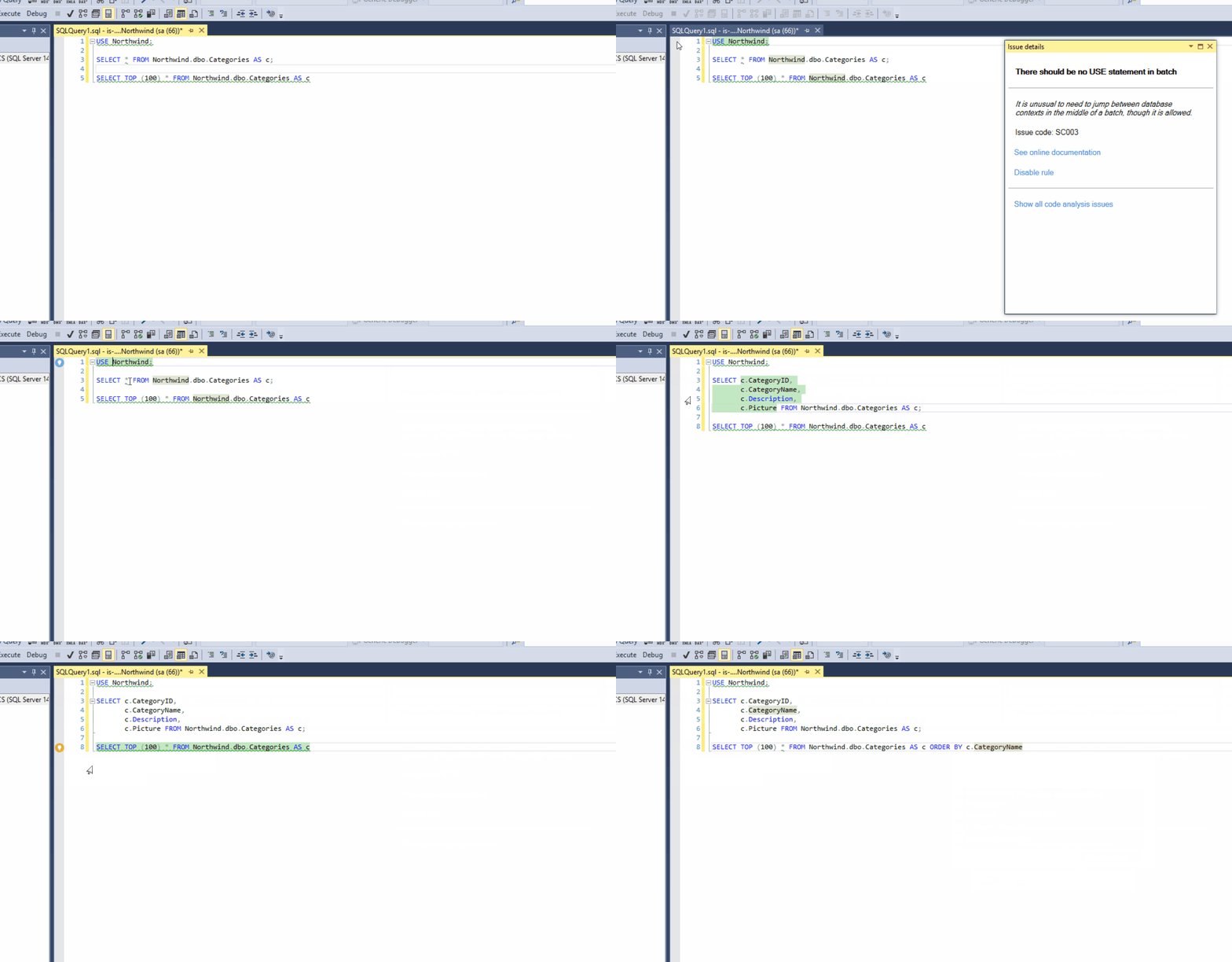
    Catching issues early in development is one of the goals. Having things like inline SCA in SQL Prompt (live demo), or continuous testing in Visual Studio, scanning with Sonarqube, and other tools are improving our code, while allowing us to build applications faster. There is plenty of other work to be done, especially for database code, but we are improving as an industry.
    If you haven’t used any of these tools and you write code, start learning a bit about them. You’ll likely appreciate their benefits once you get over the learning curve. You’ll also start writing better code.
    Steve Jones