Tag: software development

  • Disabling #sqlprompt Formatting

    I love SQL Prompt, especially the new formatting engine. However, it’s not perfect, and there are times I don’t want code reformatted. One great example is when I write INSERT statements. Here’s what I might write:

    INSERT dbo.Payments_A
      ( [Month], SerialNumber, DateBegin, DateEnd, paid)
    VALUES
      ( 'Mar-15', '0000000000001', '3/16/2015 0:00', '4/10/2015 0:00', 5000.01),
      ( 'Apr-15', '0000000000001', '4/7/2015 0:00' , '4/13/2015 0:00', 0),
      ( 'Apr-15', '0000000000001', '4/10/2015 0:00', '4/30/2015 0:00', 15000.00);

    I often build a single row, then I might copy/paste to add the other rows and then manually change the data. When I use my reformat command (CTRL+K, Y), I get this:

    INSERT dbo.Payments_A
    (
        [Month],
        SerialNumber,
        DateBegin,
        DateEnd,
        paid
    )
    VALUES
    (
        'Mar-15', '0000000000001', '3/16/2015 0:00', '4/10/2015 0:00', 5000.01
    ),
    (
        'Apr-15', '0000000000001', '4/7/2015 0:00', '4/13/2015 0:00', 0
    ),
    (
        'Apr-15', '0000000000001', '4/10/2015 0:00', '4/30/2015 0:00', 15000.00
    );

    That’s not bad, but it’s hard to read and ends up eating up a bunch of screen space when I try to look at code. What I really want is for that INSERT statement to not be reformatted, even though  I may want the spacing and line feeds in other code.

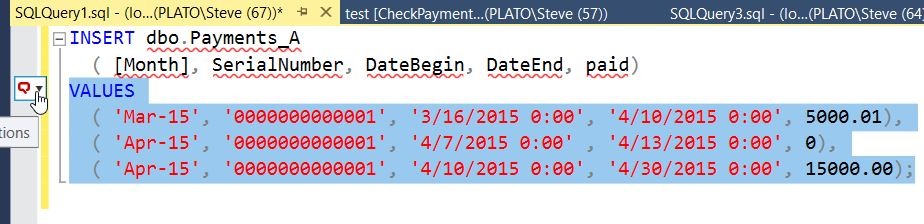
    Fortunately, SQL prompt allows me some control. If I highlight my code, I get a little box to the left of the code. There’s a hand with a finger pointing at it in the image below.

    2017-01-03 12_35_05-SQLQuery1.sql - (local)_SQL2016.sandbox (PLATO_Steve (67))_ - Microsoft SQL ServIf I hit CTRL, I get a drop down (or I can click). In this box, I can type snippets, or words. Note I’ve typed “dis” below, and I see that one of my options is to disable formatting for the selection.

    2017-01-03 12_35_14-SQLQuery1.sql - (local)_SQL2016.sandbox (PLATO_Steve (67))_ - Microsoft SQL Serv

    If I select this, I’ll get comments added to my code that SQL Prompt can read.

    2017-01-03 12_35_30-SQLQuery1.sql - (local)_SQL2016.sandbox (PLATO_Steve (67))_ - Microsoft SQL Serv

    Now I can hit CTRL_K, Y, and I’ll get all my code formatted, except what’s inside of the comments.

    2017-01-03 12_35_36-SQLQuery1.sql - (local)_SQL2016.sandbox (PLATO_Steve (67))_ - Microsoft SQL Serv

    Watch this and a few more SQL Prompt tips from a short video shown at last year’s SQL in the City:

  • How Much Code Can You Review?

    When I was in college, I mostly wrote my own code for assignments (and fun), turning it in when I thought it was done. At some point I had a class that started to adopt more software engineering practices, and I was forced to get my code reviewed by a peer before handing it in. This was an interruption to my workflow (and more work since I had to review other code), but it did allow find mistakes I had made and seemed to improve my grade.

    In one of my first development positions, I had to get two people to review my code before I could submit it for deployment. A humbling and painful process at first, but over time I became used to the idea. I’m not sure the quality of code improved, but it was more readable, more in-line with everyone else’s code, and as we learned techniques that worked well, all developers adopted them quickly.

    These days as I talk with various customers and clients, I find that code reviews are handled very inconsistently. Some companies require them, some have automated processes, some have ad hoc reviews, and everyone has ways to circumvent the system. Certainly emergency patches need to be made at times, often with little review, but I will say that it seems the more common a set process and practice is, the less issues a customer has.

    If you review code, or have your own code reviewed, on a regular basis, I have question for you.

    How much code can you review for a deployment?

    The question I’m asking is about your process and habits. Is it worth reviewing every bit of code? Perhaps there are objects that you don’t worry about as much as others, or certain developers that receive more (or less) review of their code. Perhaps seniority makes a difference as to the level of scrutiny. If there are problems found in QA and changes made, is there a way to re-review code? I’m wondering today about your process. Share what you can, and if you want to do it anonymously, please feel free to send me a note at sjones (at this domain).

    Steve Jones

    The Voice of the DBA Podcast

    Listen to the MP3 Audio ( 5.0MB) podcast or subscribe to the feed at iTunes and Libsyn.
  • The Top 20 SQL Toolbelt Tips

    Redgate produces some great software, and I’m glad that I get to use all of them as a developer and DBA. I use many of the tools each week, some daily, but I constantly find that there are plenty of features, tips, and tricks that I don’t know about.

    At SQL in the City last year, I watched Tom Austin present a session where I learned a few things that will make me more productive.

    The one that I need to start incorporating into my work is looking for all the references to an object with SQL Search. A quick check means that I won’t commit changes without considering all of the other objects impacting by development,

    Watch all the tips below.

  • Better Coding, More Savings

    This editorial was originally published on May 13, 2013. It is being re-run as Steve is on holiday.

    I’m sure most of us would like to think that we write fairly efficient code. However the reality for many of us might be that we don’t actually know. Many of us use the same patterns and practices that we’ve been using for a long time, rarely changing. When we learn a new technique or find a different way of coding that works better, we tend to then use that method over, and over, and over, and over again.

    I would guess that if many of us profiled our code, and examined the CPU and network bandwidth we consume, we might be surprised at what we find. CPU and network usage isn’t something we are often concerned about. We assume that we’ve bought a machine and we should be able to use as much of it as we can at any point in time. That’s not the best approach, but since we often have more hardware than we need for many processes, it works. It also explains why so many applications struggle as the load increases. They’re not coded efficiently.

    If you’re going to work in the cloud, you better learn to code more efficiently, mostly because it costs money. If you think about your design, you can reduce the amount of resources you use. In the cloud this translates to less cost. In the on-premises world, this means better performance and higher scale. It also means less complaints and phone calls.

    Scaling up an application can be hard, but much of the struggle comes from poorly coding your application in the beginning. Most of us have heard the saying that it takes less time to do it right the first time. That’s true in many situations, and it’s true for your application development. Learn to write more efficient code and use patterns that conserve resources. You’ll find your applications will run better, no matter what type of environment hosts them. If you’re not sure what patterns and practices work well, read an article or ask a question and find out what efficient techniques others use.

    Steve Jones