Tag: speaking

  • The Bicentennial SQLSaturday–#200 Philadelphia

    When Andy Warren (b | t | Li)started SQL Saturday with #1 in Orlando, we weren’t sure it would succeed. After a few events, we dreamed and wondered if we’d ever get to 50 events. Despite our success in the past, we weren’t sure if a free event, supported by advertising (essentially) would survive over time. We also weren’t sure if we could replicate and grow this event in other locations.

    It grew, and prospered, and then exploded, thanks to Karla Landrum (b | t). Under Karla’s guidance and nurturing, we’ve seen a tremendous number of events taking place all over the world. Not only did we get to 50 events, the SQL community blew past 100 a few years ago and earlier this year event #200 was posted.

    It’s somewhat fitting that in one of the cities that helped birth my country, and houses the Liberty Bell, will host SQL Saturday #200 in a little over a week. I’ll be traveling next week, along with Andy for the event. There’s an exciting lineup of speakers, bringing you a wide variety of SQL Server learning sessions.

    I’m looking forward to seeing friends and meeting new people, as we celebrate the bicentennial SQL Saturday. If you can’t attend this event, there are lots of SQL Saturday’s scheduled for the rest of the year. They’re free (other than lunch at a few events) and it’s worth your time to learn something new about SQL Server and network with some of the people in your local area.

    If you’re attending an event, you might even think about bringing kids and perhaps organizing a session for them.

  • Fun at SQL Bits

    Last week was the eleventh SQL Bits conference and it was a fun time in Nottingham. I traveled over to the Red Gate offices for a few days before driving to Nottingham for the event. This is my second SQL Bits and it’s one of my favorite conferences. It’s a little bigger than most SQL Saturdays, with more amenities, but it’s a low cost and it retains the charm, casual atmosphere and fun that many of the larger events have lost. Spouses and children typically have little problem attending with the data professionals, and the less formal proceedings seem to make this as much of a social event as a professional one.

    The format is a little different from many events in that there are paid days (a nominal fee for a conference event) and a free day. You can attend part of all of the conference, and all of the sessions are filmed and available online. The event moves around the UK, and I’ve been to the Liverpool, and now, Nottingham, events. The East Mindlands Conference Center was a very nice facility, nice conference rooms and facilities, one of the better venues I’ve seen. The highlight of the event was the Friday night social, with a medieval theme. It was very surprising how many people participated.  I had expected the organizers to dress up:


    20130503-DSC07175

    However I was surprised to see many others, including the Red Gate staff

    20130503-DSC07208


    And dozens of others. As I was leaving the Red Gate office on Thursday, someone gave me a bag and told me to wear it. I hadn’t checked it until Friday afternoon, and I was a good sport in just putting it on.

    fpwll

    I had fun walking around throughout the evening, seeing the various costumes, some of which were amazing. The Lego costume was really stunning. I’m not even sure how I’d make that one. I haven’t seen a picture yet (and forgot to take one), but it was incredible.

    You can see more pictures here or check out the Facebook page.

    I delivered my Searching Binary Data talk, and it went well (I think). I also attended Matijah Lah‘s talk on semantic statistics and learned a few things. I saw an amazing advanced DR/HA talk from Christian Bolton, and a few more interesting sessions. I also marked a few more to watch later.

    I love most events, but typically the smaller ones, however I am looking forward to the chance to come back.


  • SQL Saturday #175–Fargo

    One of the goals early on with SQL Saturday was to spread them far and wide. Andy Warren and I used to chat about how long it would be before we had 12 events in a year, or one event a month, or an event in every state. Karla Landrum (b | t) has made many of those milestones come true and is working hard to try and get an event in every state in the US, as well as in as many countries around the world as possible.

    SQL Saturday #175 comes to Fargo, North Dakota, on Saturday, April 27, 2013. The first event in this state, and also my first time visiting the state. I’ll be heading out Friday morning, and seeing what Fargo has to offer that day before talking on Saturday. I may just have to see the Wood Chipper.

    My talk is The Encryption Primer, but there are some other great choices if you’re looking to increase your SQL Server knowledge. The schedule is up and includes these:

    • Aaron King giving you a complete BI solution in an hour.
    • Powershell from Jim Dorame
    • Dimentional Modeling from Jason Horner
    • Indexing from Jes Borland
    • T-SQL from Kathi Kellenberger
    • and more

    Lots of great sessions, and it should be fun.

    If you’re close to Fargo, consider registering and joining us at the first North Dakota SQL Saturday.

  • Customizing SSMS–Results

    This is a short series on some customizations in SSMS to make it visually more appealing.

    As a presenter, I’ve learned how to change the way Management Studio (SSMS) looks to make it easier for people to see the screen on a projector. I had wrongly assumed that so many people knew many of these tricks, which is a poor attitude on my part. That should be especially apparent as I saw a presentation recently where the speaker didn’t know how to make things easier to see.

    In a previous post I talked about changing the query font size. In this post we’ll look at result sizes.

    The Defaults

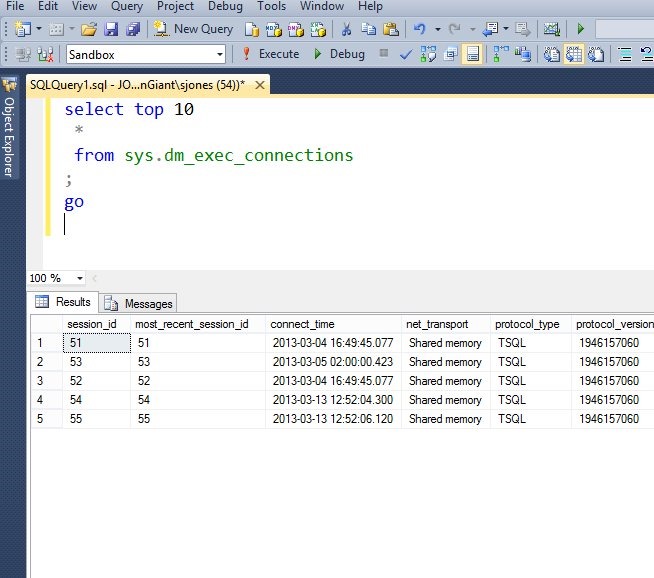
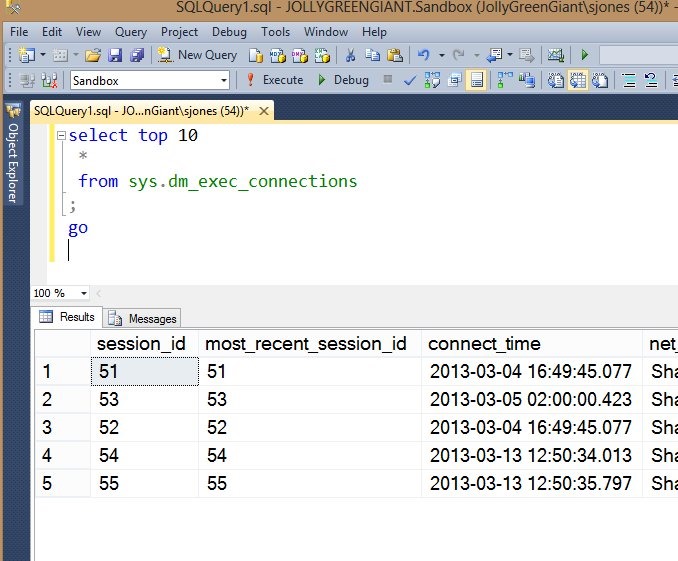
    This is what I see, and it’s not easy to read.

    Capture_009

    The results are much smaller than the query itself. How can we change this and make things easier to read?

    I wrote about one way: using results to text. This works well, but it isn’t the best solution for everyone, and you still want to change the size of your results. The technique I’ll show you works for that as well.

    Customization

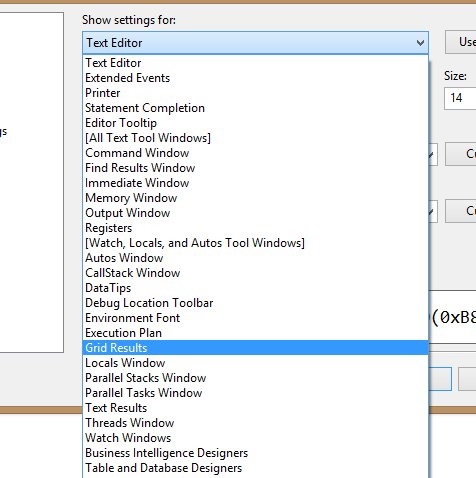
    If you go to the Tools | Options menu, in the Fonts tab as I showed in the last post, you’ll find there’s a drop down titled “Show settings for:” at the top. If you select Grid results, you can change the font settings.

    Capture_006

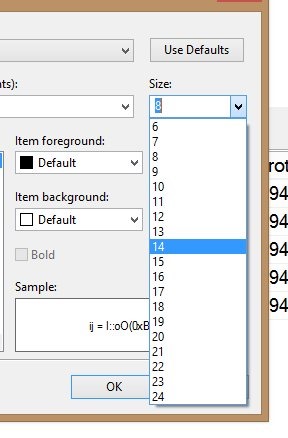
    The default is 8, and I usually up that a bit.

    Capture_007

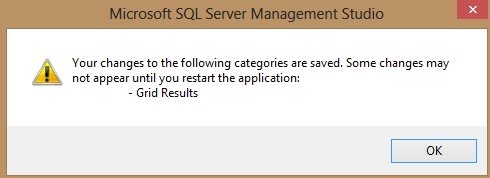
    Once that is done, you click OK, and get this note:

    Capture_008

    Make sure your tabs are saved, since you need to restart SSMS. Once you do, your results will be much easier to read.

    Capture_005

    Note that in the drop down for settings, there is an item for “Results to text”. If you change that, your text results will be larger.