Some time ago I started gathering the SQL Saturday XML files. I started to parse and work with these, but the data is a mess and it never was that important.
I regret that now.
In any case, with the announcement of insolvency from PASS recently, I asked people to save some data. One of those that responded was Ben Weissman (b|t), and he actually rendered out all the available schedules as PDFs (using VB, of course). He sent them to me and I decided to load them up.
Tl;dr; You can see my page here: https://dataplatformdaysweb.azurewebsites.net/
I had started an initial project for replacing SQL Saturday, but hadn’t planned on anything more than a static site. Actually, I wanted a sortable grid, but that was beyond the time and web skills I had at this time. That’s still a goal. This is a quick look at how I built things.
I am not a real software developer, at least not on the current, interactive web. This stuff likely makes sense to any junior web dev, but it was learning for me.
Azure DevOps and Dot Net Core
I wanted a simple site, but I wanted this built in Azure DevOps, so it has some control and tracking. I thought about a simple HTML site, but producing a build with that didn’t seem intuitive to me, so I fired up Visual Studio.
I chose a Dot Net Core ASP.NET REACT application, as I may move this to Linux. It’s cheaper 
In any case, I took the defaults. No real reason other than I’ve tried MVC and that was hard, and lots of people seem to like react. I also have people I can bug at Redgate.
I got the default project to build locally. Then I changed the names of the pages and loaded this into an Azure DevOp repo. Once up there, I took a default build process.

I pointed this at my repo and then clicked Save and Queue… and it failed.
Changes to the Build
I got a message that the nuget restore wouldn’t work with dotnet core 3.1. I could fall back to 2.2, but when I did that, the project wouldn’t build locally.
I realized I’d initially selected a Windows VS-2016 hosted agent, but I had built the project on VS2019. I changed that to the Windows 2019 agent and it worked.
Deployment to Azure
I’d set up an Azure App Service already, and I created a very simple release step. I linked my artifact and selected a release to an Azure App Service Plan. I had to authorize my plan, but once I did that, I was able to select the App Service I’d set up. No configuration needed.

I clicked save, built a release, and ran. I found the default React Site at my URL.
Changes to the Project
I made a few changes to the project as well, to remove some of the defaults. First, I needed to load my PDFs into the project. I had originally created an Assets folder in the root of the project, but that did not get included in the artifact that was built.
Looking at the project, and searching around Google a bit, led me to see that the main page, index.html, was in the ClientApp/public folder. I moved my Assets folder below this, and then saw all my files included in the build artifact and deployed.
I also wanted to remove some of the default sample menu items. I found these in the ClientApp/src/components folder in the NavMenu.js. I deleted the two entries, leaving just a “home” there for now. I may do some other grouping later.
Building the Archive
This was the more interesting item for me. Ben had sent me a ZIP file with all the PDF files in it. I unzipped these and I saw this view:

Originally I thought a simple list of numbers and files would get me started, but there are hundreds of files. How can I do this?
My first thought as PowerShell can help. I popped this open and use Get-ChildItem to get a list of files and compile this into a variable. I have been wanting to use Azure Data Studio more for PoSh, and that’s where I did this.

This got me a basic HTML list of my files. I had trouble with the pathing, so rather than futz around and try to build production code here, I just used this and then a “search and replace” of the [a href=”] to add a [a href=”/Assets/PDF/”] got me the correct paths.
I need to learn how to properly get paths working here in PoSh, but this string manipulation wasn’t important for a one off task.
Once I had this, I had something. Of course, at this point, Ben sent me his index list of the event names, which was what I really wanted. I could have taken the source of his page and used search and replace to get the pathing, but I did something stupider.
In a hurry, I copied and pasted his list of events into SSMS in a new Query Window. One of the reasons I do this is that the cross line editing is superior (IMHO) to VS and VSCode. I’ll repeat the process with just a few lines here, but keep in mind I had like 800. This is a useful text trick as well for some data changing.
I had this list:
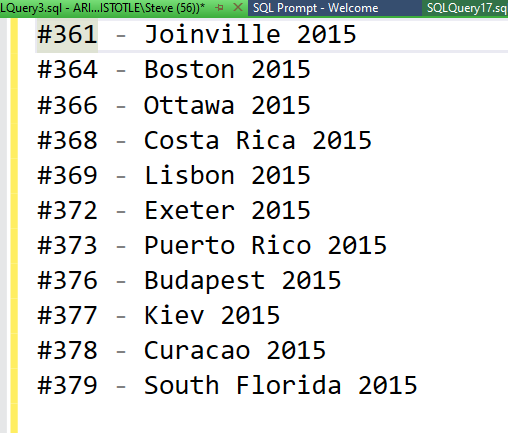
I wanted to make this a table, so I use the Select+Alt+Arrows to select the entire first column.

I then added my table HTML.

I could do this in VSCode, but the reason I like SSMS is that I can space over to the right and then get a vertical edit link, rather than a set of end-of-line cursors. I then can create another edit point and add other code, like this:
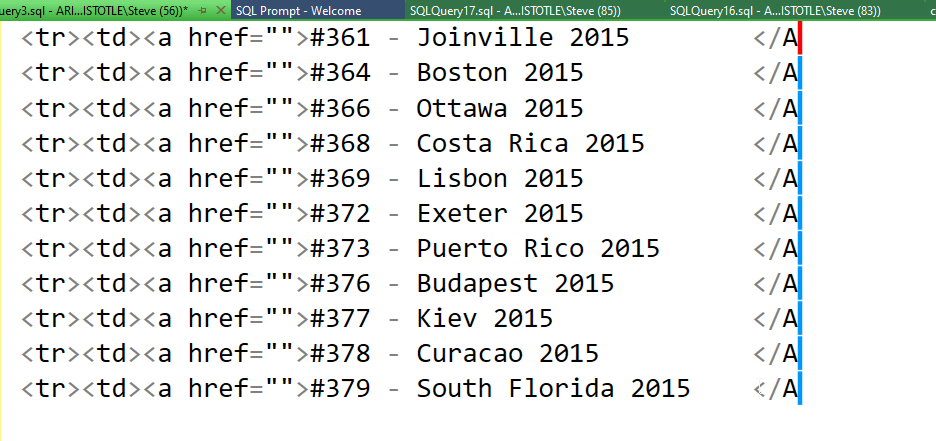
I wrapped this in the table beginning and ending and had my table.
What about the URLS? Well, I could easily add the paths, but then getting the individual file names was hard. Or was it?
I used the same trick. I pasted my list code into SSMS and selected all the file names:
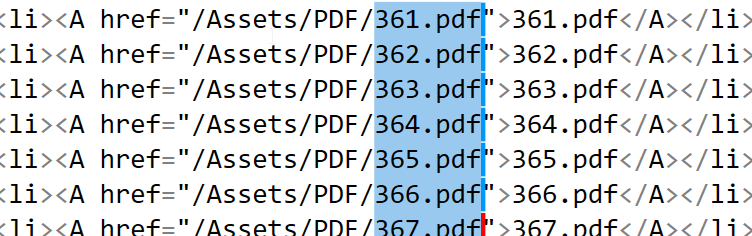
I copied and pasted this set of vertical text into my table, and viola, I had a working table that looked, well, about as good as I could make it quickly.
More to come, as I try to archive and preserve the SQL Saturday data and history as best I can.


