Tag: sql server

  • Database Maintenance Essentials – Oracle Training Days

    Presented at Oracle Training Days, 2013

    Abstract: SQL Server requires a minimal level of maintenance to ensure that the platform functions at an optimum level without any unnecessary outages or problems. This talk will look at the basics of the maintenance operations that should be performed on SQL Server on a regular basis. The topics covered include:

    • Managing MDF and LDF Files
    • Managing Indexes
    • Maintaining Statistics
    • Checking for Corruption
    • Creating Backups That Will Restore
    • Managing Maintenance Jobs

    I cover the reasons why maintenance is required and include a number of references to help you enable this maintenance in your environment.
    In some presentations I will also cover the Red Gate tools that make this maintenance easier to perform. This is optional.

    Slides: Download the PPTX

    Level: 100

    Length: 60 minutes

  • Baselines

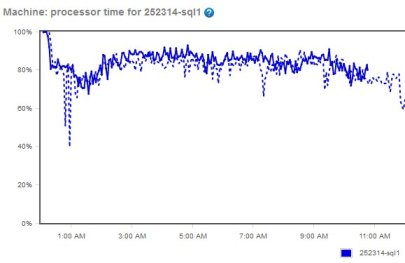
    You come into work one day and as you sit down, your phone rings. It’s one of the business groups complaining that the database is running slow. You check the server and find CPU at 80%, 800 pages/sec, disk IOps of 230 and 124 transactions/sec. Is the database the problem?

    Baselines are important to understand how your system is performing.
    Baselines are important to understand how your system is performing.
    Good DBAs know that baselines are essential. If you don’t know what values to expect from your server, it’s often hard to determine if the system is running slower than normal. Normal is something you need to define for each system, preferably in an automated way that updates your baseline over time.

    When building a baseline, however, how do you average out the information?

    That’s the poll this Friday. Let’s assume that you are examining the CPU percentage for a SQL Server and you have data points from every 5 minutes across the last month. What’s the average? Do you take the straight average? Do you break this down to hourly segments and then create further analysis that looks at different business periods?

    It can become problematic very quickly. Many of us have slow and busy periods. Do we want an average that’s perhaps lowered by the slow periods in our workload? Do we want to break out the averages for maintenance periods separately from normal operations? If you are looking to compare today’s values, do you look at yesterday’s for the same time period? Last week? An average of all points across the last week?

    Let us know what methodology you use and if you’d like to describe it in more than a paragraph or two, we’d love to have some articles published here on the site.

    Steve Jones


    The Voice of the DBA Podcasts

    We publish three versions of the podcast each day for you to enjoy.

  • Granting Permission to Grant Permissions

    I’ve never felt the need to allow this, but I saw someone ask the questions recently. Suppose you had a view and you wanted to allow a user to grant permissions to this view to other users.

    It’s not a weird edge case, but it’s just not one I’ve normally bothered with. I manage by groups, always, and never want a user to be granting permissions to a specific view. I inherently see users as fragile in the lifetime of an application (administrators as well)  and don’t like the idea of allowing them permissions.

    If you need to do this, however, there is a way. Let’s examine a basic scenario. I want to allow Bill to grant permissions on the view “MonthlySales”, which I’ve created in AdventureWorks. If I want to allow Bill to use this view, I need to do this:

    GRANT SELECT ON MonthlySales TO Bill

    If I log into the server as Bill and execute

    SELECT * FROM MonthlySales

    I get this:

    grant1

    Simple stuff.

    However if I want Bill to be able to allow other people in his department to see this view, what can I do?

    If I examine the BOL page for GRANT, I see there is an option that can help here. The WITH GRANT option allows the person specified in the statement to grant the existing permissions to others.

    Let’s assume I have another user Sue. If I log in as Sue, and I execute the same SELECT that Bill ran above, I get this:

    Msg 229, Level 14, State 5, Line 1

    The SELECT permission was denied on the object ‘MONTHLYSALES’, database ‘AdventureWorks’, schema ‘dbo’.

    I could easily manage permissions as the DBA, and I prefer this, but for when you have some data that a user can manage, and you are in an environment where things change quickly, perhaps you want to delegate some permissions to users.

    Now, let’s change the initial permission I set up for Bill to this:

    GRANT SELECT ON MonthlySales TO Bill
     WITH GRANT OPTION
    

    Bill can still see the view and the data. However Bill can now run this:

    GRANT SELECT ON MonthlySales TO Sue

    Once he does this, Sue can see the view.
  • Still 32

    I was listening to a presentation recently and the presenter talked about some of the restrictions in working with 32 bit SQL Server on 64 bit Windows hosts. Another person joked that any companies still running 32 bit software were way behind the times. I heard a comment that surely everyone runs 64 bit hardware these days, don’t they?

    Do they? How many servers in large companies are still running on the x86 architecture? I know I have old laptops still running those processors, though I’d like to think that most companies have a hardware refresh rate that’s no longer than 5 years, and most laptops and servers would be x86.

    The platform architecture, however, doesn’t necessarily imply our software has been upgraded to 64 bit. There are problems with various drivers that won’t run under 64-bit architectures. Excel is often a problem as SQL Server moves to 64-bit versions. There are 64-bit drivers, but the change, testing, etc. effort for many companies may not be worth pursuing. It can be annoying for us data professionals, but it’s a valid business decision. The same argument often applies to those companies running SQL Server 2000 (or older versions).

    Five or six years ago I heard a presenter that worked for a large Fortune 100 company say that their policy was for applications to last ten years. That included the hardware and software, since the cost of change, whether through new software or major upgrades, was significant. With many companies still running SQL Server 2000, I suspect that many companies have a similar, unofficial, policy.

    I don’t know whether the majority of software we use in our careers is 32 bit or 64 bit, but I am sure that we will have to deal with the former for years to come. You can complain about it, but you better learn to work with it.

    Steve Jones


    The Voice of the DBA Podcasts

    We publish three versions of the podcast each day for you to enjoy.