Tag: sql server

  • sp_Blitz, v16, on SQLServerCentral

    Brent Ozar Unlimited released v16 of this sp_blitz script, which is designed to run on a SQL Server instance and give you a quick, comprehensive report of the state of the instnace. It’s a great script, and if you have the chance to see Brent present on the script, go see it. It’s a great show and a good explanation of why you might want this type of script.

    I haven’t had to manage the SQLServerCentral instances, but I decided to run this and see what jumped out at me. I started a series at SQLServerCentral where you can follow along with my results. The first article went up today.

    • Security
    • Reliability
    • Performance
    • Query Plans
    • Backup
    • Global Trace Flag
    • High Availability
    • Informational
    • Non-Default Server Config

    You should think about auditing your servers periodically with something like the sp_Blitz script, which will allow you to ensure your servers are running at peak performance.

    Administering your instances is an ongoing job. It’s not a time intensive daily job, but it’s something you should be doing periodically on all your instances, with monitoring setup on your servers to let you know when things might be causing problems.
  • Is Big Data Good for Data Professionals?

    Big Data isn't well defined, but it makes a lot of people sit up and pay attention.
    Big Data isn’t well defined, but it makes a lot of people sit up and pay attention.

    There’s a lot of hype around “big data”, a term being thrown around so much in the media that I’m not really sure what it means anymore. Is 1TB “big data”? Is 10,000 transactions/sec big data? Or does it mean that you have more data than your systems can handle, causing queries and reports to run slow?

    I almost hope it’s the latter. I hope that our managers start to think that when our systems run slower that we’re dealing with big data, and we need more resources. The whole big data phenomenon could be a way for data professionals to start a new hardware renaissance, where hardware budgets grow and we begin to replace our current systems with bigger, faster servers.

    Or perhaps it’s a way to offload some of the system administration for individual servers and move to cloud services. I don’t think that’s necessarily a bad move for many DBAs as it would allow them to focus on data management, and information extraction rather than dealing with storage and hardware management.

    Big Data is in the news, and it’s being used by vendors to sell new products and services. From Hadoop to new SANs to BI interfaces, there’s no shortage of places where the term “Big Data” might be used to try and shorten the sales cycle. As a data professional, it’s important that you understand what your needs really are, and if the term is being in a way that actually provides some value to your company for the money spent.

    Steve Jones


    The Voice of the DBA Podcasts

    We publish three versions of the podcast each day for you to enjoy.

  • The Default Fillfactor for an Index

    I ran down the rabbit hole on transaction logs recently. I started with Paul Randal’s post over at the SQL Sentry blog on trimming the transaction log, then went to his video on log analysis. I also glanced at the posts on index cleaning and what index stats don’t tell you. What started out as a quick “what can I do to help transaction logs perform better” became a few hours of reading, executing code and thinking.

    However the post that caught my eye was Paul’s post on choosing an index fill factor. I’ve seen various notes on the fact that fill factor can matter for performance and maintenance, but I haven’t often seen someone give some good concrete rules on what you should choose. In a nutshell, here’s Paul’s advice:

    1. Don’t set a system wide fill factor with sp_configure
    2. Start with 70 for specific indexes that seem to experience lots of fragmentation

    I like this advice. It’s simple, and easy to start using, although the caveat to #2 is that you need to monitor and perhaps adjust the fill factor (up or down from 70) and possibly change your maintenance schedule. I might lean towards leaving my maintenance alone, especially with a script like the SQL Fool Index Defrag Script running and playing with fill factor to ensure I minimized page splits.

    There’s also the trade-off of requiring more space for your index (and maintenance) if you move to 70 from 100.

    I do think that changing the system wide level is a bad idea. If you aren’t sure what your system wide fill factor is, here’s a post on checking it.

  • Checking the Instance Fill Factor

    I was reading a post from Paul Randal recently and noted that he recommends not changing the instance’s default fill factor. I agree, and you shouldn’t alter it. However if you aren’t sure if it’s been changed on any of your instances, here’s how to check it.

    I’ll show both the GUI and code ways to do this.

    SSMS

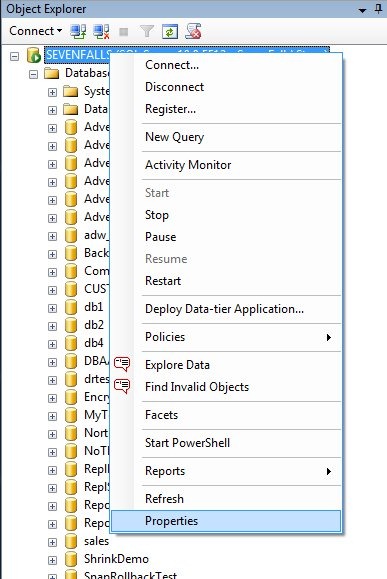
    In SSMS, right click your server instance in Object Explorer and choose properties.

    fillfactor1

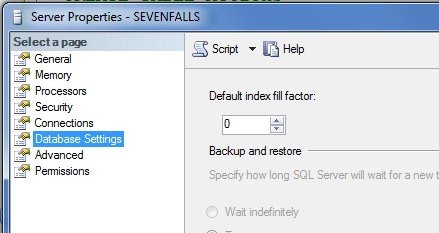
    This will open a dialog that has a number of tabs. If you click the “Database Settings” item on the left, you will have various settings appear on the right side. One of these is the default fill factor.

    fillfactor2

    It should be zero or 100. Nothing else.

    T-SQL

    In T-SQL, we can also check by opening a query window and typing:

    EXEC sp_configure 'show advanced options', 1;
    GO
    RECONFIGURE
    GO
    EXEC sys.sp_configure;
    

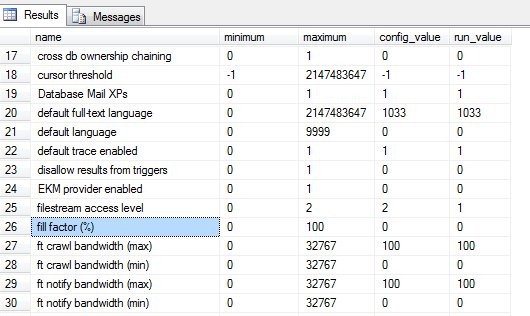
    This will return all the settings on the server. This is an advanced setting, so you don’t need to enable those.

    If you scroll through the list of items, you will find one that is labeled “fill factor (%)”

    fillfactor3

    Again, this should be zero or 100 in the config_value and the run_value columns. To change this, run this code:

    sp_configure 'show advanced options', 1;
    GO
    RECONFIGURE;
    GO
    sp_configure 'fill factor', 100;
    GO
    RECONFIGURE;
    GO