Tag: sql server

  • Who Built This Thing?

    I love this logo, and I love working with SQL Server.
    I love this logo, and I love working with SQL Server.

    This editorial was originally published on May 20, 2008. It is being re-run as Steve is on vacation.

    I came across a humorous Tweet (since removed for some reason) on David Reed’s blog. It said: Was Microsoft SQL Server designed by someone who doesn’t need to use Microsoft SQL Server? Jesus.

    There are definitely times that I think the people that build the system stored procedures and other code we can see don’t really work with SQL Server. It seems that best practices aren’t followed and things aren’t even well coded.

    But most of the people I’ve met working on SQL Server seem to be really, really smart guys. They care about what they do and I’m somewhat amazed at times how passionate they are. I can’t name everyone, but I’ll point out one that really struck me.

    Recently I was in Redmond for a small conference and quite a few of the SQL Server program and product managers were there to speak about their work and get feedback. Many of the people speaking did a fine job and some were definitely more exuberant than others, but there was one that really stood out in my mind. This presenter works on the spatial team and gave a quick overview, talked about places that his team had debated about going with future work and then walked to the front of the stage to just talk to the audience. He asked us questions, really trying to engage people and drive the discussion forward. And you could feel the passion he had for his work and to build a world class product.

    For those of you that don’t work in the spatial area, his name is Isaac, and he writes the Isaac on Spatial blog. He really opened my eyes to a subject I had somewhat dismissed since I think plotting locations on a map isn’t that interesting. However his passion for the subject, and his lateral thinking to other areas in spatial such as collisions and evolutions of areas in 4D (locations plus time), CAD/CAM work, planning and more made me think that the addition of spatial technologies is more than just a feature match with Oracle.

    In many ways SQL Server mirrors what I see in other parts of Microsoft. It’s a large group composed of teams, and each of those teams is rather passionate about what they do. They work hard, they make mistakes, they try to correct them and move forward, and mostly they care. They care about what they’re doing and it shows when you can sit down with them.

    And most importantly, I think they dislike some of the marketing moves as much as we, or at least I, do.

    Steve Jones


    The Voice of the DBA Podcasts

    Everyday Jones

    The podcast feeds are now available at sqlservercentral.podshow.comto get better bandwidth and maybe a little more exposure :). Comments are definitely appreciated and wanted, and you can get feeds from there.

    Overall RSS Feed: or now on iTunes!

  • Dropping Indexes

    While working on some demos recently, I needed to drop an index for a test. I executed this generic statement for an index I’d just created.

       1: DROP INDEX ix_IndexName

    Needless to say I was surprised when I got this error:

    Msg 159, Level 15, State 1, Line 1

    Must specify the table name and index name for the DROP INDEX statement.


    I haven’t done much index maintenance in the last few years, but since I had specified the name, and I expected names to be unique, I was surprised. That’s not the case, however, since indexes aren’t seen as objects.

    I created the index in AdventureWorks with this code:

       1: -- paste in create index statement

       2: CREATE NONCLUSTERED INDEX ix_IndexName

       3: ON Sales.SalesOrderHeader ( [TerritoryID],[ShipMethodID], [SubTotal], [Freight] )

       4: INCLUDE ([SalesOrderNumber], [CustomerID]);

    As a test, I then added this index:

       1: CREATE NONCLUSTERED INDEX ix_IndexName

       2: ON Production.Product ( [Name],[ListPrice]);

    Same name, different table.

    A quick check in sys.objects surprised me.

       1: select *

       2:  from sys.objects

       3:  where name = 'ix_Indexname'

    This returned no results. Hmmm, let’s investigate further. I next decided to check sys.indexes.

       1: select *

       2:  from sys.indexes where name = 'ix_Indexname'

    This returned two results:

    indexes

    Two entries, with two object_ids. I wondered what those objects were, so I ran more code:

       1: select *

       2:   from sys.objects

       3:   where object_id in (1010102639, 1717581157)

    I received the two tables back as the objects.

    indexes2

    This surprised me, though I’m sure I’ve read the details in a book at some point, or even seen the documentation in sys.indexes. The entry for name says it is unique only within the space of the object, which would be the parent table.

    I had assumed that indexes were objects, but they aren’t. They are an attribute of an object, and as such, I needed this code to remove my index:

       1: -- cleanup

       2: DROP INDEX ix_IndexName

       3:  ON Sales.SalesOrderHeader

       4: ;

       5: GO

    Update: As noted in a few comments, you can also drop the index as:

       2: DROP INDEX Sales.SalesOrderHeader.ix_IndexName

    And, of course, I needed to drop my test object.

       1: Drop INDEX ix_IndexName

       2: ON Production.Product

       3: ;

  • Does Connect Work?

    Sometimes I wonder if the Connect bug reporting system is really working.
    Sometimes I wonder if the Connect bug reporting system is really working.

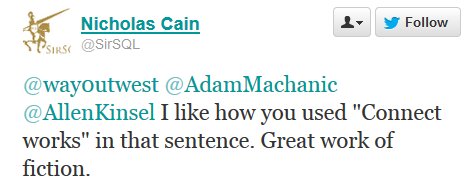
    I had a brief conversation on Twitter about the Microsoft Connect bug reporting system, and received the tweet pictured above. It notes: “I like how you used ‘Connect works’ in that sentence. Great work of fiction.” That made me laugh because it does sometimes seem that Connect doesn’t work all that well for those of us that use it.

    Connect was supposed to be a place where users could report bugs and make suggestions. Some people file a lot of bugs and suggestions, though more than a few seem slightly silly. Others file what appear to be support requests, and I’ve had a number of documentation notes. There are even Connect items filed on Connect itself, though I can’t understand why this particular one is “postponed”. There are some items that have been open for years, even with hundreds of votes.

    The Connect system is supposed to feed directly to product groups and there are more than a few times I’ve received feedback through the system from developers I know personally that provide comments. I know developers are seeing the items, but there appear to be a few times of year when the SQL Server group mass closes lots of Connect items, often without any feedback. The twitter conversation I had above included one of these items.

    I remember being excited when Connect was introduced, thinking this would be a good way to get feedback to the product groups, and hopefully influence the managers to prioritize some of the common requests. However that excitement was tempered with the idea that so many items would be submitted, and it would be hard to triage and rank them. Indeed, I rarely find something in the searches I make before submitting, even I’ll have submissions closed as duplicate.  The number of items submitted is so high, it’s hard to even comprehend how any group works with the submissions.

    With the state of Connect, the lack of feedback, and the mass closures, I’m not sure how well Connect is working these days. However it’s not all bad; I did submit one item that received enough votes to actually make a change in MS policy. Outside of that, I think @SirSQL’s statement might be closer to the truth than I would hope.

    Steve Jones


    The Voice of the DBA Podcasts

    We publish three versions of the podcast each day for you to enjoy.

  • Why SQL Server?

    I love this logo, and I love working with SQL Server.
    I love this logo, and I love working with SQL Server.

    Over the last few months I’ve met quite a few people that were just starting to work with SQL Server. For many of them, they’ve attended talks or presentations of mine or others, trying to learn enough to become more competent at their jobs. As is the case for many people starting out with a technology, they were thrown into it at their job and are struggling to understand the technology.

    That’s how I started, but I’m wondering if that’s how most of you started. I would guess most of us didn’t necessarily choose to work with this platform, but since that time, many of us have had other choices. This Friday, I wanted to ask about your work in the SQL Server world and participation at SQLServerCentral.

    Why do you work with SQL Server?

    It’s a simple question, but one that many of you might not think about. Are you stuck with SQL Server? Did you fall into this role and enjoy it? Or have you never considered moving on? A lot of people get stuck in ruts, especially ones that work well for them, without ever considering other options.

    For me, I fell into SQL Server when an instance was installed on my Novell network. I enjoyed working with sets of data and was amazed at how much easier it was to work with SQL Server than Oracle, and how much better performance was over dBase. It didn’t hurt that the pay for database work was great, but I have enjoyed working with SQL Server, and with short forays into the DB2, Oracle, and MySQL worlds, I’ve learned that I enjoy SQL Server more.

    Steve Jones


    The Voice of the DBA Podcasts

    We publish three versions of the podcast each day for you to enjoy.