Tag: sql server

  • Create a Login – Basic Skill #3

    This post is part of a series based on my presentation The Top Ten Skills You Need for SQL Server. This post is part of Skill #3 – Setup Security.

    I wrote about the basic security model for SQL Server, recently and wanted to now expand on the practical aspects of how you setup security. Let’s start with logins and creating them.

    In the current versions of SQL Server, which includes SQL Server 2008 R2 and below, a login is the way in which you connect to an instance of SQL Server. Things may change in SQL Server 11 with contained databases, but I think this will still apply in many situations.

    Logins are defined at the instance level, and in Management Studio, you can right click the Logins folder and select New Login to create one.
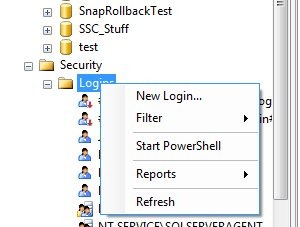
    newlogin

    This will create a dialog like this one:

    newlogin2

    There are lots of choices here, but really there are only a few decisions that we make for most logins. You might use the other options, but these are the basics for 80% of the cases, following the 80/20 rule of this series.

    The first thing is the login name. This can be a user or group in Active Directory, and as you can see in the next image, if you don’t know the exact name, there is a search button. This is the standard AD search dialog.

    newlogin3

    There is a radio button below the name, which defaults to Windows Authentication. That’s for AD accounts, and is the recommended default. You can also choose SQL authentication, which means that a password is required and the administrator must set it.
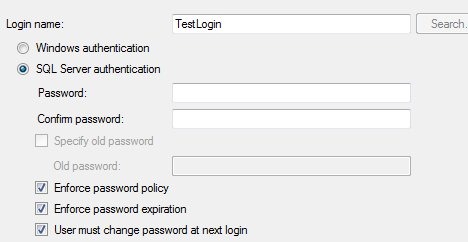
    newlogin4

    If you choose SQL authentication, and are on Windows 2003 or later (Vista/XP as well) that allow you to set password policy. As a note, leave these checked unless you have a great reason not to. For most logins you should not know the user’s password and it ought to conform to the policies.

    The rest of this page is advanced stuff that isn’t often needed. The only thing that you should look over is the default database. For normal users, make sure this is a database the person will have access to. For administrators, leave it at master.
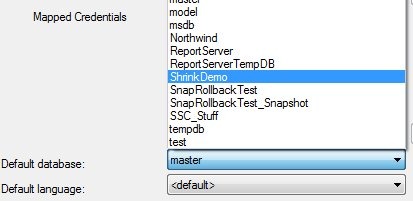
    newlogin5

    Next we look at the server roles page:

    newlogin6

    These are roles, or groups, with permissions for the instance. They don’t necessarily give a person access to a database, but many of them could allow someone to gain access, so for most users, leave this blank. For administrators, give them just what they need.

    The user mapping is next, and this is where you can have the dialog create a user in the database and grant access.
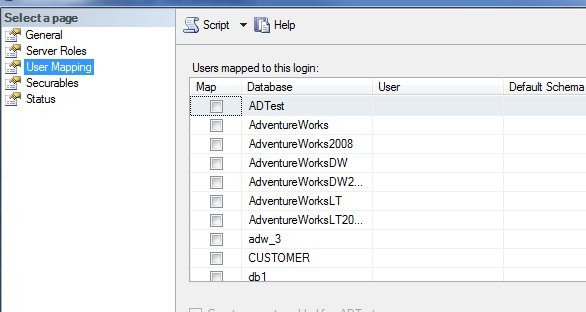
    newlogin7

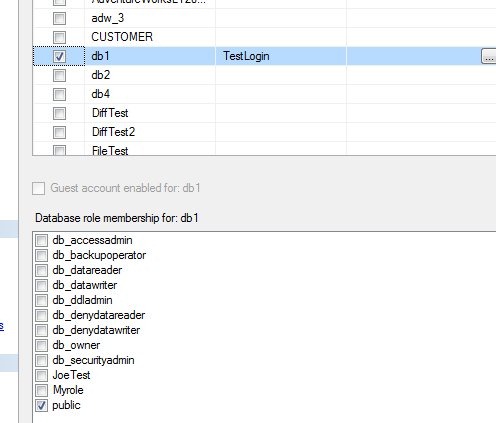
    Most users will need access to a specific database, usually the one you chose as their default database. If you select a database checkbox, the user will be created with the same name as the login by default. Leave this alone, it’s a good policy.
    newlogin8

    Once you select the user, you also can add a database role at the bottom. Everyone is a member of public, and you should have a database role you’ve created for permissions that you can assign to them. I dislike giving regular users any of the fixed database roles like db_datareader. They are too global in permissions and have caused me confusion later on.

    Create your own role and assign permissions.

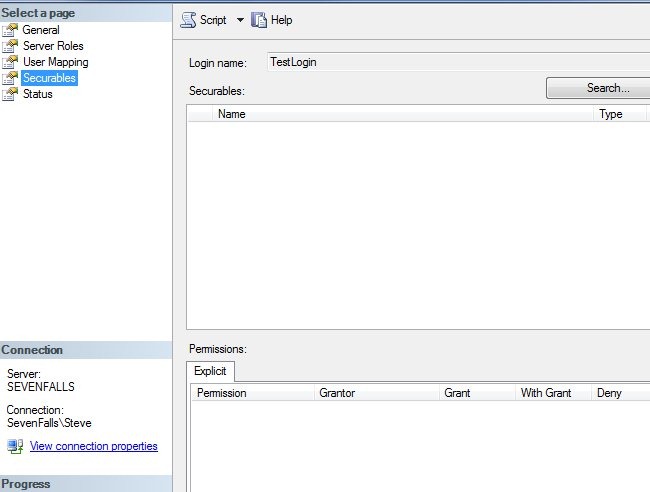
    Next is the explicit securables tab. Don’t use this unless you know what it means. I never use it, and most of the time you shouldn’t. Leave it along until you learn why, and more importantly, why not to use it.
    newlogin9

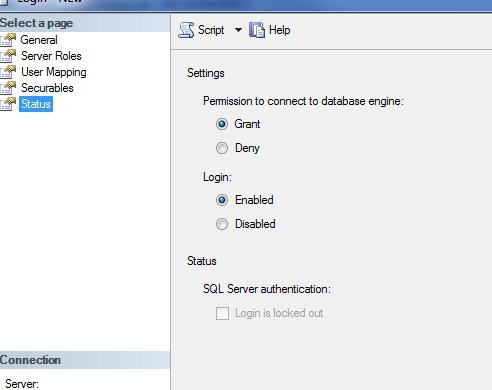
    That last tab isn’t one you normally need, but you might come here if a user has locked themselves out.
    newlogin10

    Leave these defaults alone unless you need to disable the user or prevent them from accessing this database for some reason. You can switch the radio buttons. If the user is locked out, the bottom checkbox will be selected and you can uncheck it.

    That’s the basics of creating a user in SSMS. For the most part, stick with defaults and keep your security simple, and restrictive. Don’t grant more rights than you need to.
  • Prepping for Certification

    Having prepped for, taken, and then failed the MCM exam this year, perhaps I’m not the best person to give you advice for certification preparation. However the MCM is a hard test, I did better than I expected, and I was close. Lots of people haven’t passed it on their first try, including a couple people that work with SQL Server every day to build solutions that must work in the real world. A few of them passed on their second try, though I’m not sure if I’ll take it again anytime soon.

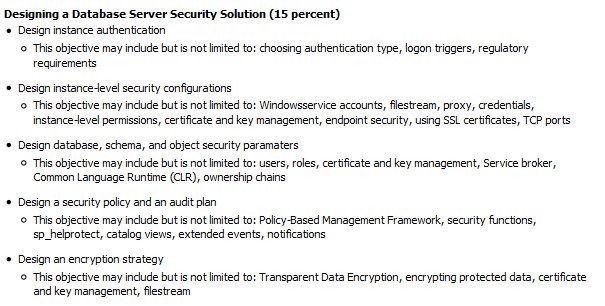
    Recently I ran across this preparation post from Susan Ibach on MSDN. I think it’s good advice and if you follow it, you’ll be prepared for the exam. At least you’ll have a good idea on which general areas the exams focus on since there are %s given for each area. I’ve shown part of the SQL Server exam 70-450:

    cert1

    Note that this section, which includes security for the instance, database, schema, and encryption, is 15%. Since the exam is supposed to be around 50-60 questions, this means that you should get about 10 questions on security. You might get 8, you might get 12, but I wouldn’t expect to get 20.

    I know most of you would like a step by step list of things to do for the exam. However these exams are going to test a wide variety of skills, and since 50 questions isn’t a lot, the exam can’t specify tightly which questions will be asked.

    Sidebar: Personally I’d like to see more specific exams, perhaps as specific as security, replication, SSIS, etc., but lots of people don’t want to certify in all those areas. Plus it changes the profits for MS since they have more exams to administer. We’ll see if this changes in the future.

    As a result you need to study a wide variety of materials. For example, for the security section above, you ought to tackle this in 5 sessions. Build yourself a short list of skills to have in each area. I’ll do section one for you. Here is what I’d go read about in BOL and practice in SSMS.

    If you can explain each of these things to someone else, and perform the skills, you should be fine. I would recommend you blog or write about these, because that helps you to learn and remember this stuff. If you blog about them, ask a friend to look at your blog and see if you have correctly described things.

    Once you think you’re OK with all the sections, not perfect and a guru, but you understand these areas, take the exam. If you want extra practice, get a MeasureUp or other practice test.

    There’s no guarantee and you shouldn’t expect one. Go through the material, explain it back to yourself or someone else and you should be able to pass the test.

  • The 80/20 Rule – Top Ten SQL Server Skills

    Over the years that I’ve worked in technology, I’ve found that the 80/20 rule seems to apply pretty well to all the different areas that one can specialize in. It doesn’t matter whether you build PCs, work on the help desk, administer systems or develop software, the rule has pretty well been true for my career.

    The 80/20 rule essentially says this: 80% of your job takes 20% of your time (or skills) and the remaining 20% of your job takes 80% of your time (or skills). It doesn’t matter if this is your daily work or a project that you are assigned. Most of your effort is in finishing the last details, or handling the most complex parts.

    I’ve heard this joked about in software development as the rule of 90s as well, saying that the first 90% of a piece of software takes 90% of your time and the last 10% takes the other 90% of your time.

    I built my presentation, The Top Ten Skills You Need for SQL Server, based on this rule. It includes the most skills that often solve questions I see asked at events or on forums. It seems that these ten skills along with the basics of performing them will solve most of your problems.

  • The Robot DBA

    Manna, a fun, and scary, sci-fi story.

    This is the story of Manna, the manager of a fast food restaurant. It’s a great read, and perhaps a little shocking. Manna is a piece of software, reading sensors, reacting, and letting employees know what to do with a synthesized voice through a set of headphones that the everyone wears in a fast good restaurant. In this tale, Manna evolves into a software system that is spread throughout many industries, essentially displacing managers and many workers at all levels in all industries. With the ability of these different “Manna” variants to communicate and negotiate contracts among themselves, the US devolves into an Orwellian nightmare place to live.

    It’s a science fiction story, but the fears that it evokes are similar to those I’ve heard expressed from many people in the IT field across my two decades in this industry. A friend of mine left IT a decade ago, while working as an Exchange admin for a company with 50,000 mailboxes. He was sure in 5 years his job would be automated and eliminated. I knew a few people that moved out of DBA work in the early 2000s, after Microsoft released SQL Server 7 and 2000, with some marketing messages that the products didn’t require a DBA. A few years ago I heard a few people arguing that PowerPivot would kill most BI development jobs because it was so easy for end users to build their own analysis applications.

    The one constant in all of those stories is that they never came true. I hope that Manna never comes true either, but I’m not worried. I’m very confident that if there’s one truth to all the computer development we do, it’s that we make constant mistakes and there is very little chance that we will be able to automate any significant percentage of IT jobs away.

    We do build better software, and we do allow an administrator to manage many more systems than in the past, but we also seem to constantly eliminate most of the efficiencies in two ways. One is by adding many more systems and applications, and the other is by introducing more complex systems that create new problems that need to be solved.

    The bar for IT knowledge needed is always being raised, but I just can’t see us getting to the point of having automated or robot DBAs running SQL Server in my lifetime.

    Steve Jones


    The Voice of the DBA Podcasts