Tag: sql server

  • The Basic Security Model in SQL Server – Skill #3

    This series of blog posts are related to my presentation, The Top Ten Skills You Need, which is scheduled for a few deliveries in 2011.

    Users and Objects

    The basic security model diagram that I use is the one below. It’s not fancy, but it conveys the basics of security in SQL Server.

    security

    From left to right, users or clients are mapped to principals. Those principals are both in the instance (login) and database (user) as well as roles. Permissions are assigned to roles on objects.

    That’s essentially what the basic security model should be for most people. There are other types of structures (credentials, certificates, etc), but in terms of the 80/20 rule, here’s what most DBAs should do:

    • Create a login for a person (either Windows or SQL Server login)
    • Map this login to a user with the same name in those databases that person needs access to. Only pick those databases needed, not all databases.
    • Create a role in each database for each group of users/permissions.
    • Add the users to this role
    • Grant permissions on the objects needed to these roles.

    It’s not complicated, and sticking to this simple scheme, and not granting db_owner or sysadmin to logins or users will allow you to implement basic, easy to understand security in SQL Server.

    References

  • Create a Log Backup Schedule – #1 Skill You Need

    This series of blog posts are related to my presentation, The Top Ten Skills You Need, which is scheduled for a few deliveries in 2011.

    You Need Log Backups

    By default databases in SQL Server are created with the Full Recovery Model. That means that without log backups, the log will continue to grow and grow until it hits the growth limit you’ve set, or it fills the disk. I see questions on this constantly at SQLServerCentral from people who have a 10MB database and a 653GB log file.

    A log backup will mark the transactions in the log as backed up, and that space can be re-used. The log backup aids in space management and also provides recovery to points in time in between full backups. With that in mind, you need to do a few things.

    Schedule Log Backups

    As soon as you create a database, and you create a full backup schedule, schedule log backups as well. It’s easy to schedule a single daily log backup along with your full backup. They don’t block each other, and for most non-production systems, this works fine.

    Note that the total space used for the log backups is the same whether you schedule 1 a day or 86,400 a day. There is a slight overhead to each file, but essentially the space used is the same. However backups scheduled more often result in a smaller log files size for the LDF.

  • Pop Tarts and Hurricanes

    The second most dold item at Wal-Mart before a hurricane.

    What do people buy most of before a hurricane? Wal-Mart determined that batteries are the number ones sales item before a hurricane, but the second most sold item was surprising: pop-tarts. That’s the type of intelligence that can come from analysts asking the right questions about their customers and then IT delivering systems that can help them get an answer.

    More and more companies are starting to deal with big data. Big data is usually seen as extremely large sets of data. Those data sets  often exceed the capability of what a single database server can handle, and place a strain on existing IT infrastructures, especially when there is an explosion of new datab types. Hadoop is an open source framework that’s designed to deal with large sets of data and help with the processing and analysis of these large data sets.

    Microsoft recently added support for Hadoop to SQL Sever. Granted it’s only in the Parallel Data Warehouse, which is a highly specialized version of SQL Server integrated with specific hardware. However I am sure this will eventually make its way to other editions over time.

    Update: I made a mistake, there is a connector for non PDW SQL Server 2008 R2 instances.

    I don’t know if I would recommend learning Hadoop, but the techniques of processing large sets, and performning analysis on big data is important., Even more important might be the writing of well performing T-SQL code that will be used. I’d recommend you read about ways to write better code, and learn to integrate those skills into your daily work. You don’t always need them, but you often don’t know that when you are writing the code.

    It doesn’t take much more effort to write better code the first time, but it does take more effort to learn to do so. It’s an investment in your career that you ought to be regularly working on to become one of those talented people that is in demand in the future.

    Steve Jones


    The Voice of the DBA Podcasts

  • Computed Columns and CASE

    I wrote about computed columns recently, but I didn’t realize that a logical expression could be used here, such as a case statement, and misspoke in this thread on SSC. Fortunately someone corrected me and I decided to blog and test this a bit.

    Why an expression?

    Suppose you had a table like this:

    CREATE TABLE OrderDetail
    ( OrderID INT
    , ProductID INT
    , Qty INT
    , OrderDate DATETIME
    , ShipDate DATETIME
    , STATUS INT
    )
    

    I record orders, but I don’t necessarily have a ship date when the order is placed. There are many cases where a user enters an order and some back end system later calculates a shipdate based on the supply situation, or even waits to update this field when the order ships. It’s entirely possible I have data in this table like this:
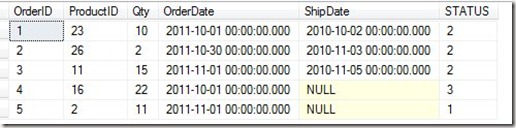
    computecol2

    Suppose I then have a status table with these values:
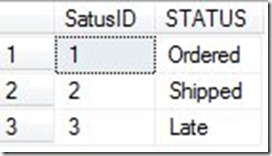
    computecol3

    Here is my logic. If the shipdate is null, then the order has not shipped and is in the status of ordered. If the shipdate is filled in, the order is shipped. If the shipdate is null, and the order date is more than 2 weeks old, the order is late. In our example, if the date is 11/5/2011, then the order #4 is late.

    We can easily join to the Status table to display this for the client, but we are depending on some process running every day to check for late orders. Otherwise how does row 4 get marked as late? When the order is entered, it’s not late, and we certainly don’t want to wait until the client checks on their order status to mark it as late.

    If we had a computed column, we could easily handle this, and display late orders for a report, or even for a other queries. I could change the definition of the status column to be this:

    CREATE TABLE OrderDetail
    ( OrderID INT
    , ProductID INT
    , Qty INT
    , OrderDate DATETIME
    , ShipDate DATETIME
    , STATUS AS CASE
           WHEN shipdate is NULL AND orderdate < DATEADD( dd, -7, GETDATE()) THEN 3 
           WHEN shipdate is NOT NULL THEN 2 
           ELSE 1
       end
     )
    GO

    Now the status I get is based on the other values in the row and is correct, regardless of my application logic.

    NOTE: This is a contrived example, and I don’t like this since I am assuming the status logic doesn’t change. In a real system, I would probably prefer to use the actual status in the column if I did this, as shown here:

    CREATE TABLE OrderDetail
    ( OrderID INT
    , ProductID INT
    , Qty INT
    , OrderDate DATETIME
    , ShipDate DATETIME
    , STATUS AS CASE
           WHEN shipdate is NULL AND orderdate < DATEADD( dd, -7, GETDATE()) THEN 'Late' 
           WHEN shipdate is NOT NULL THEN 'Shipped'
           ELSE 'Ordered'
       end
     )
    

    A Better Example

    A better example of where this might be used would be in the case where I might have a variable calculation. For example, in many Internet businesses in the US, you do not collect sales tax if your product is not being sold inside the state in which your company is located.

    If I sold horse products from my ranch, located in CO, I would have to collect sales tax for sales shipped to CO, but not those shipped elsewhere. So perhaps I’d have a table like this:

    CREATE TABLE OrderDetail
    ( OrderID INT
    , ProductID INT
    , Qty INT
    , Price NUMERIC( 10, 2)
    , St CHAR(2)
    , TaxRate NUMERIC( 12, 4)
    , LineTotal AS CASE
           WHEN st = 'CO' THEN (Qty * price) + (Qty * price * TaxRate) 
           ELSE (Qty * price)
       end
     )
    GO
    INSERT dbo.OrderDetail
            ( OrderID ,
              ProductID ,
              Qty ,
              Price ,
              St ,
              TaxRate
            )
    VALUES  ( 1 , -- OrderID - int
              1 , -- ProductID - int
              10 , -- Qty - int
              10 , -- Price - numeric
              'AZ' , -- St - char(2)
              .1  -- TaxRate - numeric
            )
    INSERT dbo.OrderDetail
            ( OrderID ,
              ProductID ,
              Qty ,
              Price ,
              St ,
              TaxRate
            )
    VALUES  ( 1 , -- OrderID - int
              1 , -- ProductID - int
              10 , -- Qty - int
              10 , -- Price - numeric
              'CO' , -- St - char(2)
              .1  -- TaxRate - numeric
            )
    
    
    SELECT OrderID, qty, Price, St, TaxRate, LineTotal
     FROM dbo.OrderDetail
     

    Useful?

    I’m not sure if computed columns are terribly useful. To me they strike of hard coding logic into a schema that I’m not sure belongs, but if you find them useful, you do have the option of doing so, and including logical expressions with CASE.