Tag: sql server

  • Help with testing Denali, SQL Server 11

    Earlier this week, Dan Jones, one of the Microsoft employees on the SQL Server team, wrote a blog post asking about testing the next version of SQL Server, Denali. Dan is trying to ensure that there are not surprises from customers because of a bug that wasn’t caught in testing.

    I know, I know, how can Microsoft, with billions of dollars being spent on this product miss a bug. It’s easy, coordination is hard, and despite the hundreds, or thousands of machines testing SQL Server, it’s not possible to hit every combination. People stress the software in all kinds of unusual ways, and it’s good to get some testing.

    So, if you have some free time at work, and can space some hardware, even a VM, get get the CTP and install it. Upgrade one of your databases, and run a workload. Even a profiler trace and see if things error out. Run the new SSMS tools and report any issues on Connect. As Dan notes, Connect sends bugs right into the Team Foundation Server that the SQL Server developers use.

    There’s even a Feedback Challenge, where you can win a prize if you get moving now.

    If you’re worried about installing Denali, there’s a nice post from Andrew Fryer on installation.

  • A Flock of SQL Servers

    Check out the #sqlhelp hashtag on Twitter

    Twitter is an amazing application. I still remember hearing about it in the spring of 2008 as some type of “let others know what you’re doing” service. It seemed a little silly to me and I couldn’t understand the value. My first tweet is lost for now, but I know that I struggled to find a use for the service at the beginning. Like many people, I ended up updating my status with inane things like “Getting a latte from Starbucks.”

    Since then I’ve found Twitter to be a very exciting way of keeping in touch with people around the world, learning new things, and even getting information at various events. It’s the ultimate water cooler that makes me smile, laugh, and share interesting information. There is a great SQL Server community on Twitter, and an amazing hashtag (#sqlhelp) that might help you solve some complex SQL issue. It’s happened before, and it’s amazing when it does, especially considering that responses are limited to 140 characters.

    It seems that there are any number of ways in which people use the service to spread information and interact with others. However there are security implications in using Twitter, and that leads me to this week’s poll:

    Do you want your SQL Servers tweeting?

    If you find some way in which it might be useful for your database server to send information out through a broadcast service, would you want to use Twitter? Are you worried about potential security implications, or maybe just the potential load from a large number of broadcasts. Would you ever consider letting your application or database server read twitter updates and respond to them?

    If you haven’t tried Twitter, I’d recommend you do so. It isn’t for everyone, but I’ve found a lot of value and inspiration from the service.

    Steve Jones


    The Voice of the DBA Podcasts

  • Basic Computed Columns

    I ran into an issue recently with a computed column, which I’ve rarely used, so I investigated them and wrote this short piece in computed columns, mostly as a reminder for me.

    What’s a computed column?

    You can read the BOL definition, but basically it is a column whose value is based on the values of other columns in a table. By having SQL Server perform the calculation, you prevent errors in the logic, or more likely, get around the chance that some application might forget to perform an update.

    Let’s say I have this simple orderdetail table.

    CREATE TABLE OrderDetail
    ( OrderID INT
    , ProductID INT
    , Qty INT
    , Price NUMERIC(10, 2)
    , LineTotal NUMERIC(10, 2)
    )
    

    If I want to add a simple order to this table, I can do this:

    INSERT dbo.OrderDetail
            ( OrderID ,
              ProductID ,
              Qty ,
              Price ,
              LineTotal
            )
    VALUES  ( 1 , -- OrderID - int
              23 , -- ProductID - int
              10 , -- Qty - int
              8.50 , -- Price - numeric
              85.00  -- LineTotal - numeric
            )
            

    Note that in this case I have to perform the arithmetic of having the line total equal to the price multiplied by the quantity. The math is:

    Linetotal = Qty * Price

    85.00 = 10 * 8.50

    However if I were to make a mistake in the arithmetic and insert $84 instead, or even $8.50, the SQL Server would not catch this.

    Instead, I could use a trigger to calculate this value, but triggers seem to have other overhead and force me to maintain them. Instead I could use a computed column, I can save space by not persisting these columns, or I can persist them and index them if needed.

    In my simple example, I could change my table to be this:

    DROP TABLE dbo.OrderDetail
    go
    
    CREATE TABLE OrderDetail
    ( OrderID INT
    , ProductID INT
    , Qty INT
    , Price NUMERIC(10, 2)
    , LineTotal AS (Qty * Price)
    )
    GO
    INSERT dbo.OrderDetail
            ( OrderID ,
              ProductID ,
              Qty ,
              Price
            )
    VALUES  ( 1 , -- OrderID - int
              23 , -- ProductID - int
              10 , -- Qty - int
              8.50 -- Price - numeric
            )
    go

    The LineTotal value is not stored in the table, which isn’t a big issue in this case. In fact, it means that I am saving a few bytes per row, which could translate into quite a few rows for this table (meaning less pages, less I/O, more chance of this remaining in the buffer pool, etc). The tradeoff is the computation is performed for this result set for every query. Which is better? It depends Winking smile

    Notice that I don’t have a value for my computed column in the insert statement, but the results from this version are the same as the previous one:
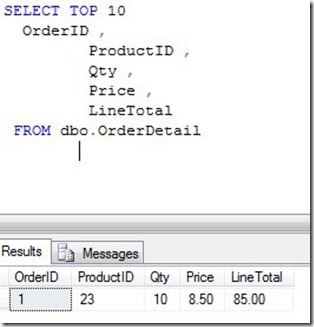
    computecol

    In fact, if I try the first insert above, which has the LineTotal in it, I get this error:

    Msg 271, Level 16, State 1, Line 1

    The column "LineTotal" cannot be modified because it is either a computed column or is the result of a UNION operator.

    That’s a simple look at computed columns. Are they useful? I’ve never really worried about them, allowing either a stored procedure or the application to handle any logic like this. In general I dislike storing computations, even defined ones like this, but that’s me.

    Use them if they fit your environment.

  • Going Big with SSDs

    Nimbus Data just sold 100TB of SSDs to eBay

    I found a report recently that eBay had implemented 100TB of SSD storage from Nimbus Data for their virtual infrastructure. That’s a huge amount of very fast storage, which definitely helps explain how the eBay auctions seem to run so quickly. Apparently eBay isn’t the only company that’s moving to SSDs for part of their infrastructure as Facebook spent $69million on FusionIO storage.

    SSD storage isn’t cheap, with eBay reporting $25k for a 2.5TB device, which is about 2.5 times the cost of my rough pricing from Dell for a similar HDD device. The SSDs have amazing performance, though I’m not sure what the reliability is compared to HDDs. There are plenty of vendor studies that promise long lasting drives, but I think we’ll have to see what more people report as they deploy these drives over time.

    I’ve never worked in a company similar to eBay or Facebook that had a very large IT budget and could afford to over-spend to achieve high levels of performance. I’ve always had to analyze the price/performance ratios and choose hardware that met our needs, at a reasonable price. However I am glad that companies that need high performance are willing to try new technologies, and hopefully release the results of their investment at some point in the future.

    More and more people are starting to implement SSD drives, but not as their only storage. I find companies using these drives in limited places, as tempdb drives, log drives, or for certain filegroups. The premium paid for these drives means they need to be used where they provide that highest level of performance for the price, which isn’t every place you store data in SQL Server.

    As SQL Server DBAs, we need to learn more about the impact of SSDs in different parts of our systems, plan for them to fail  more often than HDDs for now, and more importantly, consider designing in some type of archiving or partitioning strategy that can tier storage into faster, and slower, sets of data.

    Steve Jones


    The Voice of the DBA Podcasts