Tag: sql server

  • The Desire for Control

    Do you want more or less knobs to turn?

    Most of the people working with SQL Server have some of that geek gene, the desire to control, change, and mold the environment in which they work into some new form. Some people build physical toys, and others work onvirtual tools, but there’s this desire for control for many of us.

    Each version of SQL Server has brought with it a great deal more control in terms of the metrics we get (DMVs, wait stats, etc.) as well as tuning knobs (sp_configure options, Resource Governor, plan hints, and more). It has become possible to exert more influence over how SQL Server runs than ever before, and I suspect we’ll get even more ways in the future.

    But is that what you want? As DBAs, do you want more control in how you work with SQL Server, and potentially a higher level of knowledge needed to tune an instance? I suspect many people would like more knobs to turn, but I wanted to ask the question this Friday:

    Do you want your efforts in tuning SQL Server to have more or less options?

    As a clarification, I don’t want to imply that your instance will perform at a lower level with less tuning options, but rather that Microsoft would invest more time into the automatic tuning and learning capabilities of the database engine. My thought would be that you check some configuration options at some level (instance, database, even batch), and the server then builds a more optimal execution plan, and balances the load better between all the clients. The server ends up doing most of the tuning work with a little guidance from you.

    The alternative is that you do more investigation, apply more knowledge, and tweak your code or a variety of settings to improve server performance. In essence, do you want to do more work to tune an instance or have the server do most of the work?

    I suspect more people want great flexibility in tuning and the ability to apply their own knowledge, but let us know this week.

    Steve Jones


    The Voice of the DBA Podcasts

  • SQL Server Default Backup Directory

    Someone asked me in a webinar how to change the default backup directory. I knew, but realized that I didn’t have a reference and ended up with more explanation than needed if I’d had a post. So here it is:

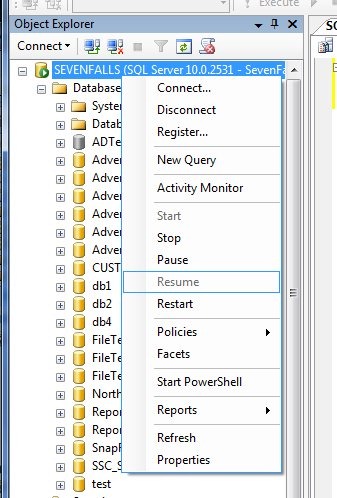
    If you right click on a server in Management studio and select properties, you get dialog with lots of options.

    serverpropertoes


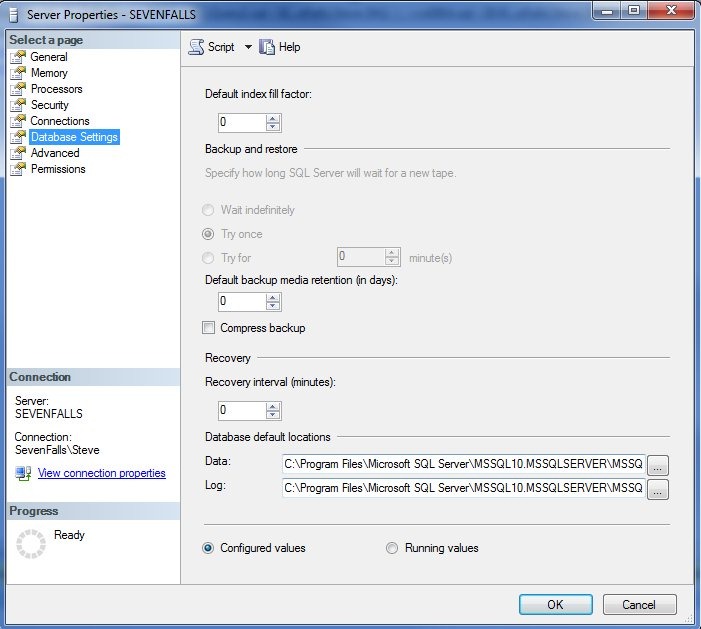
    If you click on the “Database Settings” you get this:

    serverdbsettings

    Note that there is a default path for data files and log files, not not one for backup files.

    serverdbsettings1

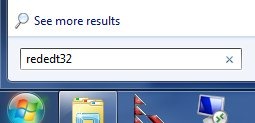
    So how do you change it? In XP or Win 7, click Start and type this right away “regedt32”

    regedior

    That will start the registry editor. You ought to get a UAC box to confirm access, which is fine. Do that and you’ll be in the registry. In the left pane, browse to this path:

    HKey_LocalMachine\Software\Microsoft\Microsoft SQL Server\MSSQL.1\MSSQLServer”

    Note that the “MSSQL.1” might be different, depending on your instance. For me it’s SSQL10.MSSQLServer.

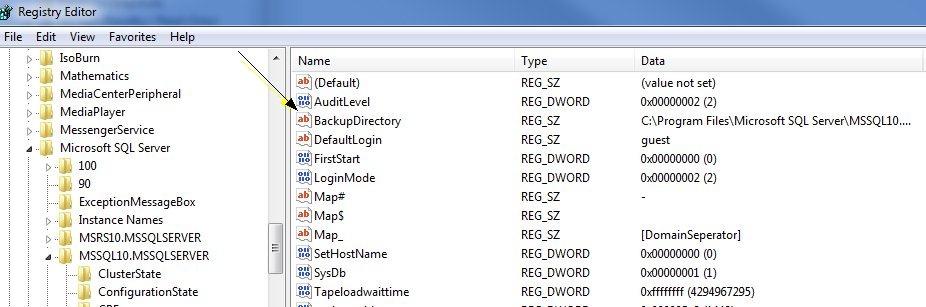
    backupdir

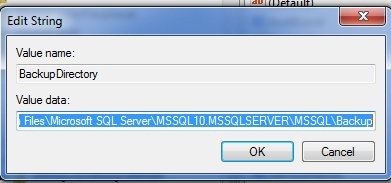
    Note that there’s a “BackupDirectory” key here. You can double click it to change the path:

    backupdir2

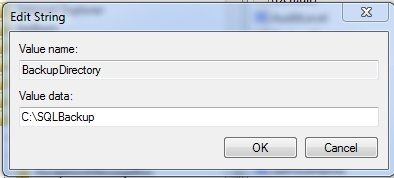
    I changed mine to a new path, c:\sqlbackup. Note that I had to create this folder.

    change path

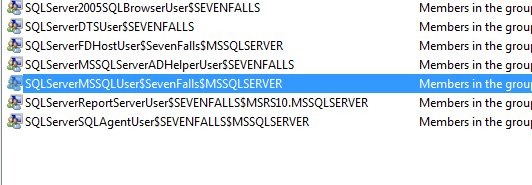
    That’s not enough, however. If you go into your adminstrative tools and find the Computer Management and look for Users and Groups (Select groups), you’ll find groups like this. The name varies, depending on the name of your workstation/server and instance.

    security


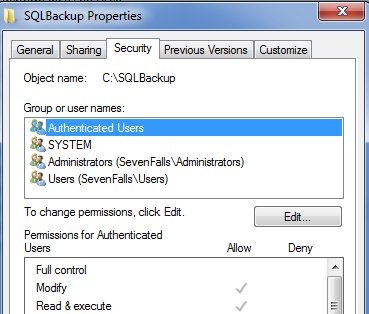
    Once you have this name, I’d copy it and go to your new folder. Right click, select properties, and then the security tab

    sevc1

    As you can see, my group isn’t in here, but this group, with the SQL Server service account in it, needs permissions to this folder. So add them, with modify.


    sec2

    Is my default changed? I could now run this:

    backup1

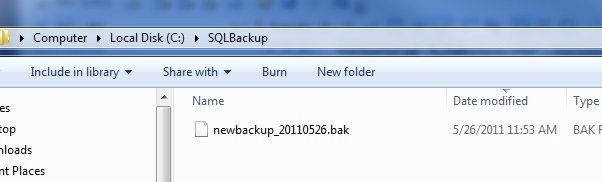
    and I find a file in my new default folder:

    backup2

  • Preparation for Disaster Talk

    This talk looks at the reasons and ways that you might prepare for disaster. I cover a number of areas, some of which might seem obvious, but are often overlooked:

    • What is a disaster?
    • Why Prepare for Disaster?
    • RTO/RPO
    • Overview of SLAs
    • Backups as insurance for issues
    • Checks for corruption
    • A checklist of skills to practice
    • Scripting and scheduling

    This talk was built at the request of Red Gate Software, my employer, so I have also included a few demos in the talk:

    • Object Level Restore with Data Compare
    • Quick overview of SQL Backup Pro
    • Running DBCC using Virtual Restore

    I can also do this talk without the Red Gate demos at a 75 minute pace.

    Length: 60 Minutes

    General Slides are available on SkyDrive.

    Specific Decks for Events:

    SQL in the City – LA 2011

    SQL Server Connections

    Related Blogs

    I have a number of blogs that are related to this particular talk:

  • The Ad Hoc Change

    Ad Hoc changes are not what I like to makeHow many times have you been asked to change data in a production system? If your career has been like mine, it’s probably too many times to count. It seems that there are always data issues in production, and the DBA is asked to fix or correct something. In my mind, there are two many causes of this: user error and code bugs.

    In both cases, you would hope that some application contains the feature to allow a user to fix an error: either one they created or one the application slipped in. However in the reality of today’s IT world, too often there are not enough tools to allow an application to be used to correct issues. Just like testing, it seems that too often we haven’t spent enough resources before deployment in an area where they are needed: tools. As a result, it’s time for the DBA to change things.

    I saw a blog from Jon Russell recently that pointed out a few things that it’s easy to forget when making these changes. Many DBAs know their systems very well, understand the data relationships between tables, and hopefully, have declarative referential integrity (DRI) in place to ensure data integrity. However it’s easy to forget about some business rule coded in a trigger, or the downstream implications of a data change. That’s was a problem at SQLServerCentral at one point when I corrected someone’s question of the day response, but didn’t realize that their total points are stored elsewhere and needed to be updated separately. In that case I ended up with a lot of data to fix.

    We do have to make manual changes to data at times. When we do, Jon’s list of steps to include in the process is important, especially in many companies where auditing is demanded or even required. Keep copies of the old data, document what you did, and most importantly, make sure you’ve sent notifications. Often if an error crops up, it will be noticed by the end-users that usually work with the data. An email from the DBA just might help them find mistakes quicker, and prevent even more problems.

    Steve Jones


    The Voice of the DBA Podcasts