Tag: sql server

  • What Limits Do You Want in 2019?

    SQL Server 2019 is in development, and likely getting close to being released. I mean, it is named 2019, so I assume we’re down less than 6 months of time before we start deploying it. One of the decisions that Microsoft will need to make before release is what the costs for each edition will be, as well as the hardware limits involved. I assume other items like OS support and feature mix will also be decided, but those are less important to me after SQL Server 2016 SP1. Most features just work on all editions.

    Recently Glenn Berry proposed some new limits. He requests that 2019 Standard edition raise it’s core limit to 64 and the RAM limit to 256GB. These would be raises from 2016, where we were limited to the lessor of 24 cores or 4 sockets and 128GB of RAM. We do get 32GB of RAM for In-Memory objects and 32GB for columnstore as well. There were no changes for SQL Server 2017.

    What do you think? Are these limits that make sense in a world where hardware advances and a “small” system is much larger than anything we used at the turn of the millennium? Since data sizes continue to grow and most of us want (and need) more hardware, is 128GB of RAM crippling to a small database server? Do you think that more cores are needed to run a Standard Edition server?

    I might also point out that raising limits might keep some people on Standard Edition, but it might also get more people to move from SQL Server 2008 to SQL Server 2019, Standard to Standard. At lower limits, when you might be limited to processor and not core licensing, why not stay on 2008 if you can’t get a much faster system?

    Personally, I think that Microsoft ought to raise limits somewhat. I do think 256GB of RAM makes sense, even if that includes the In-Memory and Columnstore usage. For cores, 24 to 64 seems like a lot, but what about 40 cores? Who cares on sockets, let’s make this simple. Cores. These days, no one is going to get 8 sockets at 4 cores each, but if they do, what does it matter? Let them use all of them on Standard Edition.

    Steve Jones

    Listen to the podcast at Libsyn
  • Initialize-HgsServiceName Fails in VMWare

    A short one, but one that took some digging and debugging and help from others. Saving here, so I remember, as do others.

    I had a VMWare Workstation v12.x VM of SQL Server 2016 and was working with this tutorial on Always Encrypted with Secure Enclaves. In setting up the HGS server, I got to step 3 which has this code:

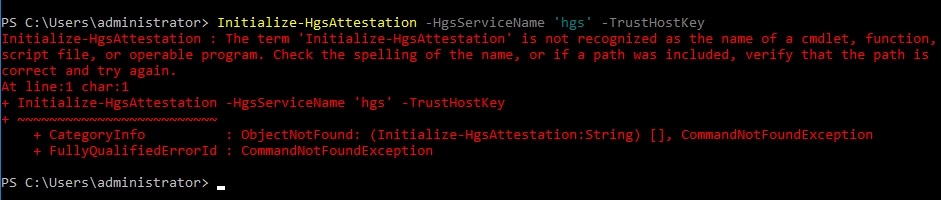
    Initialize-HgsAttestation -HgsServiceName 'hgs' -TrustHostKey

    When I ran this, I got an error:

    2019-04-24 07_52_51-Window

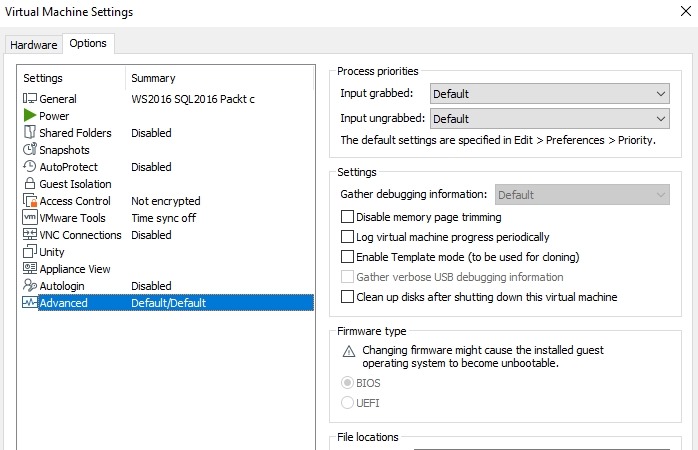
    That’s not good. In trying to find why this won’t run, eventually, I realized that my VMWare system needs the Microsoft Virtualization Based Security. This isn’t an option in my older VM, I believe because this is

    a) v12 and not v14+

    b) BIOS firmware

    You can see my settings here:

    2019-04-24 07_53_42-Window

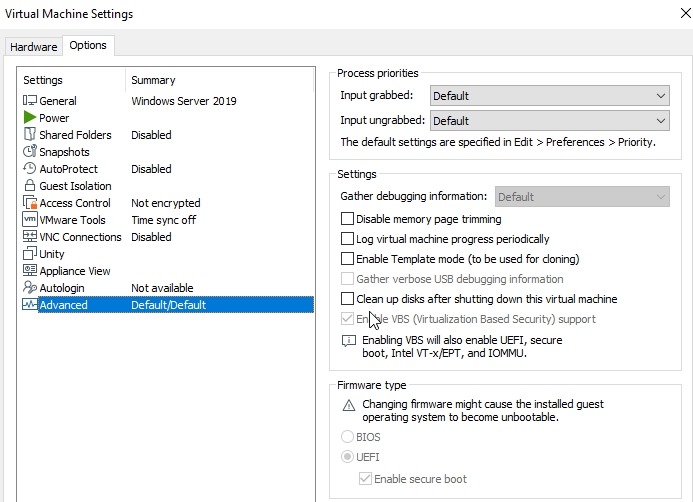
    Fortunately I had an upgrade for VMWare available and updated to v15, and then build a new VM as a v14+ hardware version. This gave me UEFI and once the VM was shut down, I could check the VBS box.

    2019-04-24 07_53_26-Window

    After doing this, I could move forward with my secure enclave config.

  • Getting Close

    Last week we saw the release of SQL Server 2019 CTP 2.5, with enhancements for Big data clusterrs and a Java language SDK for SQL Server. This is the 6th public release of the next version, and one that’s coming at an increasing rate. If you look at the cadence, there was a release in September, then November, then December, about once a month. A long delay at the beginning of the year, but now 3 releases in a month and a half, which lead me to think that they’re getting close to being done with features. I have no idea when the product will release, and I do think that //build/ is a little too close, but I do think that it will release in the next few months.
    For fun, I’ll send someone this mug (or a fun one of your choice) if you can guess which day the new version will release. Drop a note in the discussion with your guess.
    For SQL Server 2017, we had seven CTPs and 2 RCs. For SQL Server 2016, we had 11 CTPs and 4 RCs. SQL Server 2014, I only had 2 CTPs tracked, though I think this was barely a major release. You can flip back through our build lists and check, but there has been both an increase in the pace of CTP/RC release as well as an increasing volume through the versions. I think this is a direct result of an better engineering process that has adopted DevOps to ensure the release of software is easier than ever.
    I have to admit I’m torn on this. There is some effort to download and update software, and at times these versions have to be uninstalled to install a new version. That makes sense, and I certainly don’t want them spending time ensuring they can upgrade between CTPs if they can fix some bugs instead. Even if i have time to install the software and check a few things, I often don’t want to then recheck a number of things that used to work, and like many people, I probably just check one or two new things. Or if I haven’t finished checking something from a previous CTP, I might stick with that version.
    This is one place that I think containers can really change the world. I can get the updated software without effort. Other than the download, starting a CTP 2.5 image is no different than starting a CTP 2.4 image. There is still a challenge with data files, but in a very rapdily changing world, we want to be able to upgrade quickly. With the changes made with CUs to allow roll forward and roll back, containers make even more sense. Stop one container, start a new one, same IP, same name, same data, new version of binaries. Upgrade or downgrade.
    I’m both excited and intimidated by the new version. There are lots of enhancements that are going to make this a new generation of the platform, but as developers and customers request the use of new features, I’m going to be scrambling to better learn and understand some of the tricks I need to get the system to run well. Of course, with Intelligent Query Processing, maybe I’ll have a bit more free time away from some of the poor code that I’m stuck running.
    Steve Jones
  • Enable a Named Instance to Connect on 1433

    My default setup for a few years is to only use named instances, usually with a standard SQL2014 or SQL 2016 as the name of the instance. Recently, I set up a new instance and needed to connect from another machine. I’ve done this lots of times, but in this case, I wanted to both enable TCP/IP as well as move the port.

    This post explains how to get your named instance to listen on 1433.

    First, run the Configuration Manager and check your protocols for the server. You likely see something like this, where TCP/IP is disabled.

    2019-04-15 20_15_55-WS2016 SQL2016 Packt c - VMware Workstation

    Right click TCP/IP and enabled it from the menu.

    2019-04-15 20_16_06-WS2016 SQL2016 Packt c - VMware Workstation

    You’ll have to restart the instance, but wait. Cancel the message that appears. Now open the properties for the TCP/IP service.

    2019-04-15 20_16_29-WS2016 SQL2016 Packt c - VMware Workstation

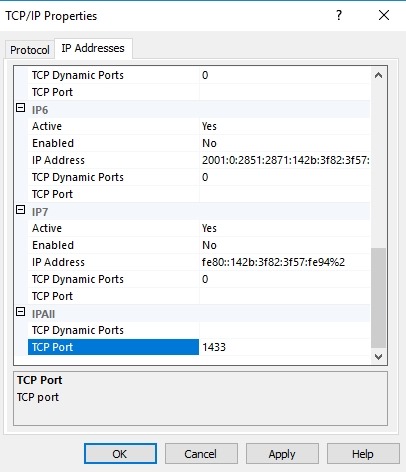
    At the bottom, there’s an IPAll item. This is likely set for Dynamic ports for your named instance. Remove the 0 and enter 1433 for the TCP Port line. You should get something like this:

    2019-04-15 20_16_52-WS2016 SQL2016 Packt c - VMware Workstation

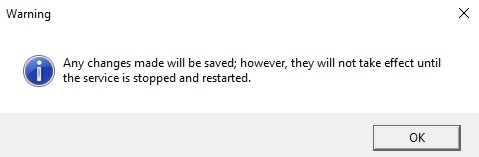
    When you click OK or Apply, you’ll see this message.

    2019-04-15 20_16_13-WS2016 SQL2016 Packt c - VMware Workstation

    Now restart your database engine service and you should be able to connect over 1433.