Tag: sql server

  • Revving the Error

    I was pleased to see the fix for the string or binary data truncated error saw some development work in SQL Server 2019. If you haven’t read about this, the changes are described on MSDN and I thanked the development team. What’s even better news is that the fix has been ported to SQL Server 2017 in CU12 is is also slated to appear in an upcoming SQL Server 2016 CU.

    In working on this error, Microsoft provided some guidance about where the first occurrence of the truncation would occur, in the column and which data value. This is invaluable in troubleshooting data movement, though this could be a trial and error process if you have lots of possible errors in different rows and columns. I could see us working our way through the list of problem data cell by cell.

    Microsoft didn’t change the error message, as that might have broken code. Instead, we get a new error message, number 2628, which allows us to slowly rev our error handling code. To me, this was a much better solution than merely revving the old error. We have a trace flag to turn the behavior on and off, so we can work through the places our code is affected.

    The plan is that at some point this will become default behavior, and error 2628 will replace that the all too familiar and frustrating error 8152. That makes sense, and I like the idea of limiting how long we can control behavior of our systems. While we might have code that needs to be fixed, we need to fix the code, and sooner rather than endlessly deferred. Even if you have an existing SQL Server 2016 or 2017 system, I’d hope that you’d be looking to patch your system at some point, perhaps to a level where this is the default behavior.

    There are many reasons why and when we patch, but we might be forced to because of some security issue. If that happens, I hope you’ve been working to fix code that is looking for error 8152 and are prepared to have SQL Server behavior changed.

    Steve Jones

    The Voice of the DBA Podcast

    Listen to the MP3 Audio ( 3.2MB) podcast or subscribe to the feed at iTunes and Libsyn.
  • New Database Options

    I saw recently that Azure SQL Database is getting a few more Database Scoped Options for that platform. These are intended to give more control over the way in which the engine behaves, without requiring each database on a server to function the same way. I expect to get to the on-premises product at some point, where they’ll be even more useful as we often might want different behavior for different contexts on an instance.

    While there are advantages to managing all databases in an instance in the same way, I do think that more and more we consolidate databases at times and it’s better to have additional control when needed at the database level. This week, I wonder if there are things that you wish you would have been able to specify for each individual database.

    What options would you want to see added at the database level? 

    I think that many of the options we’ve been given in current versions, as well as the newer ones appearing in SQL Server 2019 are a good start. I don’t know which instance level settings I might want here, but I certainly would like to see newer capabilities at the database level. It would be nice to see the capabilities for jobs and alerts to be set at the database level. Even if this were a part of the Agent subsystem, having the ability to keep these jobs within a database and have the agent read them would be useful.

    Moving more capabilities to the database level gives us more flexibility in separating the workloads for different applications. With the movement of the platform code, and many customers, to Azure SQL Database where the system requires less dependence on an instance, it makes sense to start including more options at the database level. I would guess that at some point most of the settings that we need for manage a system will be included and set at the database level.

    Steve Jones

    The Voice of the DBA Podcast

    Listen to the MP3 Audio ( 2.5MB) podcast or subscribe to the feed at iTunes and Libsyn.

  • Setting Memory–#SQLNewBlogger

    Another post for me that is simple and hopefully serves as an example for people trying to get blogging as #SQLNewBloggers.

    I had a great time away, and upon my return, I found lots of emails and messages to review from work. One of these was a note that Kevin Hill had updated his article on misconfigured SQL Server instances. I’d worked with Kevin before I left and thought this was a great topic. As I reviewed his update, I started thinking about one thing: memory.

    I typically run 3-4 instances on a host. I usually do this to test different versions and their effect on Redgate products or to review questions from the SQL Server community. I don’t have unlimited memory, however, and need to be careful. At times I’ll set an older version of SQL Server to not start so that I don’t have too much memory pressure for my regular tasks.

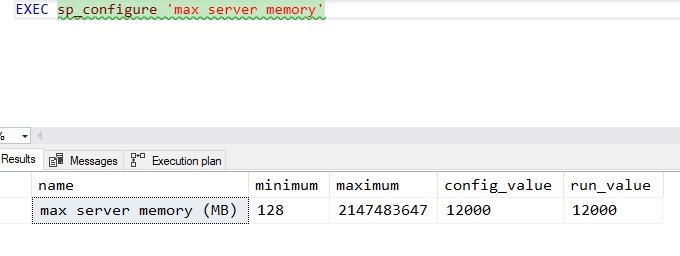
    I’d like to think I do a good job of setting up SQL Servers, and I did a double check on one of my machines. Sure enough, I had:

    2018-11-02 14_49_19-SQLQuery3.sql - Plato_SQL2016.sandbox (PLATO_Steve (62))_ - Microsoft SQL Server

    This was my SQL 2016 instance, which is the main one. For the 2014 and 2017 instances, I’d reduced this to 4096 as I use those less frequently. However, for SQL Server 2019, I got this:

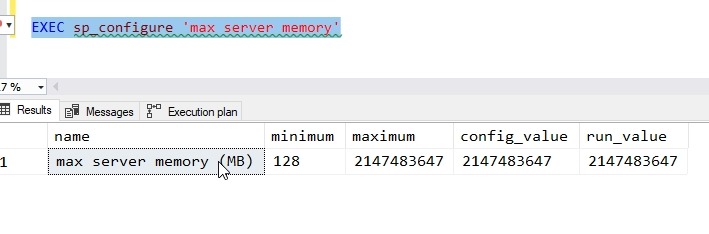
    2018-11-02 14_51_00-SQLQuery3.sql - Plato_SQL2019.master (PLATO_Steve (57))_ - Microsoft SQL Server

    The error is expected, since I set this up quickly after it was released (and before vacation) and hadn’t done anything. In this case, I need to enable advanced options.

    I do that like this:

    EXEC dbo.sp_configure 'show advanced options', 1
    GO
    RECONFIGURE WITH OVERRIDE

    That will turn on the option, so when I run the memory command it works.

    2018-11-02 14_52_55-SQLQuery3.sql - Plato_SQL2019.master (PLATO_Steve (57))_ - Microsoft SQL Server

    That’s not ideal, so let’s lower it to 4096. I can do that like this:

    EXEC sp_configure 'max server memory', 4096
    GO
    RECONFIGURE WITH OVERRIDE

    This will change the memory SQL Server uses. The doc pages describes this, and since I’ve done little on this instance, it hasn’t used much memory. My setting doesn’t do much, but it will prevent more pressure from activity in the future.

    SQLNewBlogger

    This was a quick post. Once I read the article and realized I ought to check things, I also realized this is a nice, short topic to write about and share with others. If you haven’t checked the settings on your dev machine, do so.

    And write about it.