Tag: sql server

  • An Open Thank You to the Microsoft SQL Server Team

    Thank you, Microsoft SQL Server Development team. I really am happy with your work.

    I was going through emails and noticed the someone had posted a surprise in the SQL Server 2019 CTP. The post was slightly cryptic, but since I saw the dreaded string-or-binary-data-truncated message, I was intrigued. Digging further, with some help from fellow MVPs, I found that one of the most voted on feature requests was actually implemented. I blogged about this briefly, but in case you wonder, this is the message in SQL Server 2017 and below:

    Msg 8152, Level 16, State 14, Line 8
    String or binary data would be truncated.

    In SQL Server 2019, I get this from the same repro:

    Msg 2628, Level 16, State 1, Line 8
    String or binary data would be truncated in table 'Sandbox.dbo.Customer', column 'CustomerName'. Truncated value: 'Is this th'.

    You do need to enable trace flag 460, but this works and should help you find that problematic data. I’m really glad that Microsoft has implemented the first stages of a fix, and I do appreciate their efforts here. This is a nice step forward.

    I do hope that future versions, or even continued development on SQL Server 2019 will enhance this. Right now I just get the first occurrence, which is good, but I’d love it if we could get a result set back, or maybe an indication of more problems. I know I’m asking for more here, but there is room for improvement.

    If this is all we get for SQL Server 2019, that’s fine. I think this is going to be very helpful for those problematic imports, and at least help us find bad data more quickly in those poorly structured input strings.

    Steve Jones

    The Voice of the DBA Podcast

    Listen to the MP3 Audio ( 3.1MB) podcast or subscribe to the feed at iTunes and Libsyn.

  • SQL Server v.Next is Coming in 2019

    Yesterday the 2018 Ignite conference kicked off with a number of announcements from Microsoft. You can re-watch some talks and the keynote, catching up on Windows, CosmosDB, and more. The big announcement concerning most of us is about the next version of SQL Server. This has been called v.Next in NDA briefings, as we’ve learned of different pieces of work, but now there’s a name: SQL Server 2019.

    The preview version, CTP 2.0, was released yesterday for public download. This is the first public release of the next version, and actually the first version I’ll be installing. To date I haven’t had time to even try to work with any previews. The keynote covers a bit of the product, but to see What’s New, check out Books Online. There are some database engine changes, such as UTF-8 support, better index rebuilds, improvements in Always Encrypted, Java programmability extensions and more. Big Data Clusters come as well, with Spark and better HDFS support. I don’t know much about it, but lot of friends that work in analytics are excited about Spark support.

    There are also some enhancements for SQL Server on Linux, which start to bring the two platforms closer together. Replication has been added, as well as DTC support, which have both been blockers for some users. AG support in containers is really interesting, though I’m not positive that this is that helpful. Machine learning services and OpenLDAP support are worthwhile additions as well.

    I am most excited about the secure enclaves for Always Encrypted. These will finally allow AE to be a more useful technology, and I’ll be updating my security session with this information. Maybe we’ll actually start to see AE deployed in more situations where high security is required as most of the operations we’ve needed, such as LIKE and range evaluations, haven’t been possible. I’m excited about the possibility of better security, though as most of us know, the weakest links are still the human and the client computer.

    There are plenty more enhancements, including more database scoped configuration items, better query processing for some opertions, more synchronous AG replicas, and maybe better, auto redirection of AG clients without a listener. There aren’t any new enhancements to the data classification options, though I’m hoping that will change before RTM. One last note, SQL Operations Studio has been renamed to Azure Data Studio. I’m not a big fan of naming changes, and I don’t like either of these, but I am curious if any you think this is the way forward for our toolset.

    All in all, this looks like a nice evolution for SQL Server, but not a major release with lots of new features. Perhaps my BI colleagues that use Spark or Java programers will disagree, but I don’t see anything that would be worth upgrading for the SQLServerCentral servers. Even in most of my jobs, other than getting the Always Encrypted enhancements, I don’t know many of these features would provide enough of an ROI. If you feel differently, let me know. There is some other coverage at Brent OzarMSSQLTips, and SQL Performance.

    One last item, if you’re looking to get started with any of the new Microsoft technologies, there are a few options. Certainly we will cover some items here, but we tend to focus on the data platform. Microsoft has announced Microsoft Learn, with content that covers Azure, PowerApps, and more. This might be a good resource for your learning plan this year. Pick a lunch or two a week, a weekend morning, or some other time and try to slowly improve your skills.

    Steve Jones

    The Voice of the DBA Podcast

    Listen to the MP3 Audio ( 6.0MB) podcast or subscribe to the feed at iTunes and Libsyn.

  • How Do You Setup Your Instances?

    I’ve set up a lot of SQL Server instances in my career. I’ve gone from manual only setup in SQL Server 4.2 to more automated means in the latest versions. The easiest was actually in Azure where I only need to specify a few parameters for a PoSh cmdlet. However, unattended setup is pretty easy as well for local SQL Server instances. If you’ve never done it, you’re missing out. There are plenty of other ways to do this with tools like Chef and PuppetAMIs in AWS, and more.

    Erik Darling wrote a post recently called Setting Up SQL Server: People Still Need Help. Erik’s point in the piece is not that installing SQL Server is hard, but that many people stick with the defaults once they’ve installed the instance, never changing anything. There are some basic things that you’ll want installed all the time, so having a repeatable process is important.

    This week I’m wondering how you install instances in your job. If you need to add a new SQL Server for production or development, what do you do? Let us know your process and procedure.

    I don’t set up too many instances, and in fact, I mostly add them as a lab instance on one of my machines. For the initial install at times, I’ll just run through the manual install, but I then have a quick config script that I use to change a few items, but very few. In most cases, I don’t do much more than add a few logins, limit memory, and enable the DAC. For the cases where I want to add a few different instances for testing, say for looking at patches or using mutli-server features, I’ll use an unattended install script.

    There are some amazing ways people have created for repeatable installs, such as the Finebuild project. If you’ve got a way that works for you, let us know. Just be sure that whatever repeatable process you use changes some of the defaults and ensures your SQL Server is better prepared for any workload to come.

    Steve Jones

    The Voice of the DBA Podcast

    Listen to the MP3 Audio ( 3..0MB) podcast or subscribe to the feed at iTunes and Libsyn.
  • Getting the Role Permissions–#SQLNewBlogger

    Another post for me that is simple and hopefully serves as an example for people trying to get blogging as #SQLNewBloggers.

    If you are wondering what permissions a role has, and don’t want to spend time searching and digging through Books Online, there are a few system procedures that can help. These will give you the permissions for a role, or all roles.

    Let’s see how to use these.

    Server Role Permissions

    Let’s say that you are wondering what a Processadmin can do. There is a procedure, sp_srvrrolepermission, that you can use to get the list of permissions. This can be run with no parameters, in which case you’ll get all roles and all permissions.

    2018-07-03 14_46_01-SQLQuery9.sql - (local)_SQL2016.EmptyFileTest (PLATO_Steve (74))_ - Microsoft SQ

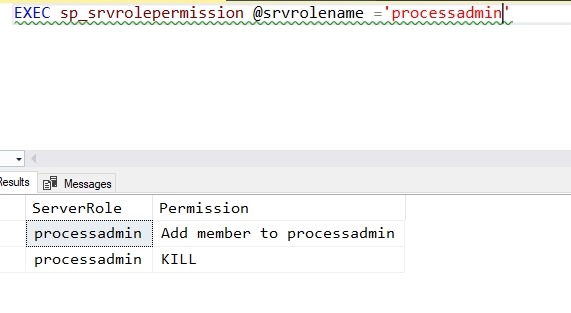
    However, often you’ll want a more manageable set of data that a person can understand. Let’s see what processadmin can do.

    2018-07-03 14_45_47-SQLQuery9.sql - (local)_SQL2016.EmptyFileTest (PLATO_Steve (74))_ - Microsoft SQ

    Only two permissions here, so I can see that granting this isn’t going to affect security or databases.

    Database Roles

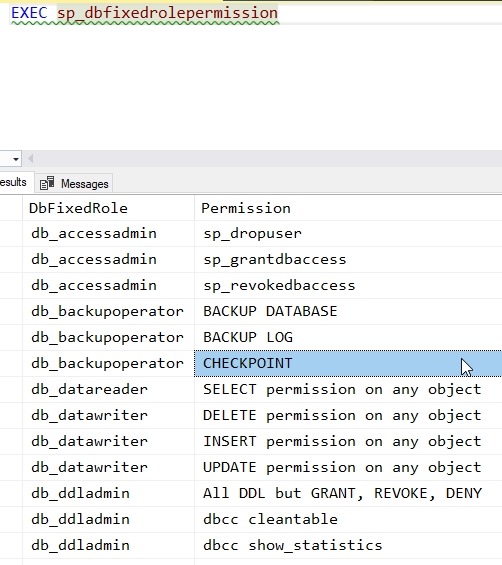
    The database has a related procedure, sp_dbfixedrolepermission, that looks for database roles. This can again be run without any parameters, as shown here.

    2018-07-03 14_50_24-SQLQuery9.sql - (local)_SQL2016.EmptyFileTest (PLATO_Steve (74))_ - Microsoft SQ

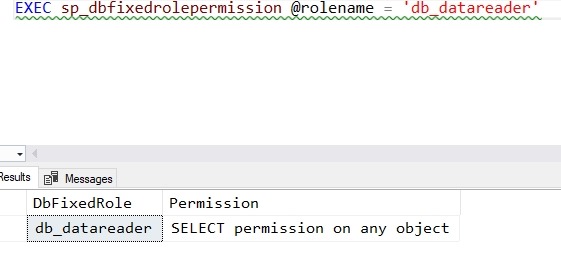
    If we include a role, we see just those permissions.

    2018-07-03 14_50_51-SQLQuery9.sql - (local)_SQL2016.EmptyFileTest (PLATO_Steve (74))_ - Microsoft SQ

    SQLNewBlogger

    This is a short post, really about 5 minutes, based on my need to solve another issue. However, this is something a DBA should know, and it’s something I’ll likely use again.