Tag: sql server

  • Data Classification in SQL Server 2019

    One of the areas that Redgate is working on is making data classification easier. Microsoft added some capabilities to SSMS 17.5 and Redgate has an EAP out for the next version of our data catalog tool.

    Azure SQL Database has had some advanced options they were building into the database engine, and we get our first look in the on-premises version with SQL Server 2019 CTP 2.0.

    The ADD SENSITIVITY CLASSIFICATION and DROP SENSITIVITY CLASSIFICATION DDL is now available, and here are few examples of how this works.

    Let’s look at a database that has some potential data to classify. I’ve got a sample database with a few tables. In fact, if I look at the data classification suggestions in SSMS, I see 7 columns.

    2018-10-23 11_56_48-Data Classification - SimpleTalkDev_Steve - Microsoft SQL Server Management Stud

    I can accept any of these, but if I do, these are written to extended properties, which isn’t the best way of storing this data.

    However, the ADD SENSITIVITY CLASSIFICATION syntax works well. If I take that dbo.Contacts.Email column and decide this is Confidential according to the GDPR, I can do this:

    ADD SENSITIVITY CLASSIFICATION TO
      dbo.Contacts.Email
      WITH (LABEL = 'Confidential - GDPR')

    If I then query my meta data table, I’ll see this:
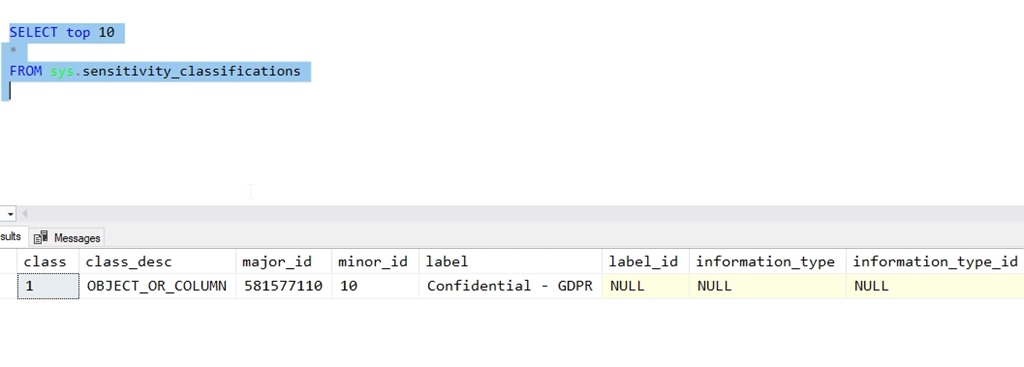
    2018-10-23 12_01_04-SQLQuery4.sql - Plato_SQL2019.SimpleTalkDev_Steve (PLATO_Steve (61))_ - Microsof

    There are other items I can add, such as the information type and then IDs for the label and type. I can, however, update that data like this:

    ADD SENSITIVITY CLASSIFICATION TO
       dbo.Contacts.Email
       WITH (INFORMATION_TYPE = 'Contact', INFORMATION_TYPE_ID = '5BFAE3B8-4549-4989-BEB6-F9BF6434DAD1')

    Note I still haven’t given the Label_ID a value, but that’s OK. This allows me to add human readable metadata to columns, as well as add IDs that I might get from some external auditing system.

    2018-10-23 12_04_01-SQLQuery4.sql - Plato_SQL2019.SimpleTalkDev_Steve (PLATO_Steve (61))_ - Microsof

    This feels primitive, but it’s slightly better than extended properties, and it’s somewhat built into the engine, so we can code this as a part of development and ensure classification is added to our sensitive data.

    If this is an area you’re interested in, we’d love to have you try the Redgate tool and give us feedback. We’re working on this problem and trying to find ways that are both useful and sustainable over time.

  • How does data file size relate to log file size?–#SQLNewBlogger

    Another post for me that is simple and hopefully serves as an example for people trying to get blogging as #SQLNewBloggers.

    The other day I saw someone asking about a way to determine which databases have a log file larger than a data file. It’s an interesting query, but not necessarily an issue. I did query as to what their thinking was, and this was more a first step to investigation rather than an alert or concern. That’s good, because that’s what this query is.

    I’ll write a query to check this in another post, but here I wanted to just discuss the meaning of data file size and log file size.

    Data File Size

    In most databases, you likely have a single .mdf file. Some might have more with other .ndf files, and others could have Filestream/MOT objects as well. The file sizes here are a combination of two things.

    1. your data
    2. free space allocated to the database for data in tables and objects, but not used.

    These files make up your data, and are roughly the equivalent of the characters in a Word file, plus any whitespace you’ve added. This isn’t quite right as Word doesn’t pad out some allocation, but it’s similar. If I create an 8MB file for my database, I use 8MB on disk. This whether I’ve added a 1 table with 1 character, 1MB, or 7.999MB of data.

    Log File Size

    The log captures transactions, or the changes to my data. This includes inserts, updates, and deletes. The size of the log file is an indication of a couple things.

    1. workload
    2. log backups

    The more activity in my database, the more log data I’ll capture. A busy database could have a lot of activity, as each change needs to be recorded. If I have a lot of inserts, I’ll grow my data file and my log file. If I have a lot of updates, I grow my log file, but may or may not grow my data file. If I have a lot of deletes, I grow the log file, but the data file remains the same, though I would have the option to shrink it.

    Side Note: DO NOT USE AUTOSHRINK

    The second influencing factor is the log backup frequency. If I generate 24MB of log records every day, do I need a 24MB log file? Not necessarily.

    I could run log backups every hour (24 a day), which would mean I only need a log file to contain the largest amount of activity that occurs during any hour. If my log gets even levels activity every hour, I’d need roughly 1MB of log file space, which would then be marked for reuse after every hourly log backup. Of course, I’d want some padding so maybe 2MB is enough.

    If I get 4MB of log record generation every hour during the business day and none outside those hours, maybe I need a 4 or 5 MB log file.

    If I’m in simple mode, I need a log file big enough to contain my largest transaction x2 (to allow for rollback).

    Is the Log File Larger than the Data File Normal?

    I wouldn’t say this is common, but it’s perfectly normal, if you follow a certain pattern in your database. If your workload consists mostly of updates or deletes, and few inserts, you might have a need for a large log file. This would also mean the level of activity is larger than your data size, and that you don’t have frequent enough log backups to allow for a lower size.

    Have I seen this? Yes.

    I managed a database for our other sysops that powered our anti-virus application. This tracked the activity for all workstations and servers. The number of nodes was relatively fixed (small additions and deletions every day or so), but the number of transactions was high. We had reporting every 30 minutes, which was really changing statuses for the nodes, so constant update activity. To prevent the server from being overloaded, and because the data was mostly replaceable, we only backed up the log every 4 or 6 hours.

    In this case, the change activity was higher than the data size, so we had a large log and a slightly smaller data size. Not common, but it happens.

    SQLNewblogger

    This is a great post for everyone to write. Explain what you understand and think about data size v log size, use your own words, and examples from your career.

  • More than 25 Years for me

    I was surprised to see a 25 year celebration for SQL Server at Ignite recently. It was also a 25 year celebration for Bob Ward. If you haven’t met Bob or seen him speak, make an effort to do so. He does an amazing job and can likely answer most any question you pose about SQL Server. I didn’t know Bob had been at Microsoft for 25 years, but that’s an impressive milestone and I’ll congratulate him when I see him in person later this month at the SQL in the City Chicago summit (register now:code Steve).

    The surprise for me was that I installed SQL Server in 1991, which by my calculations, was 27 years ago. It was in the fall of 1991 that a corporate development department came down to our remote site and had us install a SQL Server in preparation for a new application that we’d install on Dec 31, 1991.

    However, if you read the celebration post from Amit Banerjee, you will see that he notes in 1993 SQL Server released on Windows NT. That’s true, and I remember getting a wide box of NT 3.1 Advanced Server manuals that I dutifully read since I hadn’t been thrilled with the performance and stability of SQL Server to this point.

    You see, in 1991, we installed SQL Server on OS/2 1.3, which was horribly unstable and unable to handle the load of our application. I’m not sure if the SQL Server port from Sybase was the issue or OS/2 wasn’t stable, or the hardware wasn’t sufficient. Suffice it to say that I was thrilled when we migrated in 1992 to OS/2 20 and later 2.1, which were more stable. Then I could stop working 100 hour weeks.

    Despite a poor first impression from me, I grew to really enjoy SQL Server and switched from networking and infrastructure to database work. The rest, as they say, is history.

  • The Ever Expanding Data Platform

    This past week was the 2018 Ignite conference from Microsoft, where we had a number of announcements about the data platform. You can rewatch some of the sessions from the event, and I might recommend the keynotes to see some of the demos and positioning of the data platform. That’s the direction that Microsoft is moving their database products, as a complete platform that not only includes SQL Server, but CosmosDB, Managed Instances, Data Lakes, and  more.

    If you’re a SQL Server DBA, it’s time to stop thinking yourself as a SQL Server DBA or developer. Instead, you need to be a data professional, especially on the Microsoft stack. While you might concentrate on SQL Server and live in SSMS, you ought to be aware of the growing options for working on the Microsoft stack. Azure Data Studio, which Grant wrote about this week, ought to be a tool you investigate. You also ought to be looking at the latest version of SSMS, which had it’s v18 move into a public preview this week. With these tools being free, companies ought to be moving away from the older versions that shipped with SQL Server 2014 and earlier. Instead you should at least be on a v17 version of SSMS. Talk to your IT group and give it a try today. It works fine with all your SQL Server versions, from 2005 through 2017.

    Microsoft is certainly hoping you’ll run more workloads in Azure, and that’s where the data platform is growing. CosmosDB, which I think has a lot of promise for various types problem domains, or even as a companion to SQL Server for certain types of data. There is an increase in their SLA to 5 9s, which is both impressive and ambitious. I know very few on-premises instances that get by with 5 9s across multiple years, leaving aside the ability to get 10ms write performance in the SLA. The is also multi master replication and support for the Cassandra API. While I haven’t done much with CosmosDB, it is on my radar to experiment with as a data store option.

    Managed Instances will be generally available on Oct 1, just a couple days away. While I wasn’t sure that this product would catch on, I’m not surprised that some companies would like to get away from managing most of the stuff around the database and stick with the data. To me, this, more than anything else, can mean that DBAs at larger companies need to be managing data, security, and more, without worrying too much about the basics of backups and HA. Even threat detection, something few of us are good at, is handled by Azure. The restore demo in the keynote is truly impressive. I’m not sure many of us would want to, or be able to, architect those speeds. At least not as easy as provisioning an Azure Managed Instance.

    There are lots of other announcements, which you can read. The one really interesting thing for me was the Data Box announcement. I’ve had more than a few people be concerned about the initial loads of data into an Azure database or data lake. I’ve had that concern, and actually been part of a company that FedEx shipped a rack of disks as part of a SAN to a DR site because of bandwidth constraints. The Data Box is a device that you can order and fill, shipping this back to Azure for loading. It comes in 40TB, 100TB, abd 1PB sizes. That is truly stunning to me. Drop ship 1PB if you have the need. You can even see a picture of it from Argenis Fernandez for some idea of size.

    It’s an exciting time to be a data professional, and Microsoft’s data platform continues to grow. I don’t know that any of us will know more than a tiny bit about most of the platform, but I certainly plan on increasing my knowledge in a few areas to become better aware of how they work and what they are capable of. I might not be able to use them well, but I can at least have enough knowledge to have a conversation about the technology and have an idea of whether it might solve a problem that I run into at work.

    Steve Jones