Tag: sql server

  • Locking sa

    When I started working with SQL Server, the sa account was “the” account used for admin operations. This was the default account for many DBAs and as a result, it couldn’t be locked out.

    This changed in SQL Server 2005, which is a good thing. We don’t want unlimited attacks on the sa account with brute force password guesses. I wasn’t aware of this, as I haven’t had an issue with attacks in a long time. However Jeff Moden pointed out to me recently that we can lock out sa.

    I decided to test.

    First, I went to the local policy on my desktop and checked the security policy. No lockout was set, which probably makes sense for consumer OSes. I took a minute to then set my lockout to 5 attempts with a 30 minute timeout.
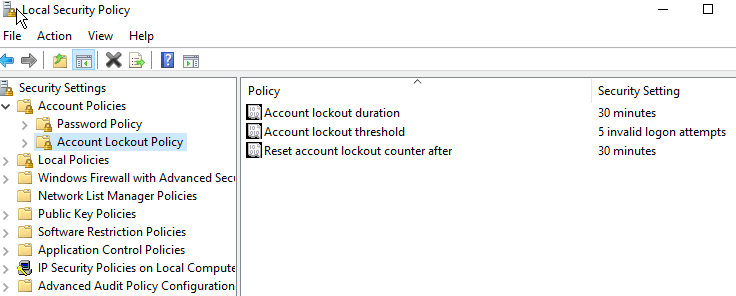
    2016-03-28 17_46_26-Settings

    I then restarted my SQL instance. I couldn’t get this to lock me out at first, so I decided to ensure the policy applied.

    I then tried logging in with the sa account 6 times with the the wrong password. Each time I got this message. Including the 7th time with the correct password.
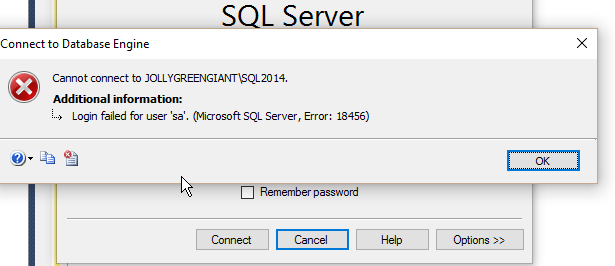
    2016-03-28 17_39_02-SQLQuery1.sql - JOLLYGREENGIANT_SQL2014.master (sa (51)) - Microsoft SQL Server

    No note about being locked out. However when I check the properties for sa, I find the login is locked out.
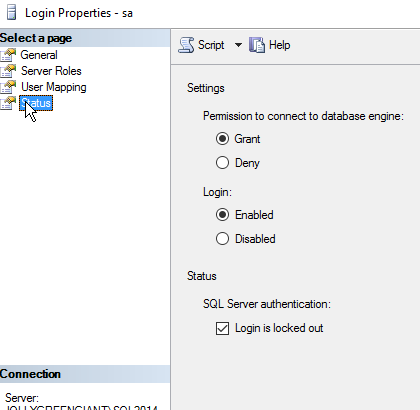
    2016-03-28 17_39_25-Settings

    I could uncheck the box, but I can easily use T-SQL as well.

    ALTER LOGIN sa  WITH PASSWORD=’test’ UNLOCK

    Please don’t use a password like this. I actually ran this to test and then reset the password to something more complex.

    Reference

    ALTER LOGIN – https://msdn.microsoft.com/en-us/library/ms189828.aspx

    SQL Authority – http://blog.sqlauthority.com/2009/04/23/sql-server-fix-error-18486-login-failed-for-user-sa-because-the-account-is-currently-locked-out-the-system-administrator-can-unlock-it-unlock-sa-login/

  • Examining SQL Server 2016

    SQL Sever 2016 is getting close to release. The updates are coming fast and furious, causing issues in some cases as many people look to test the new features in different environments. Personally, I’m struggling a bit to determine which of my environments to update and test, and which to skip. It’s also hard to keep track of those items that work in newer environments, and those I need to keep working on old systems with older code.

    We saw CTP 3.3 this year in January, with both RC0 and RC1 coming in March. I expect we will see an RTM soon, though it’s possible we have more Release Candidates before then. I know there are still some bugs in RC1, so I’m hoping we get at least one more release to show that both the core platform, as well as SSMS, are stable and working well.

    I know many of you won’t be upgrading any production systems, and maybe not even development systems, anytime soon. However are you looking to work with the platform and understand how it’s changed? I think SQL Server 2016 deserves a look, even if it’s curiosity. There are quite a few changes and it’s possible you’ll find some things in there that may make an upgrade worthwhile.

    Even if you don’t find anything valuable for your organization, it’s a neat release, with quite a few enhancements and additions. There are features you are just interesting and exciting to experiment with. Certainly there is plenty to learn as well, with the chance to see how new features, like temporal tables, work, or test the new T-SQL functions against your current code and see if you can beat them.

    Looking at a new bit of software can be invigorating to your career, as you try to grow your knowledge and build new skills. Given that most of us perform work that requires thought, just exercising your brain with the SQL Server 2016 eval might enhance your thought processs and let you enjoy your job just a bit more.

    Steve Jones

    The Voice of the DBA Podcast

    Listen to the MP3 Audio ( 2.9MB) podcast or subscribe to the feed at iTunes and LibSyn.

  • Protecting the SA Account

    The sa account is a well, known, built in account for SQL Server. Years ago, in previous

    versions, I’d see people often use the “sa” account for development, usually with a blank password. Even those speakers and experts often showed demo code with a blank “sa” password.

    Ugh, a horrible example that was repeated over and over until the SQL Server setup program stopped allowing blank password. However people then had “12345” or other simple things to type on stage. I guess some habits never change.

    In any case, I saw someone ask recently about changing the “sa” password in response to auditors’ requests. This person asked about how to randomly set this on a regular basis.

    It’s easy. Even if you have Windows Auth only, you can use this script.

    DECLARE @pwd UNIQUEIDENTIFIER = NEWID()
    , @new VARCHAR(50);

    SELECT @new = CAST(@pwd AS VARCHAR(50))

    EXEC sp_password @new = @new, @loginame = ‘sa’

    That seems to work fine in testing. I get a new sa password each time, whether I have Windows Auth or Mixed mode set. If I change the password with only Windows Auth, the last password set works if I change to mixed mode.

    This is a great little script to set up in a job and run it monthly. This will protect your sa account in case someone ever enables mixed mode.

    If you need the account, just change the password then, for the job/application that needs to run. Then run your job again to reset it.

  • Protecting sa

    Built in accounts are both a help and and a hindrance. Years ago I was working on a SQL Server 4.2 system, where I was an administrator. The database was very unstable, and we were trying to determine if it was something being done by the application or the platform itself. While I was a local administrator, I couldn’t access other, remote SQL 4.2 instances at other locations for our company. Since we ran the same code (supposedly), we wanted to test how various parts of the system performed between the two systems.

    One late night, while actually reading the manual, I discovered the “probe” account, which was a built in account for early Sybase/SQL Server versions. I used this to query remote instance and compare settings and performance. This helped us narrow down the the problems, though it wasn’t the way I would have wanted the system to work.

    Any built in account allows some ease of getting an application working, but it also provides a known backdoor to your system if it is not properly secured. The “sa” account is one of those well known accounts for SQL Server that can cause issues. This account has complete control over SQL Server, and even though it can be renamed, simple queries can discover what the new name is and mount attacks. This is one reason why many people like to only enable Windows Authorization, preventing anyone from logging in with this account?

    However, is this enough? I don’t think so, as a simple administration action could enable mixed mode authentication. I would say that everyone should set a long, random password for “sa” on all instances, but what do most of you think? Do you provide any other protections for the sa account? Let us know today.

    Steve Jones

    The Voice of the DBA Podcast

    Listen to the MP3 Audio ( 2.8MB) podcast or subscribe to the feed at iTunes and LibSyn.