Tag: sql server

  • Restoring a Striped Backup–#SQLNewBlogger

    Another post for me that is simple and hopefully serves as an example for people trying to get blogging as #SQLNewBloggers.

    Recently I uncompressed some SQL Backup Pro files. Since multiple threads were used to make the backup, I ended up with multiple files in my file system, as shown here:

    2016-02-16 11_58_57-Backup

    Each of these is part of a striped backup, a piece of a backup file. To restore the backup, I need all the files to reassemble the backup. This is fairly simple, but you should be aware of how this works and how to perform a restore.

    In my case, you can see I have 7 files for each database. They are the same name with an _0x at the end, with x being the number of the file.

    To restore these, I go to SSMS and click the restore choice. That gives me my restore database dialog, where I can select that I’m restoring from devices. As you can see below, no devices (files) are selected.
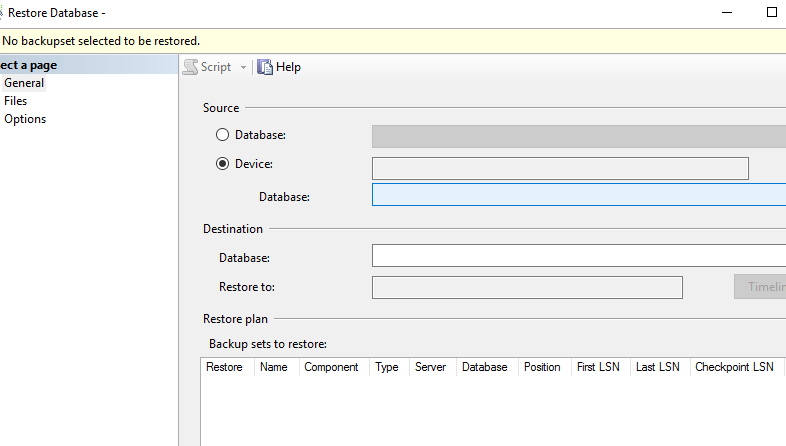
    2016-02-16 12_00_56-Restore Database -

    I then click the ellipsis to get a dialog allowing me to add files.
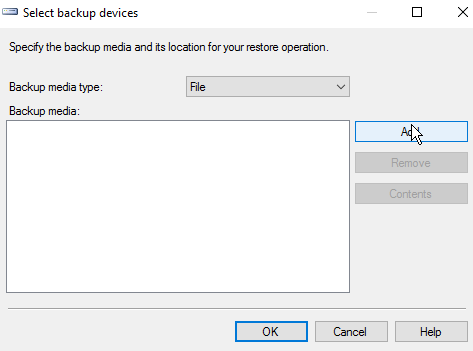
    2016-02-16 12_01_03-Select backup devices

    Hopefully you’ve done this before, and you can click “add” to add files. You need to naviate to the location of your backup files if it isn’t the default.

    2016-02-16 12_02_02-Locate Backup File - JOLLYGREENGIANT_SQL2014

    Next you can select the files. Holding down CTRL, I can multi-select files.
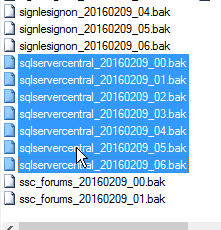
    2016-02-16 12_02_12-Locate Backup File - JOLLYGREENGIANT_SQL2014

    Once I pick them, I click OK and then I see them all in the device dialog.

    2016-02-16 12_02_19-Select backup devices

    Now I click OK and SQL Server reads the headers, and I end up with a single database to be restore, as shown below.
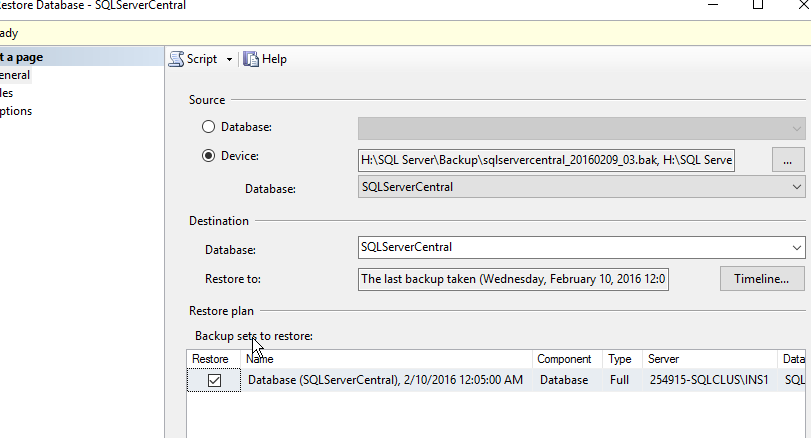
    2016-02-16 12_04_24-Restore Database - SQLServerCentral

    Now, I can click OK, and often do in development areas. HOWEVER, if you are doing this in production, please, please, please, click the Script button instead. You’ll get a new query window, and you can cancel out of this dialog to see the code.

    2016-02-16 12_16_07-SQLQuery7.sql - JOLLYGREENGIANT_SQL2014.master (JOLLYGREENGIANT_sjones (59))_ -

    From here, you should click “Save” and save this, then execute it.

    As you can see above, the statement is simple. List each disk file, separated by a comma. Then the rest of the RESTORE statement is a standard restore.

    SQLNewBlogger

    This is a fairly simple task, one I’ve done dozens of times, but it’s worth practicing. If you want to write about it, what happens if you’re missing a file? What if you change the order of files? This was a 10 minute blog, and it’s a good chance to play and practice your restore skills, which are as important as anything you do as a DBA.

  • Learning from Microsoft

    I know that many data professionals out there are skeptical of the cloud. Certainly there are problems with reliability, security, and more that prevent many of you from migrating to some online database. However that doesn’t mean that everything being done in platforms like the Azure SQL Database is a bad idea.

    One of the interesting things that has occurred at Microsoft is a completely new engineering effort for SQL Server. It seems there is one SQL Server development team that works on the Azure SQL Database. This is (I guess) the main branch in version control, and what we see with SQL Server 2016 is a subset of the code being built for the on-premises, boxed product.

    Certainly there are some features that exist in the box that aren’t in Azure, but relatively few of them. Those features, and many new ones, have to be included in the version control system, but they can’t be activated. Microsoft must be making extensive use of feature flags, allowing their developers to build and test features in the Azure cloud, but not make them available to customers, or potentially even other parts of Microsoft.

    If you really think about the effort to build a platform like Azure SQL Database and allow it to be a development environment as well as a production environment, that’s an amazing engineering effort. From the outside, I’m amazed at how far the SQL Server team has come in the last few years. I’ve seen a number of features released in the cloud first, and then appearing in the SQL Server 2016 CTPs.

    I think there are some amazing lessons here for software development. Certainly I think many of us could learn from how feature flags and multiple versions of software can co-exist in systems. That would certainly help many of us deploy new software in a way that minimizes interruptions to customers and clients. Or manage those multiple clients with different requirements from the same codebase.

    I hope that Microsoft will continue to evolve, as well as share their knowledge with the world. There are other companies that seem to be accomplishing amazing things at scale, Netflix, Amazon, Google, and more. Some of them share their techniques, but I truly hope that the methods they all use for building software become spread throughout the industry and help all of us build better, more secure applications.

    Steve Jones

    The Voice of the DBA Podcast

    Listen to the MP3 Audio ( 3.3MB) podcast or subscribe to the feed at iTunes and LibSyn.

  • Create a Database Master Key–#SQLNewBlogger

    Another post for me that is simple and hopefully serves as an example for people trying to get blogging as #SQLNewBloggers.

    One of the first things you need in a SQL Server database in order to implement encryption is a database master key, DMK. This is simple to create, though you need one in each database that will support encryption.

    The syntax is easy, with only really an option to specify a password. There is no name, as there’s a single DMK per database. Set your context to the correct database and end enter:

    CREATE MASTER KEY ENCRYPTION BY PASSWORD = ‘Som3thingR3ally$|tr0ng’;

    When you execute this, you’ll just get a result message. At least, if it works you will. The password must conform to the password requirements of your Windows OS, which is good.

    Note: This is a securable code, like the password for a user account. Make sure you store this in a password manager for your organization.

    By default, this is protected by your password as well as the Service Master Key (SMK) on your instance. In practice this doesn’t usually mean much for you, but be aware of this.

    You do need CONTROL permission on the database, though usually I’d expect a db_owner or more permissions to actually create these keys.

    And, of course, back up the key as soon as you can.

    SQLNewBlogger

    This was about 5 minutes work for me. I would guess most new bloggers could read, understand, and produce an explanation of this in 30 minutes.

    References

    CREATE MASTER KEY – https://msdn.microsoft.com/en-us/library/ms174382.aspx

    Create a Database Master Key – https://msdn.microsoft.com/en-us/library/aa337551.aspx

  • SQL Server 2016: The Data Protection Version

    I’ve spent a few years working with SQL Server encryption and security, trying to educate people on the various capabilities involved. There are some nice features available in the platform that can help you run a more secure SQL Server, but there has been a lot of room for improvement across the last few versions. The openness of the platform is somewhat tempered by the need for each of us to write a fair amount of code to properly secure our databases. That is the hard part as many developers don’t write secure code.

    That is changing a bit. I am really excited about the SQL Server 2016 release in that there are a number of data protection mechanisms that are going to greatly expand how we can protect our data moving forward. From Row Level Security to Always Encrypted to Dynamic Data Masking, the number of new features that will help make security a bit easier is growing dramatically.

    I certainly think Microsoft is definitely encouraging and supporting better, more secure coding practices. If you look in Books Online at MSDN, there is now a Security Center that covers a number of topics and organizes information in a much better way. Security has seemed like an afterthought in past documentation. From Encryption to SQL Injection to Auditing to even Metadata Visibility, it seems like the next version of SQL Server on premise, and in Azure, really is taking security more seriously.

    I look forward to watching the platform evolve and security increasing over time. It does seem as though SQL Server has the fewest security holes in the platform, but I hope that many of us can take advantage of the changes in SQL Server over time and build applications that will be viewed as being secure as well.

    Steve Jones

    The Voice of the DBA Podcast

    Listen to the MP3 Audio ( 2.1MB) podcast or subscribe to the feed at iTunes and LibSyn.