Tag: sql server

  • Creating a Database Snapshot

    Another post for me that is simple and hopefully serves as an example for people trying to get blogging as #SQLNewBloggers.

    I’ve rarely dealt with database snapshots, outside of lab experimentation. They didn’t exist when I did most of my DBA work, and since then we haven’t seen the need for them at SQLServerCentral, though, I may suggest we add them to our deployment process since we can quickly roll back if something breaks.

    However, I created one recently for a test and realized that I’d forgotten the syntax. Unlike the quick "create database xx" syntax I often use, with a snapshot I need to be more specific.

    The big item that I must specify is the location of the snapshot file. This is the file that gets written to with the copy-on-write process that ensures the original state of the pages when the snapshot is created are still available.

    You do need to give the database a logical name as well, which can be anything, but the reference below has suggestions. I’d say that this is bad:

    CREATE DATABASE sandbox_snapshot
    ON (NAME = MySnap
    , FILENAME = ‘h:\SQL Server\MySnap.ss’
    )
    AS SNAPSHOT OF Sandbox

    But this is better

    CREATE DATABASE sandbox_snapshot_20150122_1345
    ON (NAME = SandBox_Snap_20150122
    , FILENAME = ‘h:\SQL Server\MySnap.ss’
    )
    AS SNAPSHOT OF Sandbox

    Because the snapshot is based on an existing database, at a particular point in time, it’s useful to specify the time when the snapshot was created, if possible. While you can get this from metadata, if you have people that look to multiple snapshots for information, it can be handy to know when each is from.

    However if you are providing this on a schedule, like daily, for people to report from, you might need to have the same name every day. Think about this, as you cannot rename a snapshot once it’s created.

    SQLNewBlogger

    When I realized I had to lookup the syntax, I took a few notes and captured code, which meant I combined this writing (< 10 minutes) with other work I was doing.

    You should do the same. When you tackle something new, take screenshots, save code, and drop it in a OneNote/EverNote/etc notebook for your weekly blog writing.

    Reference

    The references I used:

  • Disabling SQL Server Network Protocols

    Another post for me that is simple and hopefully serves as an example for people trying to get blogging as #SQLNewBloggers.

    I ran across a question on network protocols recently, which is something I rarely deal with. Often the default setup for SQL Server is fine, but there are certainly times you should add or remove network connectivity according to your environment.

    Here’s a short post on turning off (or on) a network protocol for SQL Sever.

    What’s Enabled?

    The easiest way to verify what’s enabled is to use the SQL Server Configuration Manager. You’ll need administrative permissions on the host to run this, but it’s easy to find.

    2016-01-13 14_59_40-Start

    Once you open it, typically you’ll have a list of the items that can be configured.

    2016-01-13 15_02_09-Photos

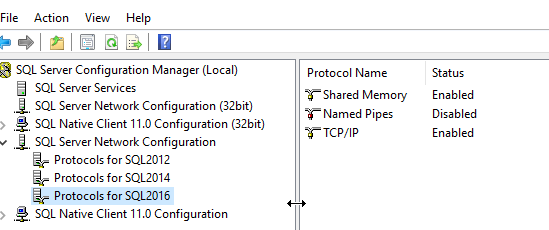
    We want the SQL Server Network Configuration, which is the server level configuration for this host. The Client configurations are for the host being used a client to connect to a SQL Server.

    2016-01-13 15_02_31-Photos

    As you can see here, I have Shared Memory and TCP/IP enabled for this instance, but Named Pipes disabled.

    Disabling a Protocol

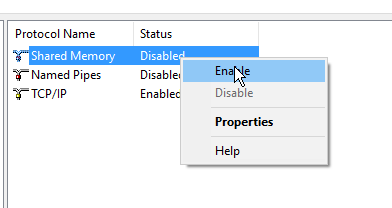
    As you might expect, this is easy. I right click on a protocol, and I can change the status. In this case, I’ll disable Shared Memory

    2016-01-13 15_03_50-Photos

    Once I do that, the protocol is disabled. However not on the instance. I’ll get this message.

    2016-01-13 15_04_56-Photos

    I need to restart the server. Once that’s done, no one will be able to use Shared Memory on the host.

    I can fix this

    2016-01-13 15_04_49-Photos

    Of course, I need to restart my instance again.

    Checking the Log

    When SQL Server starts, quite a bit of configuration information is written into the log. This is useful for troubleshooting in many cases. One of the things you’ll find is the network listeners, as shown here.

    2016-01-13 15_08_14-Log File Viewer - JollyGreenGiant_SQL2016

    This is usually after the database startup information, so if you look, you can see I have some local pipes and some TCP/IP settings here.

    SQLNewBlogger

    After reading a question, this was less than 10 minutes to write, with making screenshots. However I’ve done this before. If this was your first time, then it might take you longer to research and write, but I bet most DBAs could do this in 30-45 minutes.

  • Rebuilding a Heap–Don’t Do It

    I saw someone mention recently that you can run a REBUILD on a heap table. I hadn’t realized that, but when I looked in BOL, I saw that indeed you can run this on a heap. That’s interesting, in that you can now move the pages in a heap around to remove fragmentation. At first glance that sounds good, but I wasn’t sure.  A little more searching was required.

    The authoritative source for me on many things like this is SQLskills, and sure enough, Paul Randal has a myth piece on this. Paul has a great explanation, but basically if you rebuild the HEAP structure, you are creating work in that every non-clustered index also has to be rebuilt. Why? The pointers back to the heap pages, which are locations, will change.

    What about adding a clustered index and dropping it? Nooooooo, and again, I learned something new. This causes two rebuilds of the non-clustered indexes as they are rebuilt with the cluster addition and then rebuilt when the table changes back to a heap (to get the heap locations). That’s crazy, and certainly not what we want.

    The short answer here is that you want a clustered index, for the maintenance reasons here, as well as others. If you don’t have a fundamental reason not to create a clustered index, just add one.

    Just do it.

  • An Impressive SQL Server

    This editorial was originally published on May 6, 2011. It is being re-run for the Christmas holiday.

    Merry Christmas and Happy Holidays!

    Recently I heard about one SQL Server with 1TB of RAM and another one that was handling over 10,000 transactions a second. I read a note about a 1.1PB database, built on SQL Server to hold data from telescopes. That particular data warehouse is producing 1.4TB a day. I know it’s mostly binary data, but that’s a lot of 1s and 0s being stored in SQL Server.

    Over the years I’ve heard regular complaints and concerns from executives about SQL Server scalability. Those complaints have dwindled, but I think there are people in the relational database world that still question SQL Server’s ability to handle high volumes or data sets.

    This Friday, I wanted to see what might change their mind, or maybe what might make you view SQL Server differently. While I suspect most of you are SQL Server fans, that doesn’t mean that you don’t have concerns at times about how far you can push SQL Server. The question this week is:

    What company would impress you if SQL Server backed their main systems?

    This isn’t scientific, and I’m not defining which systems impress you. It could be their web site, their supply chain management, their largest data warehouse, or anything else. What company talking about using SQL Server in one of their systems would impress you? And which system would you like to see backed by SQL Server?

    When I think about a lot of data, high volumes and rates, I think of a few things. The stock market, sports, and Amazon. If Amazon switched their website and ordering systems to SQL Server, I’d be impressed. If Major League Baseball, or the National Football League were to run all their statistical systems on SQL Server, I’d be impressed. With all the fantasy sports fans out there, the gathering and processing live data for real time calculations of performance, would be impressive.

    I’ve left out other companies. Wal-Mart using SQL Server for supply chain management would be impressive. UPS managing packages on SQL Server would be something. I’m sure have your own ideas, and let us know this week.

    Steve Jones