Tag: sql server

  • Adjusting Model

    In July the T-SQL Tuesday theme was defaults. There were lots of posts about various items, but I found one by Kevin Kline interesting. Kevin noted that the settings for model are not necessarily what many of us would want in production.

    Is that really the case? This week I wanted to take a poll and see if many of you actually do create defaults for your new databases by changing model that are different than what Microsoft has done.

    Do you change the model database?

    Certainly there are some people that have create scripts with various settings for their databases. Some people prefer to customize the setup each time, based on the purpose of the database. Still others have scripts that alter the database to change settings after a someone has installed the instance.

    There are any number of ways to ensure you have good settings for your production (or other) databases. Let us know this week if you have a step to change the model database when a new instance is installed.

    Steve Jones

    The Voice of the DBA Podcast

    Listen to the MP3 Audio ( 1.7MB) podcast or subscribe to the feed at iTunes and LibSyn.

  • The Log Chain

    I ran across a question recently from someone that received a similar message to the one showed in this image:

    2015-07-30 12_02_22-SQLQuery3.sql - ARISTOTLE.master (ARISTOTLE_Steve (62))_ - Microsoft SQL Server

    In this case, the log chain is broken. I’ve received this message, usually from a script that is automatically restoring all the logs in a folder. I’ve also had clients call me with this message, saying their log shipping system is broken.

    What has happened is that you (or someone) is restoring the logs out of order. Each log backup forms part of a sequence that we call the log chain. The restore process requires that each log backup be restored in the same sequence in which is was created.

    In the error message above, SQL Server is letting you know that the Log Sequence Number (LSN) contained in the file from which a restore was attempted doesn’t match the last LSN in the restored database.

    Fixing This

    The fix is easy; restore the correct files in the correct order. In this case, I knew I’d taken 3 log backups, and I was restoring in the incorrect order. I’d restored log backup 1, and was now trying to restore log backup 3.

    If I restored log backup 2 (using with norecovery), the restore would work. I could then restore log backup 3 and eventually bring the database online.

    If you can’t find the correct log backup, then your database is still usable. Just run RESTORE DATABASE WITH RECOVERY, and you can access your data. However the data will only be correct to the point in time of the last successful restore.

    That could be a serious problem if you are missing a log backup early in your restore sequence. It could be a career limiting problem.

    Always be sure you keep all log backups since the earliest full backup you keep handy for restores and protect those files. Losing one could be a major problem for your organization.

  • Gauges and Alarms

    I was looking through the news this week and found a piece by Michael J. Swart that I really enjoyed. It talks about different types of metrics that he has used when monitoring and alerting on his database servers. Michaal talks about the difference between alarms and gauges, which are usually base on the time scale in which a DBA or administrator needs to react to a situation. Alarms are created when something grows in a short term and causes an issue. The gauges tend to be longer term items that eventually cause a problem.

    I’ve had a similar view in the past. However I look at these types of metrics from the standpoint of how I tackle my job as a DBA. I also try to think about these issues as a developer, ensuring that telemetry helps track issues that occur over time and acute issues cause a graceful degredation (or exit) and not an unexpected one.

    When I’ve needed to manage systems, I ensure that I have alarms set up. I need these for the situations where something goes wrong in a short period of time. However I never want alarms to be based on a lack of visibility into the system over time. I want to try and eliminate as many alarms as possible with better long term monitoring that looks for indicators that the system might have issues. I’ve found that many (not all) of the alarms that I receive could have been prevented if I’d been paying close attention.

    In other words, I’m a proactive DBA, looking at gauges (using MIchael’s terms), not a reactive one counting on alarms.

    I can’t predict everything, but when I find that looking back at data is helpful. If I find a trend that could have alerted me, I’ll evolve my monitoring system to try and track those potential issues in the future. I’ve written my own custom metrics in the past, which track data, either PerfMon type counters or business data, and then let me know when the growth, decline, or change is unexpected. In this way, I tend to find I can often proactively prevent issues. If I can use my data to “predict” an issue my boss doesn’t believe in, I’ve also found my budget for resources may increase a bit, allowing me to manage systems even better in the future.

    Steve Jones

  • Start SQL Server in Single User Mode

    Another post for me that is simple and hopefully serves as an example for people trying to get blogging as #SQLNewBloggers.

    I saw someone recently ask how to reset the sa password, and myself (along with a few others) suggested starting SQL Server in single user mode as an administrator. The poster had problems and at one point I suggested using the command line, which I had used in the past. However that didn’t’ work,  and when I tried it myself, it gave me errors.

    The errors were Operating System errors, which indicated that the errorlog location wasn’t accessible by me. So I decided to elevate my privileges.

    2015-07-06 13_48_41-Start menu

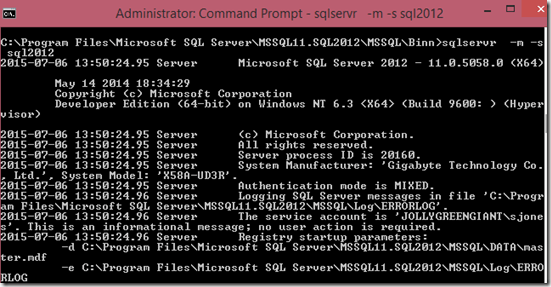
    Once I did that, I was able to get the service to start:
    2015-07-06 13_52_27-Administrator_ Command Prompt - sqlservr   -m -s sql2012

    I’m not sure what was hard here, and this is how I’ve always managed to start and stop SQL Server in single user mode from the command line. I then see the output of what is sent to the error log at the console.

    However I also searched around and found a few other ways that are easy to accomplish.

    Net Start

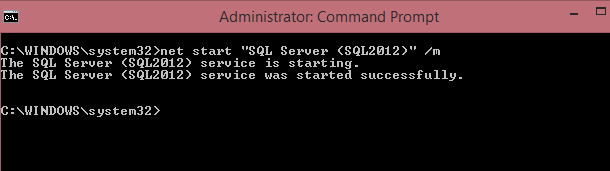
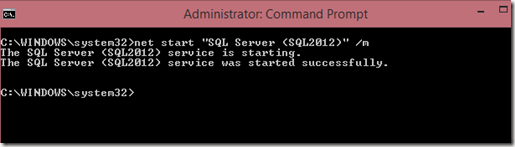
    I haven’t often used net start for commands, but I have a few times. In this case, I looked at BOL and found I could do this:
    2015-07-06 13_43_20-Administrator_ Command Prompt

    This is essentially what clicking "start" in the services applet or Configuration Manager does. However I can add in my "m" parameter with a slash (/) instead of a dash.

    To stop the service, I use NET STOP.

    2015-07-06 13_43_44-Administrator_ Command Prompt

    Configuration Manager

    If you run Configuration Manager, you can also add parameters. First, right click the service and get the properties. Then you want the "Startup Parameters" tab. In there, you can add a parameter in the top box, as I’ve done here.

    2015-07-06 13_44_19-SQL Server (SQL2012) Properties

    Clicking "Add" will put it in the list.

    2015-07-06 13_44_26-SQL Server (SQL2012) Properties

    When you stop the service, the next startup will have this parameter take effect.

    2015-07-06 13_44_06-Sql Server Configuration Manager

    Beware that when you start things up, the first connection that successfully logs into SQL Server will be the only one allowed. Any applications looking to connect, monitoring programs (SQL Monitor or DLM Dashboard) or other clients can take your connection, so be careful and quick.

    SQLNewBlogger

    This was really a quick writeup. I stopped my service and played for 10 minutes, ran a few searches, and took some screenshots. I would have been faster, but I wanted to document this.

    This is great practice for a skill you need rarely, but when you do, you’ll be stressed. Be sure you can start and stop SQL Server a few ways, and add parameters like trace flags and the -m for emergencies.

    References