Tag: sql server

  • Adding Extended Properties to a Table

    Another post for me that is simple and hopefully serves as an example for people trying to get blogging as #SQLNewBloggers.

    I had the need recently to get put an extended property on a table in a database. I could easily have done this in SSMS, and have used the GUI before, but since I wanted to make a number of changes for testing, I wanted this done programmatically.

    I knew there had to be an easy way to do this, and was hoping for an ALTER TABLE statement, but that’s not the way it works right now. There’s an sp_addextendedproperty procedure that you can use.

    This procedure is somewhat of a generic procedure that takes a number of parameters, which are used to specify where the extended property applies. There is a name and value of the property, essentially a key-value pair, and then there are 3 levels of properties you can specify.

    Each of the levels has a name and type as well, so this is almost like a hierarchical EAV table. It’s a bit of a mess, IMHO, but that’s OK. It’s nice to have the ability to use Extended Properties for objects, though I wish this were better implemented at different levels and embedded as a core part of your database. The levels are

    • Level0 – Should be used for database scope items. For our purposes, we will use SCHEMA as the type here.
    • Level1 – The next level and should be the type of object getting the property (table, view, procedure, etc.)
    • Level2 – The level that gives the part of the Level1 object, i.e. COLUMN, TRIGGER, etc.

    These will change, and there are some notes on BOL, so be careful and read this before you do much.

    This post looks only at adding a property to a table, so let’s do that.

    I want to add a property to note that a particular table doesn’t need a Primary Key (PK). To do that, I’m going to call my type [PKException] and use a value of 1 to indicate that no PK is expected on this table.

    My call for the procedure will be:

    EXEC sp_updateextendedproperty 
    @name = N'PKException', 
    @value = '1',
    @level0type = N'Schema', @level0name = 'dbo',
    @level1type = N'Table',  @level1name = 'SalesTax3'
    ;


    In this case, I have a table called “SalesTax3” and it’s in the dbo schema. Those are my values for the Level0 and Level1 parameters. I can ignore the Level2 parameter since I am specifying this as a table level property.

    When I do this, I can then see the property in a few ways, but the easiest for most people is in the table properties, the Extended Properties tab,
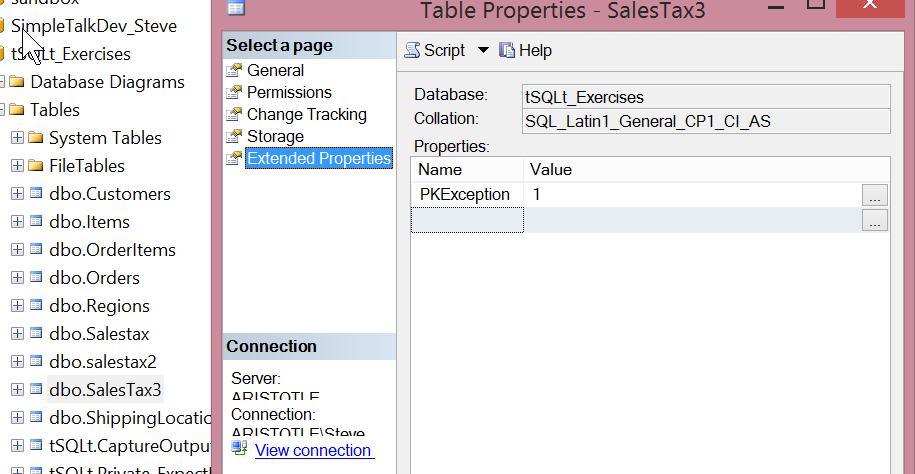
    2015-05-26 09_55_09-Table Properties - SalesTax3

    That’s about it. If I want more properties, I can add them by changing the name and value of the property in the code above. I can also change the schema and table if I want this property added to other tables.

    SQLNewBlogger

    This was another side post from a separate post I was writing. I was working on solving a problem and needed an extended property. As I looked up the data to solve my issue and wrote code, I copied the Extended Property code and took a screenshot, leading to this side post.

    Once I had that, this was about 15 minutes to write. I’ll publish this one first, and refer to it in the post that solved my original problem.

    References

    sp_addextendedproperty – https://msdn.microsoft.com/en-us/library/ms180047.aspx

    sys.extendedproperties – https://msdn.microsoft.com/en-us/library/ms177541(v=sql.90).aspx

  • The Challenges of Space

    It wasn’t that long ago in my career when a survey showed the vast majority of SQL Server databases were < 10GB in size. These days I’m sure the average has risen as there are some very, very large SQL Server databases. I know a few people managing PB sized systems, which certainly will move the average upa bit. It’s likely, however, that the majority of databases are still very small, powering smaller applications with < 100GB.

    However almost every databases continues to grow, and as systems grow, new challenges come into play. While we can still store a 100GB backup file on a thumb drive or SD card, it’s still a significant amount of data to write, which can take more time than our clients would like. Archivals, backups, restore, all tend to come from non-flash media, so larger systems certainly mean longer RTOs if we have issues, even if we’re just restoring a copy of a database to extract some deleted information.

    However there can be more fundamental problems. I ran across a post from the CSS Engineers at Microsoft that talks about exhausting NTFS resources as more and more writes occur on a filesystem. I’d never heard of this, or expected it to be an issue, but apparently it’s occurring more often. I suspect even the NTFS developers hadn’t considered the scales to which we probably stress the file system daily. What is interesting is that this can occur with DBCC operations, database snapshots, and even bcp operations. There are workarounds, and certainly I’m sure that Microsoft has people working hard to increase the capacities of ReFS, which I expect will take over from NTFS, just as NTFS has largely displaced FAT.

    As we grow to larger and larger scales of data sizes, with multi-terabytes on laptops and petabytes on servers, I think we’ll need to adapt a number of our techniques and operations in the future. We might end up needing different types of backups (anyone considering lookup table backups or daily backups of a set of rows, like orders?), as well as the possibility of continuing to spread the load of our server across multiple drives. I just hope that Microsoft recognizes this and looks to ensure mount points work smoothly across all of their technologies and features. At some point, 26 drive letters won’t be enough for the majority of us.

    Steve Jones

  • Using the DAC with SSMS

    I’m writing this post as a way to help motivate the #SQLNewBloggers out there. Read the bottom for a few notes on structuring a post.

    While troubleshooting another issue, I needed to connect to SQL Server with the DAC. I couldn’t remember the syntax, so I looked it up quickly and ran into this link: Diagnostic Connection for Database Administrators. I added the ADMIN: to my connection in SSMS for a query window and clicked Connect.

    dac_g

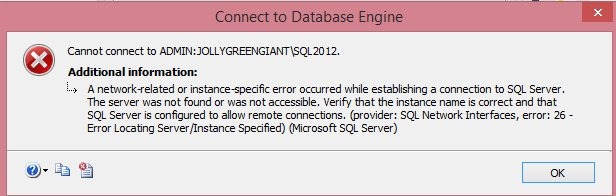
    This took entirely too long and then I got this:

    dac_a

    That error resulted in a rabbit trail for me to debug this, but it worked out and I’ve learned a few things. The main one is to be sure that I’ve read the documentation and errors correctly.

    As I tried a few things, including SQLCMD, I realized I had issues. I searched and found that the DAC gets set to a specific port. I checked the error log to get the number.

    dac_b

    With that, I added it to my connection dialog, sure that this would work, but of course, it didn’t.

    dac_c

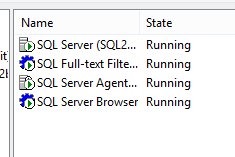
    Eventually I stumbled on the post about errors and realized I should have checked the SQL Browser earlier. I thought about it, but discarded that thought because I could connect in other ways. Mistake. Check networking first, and networking is where the browser comes in. Sure enough, it was stopped.

    dac_d

    The properties were set to DISABLED, so I had to change that before I could start it. I assume you can do that, if not, poke around the properties until you find that setting. With that changed, I started the service.

    dac_e

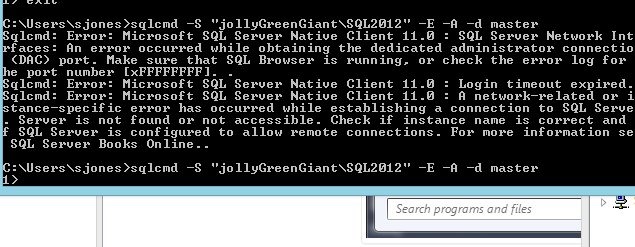
    Then I could connect. Here’s the SQLCMD version.

    dac_f

    With this working, the first command dialog at the top of this piece worked from an SSMS query window.

    SQLNewBlogger

    This was longer. What I thought was a quick lookup turned into a troubleshooting exercise that lasted about 20 minutes as I searched, read, experimented, etc. At least I made a bunch of screenshots as I was experimenting, so I had lots of data and didn’t duplicate anything.

    The actual writing was only about 10 minutes, most of that looking through screenshots and trying to organize my thoughts.

    References

  • Practical Hekaton

    I got into a debate recently with someone about the In-Memory OLTP tables (formerly Hekaton) feature that was released with SQL Server 2014. This person asked if anyone was actually using the technology, given all the limitations that were placed on these structures in this first release.

    I’ve had quite a few people actually get upset with Microsoft releasing a “feature” that doesn’t just work as a replacement for the regular tables in SQL Server. They feel that Microsoft should have spent more time working to make the transition to these tables seemless, perhaps not releasing in-Memory tables until SQL Server 2016.

    I feel differently. I think that Microsoft should get the technology working and stable, and then release it. Even if it has limitations, I’d like to see an implementation available early and give companies the chance to see how it performs in real world workloads. If you can’t workaround the limitations, then you can’t use it, but then does it matter if the feature is available in 2014 or 2016? I’m not sure it does.

    We would really like to publish more guidance here, and help people understand the feature better. If anyone is out there actually using Hekaton in production, or has a development project underway that should get to production soon, we’d like to contact you and work out a way to publish information. You’re welcome to write an article, or we can write one for you with a little interview time, either way is fine; we’d just like to get some practical, real world information out for everyone to learn from.

    Please contact us if you’re using In-Memory OLTP tables and natively compiled stored procedures.

    Steve Jones

    The Voice of the DBA Podcast

    Listen to the MP3 Audio ( 2.4MB) podcast or subscribe to the feed at iTunes and LibSyn.