Tag: sql server

  • DB_Owner Querying for Database Options

    Another post for me that is simple and hopefully serves as an example for people trying to get blogging as #SQLNewBloggers.

    What can a user with the db_owner database role do? I assumed anything inside of the database (create/alter objects, assign permissions, back up the database, etc). However someone asked recently about whether someone could read database properties. I’d assume they can, but I needed to check.

    I decided to start by creating a new login. I have lots on my test instance, but I went with just building a new one. I used the GUI to add [DBOwnerTest] because it’s quicker. I assigned a password, set a default database, and mapped this user to db_owner in a database.

    dbowner_a

    I then opened a query window and changed the connection:

    dbowner_b

    Now I could easily run a query for properties and see the results:

    dbowner_c

    Note the connection at the bottom of the image above.

    Here’s where it’s a little interesting. I disconnected Object Explorer and connected back as DBOwnerTest. I see this:

    dbowner_d

    Looks normal. According to the BOL documentation for permissions, db_owner gets View Any Database as well as control over their own database. I can see the properties of the Sandbox database (where I’m db_owner).

    dbowner_e

    But I can’t see properties of other databases.

    dbowner_f

    I also see my login, but not the couple dozen others I have, other than sa. That’s curious, and perhaps not good. However this isn’t the place to delve into that.
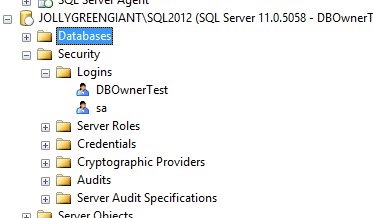
    dbowner_g

    I have the ability to query through databasepropertyex(), which I’ve documented in another post.

    Certainly db_owner conveys lots of rights to the user, and certainly the ability to see some of the outside of the database container, such as the options and properties, as well as other databases.

    Writing

    This was based on a question I saw posted at SQLServerCentral. It took me about 5 minutes to set up a test login and query for information. I had to perform a few searches and try some queries. I spent a few minutes researching databasepropertyex(), which became another post.

    All told, this was about a 15 minute post.

    You can do this. Join the #SQLNewBlogger group and start documenting your career. You can see all my posts that fall into this area by looking through the SQLNewBlogger tag here.

    References

    Permissions of Fixed Database Roles – https://technet.microsoft.com/en-us/library/ms189612%28v=sql.90%29.aspx

  • Naming Confusion

    When I first worked in a corporation that had many servers, I had to learn the encoding of our systems. We had SUIS01, SUIS02, NAIS01, NAOP01, etc. Each name designated a location and department, but no information as to what applications were running. That was a separate thing to learn, which thankfully didn’t change often as procuring and setting up a new system was a relatively rare event.

    However I also ran into a few systems named “Dorothy” and “Wiz”. The other administrators griped constantly about the unprofessionalism of those names. I’m not sure I think SUIS01 is better or worse than Dorothy, but that’s a separate debate. In both cases, we had to memorize what applications were actually running on which systems. Since all of them were managed by IS, regardless of the department that owned them, we were responsible for understanding the purpose of the server.

    I ran into a situation recently where a company had a server called SalesSQL, which was there production server. The development server was SalesSQL_Dev, which is fine until you see someone opening SSMS, thinking they’ve connected to the right server since they see “SalesSQL” in the connection dialog and starting to execute code. Granted, even a rookie should be able to notice the “_Dev” (or a similar “Dev_SalesSQL” name), but mistakes happen.

    I wonder sometimes if naming systems too closely to similar systems in different environments is a good or bad idea. I especially get concerned if shortcuts are taken with database names like “Sales” and “Salesqa”. I think it can be easy to confuse those systems when you become stressed or are in a hurry and are glancing at a small drop down box.

    Ultimately I’m not sure there’s a good method for naming systems that prevents confusion, and ensures people are working in the correct environment. I have tended to use suffixes in my career to denote development and test environments as I can more easily differentiate a dev environment, but I wonder if I shouldn’t be using prefixes instead. Having to retype the beginning of a name (or delete the “dev”) in the connection dialogs might force me to do extra work to connect to a production system. That little extra bit of effort might be just the thing to reduce the chance of performing development work on a live system.

    Steve Jones

    The Voice of the DBA Podcast

    Listen to the MP3 Audio ( 2.5MB) podcast or subscribe to the feed at iTunes and LibSyn.

  • Controlling Alerts

    None of us likes to be on call for our organizations. Late night phone calls, especially for something silly like adding a new user to a system or rebooting a machine, can make for irritable employees in the morning. Too many nights in a row of problem calls, legitimate or not, and I’d argue that an employee’s effectiveness during the day is substantially diminished.

    Since many of us are paid to be creative and improve systems over time, is regular firefighting a good use of our knowledge? This might be even more true if we find ourselves receiving escalation calls on a regular basis and our daily workload doesn’t change.

    I ran across a company that had set up a rule for alerts and pages. If any alert was set up in an automated system, it had to have corresponding documentation, with a resolution, in an operations manual. That’s an interesting idea, and certainly promotes the idea of performing root cause analysis and understanding your systems in advance. However does this really reduce any escalation? 

    Perhaps if there is a team available 24/7 that triages initial alerts this helps, but if there’s a small team of people that must support systems, is it worth the effort to document every issue? I suspect that a better policy is that repeating alerts, those that occur regularly, need to be analyzed and a more permanent solution implemented. I know that’s easy to say and hard to do, but that really is the best policy. At least if you want to ensure your employees are working efficiently over time.

    For those calls that are ad hoc, I recommend a log of actions taken be kept in an easily accessible location, in a text format for searching. That way if a different person receives a similar alert, at least they’ll have some idea of what actions the last person performed.

    Steve Jones

    The Voice of the DBA Podcast

    Listen to the MP3 Audio ( 2.6MB) podcast or subscribe to the feed at iTunes and LibSyn. feed

  • PostgreSQL v SQL Server

    A site that’s a comparison of the platforms.

    http://www.pg-versus-ms.com/

    Certainly some good arguments being made, but (admittedly) biased towards specific workload items that the author uses.

    However, I agree with lots of the items listed. There are quite a few items, such as 1.1 and 1.2. Not having 1.5 is stupid silly. I know I can write a CLR assembly and stick this in here, but why hasn’t it just been included? 1.6 is interesting for sure and as someone that lives in BOL, it is very frustrating.

    Without a doubt there are some cumbersome things in SQL Server that I think could be made much, much easier. However, as pointed out numerous times, MS is concerned about money, and not necessarily making the product better.

    I don’t agree with the Linux v Windows debate. Lots and lots of people run Windows and the latest surveys I’ve seen of servers from automated places show Windows as close in terms of numbers.

    I’m also not sure some of the BI stuff matters a lot in a general comparison, but if that’s what you do, then this is interesting. I’d also point out that since MS is trying to move into these areas, some of these things are being addressed. SQL Server 2016 will support JSON and R.

    Enjoy the read. Don’t get too wrapped up in the details, but certainly if you think some of these items are important, let MS know.