Tag: sql server

  • No Handwaving Away the DBA

    There’s a great quote I read, at the end of this article. It says: “…if you think that switching to NoSQL will just let you hand-wave away all of the challenges of running a database, you are terribly misguided.” The context is that all too often people looking to move away from some of the hassles of working with RDBMS platforms, which includes working with the DBA, haven’t completely thought through the issues.

    I do think NoSQL has a place in the world. There are domains of problems that I’m sure Riak, MongoDB, and others, solve in a more efficient way than SQL Server, Oracle, MySQL, and other relational systems. I’m not sure what they are, and to some extent, I haven’t seen good guidance on where particular platforms excel. Most of the articles and pieces on choosing NoSQL seem to be trying to sell me “why a particular platform can replace my other one”, and telling me to add in things like transactions, but not explaining the drawbacks.

    However in all platforms, we often forget that there are really two frames of reference that matter. We need quick ways to work with data, insert it, update it, query it, etc. This is the development frame of reference, and it often dominates discussions of platforms. For good reasons, as developers are expensive, but that’s only part of the system. We also need to consider the operational portion of managing data and applications. When I have those needs to rebuild indexes in relational platforms, or the requirement to periodically merge/remove old versions of documents, or even manage clustered, horizontally scaled resources, we need operational maturity.

    In some sense the DevOps movement is built around merging these two frames of reference into the minds of all those involved. I hope that movement continues to grow and mature, and we learn that developers and operational staff are both necessary, and both need to function in a symbiotic, harmonious fashion.

    Steve Jones

    The Voice of the DBA Podcast

    Listen to the MP3 Audio ( 2.6MB) podcast or subscribe to the feed at iTunes and LibSyn. feed

    The Voice of the DBA podcast features music by Everyday Jones. No relation, but I stumbled on to them and really like the music. Support this great duo at www.everydayjones.com.

  • Getting Local Books Online

    One of the things that’s annoyed me in the last few versions is that Books Online isn’t smoothly installed for me. I often seem to forget to run through the process, and I’ll find myself on an airplane without being able to check documentation. It’s frustrating and while I’ve muddled through the process, I’ve never documented it.

    And I’m not going to. Aaron Bertrand did it for me for SQL Server 2014. I recently ran through this in a VM that didn’t have the docs installed and it worked great. Along with the 2014 documentation, I also added the 2012 documentation at the same time as I’ve been using this demo VM with 2012 for quite some time and I want to be able to check if behaviors I see are different between 2012 and 2014.

    It’s a simple process, though a touch time consuming. Don’t do this while you’re waiting for a plane. In fact, I’d recommend that you do this early in the morning, when you can let it run for awhile. In a VM, mine took over 30 minutes to get BOL 2014 and BOL 2012.

    When I finished, I could launch the help viewer from 2014 and see both versions of the docs. If I launched the 2012 documentation, I saw thing, this despite seeing both book as “up to date” in the help configuration. I suspect there’s something in the shortcut that would fix this, but ultimately I don’t care. I have BOL installed, and I can just move the 2014 shortcut to the taskbar, since I use it often.

  • Filetable–Moving files programmatically

    I’ve been playing with Filetable and I was asked an interesting question. Can I move files to a folder programmatically?

    It’s trivial to do this in Explorer. Just drag and drop, and I’d expect that most people using Filetable from the client side would do this. I’d even expect that lots of programmers might use Powershell and the

    However suppose I loaded a bunch of documents into the Filetable folder and I needed to move or process them. I certainly could handle this easily from the client, but it’s actually simpler to do this from T-SQL.

    The Example

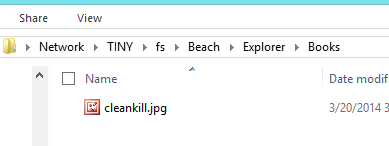
    Let’s say I have a few files in the root of my Filetable as shown in this image. My Filetable is the Explorer table inside this path.

    filetable_c

    If I check this from T-SQL, I see four rows I my table. Two jpgs and two pngs. The jpgs are books and I want to move them into a separate folder.

    filetable_a

    I decide to set up a folder inside of this structure. I can do that, using the technique from another post to create a folder from T-SQL. I create the “Books” folder and now If I look at how this appears in the table, it’s like this:

    filetable_b

    In the share it looks like this:

    filetable_d

    What I want is to now set the parent_path_locator of the jpgs to be that of the Books folder. However I can’t update that field as it’s a computed column. However I can update the path_locator of the two rows and compute a new HierarchyID value that includes the path_locator of the Books folder.

    The way to do this is similar to how I would add a file to a folder. I use this code to computer the new HierarchyID and update the existing rows.

    DECLARE @path HIERARCHYID
    DECLARE @new_path VARCHAR(675)
     
    SELECT  @path = path_locator
    FROM    dbo.Explorer
    WHERE   name = 'Books'
    
    SELECT  @new_path = @path.ToString()
            + CONVERT(VARCHAR(20), CONVERT(BIGINT, SUBSTRING(CONVERT(BINARY(16), NEWID()),
                                                             1, 6))) + '.'
            + CONVERT(VARCHAR(20), CONVERT(BIGINT, SUBSTRING(CONVERT(BINARY(16), NEWID()),
                                                             7, 6))) + '.'
            + CONVERT(VARCHAR(20), CONVERT(BIGINT, SUBSTRING(CONVERT(BINARY(16), NEWID()),
                                                             13, 4))) + '/'
     
    Update dbo.Explorer
          SET path_locator = @new_path
          WHERE name = 'Cleankill.jpg'

    Once this is done I see the share looking like this:

    filetable_f

    Here’s the root of the share, and you can see my file has been moved.

    filetable_e

    I repeat this for the other file, though I could potentially have wrapped this all up into one statement. This easily moves my files to the subdirectory in my Filetable.

  • The Cardinality Estimator in SQL Server 2014 – Going Forward and Backward

    I saw a talk from Joe Sack (b | t) on the cardinality estimator (CE) in SQL Server 2014 and found it very interesting. To be fair, some of the "how it works" isn’t something I care about much, but I did like Joe sharing some places in which you might find problems with your queries and how the cardinality estimator might affect you. The talk is worth seeing if you get the chance.

    However one of the really interesting things, and an item I appreciate Microsoft building, is a switch to turn off the new CE. Actually, it’s not turned off, but you can set it to pre-SQL Server 2014 behavior (essentially 2005-2012) or to SQL Server 2014 behavior. What’s even better is that you can set this in a number of ways.

    Setting Database Behavior for all Queries

    Turning on the new CE is as simple as setting the compatibility level to 120. This will turn on the new CE for your queries in this database.

    The flip side is setting your compatibility level to something below 120 (110, 100, etc.) and your queries will use the old CE behavior in the query optimizer.

    Setting Behavior for Queries

    You can also specifically test queries with either the new or old CE. The QUERYTRACEON option can be used with these two flags.

    • 9481 – Uses the 2012 (pre-2014) CE with queries. This is used when the database is in SQL Server 2014 (compatibility mode 120) mode.
    • 2312 – Uses the new 2014 CE when the database, or defaults, are set to use the 2012 CE.

    This is documented in KB 2801413 from Microsoft.

    Setting the Server Level

    There is a trace flag that you can use at Server startup that globally sets the CE behavior. Set 9481 at startup and your SQL Server 2014 databases will use the old CE by default. Joe documented this on his blog.

    Usage

    I think this is great because if you are concerned about workloads being effected by the CE changes, then you can set the old CE as the default and test on your real production server by executing specific queries with the new CE and the query plan.

    Alternatively, if you upgrade and find problems, you can duplicate the old CE by using a query hint and see if the query performs better.

    I’d like to see this upgrade/downgrade granularity in more features that can potentially affect performance and I would say this is a fantastic architectural win by the SQL Server development team.