Tag: sql server

  • Consolidation Matters

    Throughout my career I’ve been looking to consolidate SQL Servers when I find them. The typical employer I’ve had usually grows their IT infrastructure over time and many projects look like this:

    • Build or buy a software package
    • Buy a new server
    • Install SQL Server and one database for the application

    Over time this means I find lots of individual servers running at much less than full capacity. That’s something that DBAs like, because it means that we can handle the inevitable spikes in resource usage that our workloads will encounter. However that’s not what the rest of the business, especially the financial management, wants. Underused resources mean money that isn’t spent well.

    As a result, I’ve often looked to consolidate instances where possible. Often I let an instance run by its own hardware for a period of months, perhaps even a year, during which I can get a good idea of what level of resources the database and application require. Once I have that, I try to match up the needs with an existing SQL Server that might be underutilized by at least that amount of resources. Typically I’m looking at RAM and CPU since disk resources can often be transferred to a new piece of hardware. It’s not quite as simple as it sounds as I also need to look at workload patterns and potentially match up instances whose workload peaks occur at different times.

    I’ve successfully consolidated many instances this way, often reducing the amount of physical hardware in data centers substantially. As hardware cycles turn over and newer machines are purchased, I can usually repeat the process again and again. The advent of virtualization has made this even easier as bad guesses can usually be reversed or corrected by moving the database to a different instance.

    I suspect that virtualization will become more important in the future, especially as licensing changes in SQL Server make it much more expensive to add the ad hoc instance on its own hardware. I’d encourage you to plan on consolidating new databases from the beginning to ensure that your organization gets the most performance out of the hardware that it has purchased.

    Steve Jones

    Podcast: http://traffic.libsyn.com/voiceofthedba/consolidation_56_v1061.mp3

  • FileTables–Inserting Directories from T-SQL

    Creating a directory in a Filetable share is easy. It looks like this:

    filetable_i

    It’s hard to see, but this was a right click, New, Folder in the share from Windows Explorer.

    However what about creating a directory from T-SQL? That’s almost as easy.

    I created that folder above by running this code:

    -- create a folder
    INSERT  INTO dbo.Explorer
            ( name, is_directory )
    VALUES  ( 'Books', 1 );

    I provided a name for my folder and then a 1 for the is_directory property. Once I ran this, the folder above appeared in my share.

    Note that this works for folders in the root, but not nested folders. I’ll tackle that in another post.

  • One Database to Rule Them All

    This is what you build to juggle 6,000 tweets a second. That’s the headline that caught my eye and it’s about the challenges of Twitter and the data that they handle. Twitter definitely has a tough problem, one that few of us have, but perhaps they can help us learn to better deal with our own data from their experiences on an edge case.

    The story is journalistic, not so technical, but it is interesting. Twitter has struggled with a blend of data that is partially crucial and must be consistent now (usernames) and other data that can be a bit out of date (tweets). They also have lots of unstructured data (photo/video) that is combined with more traditional, structured data. They’ve used a few different database platforms to store this data and assemble it with their application. That’s the same things that most of us also do when we deal with many different types of data.

    However Twitter is trying to find away around dealing with disparate systems. They’ve had a number of engineers working on Manhattan, their database designed to handle both structured and unstructured data. And because they work for Twitter, this platform is designed to manage all of this data with very high workload demands at scale.

    It will be interesting to see if they come up with any innovative ideas. Certainly SQL Server already has options for managing structured and unstructured data, though perhaps not at the scale Twitter needs.

    Steve Jones

  • FileTable–Adding a file to a folder

    At my Filestream/Filetable talk yesterday at SQL Intersection, someone asked me about programmatically adding a file to a Filetable. Easy enough, I thought, since I’d seen someone do this in .NET and was thinking this has to be simple. Turns out it’s not quite so simple.

    I was assuming that I could use the GetDescendent method of the hierarchy ID for the path_locator field to get the path you needed and insert that. It turns out that’s not correct.

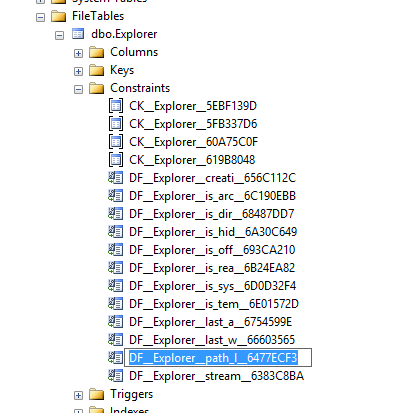
    I searched around when that didn’t work and found this post from Bob Beauchemin and a question on StackOverflow. If the two, Bob’s post explains things better. He actually dug into the Filetable, looking at the constraints and defaults in the schema. If you do that, you can find this constraint on the path_locator field:

    filetable_h

    The code in this constraint looks like this, which matches with what Bob and SO show as the way to calculate the path.

    ALTER TABLE [dbo].[Explorer] ADD  CONSTRAINT [DF__Explorer__path_l__6477ECF3]  
    DEFAULT (CONVERT(HIERARCHYID, '/' +     CONVERT(VARCHAR(20), CONVERT(BIGINT, SUBSTRING(CONVERT(BINARY(16), NEWID()), 1, 6))) + '.' +
         CONVERT(VARCHAR(20), CONVERT(BIGINT, SUBSTRING(CONVERT(BINARY(16), NEWID()), 7, 6))) + '.' +
         CONVERT(VARCHAR(20), CONVERT(BIGINT, SUBSTRING(CONVERT(BINARY(16), NEWID()), 13, 4))) + '/')) FOR [path_locator]
    GO

    This means that your insert statement needs to perform this calculation. For me, I decided to insert a jpg of a circle into the table, under the folder “books”. The folder looks like this:

    filetable_g

    Since I have the binary values for a circle image, I’ll use those, and then the code below. The first part of this code calculates the new path that’s needed, basing this on the path_locator value for the “Books” folder, and then building a NewID(). From there, it’s a simple insert.

    DECLARE @path HIERARCHYID
    DECLARE @new_path VARCHAR(675)
     
    SELECT  @path = path_locator
    FROM    dbo.Explorer
    WHERE   name = 'Books'
    
    SELECT  @new_path = @path.ToString()
            + CONVERT(VARCHAR(20), CONVERT(BIGINT, SUBSTRING(CONVERT(BINARY(16), NEWID()),
                                                             1, 6))) + '.'
            + CONVERT(VARCHAR(20), CONVERT(BIGINT, SUBSTRING(CONVERT(BINARY(16), NEWID()),
                                                             7, 6))) + '.'
            + CONVERT(VARCHAR(20), CONVERT(BIGINT, SUBSTRING(CONVERT(BINARY(16), NEWID()),
                                                             13, 4))) + '/'
    INSERT INTO dbo.Explorer
            ( stream_id
            , file_stream
            , name
            , path_locator
            )
    VALUES  ( NEWID()
            , 0xFFD8FFE000104A46494600010101006000600000FFE100684578696600004D4D002A000000080004011A0005000000010000003E011B0005000000010000004601280003000000010002000001310002000000120000004E00000000000000600000000100000060000000015061696E742E4E45542076332E352E313000FFDB0043000201010201010202020202020202030503030303030604040305070607070706070708090B0908080A0807070A0D0A0A0B0C0C0C0C07090E0F0D0C0E0B0C0C0CFFDB004301020202030303060303060C0807080C0C0C0C0C0C0C0C0C0C0C0C0C0C0C0C0C0C0C0C0C0C0C0C0C0C0C0C0C0C0C0C0C0C0C0C0C0C0C0C0C0C0C0C0C0C0C0C0C0CFFC0001108000A000D03012200021101031101FFC4001F0000010501010101010100000000000000000102030405060708090A0BFFC400B5100002010303020403050504040000017D01020300041105122131410613516107227114328191A1082342B1C11552D1F02433627282090A161718191A25262728292A3435363738393A434445464748494A535455565758595A636465666768696A737475767778797A838485868788898A92939495969798999AA2A3A4A5A6A7A8A9AAB2B3B4B5B6B7B8B9BAC2C3C4C5C6C7C8C9CAD2D3D4D5D6D7D8D9DAE1E2E3E4E5E6E7E8E9EAF1F2F3F4F5F6F7F8F9FAFFC4001F0100030101010101010101010000000000000102030405060708090A0BFFC400B51100020102040403040705040400010277000102031104052131061241510761711322328108144291A1B1C109233352F0156272D10A162434E125F11718191A262728292A35363738393A434445464748494A535455565758595A636465666768696A737475767778797A82838485868788898A92939495969798999AA2A3A4A5A6A7A8A9AAB2B3B4B5B6B7B8B9BAC2C3C4C5C6C7C8C9CAD2D3D4D5D6D7D8D9DAE2E3E4E5E6E7E8E9EAF2F3F4F5F6F7F8F9FAFFDA000C03010002110311003F00E97FE0E87FF82CA7ED35FB04FED85E09F03FC2BD6A5F87BE1097408B5C4D523D2ADAF1BC41746795248CBDC4722F970848C18940399373E43478FD75FF00827CFC68F177ED17FB0FFC2AF1D78F3461A078C7C59E19B2D4F57B110B42B14F244199846DF346AFC384392A1C024E335E95E2EF87BE1FF880968BAF687A3EB6B612F9F6C2FECA3B916F27F7D3783B5BDC60D6C5007FFFD9
            , 'Circle.jpg'
            , @new_path      
          );
    go


    If I now look at the folder, I see this:

    filetable_j

    An insert into the folder of a file.

    I could easily adapt this to stream in the binary values from a .NET application, or OPENROWSET, but this works well enough.