Tag: sql server

  • The SQLCLR Impact

    While I’m sure there are a few of you still using SQL Server 2000 instances, I think at this point that most companies have moved to SQL Server 2005 and later. Even if you still manage a pre-2005 instance, chances are you have a few 2005, 2008, or 2012 instances as well.

    It’s been a little over 8 years since the CLR subsystem was added in SQL Server 2005. At the time this was announced, we had any number of DBAs worrying about the impact. Before SQL Server 2005 was released there were lots of concerns that developers would embed most of their database logic in SQLCLR procedures and cause lots of performance issues. That doesn’t seem to have been the case, but this week I wanted to ask you about your experience.

    Have you had to review and implement custom SQLCLR assemblies on your instances?

    I’m looking for an idea here of the impact of the SQLCLR in your environment. Do you have standard assemblies on multiple instances or have you dealt with an ad hoc object here and there? Do you think SQLCLR is a normal part of your applications or a one-off that’s rarely used? Do you go through the code and understand how the logic is implemented? Do you ensure error handling is implemented? Perhaps you’ve not dealt with it at all?

    I haven’t seen much of a call for SQLCLR objects from the various developers that have worked on the SQLServerCentral site. Most of them seem content to use their traditional tools: they use .Net code in the front end or T-SQL code in the database.

    Let us know this week. Has the SQLCLR been a regular part of your SQL Server environment.

    Steve Jones

    The Voice of the DBA Podcast

    Listen to the MP3 Audio ( 2.4MB) podcast or subscribe to the feed at iTunes and Mevio . feed

    The Voice of the DBA podcast features music by Everyday Jones. No relation, but I stumbled on to them and really like the music. Support this great duo at www.everydayjones.com.

  • Virtual Lab – Creating Differencing Disks

    This is part of my series on building a virtual lab for use with SQL Server and Windows. You can see the entire series here: Building a Virtual Lab with Hyper-V.

    The whole point of virtualization is better use of resources. Whether it’s CPU, storage, networking, power, etc., we are trying to save having to purchase 5 or 6 machines and connect them all, pay for them, etc. It’s much, much easier to use virtualization.

    This is especially true of storage. When we build a lab, we don’t want to have to allocate a ton of space for our systems. In my case, for my design, this is what I want to end up with.

    virtlab_o

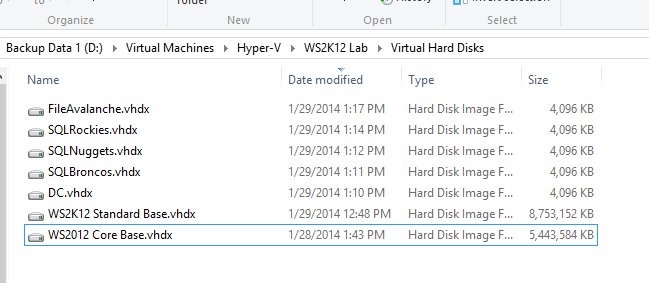
    From my last post, I had the bottom two files already set up. These are my installations of Windows Server 2012 R2 Standard and Core, sysprep’d and ready to use.

    Differencing – Saving Space

    The idea in differencing disks is similar to the snapshot feature I used in VMWare to do this same process. I take a base disk, and create a “copy” of it. Except the copy doesn’t have everything from the base disk. Like a database snapshot in SQL Server, if I need to read something that’s in the base disk, I reference that. If I change something, or add something, I read from the copy.

    As you can see above, I have 5 small disks at 4MB and my 2 large base disks. Each of the small disks is a differencing disk off either the Standard or Core base installations.

    I created these by selecting New Hard Disk in Hyper-V Manager

    virtlab_i

    After the intro screen, I make sure I’ve picked VHDX.

    virtlab_j

    At the next screen, I choose the differencing option.

    virtlab_k

    Now I need to pick a location for the copy. On my setup, I’m trying to keep this lab contained, so I have a WS2K12 Lab folder. I choose that as my location for the differencing disk. I give it a name, in my case, I’m using “Function” concatenated with the name of the Windows host. As seen below, my file server will be named “FileAvalanche.vhdx”.

    virtlab_l

    Next I choose the parent disk. this is the base image. Depending on what I had in my design, I choose the Standard or Core images for various machines.

    virtlab_m

    I get a summary where I can see all my options, and then click finish.

    virtlab_n

    I do this five times and all of a sudden I have a lab.

    A few things. Use some naming convention so you can tell which disk is which. Also, make sure you stick things in a location. I set a specific folder location for my VMs and disks, and then altered the Hyper-V Manager settings to default to this folder. On my machine that’s D:\Virtual Machines.

    That helps me keep things contained, and it also means that when I want to copy a VM for a backup or to another machine, it’s easy.

  • Building a Virtual Lab with Hyper-V

    I needed to get this one on Hyper-V, so I decided to document the process. I’ve put together a series that looks at the steps I took.

    This will fill in as I go through the process, so if there’s something you don’t see, it’s coming.

  • The Data Platform Vision

    Recently the Microsoft Data Platform blog published a piece on what drives Microsoft’s vision. It’s an interesting look at the ways in which data is being used in some businesses as well as the variety of types of situations that must be dealt with. There is this idea that the value derived from having lots of different data was once only used by specialized companies or applications. However today, it’s being more widely analyzed and accepted by more businesses. Of course, the vision is that Microsoft can help those businesses.

    In the cloud.

    I know this piece is more marketing than technical, but I have concerns that Microsoft is not driven by what customers want and need, but is instead seeking to drive customers to their own tooling and offerings in the Azure cloud. While I do like many things about the cloud and think it has a place in the future of many companies, I also think that there are still lots of opportunities, as well as demand from customers, for on-premises solutions.

    I worry that the focus of Microsoft, which can be tightly bound in one idea as they eye more sales revenue, is driven with the idea that everyone, and all applications, will some day be in the cloud. I can’t see that in the future for many businesses, and certainly hope that Microsoft recognizes this. Otherwise many of our hybrid solutions that push some data into the cloud might be backed by PostgreSQL or some other platforms as the on-premises database.

    Steve Jones

    The Voice of the DBA Podcast

    Listen to the MP3 Audio ( 2.2MB) podcast or subscribe to the feed at iTunes and Mevio . feed

    The Voice of the DBA podcast features music by Everyday Jones. No relation, but I stumbled on to them and really like the music. Support this great duo at www.everydayjones.com.