Tag: sql server

  • Virtual Lab – Design and Setup

    This is part of a series where I set up a virtual lab for testing and misc work. The other parts in the series are here: Building a Virtual Lab with Hyper-V.

    I haven’t had a good lab set up since I moved from VMWare to Hyper-V on my systems. Since then I’ve had a number of random VMs set up, but none connected in any meaningful way as a domain. They were all standalones, but that needs to change.

    I wanted to do some additional testing with a few Windows and SQL features that needed a domain. So I decided to set one up with Hyper-V.

    I googled around and found a few references:

    I decided to try to do some of this myself, using these as guides, but also incorporating some of my new Powershell knowledge along the way. I won’t claim this is the best way to build a virtual lab, but this is the way I did it by cobbling together various piece of information.

    With that in mind, here’s what I’m looking to do. I want to create a domain with a few servers and a client for testing. I plan on making this setup on a separate network, using the 10.10.10.x address space as I don’t expect to run into networks with that one at home, or work.

    The machines I’m looking for are as follows. The role, OS, and then names are listed below:

    • DC (WS2K12 R2 Core) – DenverDC
    • SQL Server instances (WS2K12 R2 Core and Standard) – Broncos, Nuggets, and Rockies
    • File Server (WS2K12 R2 Standard) – Avalanche
    • Client (Win 8) – Keystone

    I’ll be running through the process and trying to document this for myself, and others.

    First Steps

    The first steps here are easy. I have Hyper-V setup, but if you don’t, it’s an easy confg item you can see at the beginning of this article.

    Next, download software. I didn’t have Windows Server on this machine, so I accessed MSDN and downloaded Windows Server 2012 R2. I have an MSDN license, so I get a few licenses. As this was downloading, I made not of the product keys.

    I’ve had a space on my machine setup. Since I used to use VMWare and Hyper-V, I have a space on my spare drive where I separate Hyper-V and VMWare. Inside the Hyper-V folder are my VMs for quick copying to my external drives and laptop as backups. In this case, I’m setting up a “WS2K12 Lab” folder.

    virtlab_g

    The Parent

    This is a standard setup I’ve seen in all the tutorials. Create a VM, create a new hard disk (I used defaults), install Windows Server, and run “sysprep” on the VM. I did this with both Core and Standard Server. This gave me two hard disks that had images of the server systems on them.
    virtlab_h

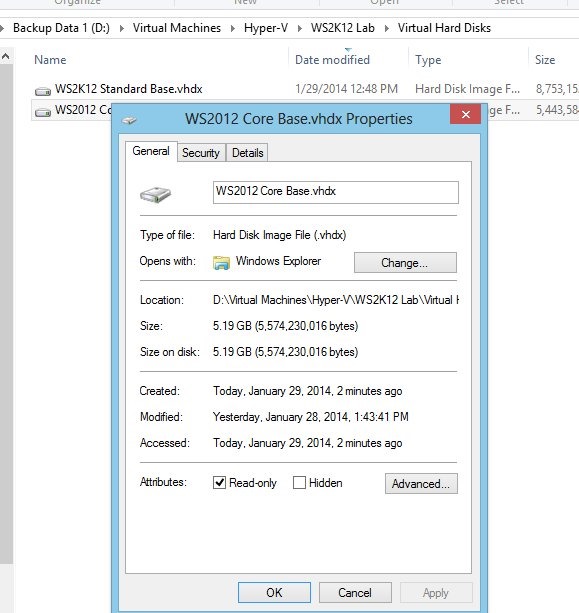
    I first set these disks to “read only” and then deleted the parent VMs. This gets me the base systems on which I will build things. I’ll deal with the Win 8 client later.

    That’s all I’m talking about here. I’ll move into the rest of the steps in future posts.

  • The Cloud

    I like the cloud. It’s very handy for a lot of the things I do. I like having backups restored for my iPhone upgrade. I appreciate having my documents synced through Evernote, Dropbox, and OneDrive (formerly SkyDrive) automatically moving to new machines. These services are incredibly convenient and handy. I expect that my mail will be accessible from multiple machines and my blog posts can be created, edited, and published from anywhere. Many of us work in a similar fashion, using the cloud as a service construct in much of our lives. In fact, many of us expect our own knowledge will be supplemented by the cloud. We use Google to search, getting us syntax,  solutions, or ideas from sources that we expect to just be there.

    Someone was talking to me about their concerns with the cloud recently. This person thought the cloud would be a fad that passes quickly and businesses will get back to owning, hosting, and managing their servers from the bare metal up to the network connection. I disagreed, and not because I use the cloud personally.

    I remember setting up a web server in 1996 for a company. I remember installing an email server in 1999. I would never do either of those things again for my own company, and I wouldn’t expect it from most companies. These days we’ve learned that email can easily be handled by a third party and more and more companies are using email services instead of managing their own systems. Web servers are mostly a shared service that we rent from any number of other companies, sometimes even stitching together a presence across multiple providers. Even many companies that want to manage their own host operating system are turning to third party companies to manage the hardware and networking. More and more we accept renting the things we need from others.

    We’ll get there with databases as well. Not all databases, but more and more of them will be hosted at third party companies. Whether this is in some type of VM environment or a service that hosts data, it will still be hosted at a third party. We will have concerns and we will have reasons to not do this, but I think for more and more of our data, we won’t care.

    Companies have lots of systems in place. They have legacy investments in infrastructure and facilities. In those cases, it’s hard to justify the cost of cloud computing. However as we grow into new areas, or with new companies, we’ll have to re-evaluate whether it is a good idea to continue to make those investments. As the management of software grows to allow the quick scale up and down of assets, I think we’ll be much more likely to consider moving applications into the cloud than ever before.

    We’ll never be 100% in the cloud, or out of it, in the future, but increasingly, we’ll be partners with the cloud.

    Steve Jones

    The Voice of the DBA Podcast

    Listen to the MP3 Audio ( 3.4MB) podcast or subscribe to the feed at iTunes and Mevio . feed

    The Voice of the DBA podcast features music by Everyday Jones. No relation, but I stumbled on to them and really like the music. Support this great duo at www.everydayjones.com.

  • Big Data Comes to Hiring

    I remember first seeing kiosks a few years back in some stores such as Best Buy, Target, Barnes and Nobles, etc. The devices had banners above them that invited people to apply for a job using the computerized system. This was just before my oldest son started applying for jobs, and shortly thereafter I found a few articles that stated quite a few of these large corporations were using the same company to manage the kiosks and pre-screen candidates. Not only were they considering the applications, but they were examining employment records, noting which candidates might have been terminated or left another job quickly. They were trying to use analytics to decide which applicants to interview.

    That entire process reminded me of the “black mark” on your record that I heard about as a kid. It was a reminder to not make too many mistakes, at least not serious ones, that might follow you forever. It appears now that it’s not just entry level jobs that are starting to use data and analysis for hiring decisions. It seems as though some companies are starting to evaluate candidates with different types of algorithms and applications for a wide range of positions. This piece from the Atlantic talks about the history of hiring and a few ways in which data is being gathered about workers and used to analyze their performance. Even more interesting the section about halfway down that talks about how they analyze developer’s work from afar.

    It’s expensive, time consuming, and stressful to hire people. We’ve proven in technology over and over that many of the hiring decisions made, aren’t made that well. We find talented people being underpaid and quick to leave, while other employees are overpaid and are happy to toil away in their positions for years. Neither situation is good for the employer, and often not good for the employee either. It’s less than motivating for any of us when we don’t find some challenge and enjoyment in our jobs.

    Ultimately I know more “people analytics” will be used in the hiring process by some companies, but I find that even with the data, there’s one thing that seems to matter more: personal referrals. Networking matters, and there is no shortage of companies that are placing lots of value on their employees’ networks. Some of them are even looking to conduct the majority of their hires through networking. So make sure you’re networking with others in technology. You never know when it will be the way you get your next job.

    Steve Jones

    The Voice of the DBA Podcast

    Listen to the MP3 Audio ( 2.8MB) podcast or subscribe to the feed at iTunes and Mevio . feed

    The Voice of the DBA podcast features music by Everyday Jones. No relation, but I stumbled on to them and really like the music. Support this great duo at www.everydayjones.com.

  • Adding to SQL Server

    The next version of SQL Server will release in a few months. Most of the development is complete, and the feature list is set for SQL Server 2014. However there is work already underway for a version of SQL Server that will likely release in late 2016.

    Each product cycle brings with it new capabilities and enhancements to existing features. Despite the large resources that are devoted to SQL Server, we also find that choices are made and some features, functions, or tools that are ignored. As get ready for the release of SQL Server 2014, I wanted to ask you to look beyond this version.

    What feature, area, or tool would you like to see enhanced in SQL Server 2016?

    As I review the list of changes in each version, I find myself as disappointed as I am excited. The new features are interesting and bring about new ways to build on the SQL Server platform, but I find that so many existing areas receive little work and don’t mature over time.

    Service Broker has never had good tooling, and despite the fact that it underpins many features, and is a fantastic way to scale SQL Server, it seems to be largely ignore with each new release. Replication is barely changing, and spatial data seems to be a very low priority. Perhaps the most disappointing area for me is Management Studio, which seems to get the bare minimum of changes each version to support new features.

    The Connect system allows us to communicate with the SQL Server team, but the signal to noise ratio seems so low that I suspect the product managers don’t find it very useful. However if you could set a priority in one area for the next version of SQL Server, let us know what it would be in the discussion below.

    Steve Jones

    The Voice of the DBA Podcast

    Listen to the MP3 Audio ( 2.4MB) podcast or subscribe to the feed at iTunes and Mevio . feed

    The Voice of the DBA podast features music by Everyday Jones. No relation, but I stumbled on to them and really like the music. Support this great duo at www.everydayjones.com.