Tag: sql server

  • Versions of Disaster

    Today’s editorial was originally released on Jan 13, 2009. It is being re-run as Steve is on vacation.

    I wrote about versioning of old software recently and how I had to restore an old version of SQL Server in response to a lawsuit. We had some challenges because the backup file that we had was from years before and we weren’t sure which version of SQL Server we needed. I forget how we finally determined which service pack was needed, perhaps we read master somehow to get a build.

    In any case, when you apply patches or change how SQL Server functions, you can change the way that code is executed or even the results that might be returned to an application. You would hope that code would break and error out rather than return different results than you expect.

    Since many of us patch servers when Service Packs come out, or when we find a hot fix we need, and we are constantly deploying and changing code, do we pay enough attention to the server version as we make these deployments? I started thinking about this after the last editorial and I think that we often take it for granted that we can easily recreate our environments.

    Consider what would happen in the event of a disaster. Suppose that one of your server instances, any particular instance, died and you had to go back to a backup of the database, would you know what version of SQL Server is needed? Do you know what version each of your instances is using right now?

    In some ways this makes me think that only installing RTM and Service Pack versions in your production environment is a good idea. It’s easier to track things if you keep all your instances within a very narrow band of versions, and the worst case would be attempting a restore on RTM, then SP1, then SP2, etc. until you hit the correct version. Imagine now if you had to work through the various builds on my build list.

    I used to think that I’d want to keep current on my patches. In one large environment, we were actually pretty good about deploying patches to hundreds of instances inside a month, so we always had a large percentage of our servers, and usually all the critical servers, at the same patch level. However if a disaster had occurred within the month, we wouldn’t necessarily have been sure of what versions were installed.

    I really don’t have a great recommendation on how to handle this other than build some automated system that tracks the current build number on a daily basis, perhaps even putting it in each database. At least then you’ll have it handy in the event of a disaster.

    Steve Jones


    The Voice of the DBA Podcasts

    Everyday Jones

    The podcast feeds are now available atsqlservercentral.mevio.comto get better bandwidth and maybe a little more exposure :). Comments are definitely appreciated and wanted, and you can get feeds from there.

    Overall RSS Feed:  or now on iTunes! 

    Today’s podcast features music by Everyday Jones. No relation, but I stumbled on to them and really like the music. Support this great duo at www.everydayjones.com.
  • Backup Your Certificate for TDE

    If you’ve enabled TDE, you need to be sure you have a copy of the certificate that protects the Database Encryption Key (DEK). If you follow my instructions, then you have one.

    If you didn’t make a backup, or you have just discovered a TDE database, make one now, and secure the password you use with your DR materials (off site).

    How do you make a backup? That’s easy. Use the BACKUP CERTIFICATE command. Here’s the command I use in demos:

    USE master
    ;
    go
    BACKUP CERTIFICATE TDEPRimer_CertSecurity
     TO FILE = 'tdeprimer_cert'
      WITH PRIVATE KEY (
                   FILE = 'tdeprimer_cert.pvk',
                   ENCRYPTION BY PASSWORD = 'AStr0ngB@ckUpP@ssw0rd4TDEcERT%')
    ;
    go


    The certificate for TDE is in master, so you must make sure you’re in master for the backup. The TO FILE option lets you choose the file path. By default, this will be in the DATA folder for your instance, but you can choose other locations. You can give an extension if you like. This file is the certificate (public).

    There is a private key portion of the certificate, which is backed up with the “WITH PRIVATE KEY” portion of the command. This is where you specify the password and provide the protection for your certificate.

    You will need this password on restore, so keep track of it.

  • Guidance

    How do you manage SQL Server? Do you have a list of rules that tell you to do yy whenever xx happens? Or if yy doesn’t solve the problem, you next try zz? Some of you have guidelines like that, though it’s likely that the way you solve problems is somewhat internalized. You adjust your “rules” or “steps” based on the situation. Do you reduce or increase parallelism when you have high CPU? Either change might be the solution, depending on the causes of an issue.

    SQL Server is complex. We can’t easily reduce the solutions to problems to a set of rigid protocols that ensure optimal performance. If we could, there truly wouldn’t be as much of a need for DBAs as there is. Consultants and experts are well paid, and often very busy precisely because SQL Server is not so easy to tune and optimize in many organizations.

    That’s a bit of the point I saw in Grant Fritchey’s “Be Cautious Offering Guidance” piece recently. When trying to help someone improve performance, or reduce issues, or anything else, you can’t often give someone a rule of thumb that just works. You can’t give them a one sentence solution. Most things in life aren’t that simple, and neither is working on SQL Server.

    The environment in which your application runs is complex and there are lots of variables that can affect the advice or guidance that an expert might recommend. It’s the reason we see DBAs often saying “it depends.”

    Because it does.

  • Restoring a TDE Database on a New Instance

    You’ve enabled Transparent Data Encryption (TDE) on one of your databases, and the server has failed. How do you get this database working on a new instance? This short post will show you how this works.

    Files Needed

    There are two files you need in order to restore the database.

    1. A full backup of the TDE database
    2. A backup of the server certificate that protects the Database Encryption Key (DEK).

    You might have multiple files for the backup, and potentially other backup files (diff, log), but the process for those will be the same as any other restore once you complete this process.

    If you have multiple full backup files (striped backup), just include them in the restore command as you normally would.

    Prepare the New Instance

    To prepare the new instance for restore, you need to ensure that you have a database master key (DMK) in the master database. You can do this by checking the master_keys DMV.

    SELECT * FROM sys.symmetric_keys


    If you have a key, that’s fine. If you don’t, you can create one like this:

    CREATE MASTER KEY ENCRYPTION BY PASSWORD = 'sdkj3G3$sh'

    Now you need to restore the certificate from your source instance. You do this with the CREATE CERTIFICATE command, and the FROM FILE option. You’ll typically find the backup from your BACKUP CERTIFICATE command in the DATA folder for SQL Server if you didn’t specify a complete path.

    You do have a backup, right?

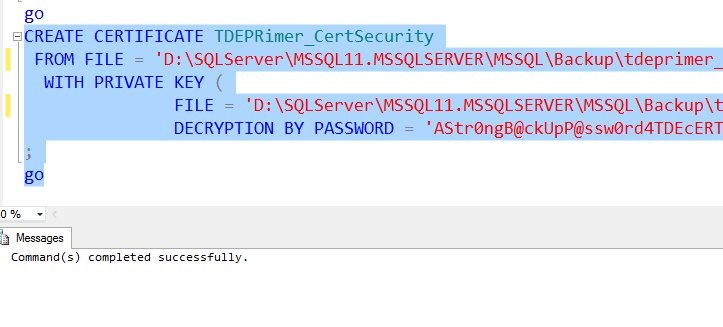
    For me, I’ll run the create certificate command:

    CREATE CERTIFICATE TDEPRimer_CertSecurity FROM FILE = 'D:\SQLServer\MSSQL11.MSSQLSERVER\MSSQL\Backup\tdeprimer_cert' WITH PRIVATE KEY ( FILE = 'D:\SQLServer\MSSQL11.MSSQLSERVER\MSSQL\Backup\tdeprimer_cert.pvk', DECRYPTION BY PASSWORD = 'AStr0ngB@ckUpP@ssw0rd4TDEcERT%') ; go


    This works

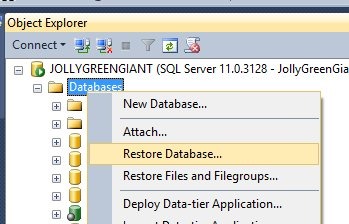
    tde_a

    Now I’m ready to restore the TDE database.

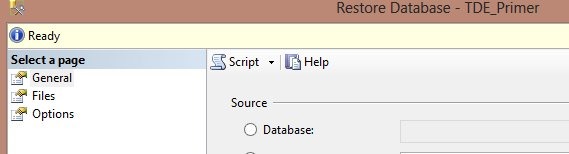
    tde_b

    I select my backup file, and everything proceeds as a normal restore. How do I know the certificate worked?

    Because I have a “Ready” at the top of the dialog.

    tde_c

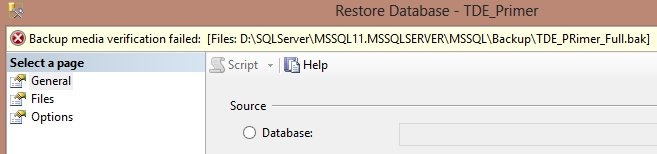
    If I didn’t have the certificate on the instance, I’d get this:

    tde_d

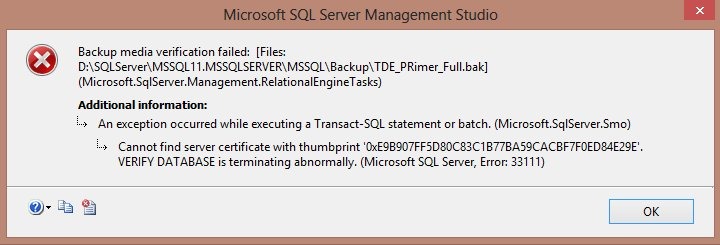
    Double clicking that would bring up the error:

    tde_e

    If the certificate is not on the instance, then the server cannot decrypt the DEK and restore the database.

    Hope this helps, and if you use TDE, make sure you can do this.