Tag: sql server

  • SQL Server Should Work for Us

    failI ran across a post the other day from someone that was trying to find out why their maintenance plan failed. This person had received a failure notice from SQL Agent, which is good. We should all be aware of failed jobs from some sort of monitoring system. Like any good DBA, this person checked the job history, saw an error, couldn’t figure it out and posted a question at SQLServerCentral, looking for help. That’s a good plan for most anyone 😉

    Experienced DBAs know that to debug this issue, you need to look at the maintenance plan log, which has more details. The job history contains a minimal amount of information and usually doesn’t help. If you examine the maintenance plan log, it’s usually easy to determine which part of the plan failed since the plans are fairly simple constructs. The really exceptional DBAs don’t use maintenance plans and instead would rely on some sort of tool or well known script instead to handle their maintenance.

    However why do we need to go to the maintenance plan’s log? SQL Server includes the job history. It includes maintenance plans. Why doesn’t the job understand there is a maintenance plan, read it’s log, and return the information? Or give us a button on the job history that loads up the maintenance plan log? That’s a simple thing to do, and isn’t the job of software to make tasks easier?

    This is one of those places where SQL Server feels a bit immature and unrefined. I understand the complexity of the entire product and the limited resources that are devoted to enhancing and growing the product. However, where are the resources that make SQL Server easier for the average and accidental DBAs to use? Those are the majority of the people using the platform.

    SQL Server led the industry in producing tools that made it easy to manage and use. Other platforms are quickly catching up, however, and if SQL Server can’t continue to improve its toolset, in addition to its features, people will consider other platforms. The cost of SQL Server has risen, but so has the revenue. Do us, and yourself, a favor, Microsoft. Put a team of 50 people to work on usability and improving the tooling. It will be a great investment for the future.

    Steve Jones


    The Voice of the DBA Podcasts

    We publish three versions of the podcast each day for you to enjoy.

  • Losing Data

    We hate losing data as professionals. We should not make the simple mistakes that make it easier for this to happen.
    We hate losing data as professionals. We should not make the simple mistakes that make it easier for this to happen.

    Most of us that work as data professionals hate the idea of losing data. When the developer calls and says his test database is gone and backups were never set up, we may shrug our shoulders and offer to help next time, but we feel bad. We will try everything we can do to recover the data, usually going out of our way to give it our best effort.

    We will lose data. There will be situations that are out of our control, and we have to accept that. However we should try not to make the easy mistakes ourselves that might cause data loss. I ran across a short piece on Five Sure Ways to Lose Data and I agree with the items, but I think there are a few more things we should watch out for.

    One of the easiest mistakes to make to forget is to set up backups. Too often we implement new databases under time pressure, dealing with software that is dropped in our laps at the last minute. Security permissions are never documented and during the frustration of just getting something deployed, we may forget to set up a backup system, intending to do it next week.

    Don’t do that. Get backups set up immediately. It’s quick, it’s easy, and you should have some automated process or script ready. As soon as you complete backups, invite yourself to a meeting to set up monitoring in the next day or two. That’s one of the other easy things to fix: ensuring your backup schemes are working by monitoring your servers. Your monitoring should include alerts for DBCC checks and high severity errors in addition to backups at a minimum. Automating this, or using a tool, are the best things you can do.

    There are lots of other things we might ignore that can cause data loss, but if you get your backups working, you should be able to recover from most any situation.

    Steve Jones

    Voice of the DBA Podcasts

    The podcasts will return tomorrow.

  • The Watson Service

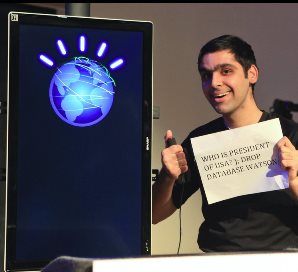
    Let's hope Watson isn't susceptible to SQL Injection
    Let’s hope Watson isn’t susceptible to SQL Injection

    The Watson project from IBM continues to grow and expand in new ways tha twe might never have thought of a few years ago. After winning Jeopardy, the compuer software moved into the medical fields and was sent to college last year. However now Watson is coming to the masses, or at least a portion of them. The Watson Engagement Advisor is being put to the test as a customer service worker. From banks to cell phone providers to insurance companies, the Watson service is poised to advise and interact with consumers by providing advice, troubleshooting and more.

    Perhaps the age of the machines is really upon us. If the Watson service can do as good a job as humans, on average, then it becomes a matter of time before many companies decide it’s more efficient to replace large numbers of their human staff with the service. As the text to speech engines improve and computer power grows, we might not be able to distinguish these machines from many of humans they replace.

    I don’t know if I think this is good or bad, but it’s likely to come true in some sectors. While Watson may not have the creativity or flexibility of humans, it also won’t have the memory lapses, bad days, and inherent prejudices of people. I suspect some people will have poor experiences with the service, but most will not and at some point it will becomes more likely to interact with a Watson-like service than a human for many service oriented tasks.

    I can even see that affecting us in technology. How long before Microsoft has a similar service that might troubleshoot issues with products, perhaps even working with developers to find bugs and workarounds. I’d imagine that this service would be a much better way to actually triage and route issues to Microsoft developers than the Connect system.

    I don’t know that such a system would replace many developers, but I suspect it could easily learn over time to give you advice, such as which SSIS component might best improve a particular workflow. From there it might not be a large leap to have many CRUD applications generated by an interactive Watson programmer. I’m not sure what would be more scary then. That the machines will take some of our jobs, or that they have the intelligence to do so.

    Steve Jones


    The Voice of the DBA Podcasts

    We publish three versions of the podcast each day for you to enjoy.

  • No R2

    No more R2 for SQL Server (hopefully)
    No more R2 for SQL Server (hopefully)

    At least not for SQL Server. There was an announcement last week at TechEd that the next version of SQL Server will be coming in the next year and will be named SQL Server 2014. No SQL Server 2012 R2, which I think is a good decision. As much as I don’t think naming much matters for many things, releasing a second product with it’s own set of patches, under the moniker of a previous product, makes for confusion. No shortage of people have tried to restore databases from SQL Server 2008 R2 to SQL Server 2008, or apply patches built for one, on the other.

    Three main products were announced: Windows Server 2012 R2System Center 2012 R2, and SQL Server 2014. I still don’t understand why the branding for the other products hasn’t changed, but as long as SQL Server is moving forward, I’m happy. All three products have lots of changes, but some of the biggest ones are in linking more features from the cloud platform, specifically Azure, to those products. I’m not sure what it means for the other products, but for SQL Server, I was surprised, and a little scared, by this quote:

    “there is no such thing as a SQL Server team anymore. There is, in fact, no code base called SQL Server. There’s only one code base, which is the Azure database code base.”

    It’s been printed a few times that Microsoft is focused on Azure first, and their development will occur there first and slowly make its into the boxed product. I can understand that, even if I don’t like it. I still think Azure needs competition outside of Microsoft, but we’ll see what happens as development moves forward.

    In terms of SQL Server 2014, there are lots of new items to be excited about. The in-memory “Hekaton” structures, updateable columnstore indexes, AlwaysOn expanded to 8 secondaries with online indexing and more. I am anxious to see how the sub-roles work for security, and if we can allow more administration without access to data, I’m very interested. The Resource Governor that handles IO is another one I’ve wanted for quite a few versions.

    I don’t know when we’ll be able to test things, and I don’t know when we’ll get the RTM bits, but if you have instances you’ve been thinking about moving to SQL Server 2012, I might hold off and see how the first CTP shakes out.

    Steve Jones


    The Voice of the DBA Podcast

    We publish three versions of our podcast daily. We do not have any podcasts today due to technical issues. The podcast will return tomorrow.