Tag: SQLNewBlogger

  • Delete a 2020 GitHub Repository–#SQLNewBlogger

    Another post for me that is simple and hopefully serves as an example for people trying to get blogging as #SQLNewBloggers.

    I have a lot of GitHub repos, sometimes just set up to test something. Recently I wanted to delete one, but most of the docs on the Internet were out of date. So I wrote this one.

    The help docs say to find the Danger Zone for your repo. I didn’t see this as an item under Settings. Instead, I see this.

    2020-06-09 19_35_56-Options

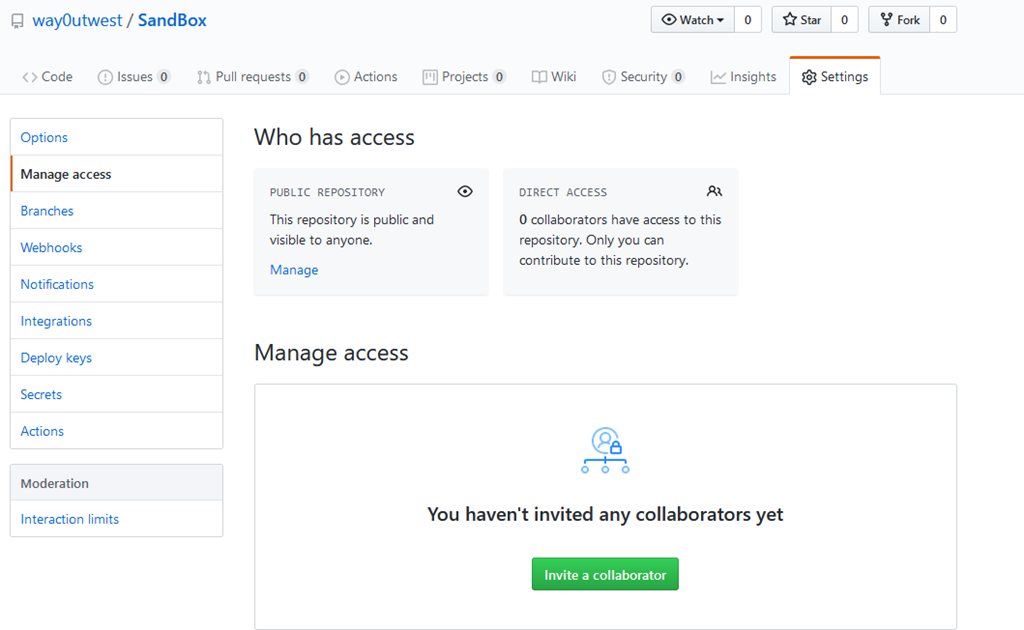
    However, the docs talk about access, so I decided to check the “Manage Access” item on the left. I see options, and since this is a public repo, I see the “Manage” link.

    2020-06-09 19_37_12-Manage access

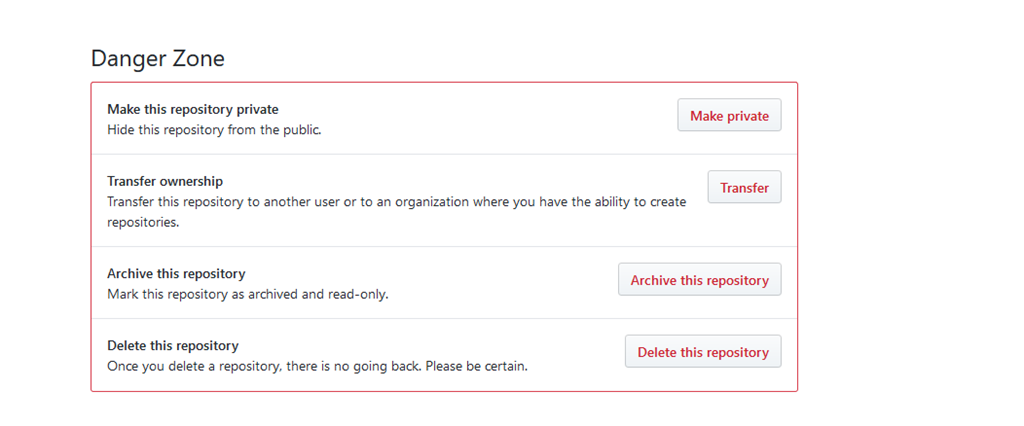
    This actually scrolls me down, which I might have figured out, but in my view, I didn’t see any obvious idea that there was more below the settings. Instead, I find the Danger Zone.

    2020-06-09 19_37_54-Options

    Here I can click “Delete this repository” and it’s gone. Well, it’s gone if I confirm I know bad things happen here.

    2020-06-09 19_38_52-Options

    Be super sure and super careful with this. Be sure you know what happens. If you do this to a private repo, forks go away. That could be really bad in an org.

    SQLNewBlogger

    If you build software, employers want to know how you build software. This post took me 10 minutes to write, and gives someone interviewing me the chance to ask me questions. How, why, etc.

    You can do this for your own reasons.

  • Where are Sequences?–#SQLNewBlogger

    Another post for me that is simple and hopefully serves as an example for people trying to get blogging as #SQLNewBloggers.

    I created a few sequence objects lately to test some things. Since I tended to create and use these, I knew the names. Coming back a few days later, with new queries, I wondered where these were stored. This post shows a few things I learned.

    SSMS

    Where would you think Sequences are stored. They are a weird object, with the NEXT VALUE FOR syntax being used. This feels DDL-ish. However, if we look at the Object Explorer, there aren’t a lot of choices here.

    2020-05-12 10_36_03-SQLQuery7.sql - ARISTOTLE_SQL2017.way0utwest (ARISTOTLE_Steve (56))_ - Microsoft

    The area that seems most promising is Programmability, and when I check here, I see them.

    2020-05-12 10_37_00-SQLQuery7.sql - ARISTOTLE_SQL2017.way0utwest (ARISTOTLE_Steve (56))_ - Microsoft

    If I look at the properties, I can see the settings, which is good. I especially like seeing the current value.

    2020-05-12 10_37_20-Sequence Properties - MyKey


    T-SQL

    Since this is an object, it ought to be query-able from T-SQL. sys.objects is a good place to start, and when I query, I see this:

    Sequence object results from sys.objects

    Good, but not a lot of information here. With SQLPrompt, I do see there is another choice, sys.sequences.

    SQL Prompt Intellisense with sys.sequences

    If I query this DMV, I now see the same information from sys.objects at the top of the result set.

    First few columns of sys.sequences

    If I scroll, I can see more of the metadata I am looking for. Last_used_value is important, though I wonder what caching does here. A post for another day.

    metadata for the sequence from the DMV

    ADS

    Azure Data Studio has an Object Explorer, but it’s not as useful, as you can see. No options to get data. In ADS, I’d query the DMV.

    Azure Data Studio Object Explorer with just a Refresh option

    SQLNewBlogger

    This was a quick post, as I tried to find information. Once I did, which took just a minute, I decided to spend 5-10 minutes assembling this post and trying the various tools to get information.

    A quick look at how I find the information. You could focus a small post in this way on some learning effort you make.

  • Creating a New Sequence–#SQLNewBlogger

    I wrote about sequences in an editorial recently and decided to start using them. Creating one turned out to be surprisingly easy.

    I had a table I’d been logging some data in, with a PK, but no natural key or identity bound to the table. Instead, this was low volume (1x per day) and I just manually adjusted the PK value.

    I decided to create a sequence. As I did this, I found it interesting and consulted the BOL page for some ideas on the options.

    The first part is simple. A name and datatype.

    CREATE SEQUENCE dbo.MyKey as INT

    That makes sense. Next, I need a starting value. In my case, I had 7 values in the table, so I added this:

    START WITH 8

    That gets me what I need. The last part I added was the INCREMENT BY clause. In my case, 1 works fine. My code:

    2020-05-09 09_33_59-SQLQuery7.sql - ARISTOTLE_SQL2017.way0utwest (ARISTOTLE_Steve (56))_ - Microsoft

    The last query is how you get the next value. The NEXT VALUE FOR phrase can be used in various places, but that’s for another day.

    If I needed to bind values, I could use the MINVALUE or MAXVALUE, which I’ll look at in a different post. I could also control caching and cycle values if I needed to.

    SQLNewBlogger

    I actually started a post on binding this to a column and then decided to add this short post in about 5 minutes.

  • Custom Quarantine PoSh Prompt

    Since I’ve been quarantined at home and working in my office, every day is the same. I can’t go to the gym, or coach, or go to the restaurant, or much of anything. As a result, I regularly, forget what day it is.

    Yes, it’s on my phone, but that’s not always open and visible. It’s on my watch, but I have to swing up my wrist and hope it lights up. Or reorient my wrist to see it.

    I have Rainmeter running, which is nice, and I have a summary in the upper corner of my screen, but often I have something covering this.

    2020-05-19 15_04_13-Microsoft Edge

    The time is in the toolbar, but I sometimes hide toolbars to record things. Basically, I forget what day it is and I’m looking for a few hints I can use to make this easier. As I play with PowerShell regularly, I thought it would be good to update my prompt slightly.

    Plus, it would be good PoSh practice.

    Setting a profile. I’ve seen a few posts on customizing the prompt, and they all say I need a function, called prompt, in my profile. I found this article, which gave me a good idea. Put the time in the prompt.

    I then had to figure out how to get to my profie. It turns out “notepad $PROFILE” in a PoSh prompt will get you there. If you don’t have a profile, you’ll see this:

    2020-05-19 14_55_12-Notepad

    Say yes, and then add some code. I had to look up the Format options and experiment a bit to decide how I wanted things to look.

    function prompt {
            $lastResult = Invoke-Expression '$?'
            if (!$lastResult) {
                    Write-Host "Last command exited with error status." -ForegroundColor Red
            }
            Write-Output "${msg}$(
                    # Show time as 12:05PM and day of week
                    Get-Date -Format "dddd HH:mm"
                    # Show current directory
            ) $(Get-Location)> " 
    }

    I saved this and now when I get a new PoSh prompt, I get this:

    2020-05-19 15_01_53-PoSh

    Now I easily know the day and time when I’m working in a PowerShell terminal. This also shows up in my Visual Studio Code terminal as well, since that’s just a PoSh environment.

    SQLNewBlogger

    This was a quick thing I did in about 5 minutes to customize my environment, and help me be more productive. A happy employee works smoother.

    I decided to show off how I did this and spend a quick 10 minutes writing down and documenting what I did.