Tag: SQLNewBlogger

  • Using WAITFOR to Test Slow Code–#SQLNewBlogger

    Another post for me that is simple and hopefully serves as an example for people trying to get blogging as #SQLNewBloggers.

    One thing I needed to do lately was test how a calling program would respond to slow code. I decided to use a normal query, but add a WAITFOR() to simulate different delay levels. However, I had to look up the syntax for the call and I decided to blog about it.

    WAITFOR DELAY

    The WAITFOR call isn’t a function. I’ve written about that before. Instead, this is listed as a control-of-flow element in the language.

    I have a rough idea of how this works. I use

    WAITFOR DELAY

    as the basic syntax. SQL Prompt helps me here, since looking this up is a pain and slow. I know there is a time element in here, but I always worry I’ll pick the wrong time and then sit for a long time testing.

    The key is this format: hh:mm[[:ss].mss]

    To delay for 2 minutes, I write this:

    WAITFOR DELAY '00:02:00'


    That gives me what I need, and using a string variable, I can control this delay programmatically.

    SQLNewBlogger

    This is a good example of learning a piece of code and writing about it. Short, simple, show how this one works in T-SQL. Add the why, show some code, and results. How you use it, and what you learned.

    This was a 10 minute post.

  • Connecting to SSAS–#SQLNewBlogger

    Another post for me that is simple and hopefully serves as an example for people trying to get blogging as #SQLNewBloggers.

    In a previous post, I installed SSAS on a machine. Now I need to connect to it. This post covers a quick, how do I do that.

    Do connect in SSMS, you can use the Object Explorer. If you click the down arrow on the Connect button, you’ll see choices.

    2020-05-04 10_18_51-

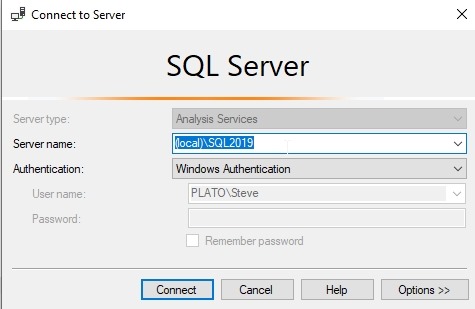
    If you pick SSAS, you get a similar connection dialog. The SSAS instance is named the same as your base instance. In this case, I had a named instance, so I enter the same name as I’d use for the database engine.

    2020-05-04 10_18_59-Connect to Server

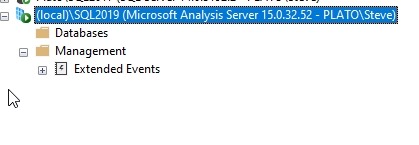
    There’s not much to see, but I’m connected. My installation is working.

    2020-05-04 10_19_15-SQLQuery4.sql - Plato_SQL2017.way0utwest (PLATO_Steve (89))_ - Microsoft SQL Ser

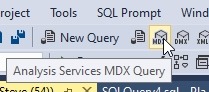
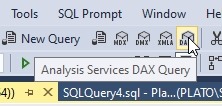
    I could also connect with  a query window. The toolbar has a couple choices.

    For MDX:

    2020-05-04 10_22_04-SQLQuery5.sql - Plato_SQL2017.way0utwest (PLATO_Steve (54)) - Microsoft SQL Serv

    For DAX:

    2020-05-04 10_22_19-SQLQuery5.sql - Plato_SQL2017.way0utwest (PLATO_Steve (54)) - Microsoft SQL Serv

    For either one of these, the connection process is the same.

    SQLNewBlogger

    After the post where I installed SSAS, I needed to test it. Rather than add that to the post, I ran through the steps, grabbed sceenshots, and then wrote this post as a second one.

    Focus on one thing, not multiple things, in a post.

  • Adding Analysis Services (SSAS) to your SQL Server instance–#SQLNewBlogger

    Another post for me that is simple and hopefully serves as an example for people trying to get blogging as #SQLNewBloggers.

    This is a fairly simple task, but recently I needed to test something in SSAS. I hadn’t installed this on my machine, so I had to add it. It’s simple, but worth a quick post.

    The way to add SSAS (Analysis Services) to your instance is to run the setup program for SQL Server. When you do this, pick the Installation tab from the left menu.

    2020-04-30 11_08_06-SQL Server Installation Center

    From here, I want the first item (New SQL Server stand-along installation or add features to an existing installation). SSAS is a new feature.

    When this starts moving, be sure you stop on the Installation Type screen and move the radio button to the “Add features” item.

    2020-04-30 11_08_42-SQL Server 2019 Setup

    The next screen is where you will check the Analysis Services box.

    2020-04-30 11_09_26-SQL Server 2019 Setup

    You will then get an SSAS config screen. In my case, I was testing something with the Tabular model. If you don’t know which to choose, you need to research this. Here are a couple links:

    You also need an account here. I typically add my local account here for dev machines.

    Don’t forget to reset the data directory if you need to do this.

    2020-04-30 11_09_53-SQL Server 2019 Setup

    That’s it. Let the setup run and you’ll have SSAS installed.

    2020-04-30 11_12_38-SQL Server 2019 Setup

    How do you check? That’s another post.

    SQLNewBlogger

    This is a really simple task, but it’s something that you should be familiar with. I needed to do this, and just documented my task, this one simple thing.

    This can drive interviewers to ask about how I did this, why, what I tested, etc. This helps control the interview and the direction in which someone might query your knowledge.

    As you do small tasks, write about the specific task. If you want to cover what you did after this task, write a second post.

  • Dropping a Database Now–#SQLNewBlogger

    Another post for me that is simple and hopefully serves as an example for people trying to get blogging as #SQLNewBloggers.

    One of the things I find myself doing often with demos is dropping databases. I may create and drop databases often to try some technique out or practice a skill. I’ve done this for years, going back to SQL Server 4.2, using small databases as quick lab spaces.

    A common problem for me is that often a database is in use, often because of another connection from ADS or SSMS. This is actually a common problem for many people in teams as well, when someone else might be holding an open connection. If you’ve tried to run a simple DROP DATABASE, you know this doesn’t work. In the SSMS GUI, we have a “Close existing connections” option, but nothing with the DROP DATABASE command.

    2020-04-21 11_24_00-Delete Object

    The best solution I’ve found is on StackOverflow. Set the db to single user, which allows you to use the WITH ROLLBACK IMMEDIATE option. This terminates any existing connections and rolls back their transactions.

    Here’s the syntax:

    ALTER DATABASE ClientDemo SET SINGLE_USER WITH ROLLBACK IMMEDIATE

    If I do that, I can then run this, without any issues.

    DROP DATABASE ClientDemo

    SQLNewBlogger

    This is a fairly simple task, and one I’ve done often. I’ve never written about it, mostly because I never took the time. Solving this issue was something that took about 5 minutes of Internet research. I had to check that the DROP command hadn’t added the option. I know this has been discussed, but apparently, never added.

    In any case, since I had to do this for work, I made a new notes, snapped a screenshot, and saved a few links. I do this with OpenLiveWriter. Later I took 10 minutes and typed this up, including this section on how and why.

    This is a quick way to show some knowledge, problem solving, cement learning, and give the next interviewer something to ask you about. Give it a try.