Tag: SQLNewBlogger

  • Restoring an Expired Certificate–#SQLNewBlogger

    Another post for me that is simple and hopefully serves as an example for people trying to get blogging as #SQLNewBloggers.

    One common task that you might need to handle if you work with encryption is dealing with a certificate. Whether this is for TDE, SSL, or something else, you will want to ensure that you know how to restore a certificate.

    I’ve written about this before (restoring a certificate), but what about restoring an expired certificate? If you forget to replace one in TDE, does it still work?

    Tl;dr yes.

    Validating a Restore

    I backed up an certificate from one instance that had expired. I used this in a customer demo a few years ago, and it was on my system. Here’s what I saw.
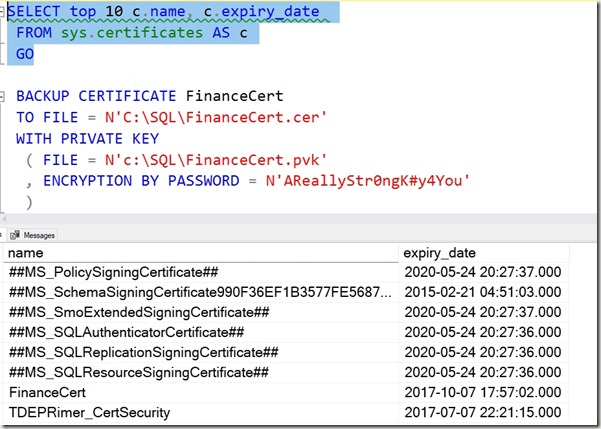
    2019-08-23 14_35_57-SQLQuery1.sql - Plato_SQL2014.MASTER (PLATO_Steve (57))_ - Microsoft SQL Server

    I ran the backup script shown to get the expired backup of the cert.

    Next, I connected to a new instance and ran this.

    CREATE CERTIFICATE FinanceCert
    FROM FILE = N'C:\SQL\FinanceCert.cer'
    WITH PRIVATE KEY
    (
         FILE = N'c:\SQL\FinanceCert.pvk',
         DECRYPTION BY PASSWORD = N'AReallyStr0ngK#y4You'
    );

    This completed, but I get the warning that this cert is expired. It’s a warning. SQL Server will still use the certificate to decrypt anything necessary, like a DEK for TDE.
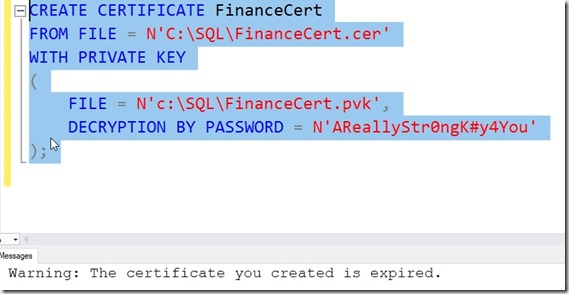
    2019-08-23 14_37_20-SQLQuery2.sql - Plato_SQL2017.master (PLATO_Steve (55))_ - Microsoft SQL Server

    This is a good reason to keep an eye on certificates, as someone might be worried about expired certs. They work, but some people (auditors) do not like to see these in use.

    To change the certificate used, see Key Rotation in TDE.

    SQLNewBlogger

    Anything DR related is a good skill to showcase. Blog about your practicing different skills. The writing will cement the skills further in your mind and employers will appreciate you showing the way you handle things.

  • Finding SQL Configuration Manager in Windows 10–#SQLNewBlogger

    Another post for me that is simple and hopefully serves as an example for people trying to get blogging as #SQLNewBloggers.

    I went to check a network protocol setting for SQL Server the other day on my (newish laptop) and was disappointed.

    2019-08-15 08_26_25-Settings

    This is Windows 10 and on this machine, I’d installed SQL Server 2014, 2016, and 2017. I thought that at least SQL Server 2014 had the SQL Server Configuration Manager installed, but it appears not. I know that this has been a tool that sometimes gets hidden in recent versions, but I was sure I’d seen it here.

    Either I’m wrong or Windows 10 has changed.

    In any case, the Computer Management MMC plugin has it. You can run this in a couple ways. First, hit the Start menu and type “Computer Man”. You’ll get something like this and can run this:

    2019-08-15 08_29_15-Finding SQL Configuration Manager in Windows 10 - Open Live Writer

    The other choice is to his Win+R (run) and type “compmgmt.msc”. Both will get you here:

    2019-08-15 08_30_06-Computer Management

    If you now expand the Services and Applications, you’ll see the SQL Server Configuration Manager and the various items underneath it. For me, the top one (most recent?) was the SQL Server 2017 version. The others were below as other snap-ins.

    2019-08-15 08_31_03-Computer Management

    The good thing about this is I can also manage local users and see the local logs, things I sometimes need when configurating SQL Server.

    SQLNewBlogger

    An easy post that solves a common problem, and shows I know some tips and tricks. How would you rewrite this post? You could show this knowledge with a quick 10 minutes of your time.

  • Always Use Roles–#SQLNewBlogger

    Another post for me that is simple and hopefully serves as an example for people trying to get blogging as #SQLNewBloggers.

    Which of these is more complex?

    GRANT SELECT ON dbo.Customer TO JoeDev

    or

    CREATE ROLE Sales
    GRANT SELECT ON dbo.Customer to Sales
    ALTER ROLE Sales ADD MEMBER JoeDev

    The second one, right? What if I change this slightly. I have this code:

    GRANT SELECT, INSERT, UPDATE ON dbo.Customer TO JoeDev
    GRANT SELECT, INSERT, UPDATE ON dbo.Customer TO SallyDev
    GRANT SELECT, INSERT, UPDATE ON dbo.Customer TO SaraDBA

    or

    GRANT SELECT, INSERT, UPDATE ON dbo.Customer TO Sales
    ALTER ROLE Sales ADD MEMBER JoeDev
    ALTER ROLE Sales ADD MEMBER SallyDev
    ALTER ROLE Sales ADD MEMBER SaraDBA

    What if I changed this slighly and told you that between the GRANTs to users, a few months of time had passed and you had to go figure out which rights JoeDev had because the request was “give Sally the same access as Joe.”

    That’s the type of thing I’ve done often as a DBA. I’ve often had to move permissions between users, duplicate the access, or quickly remove lots of access from multiple users.
    While it seems like there are just two extra statements using roles, there is often lots of time tracking down security and building statements to duplicate rights.

    Always use roles and your life will be easier.

    Plus you can script the permissions for objects once, log them, and forget about them. From that point forward you’re just adding/dropping users from roles.

  • Lengthen a Primary Key–#SQLNewBlogger

    Another post for me that is simple and hopefully serves as an example for people trying to get blogging as #SQLNewBloggers.

    I saw a post recently where someone needed to increase the size of a PK and was getting a table rebuild message in SSMS. This is short post to show that isn’t required.

    First, let’s create a table and give it some data. Note that the PK is set to a specific size.

    CREATE TABLE dbo.Document
    (DocumentKey NVARCHAR(5) NOT NULL CONSTRAINT DocumentPK PRIMARY KEY
    , DocumentName NVARCHAR(200)
    , DocumentDate DATETIME2
    )
    GO
    INSERT dbo.Document
         (
             DocumentKey
           , DocumentName
           , DocumentDate
         )
    VALUES
         (N'ABC23', N'Something very interesting', '2019-01-02'),
         (N'QNI43', N'An adventure you admire', '2019-02-02'),
         (N'MNT33', N'Magnets describing life', '2019-03-04'),
         (N'DEF25', N'Time for nothing', '2019-03-12'),
         (N'HIJ54', N'Dreams of the dark', '2019-04-17')
    GO
    SELECT top 10
      *
      FROM dbo.Document AS d
    GO

    If I try to insert data that’s larger, I’ll get this message:

    2019-04-16 08_58_43-SQLQuery10.sql - Plato_SQL2017.sandbox (PLATO_Steve (53))_ - Microsoft SQL Serve

    In SQL 2019, I’ll get a better error, but for now, this shows me a limitation of my key.

    Now I’ll increase the size of the key. I use the ALTER TABLE … ALTER COLUMN statement.

    ALTER TABLE dbo.Document ALTER COLUMN DocumentKey NVARCHAR(7) NOT NULL
    GO

    Now, I’ll run my failed insert again:

    2019-04-16 09_00_00-SQLQuery10.sql - Plato_SQL2017.sandbox (PLATO_Steve (53))_ - Microsoft SQL Serve

    As you can see, I can increase the size of the PK without rebuilding the table. Making it smaller is a post for another day.

    SQLNewBlogger

    This was a quick repro I set up to answer the question for myself and others. I thought I could do this and spent five minutes proving it.

    The longest part of this post was the test data. You could do the same thing, maybe showing how this relates to a child table as well. In fact, start today and you might beat me to creating that post.