Tag: SQLNewBlogger

  • Identity Gaps–#SQLNewBlogger

    Another post for me that is simple and hopefully serves as an example for people trying to get blogging as #SQLNewBloggers.

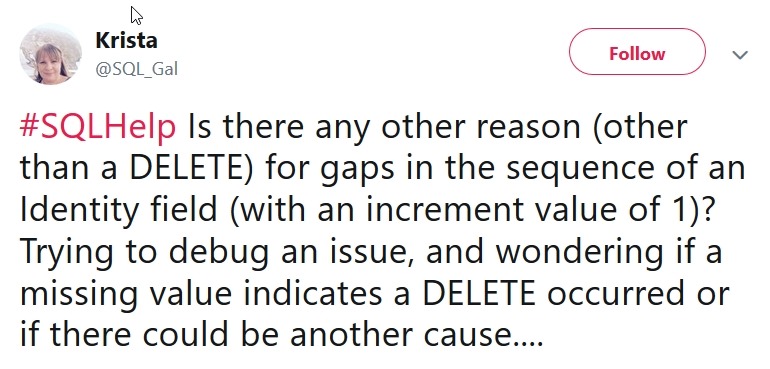
    Many people think that that an identity property will ensure a consistent, increasing numerical value. I ran across this tweet that indicates that situation.

    2018-12-21 12_13_51-Krista on Twitter_ _#SQLHelp Is there any other reason (other than a DELETE) for

    This isn’t really true, for many reasons, but in this post I’ll look at the possible reasons we get gaps in identity values.

    Normal Operation

    Let’s start with a basic table that contains an identity value. I’ll use this code:

    CREATE TABLE dbo.SalesOrderHeader
    ( OrderKey INT IDENTITY(1, 1)
    , CustomerName VARCHAR(30)
    )
    GO

    Now I can insert a few rows. Note that the results shown below the code will contain increasing values for the OrderKey.

    INSERT dbo.SalesOrderHeader (CustomerName) VALUES ('Andy')
    INSERT dbo.SalesOrderHeader (CustomerName) VALUES ('Brian')
    INSERT dbo.SalesOrderHeader (CustomerName) VALUES ('Steve')
    INSERT dbo.SalesOrderHeader (CustomerName) VALUES ('Anna')
    GO

    Each of these inserts is a separate transaction, and they cause the identity to increment.

    2018-12-21 12_04_17-SQLQuery5.sql - Plato_SQL2017.sandbox (PLATO_Steve (59))_ - Microsoft SQL Server

    Deleting Rows

    This is noted in the tweet as a cause, but let’s test this.

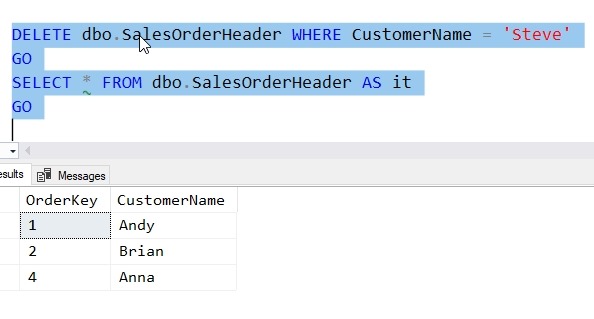
    One of the common ways that we get gaps in identity values is when rows are deleted. Let’s remove the row with Steve in it.

    2018-12-21 12_06_46-SQLQuery5.sql - Plato_SQL2017.sandbox (PLATO_Steve (59))_ - Microsoft SQL Server

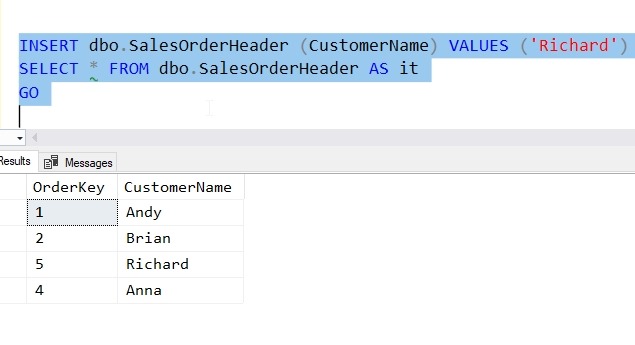
    I clearly have a gap in OrderKey here now. What happens if we add a new row? The identity value is built for (some) efficiency and doesn’t fill the gap. Only the next value is kept. We insert a row and get a 5.

    2018-12-21 12_08_00-SQLQuery5.sql - Plato_SQL2017.sandbox (PLATO_Steve (59))_ - Microsoft SQL Server

    As a side note, there is no index on this table, and no ORDER BY clause, so you can clearly see that there isn’t a reason why I should expect the ORDERKEY column to be returned in numerical or even insert order.

    The Rollback

    One of the more common occurrences with inserts is a problem with the value. For example, in this table, I have allocated 30 characters. What happens if I run this code?

    INSERT dbo.SalesOrderHeader (CustomerName) 
       VALUES ('A Really Long Name Van Something The Third')

    I get an error, which is shown here.


    Checking the table, I have no value:

    2018-12-21 12_11_17-SQLQuery5.sql - Plato_SQL2017.sandbox (PLATO_Steve (59))_ - Microsoft SQL Server

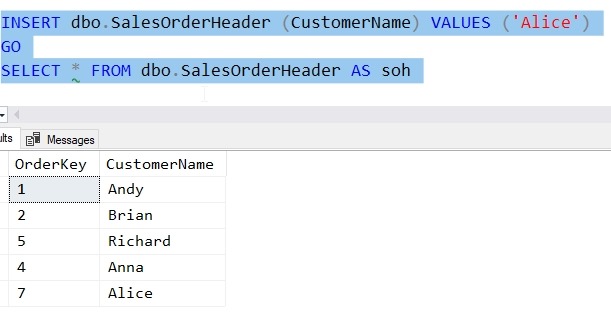
    Let’s insert a new value and see.

    2018-12-21 12_12_00-SQLQuery5.sql - Plato_SQL2017.sandbox (PLATO_Steve (59))_ - Microsoft SQL Server

    We get a gap. The value “6” was skipped because of the error. The identity was allocated, but the rollback of the transaction due to the error did not rollback the identity sequence.

    Reseeding the Property

    One of the other ways to miss a value is directly reseeding the table. I can use the DBCC CHECKIDENT function to accomplish this. In my case, let’s run this code and set the identity value to 20.

    DBCC CHECKIDENT(SalesOrderHeader, RESEED, 20)
    GO

    Now I can insert new values and I’ll get these results.

    2018-12-21 12_17_28-SQLQuery5.sql - Plato_SQL2017.sandbox (PLATO_Steve (59))_ - Microsoft SQL Server

    The identity value was set to 20 and the next insert will increment this and take 21, leaving a gap from 8 to 20.

    Be Careful

    Don’t depend on the identity property to give you uniqueness, consecutive values, or avoid duplicates. It is up to you to code properly to account for these values.

    SQLNewBlogger

    This post came about from helping someone understand the problems and limitations. I wrote this in about 20 minutes (with setup and testing) to ensure that I understood what I was explaining to someone.

    You could write something similar to show that you know the ways in which identity works.

  • Restarting a Sequence–#SQLNewBlogger

    Another post for me that is simple and hopefully serves as an example for people trying to get blogging as #SQLNewBloggers.

    As part of my experiments with the sequence object, I wanted to see what allows me to restart a sequence at a new value. This is useful in a few situations, some of which I want to see in this post.

    Starting Over

    One common scenario might be where I create a sequence and test it a few times, but don’t want those values lost. For example, Suppose I create this sequence and test it a few times.

    CREATE SEQUENCE Counters.TopTen
    START WITH 1
    MAXVALUE 10
    CYCLE
    GO
    SELECT NEXT VALUE FOR Counters.TopTen
    GO
    SELECT NEXT VALUE FOR Counters.TopTen
    GO

    I don’t want the first two values to be removed from the sequence. Instead, I want to get the next number back to 1. I could run 8 more SELECTs to allow the sequence to cycle, but if you’re like me, you’ll end up executing this one too many times and then have to repeat the experience.

    Instead, I can use the ALTER command to fix this.

    ALTER SEQUENCE counters.TopTen RESTART WITH 1

    Of course, I’ll test this with a SELECT, but once I am confident this behaves as expected, I’ll re-run the ALTER again.

    Going Backwards

    One common situation might be a case where an application requests a number of sequence numbers for a situation, but they never get inserted. Suppose I set up an insert statement to load some data in a table, but a key error or some other problem prevents the inserts. I don’t want those values to be lost, so I want to restart numbering.

    As an example, I find that one of my sequences has the value, 41.

    2018-12-05 15_49_08-sequences.sql - dkrSpectre_SQL2017.sandbox (DKRSPECTRE_way0u (65))_ - Microsoft

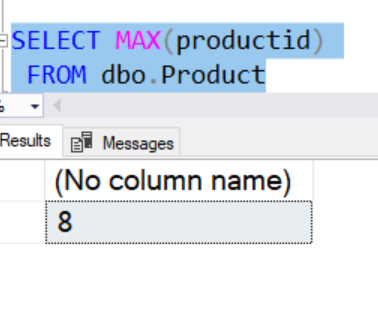
    However, this is because a load of new products failed. The last number used in the table was 8.

    2018-12-05 15_49_29-sequences.sql - dkrSpectre_SQL2017.sandbox (DKRSPECTRE_way0u (65))_ - Microsoft

    In this case, I want to reset the sequence object to 9, so let’s do that.

    ALTER SEQUENCE Counters.Products RESTART WITH 9

    Now I can proceed on loading products into this table, using the sequence object to get the next value.

    SQLNewBlogger

    This was a continuation of a series of posts on the sequence object. As I continued to experiments, I captured the code and some images to use in posts, writing this up as I had time.

    For this post, I took about 10 minutes of experimenting and then another 5-10 trying to sort out some of the experiments into an area. This writeup was about 10 more minutes.

  • The Default Frame for Window Functions

    Another post for me that is simple and hopefully serves as an example for people trying to get blogging as #SQLNewBloggers.

    This bites me constantly, and I was reminded of this while watching Kathi talk at #SQLintheCity. When you write a Window function, there is an implicit default frame for the windows that you might not be aware of.

    For example, if I have this data:

    create table WindowDemo

    ( groupid int,

    letterid int

    , letter varchar(10))

    GO

    insert WindowDemo

    values

    ( 1, 1, 'A')

    , ( 1, 2, 'B')

    , ( 1, 3, 'C')

    , ( 2, 4, 'D')

    , ( 2, 5, 'E')

    GO

    and I run this code:

    select groupid
    , letterid
    , last_value(letter) over (partition by groupid order by letterid)
    from WindowDemo

    I get this:

    2018-12-12 15_29_02-● SQLQuery3 - Azure Data Studio

    Not what I expected. I would think the last value for each groupid is the largest letter. Instead,  I have a running total of sorts.

    The Default Framing

    There is a framing clause that I can use after the ORDER BY in the OVER clause. The default frame is RANGE UNBOUNDED PRECEDING AND CURRENT ROW. At least, this is what appears when you include an ORDER BY clause. Many of us do this, but still get confused with the LAST_VALUE() and FIRST_VALUE functions.

    What I really want is a complete set of data, which is either starting from the current row to the end, or  includes all values. If I modify my framing clause, I’ll get what I expect.

    select groupid

    , letterid

    , last_value(letter) over (partition by groupid order by letterid rows between unbounded preceding and unbounded following)

    from WindowDemo

    This gives me:

    2018-12-12 15_36_36-● SQLQuery3 - Azure Data Studio

    That’s what I’d expect for a LAST_VALUE().

    SQLNewBlogger

    This has bitten me a few times, so I decided to write about it. I can show that I solved this issue, which is what my next boss wants to see. The other side effect is that blogging helps me remember how this works.

    This took about 15 minutes, mostly to reproduce the demo that was similar to my issue, but simpler to explain.

  • Adding the Constraint Name to the PK at the End of Create Table–#SQLNewBlogger

    Another post for me that is simple and hopefully serves as an example for people trying to get blogging as #SQLNewBloggers.

    A good habit to get into is to explicitly name your constraints. I try to do this when I create tables to be sure that a) I have a PK and b) it’s named the same for all environments.

    I can create a PK inline, with a simple table like this:

    CREATE TABLE Batting
       (
            BattingKey INT NOT NULL CONSTRAINT BattingPK PRIMARY KEY
            , PlayerID INT
            , BattingDate DATETIME
            , AB TINYINT
            , H TINYINT
            , HR tinyint
       )
    ;

    This gives a primary key, named “BattingPK, that I can easily see inline with the column.

    Not everyone likes this, and I do run into clients and customers that want the keys separated from the column. This is fine, and I understand that this explicitly calls out the keys separately from the column.

    This is an easy change to my code.  I move the CONSTRAINT part to the end, as a separate item in the column list, and add the column(s) that I want to use in the constraint.

    CREATE TABLE Batting
       (
            BattingKey INT NOT NULL
            , PlayerID INT
            , BattingDate DATETIME
            , AB TINYINT
            , H TINYINT
            , HR TINYINT
            , CONSTRAINT BattingPK PRIMARY KEY (BattingKey)
       )
    ;

    As you can see, inlining names for constraints is pretty easy, and it’s a good practice to get in the habit of adopting.

    If I didn’t do this, I’d get a system generated name, which is fine, but the constraint name would then be different on every system where I deployed this object. Since I often want to test something on one system and deploy on another, future coding gets much more complex than it is by just doing this from the start.

    SQLNewBlogger

    This was a quick 5 minute post for me, following a short session teaching a client how to add the constraint to their table code.