Tag: SQLNewBlogger

  • Fun with Savepoints–#SQLNewBlogger

    Another post for me that is simple and hopefully serves as an example for people trying to get blogging as #SQLNewBloggers.

    I haven’t spent a lot of time with savepoints, but I did find a question recently and thought I’d take a moment to dig into how they work. They are interesting, and they can be useful for you in certain situations.

    Warning: Anything involving transactions can be tricky, so be sure you test, test, test and check out how things work with a wide variety of situations, including some you might not expect.

    Here’s a basic setup. I’ll create a table to log some actions.

    CREATE TABLE TransLogger
    (ID INT IDENTITY(1,1) NOT NULL CONSTRAINT TransLoggerPK PRIMARY KEY
    , LogMessage VARCHAR(200)
    )
    GO

    Now that I have a table, let’s do something in a transaction. I’ll start a transaction, make two inserts, but set a savepoint between them

    BEGIN TRANSACTION
    

    INSERT dbo.TransLogger (LogMessage) VALUES ('First insert inside transaction')

    SAVE TRANSACTION Firstsave

    ROLLBACK TRANSACTION Firstsave

    COMMIT

    SELECT top 10
      *
      FROM dbo.TransLogger AS tl

    If I look at the results, I see this:

    2018-11-12 16_46_08-SQLQuery8.sql - Plato_SQL2017.sandbox2 (PLATO_Steve (57))_ - Microsoft SQL Serve

    That makes sense. I inserted this row (I’ve been testing, so that’s why it’s 11), and marked a savepoint with the SAVE TRANSACTION Firstsave line. Then I rollback a transaction to this savepoint, which does nothing. Finally I commit. I see my one row.

    Let’s add something. I’ll add a second item, and decide to roll it back.

    DECLARE @rollback INT = 1
    

    BEGIN TRANSACTION

      INSERT dbo.TransLogger (LogMessage) VALUES ('First insert inside transaction')
       SAVE TRANSACTION Firstsave

      INSERT dbo.TransLogger (LogMessage) VALUES ('Second insert inside transaction')
       IF @rollback = 1
         ROLLBACK TRANSACTION Firstsave

    COMMIT

    SELECT top 10
      tl.ID, tl.LogMessage
      FROM dbo.TransLogger AS tl

    Note I’ve added a variable so I can decide to rollback or not. I’d often have some condition or error handling that might cause a rollback, so this simulates that. Note that work before the savepoint is committed, but work after is removed with the ROLLBACK TRANSACTION Firstsave.

    My results are a single row. Note, I cleared the table between runs.

    2018-11-12 16_49_42-SQLQuery8.sql - Plato_SQL2017.sandbox2 (PLATO_Steve (57))_ - Microsoft SQL Serve

    Savepoints give me a place to commit work if I need it before doing more. This potentially allows me to capture some changes and not others if I don’t want to fail my entire transaction.

    Personally, if I’m doing this, I would likely just have two transactions if I can have one commit without the other.

    SQLNewBlogger

    A few minutes of experimenting gave me a quick post. I need to do more, and certainly test more, but this is a basic idea of what savepoints are. You can write something similar.

  • Setting Memory–#SQLNewBlogger

    Another post for me that is simple and hopefully serves as an example for people trying to get blogging as #SQLNewBloggers.

    I had a great time away, and upon my return, I found lots of emails and messages to review from work. One of these was a note that Kevin Hill had updated his article on misconfigured SQL Server instances. I’d worked with Kevin before I left and thought this was a great topic. As I reviewed his update, I started thinking about one thing: memory.

    I typically run 3-4 instances on a host. I usually do this to test different versions and their effect on Redgate products or to review questions from the SQL Server community. I don’t have unlimited memory, however, and need to be careful. At times I’ll set an older version of SQL Server to not start so that I don’t have too much memory pressure for my regular tasks.

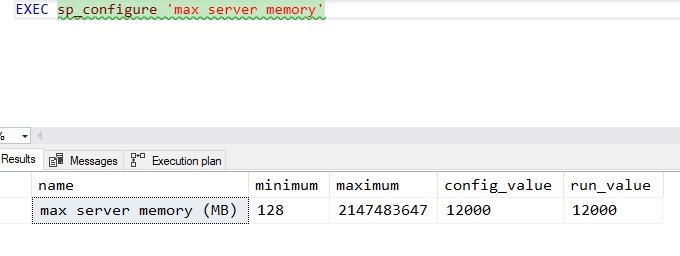
    I’d like to think I do a good job of setting up SQL Servers, and I did a double check on one of my machines. Sure enough, I had:

    2018-11-02 14_49_19-SQLQuery3.sql - Plato_SQL2016.sandbox (PLATO_Steve (62))_ - Microsoft SQL Server

    This was my SQL 2016 instance, which is the main one. For the 2014 and 2017 instances, I’d reduced this to 4096 as I use those less frequently. However, for SQL Server 2019, I got this:

    2018-11-02 14_51_00-SQLQuery3.sql - Plato_SQL2019.master (PLATO_Steve (57))_ - Microsoft SQL Server

    The error is expected, since I set this up quickly after it was released (and before vacation) and hadn’t done anything. In this case, I need to enable advanced options.

    I do that like this:

    EXEC dbo.sp_configure 'show advanced options', 1
    GO
    RECONFIGURE WITH OVERRIDE

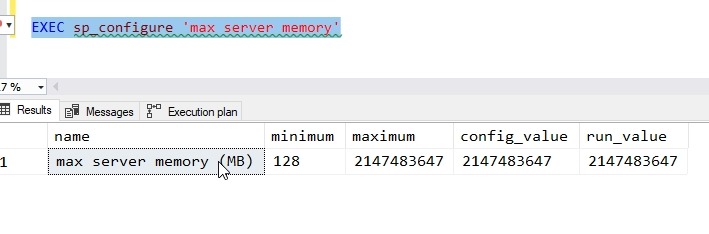
    That will turn on the option, so when I run the memory command it works.

    2018-11-02 14_52_55-SQLQuery3.sql - Plato_SQL2019.master (PLATO_Steve (57))_ - Microsoft SQL Server

    That’s not ideal, so let’s lower it to 4096. I can do that like this:

    EXEC sp_configure 'max server memory', 4096
    GO
    RECONFIGURE WITH OVERRIDE

    This will change the memory SQL Server uses. The doc pages describes this, and since I’ve done little on this instance, it hasn’t used much memory. My setting doesn’t do much, but it will prevent more pressure from activity in the future.

    SQLNewBlogger

    This was a quick post. Once I read the article and realized I ought to check things, I also realized this is a nice, short topic to write about and share with others. If you haven’t checked the settings on your dev machine, do so.

    And write about it.

  • How does data file size relate to log file size?–#SQLNewBlogger

    Another post for me that is simple and hopefully serves as an example for people trying to get blogging as #SQLNewBloggers.

    The other day I saw someone asking about a way to determine which databases have a log file larger than a data file. It’s an interesting query, but not necessarily an issue. I did query as to what their thinking was, and this was more a first step to investigation rather than an alert or concern. That’s good, because that’s what this query is.

    I’ll write a query to check this in another post, but here I wanted to just discuss the meaning of data file size and log file size.

    Data File Size

    In most databases, you likely have a single .mdf file. Some might have more with other .ndf files, and others could have Filestream/MOT objects as well. The file sizes here are a combination of two things.

    1. your data
    2. free space allocated to the database for data in tables and objects, but not used.

    These files make up your data, and are roughly the equivalent of the characters in a Word file, plus any whitespace you’ve added. This isn’t quite right as Word doesn’t pad out some allocation, but it’s similar. If I create an 8MB file for my database, I use 8MB on disk. This whether I’ve added a 1 table with 1 character, 1MB, or 7.999MB of data.

    Log File Size

    The log captures transactions, or the changes to my data. This includes inserts, updates, and deletes. The size of the log file is an indication of a couple things.

    1. workload
    2. log backups

    The more activity in my database, the more log data I’ll capture. A busy database could have a lot of activity, as each change needs to be recorded. If I have a lot of inserts, I’ll grow my data file and my log file. If I have a lot of updates, I grow my log file, but may or may not grow my data file. If I have a lot of deletes, I grow the log file, but the data file remains the same, though I would have the option to shrink it.

    Side Note: DO NOT USE AUTOSHRINK

    The second influencing factor is the log backup frequency. If I generate 24MB of log records every day, do I need a 24MB log file? Not necessarily.

    I could run log backups every hour (24 a day), which would mean I only need a log file to contain the largest amount of activity that occurs during any hour. If my log gets even levels activity every hour, I’d need roughly 1MB of log file space, which would then be marked for reuse after every hourly log backup. Of course, I’d want some padding so maybe 2MB is enough.

    If I get 4MB of log record generation every hour during the business day and none outside those hours, maybe I need a 4 or 5 MB log file.

    If I’m in simple mode, I need a log file big enough to contain my largest transaction x2 (to allow for rollback).

    Is the Log File Larger than the Data File Normal?

    I wouldn’t say this is common, but it’s perfectly normal, if you follow a certain pattern in your database. If your workload consists mostly of updates or deletes, and few inserts, you might have a need for a large log file. This would also mean the level of activity is larger than your data size, and that you don’t have frequent enough log backups to allow for a lower size.

    Have I seen this? Yes.

    I managed a database for our other sysops that powered our anti-virus application. This tracked the activity for all workstations and servers. The number of nodes was relatively fixed (small additions and deletions every day or so), but the number of transactions was high. We had reporting every 30 minutes, which was really changing statuses for the nodes, so constant update activity. To prevent the server from being overloaded, and because the data was mostly replaceable, we only backed up the log every 4 or 6 hours.

    In this case, the change activity was higher than the data size, so we had a large log and a slightly smaller data size. Not common, but it happens.

    SQLNewblogger

    This is a great post for everyone to write. Explain what you understand and think about data size v log size, use your own words, and examples from your career.

  • Finding Objects in a Schema #SQLNewblogger

    Another post for me that is simple and hopefully serves as an example for people trying to get blogging as #SQLNewBloggers.

    One of the things I needed to do recently was move some objects from one schema to another. I wrote about moving an object between schemas recently, but another part of that process was finding  the objects to move.

    This is a quick post on how to find the objects in a schema. To start, here are a number of objects in a test database.

    2018-09-17 19_25_07-SQLQuery1.sql - dkrSpectre_sql2017.sandbox (DKRSPECTRE_way0u (68))_ - Microsoft

    A schema has a name, which is the way that we would search for related objects. That means I want a parameter for my query, so I’ll start with a variable to store the name. For me, I’ll use a well named variable like this:

    DECLARE @schema VARCHAR(100) = 'SallyDev';

    Now I have a schema name, where do I find schema data? There is a DMV called sys.schemas, which contains a bit of meta data. If I query that, I see this:

    2018-09-17 19_26_25-SQLQuery1.sql - dkrSpectre_sql2017.sandbox (DKRSPECTRE_way0u (68))_ - Microsoft

    I can see my SallyDev schema, so I know I’ll query this DMV.

    The other information I need is the object data, which is in sys.objects. I query that for the various data I want, but I want to limit data by the schema. In sys.objects, there is a schema_id, which is the data I’ll join with from sys.schemas.

    When I do that, I build a query like this:

    DECLARE @schema VARCHAR(100) = 'SallyDev';
    SELECT
            o.type_desc,
            s.name AS 'Schema Name',
            o.name AS 'Object Name',
            o.object_id
    FROM sys.objects o
         INNER JOIN sys.schemas s ON s.schema_id = o.schema_id
    WHERE s.name = @schema;

    I can execute that and I’ll see the objects I need.

    2018-09-17 19_28_57-SQLQuery1.sql - dkrSpectre_sql2017.sandbox (DKRSPECTRE_way0u (68))_ - Microsoft

    SQLNewBlogger

    This was a post related to the one on moving objects and I wrote this write after that one. It was only about 5 minutes longer to put this together, and it gives me a script I can easily search for on my blog if I need to do this task.

    Once again, a quick and easy way to show some skills, practice explaining something, and get some knowledge stored for my own reference.