Tag: SQLNewBlogger

  • Create a DACPAC to Move Databases–#SQLNewBlogger

    Another post for me that is simple and hopefully serves as an example for people trying to get blogging as #SQLNewBloggers.

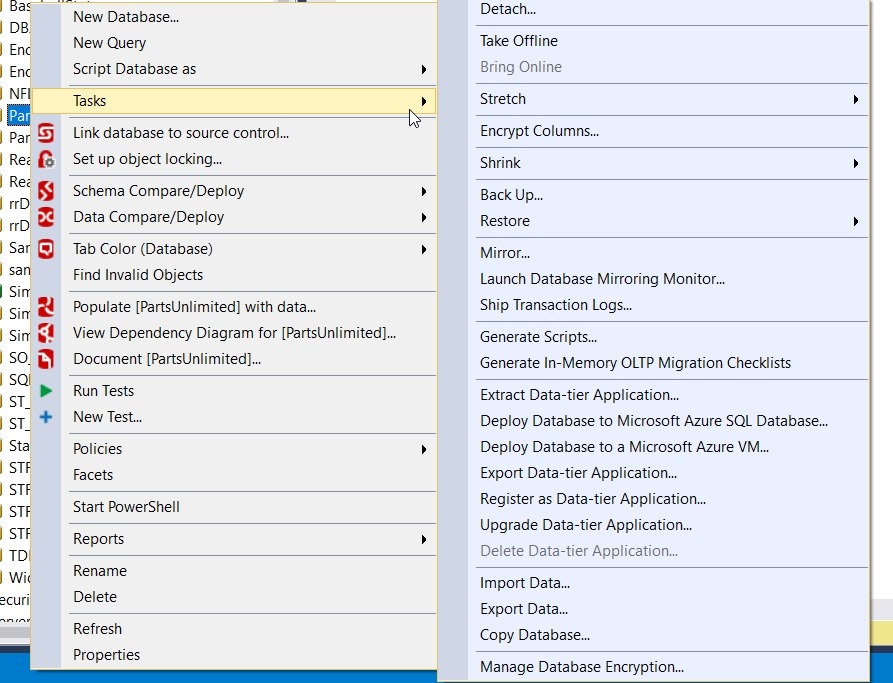
    In my last post, I talked about what a DACPAC was. Now let’s create one. This turns out to be about as simple as it could be. First, let’s choose a database. In my case, I’ll use the PartsUnlimited database on my SQL Server 2016 instance. I’ll start by right clicking the database and selecting “Tasks”.

    2017-03-03 11_40_53-

    Down near the bottom there is an “Extract Data-tier Application” entry. Choose that. Once you do, you should get a wizard screen. We’ll click past the first screen.

    2017-03-03 11_43_04-Extract Data-tier Application

    Next we need to set the properties of the DACPAC we are building. The application name is usually the database. The version can be anything, but ideally you are versioning your database in some way. Most people don’t, so they can leave this as 1.0.0.0. If you are actually building your database somehow, you ought to be using a CI process and have some version number. Ideally you’d keep this somewhere in the db and rev it.

    We also need to include an optional description and a path to the file. I’ll leave the defaults, but feel free to change these as needed.

    2017-03-03 11_44_54-Extract Data-tier Application

    The next screen is a summary. If everything looks OK, click Next. This will start the creation of the .DACPAC.

    2017-03-03 11_45_02-Extract Data-tier Application

    The final screen will show progress, which is fairly short and simple. I think this has always worked for me. If I click the “Finish” button at the bottom (not shown), the dialog disappears.

    2017-03-03 11_46_16-Extract Data-tier Application

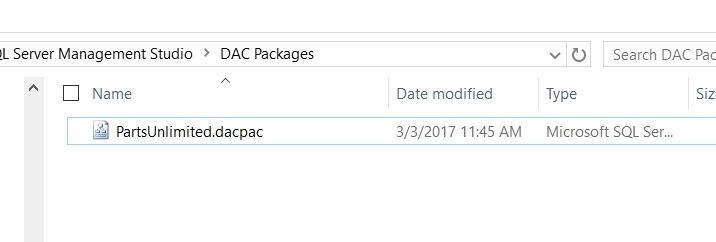
    If I go to the file location, I’ll see my DACPAC in the filesystem. The file is recognized as an SSMS file, and in another post we’ll look at how we unpack this.

    2017-03-03 11_47_19-DAC Packages

    I can check this file, however, to be sure there is something inside it. This is a zip file, and if I open it in 7-Zip, I see this:

    2017-03-03 11_48_18-e__Documents_SQL Server Management Studio_DAC Packages_PartsUnlimited.dacpac_

    Opening the model.xml file, I see data that seems like it describes my database. I talked about this in my previous post.

    2017-03-03 11_48_33-model.xml - Visual Studio Code

    There, a simple DACPAC. This is a format Microsoft uses, and while it’s not perfect, at least I now know how to build one.

    SQLNewBlogger

    This post really took me about 10 minutes, across a few days. I started it after building a DACPAC, and taking the screenshots, but I didn’t have time to write it. I finally spent the other 6 or so minutes putting these words down the next week.

    A quick showcase of something I learned.

  • Implicit Time Conversions – #SQLNewBlogger

    Another post for me that is simple and hopefully serves as an example for people trying to get blogging as #SQLNewBloggers.

    I was trying to work with times recently and needed to get the current time. I thought, well, Getdate(), or better yet, SysDateTime() will give me a date and time, but what about the time?

    A simple experiment showed it’s easy:

    DECLARE
        @t TIME,
        @t1 TIME;
    SELECT @t = SYSDATETIME(), @t1 = GETDATE();
    SELECT @t, @t1;

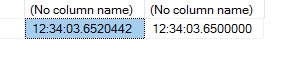
    I got this:

    2017-02-24 12_34_19-SQLQuery2.sql - (local)_SQL2016.PartsUnlimited_Grant (PLATO_Steve (59))_ - Micro

    Quick, easy, and what I suspected would work. If you need to work with times, you can easily cast a datetime value to a TIME to strip the date, or just assign the values to a time.

    CREATE TABLE TimeTest
    (t TIME)
    GO
    INSERT TimeTest
    SELECT top 10
     CreationDate
     FROM dbo.Posts
     GO
     SELECT top 10
      *
      FROM dbo.TimeTest
    GO
    DROP TABLE TimeTest

    This code takes a datetime column and just inserts the time into the new table.

    SQLNewBlogger

    Literally about 3 minutes of my day to write this. When you learn something, write it down.

  • What’s a DACPAC and a BACPAC?

    Another post for me that is simple and hopefully serves as an example for people trying to get blogging as #SQLNewBloggers.

    If you’ve worked with SQL Server development and database projects, you might have heard about DACPACs. However, if you haven’t, this was a concept that didn’t seem to catch on with many companies. I’m not a fan of the format, but it works and you should be aware of what a DACPAC is and how it can be used.

    The DAC part of the moniker is show for Data-tier Application.  This is the container that includes all of the object definitions for the objects that are contained inside of the DACPAC. The PAC part is just an easy way to note this is a contained in a compressed format.

    In fact, the .DACPAC is a zip file. If I rename one of them, I can open is like any other zip file. Here’s one I’ve added a .zip to the end of and opened in Windows Explorer. There are a few files in here.

    2017-02-21 14_30_31-PartsUnlimited.dacpac.zip

    The only really important one is the model.xml, which is a model of my objects. If I look inside, it’s a cumbersome XML format, but I can easily see my Order table as a part of the file.

    2017-02-21 14_25_38-Lab Setup.docx - Word

    These are useful files for having a machine read the format and reproduce database objects in a live database. SQLPackage.exe will do this, as will other tools such as a the DacFX (Data-tier Application Framework).

    I don’t love the format, but it is machine readable and can allow you to package and deploy database changes. There are limitations, especially between versions, and I think that it’s harder to understand than the formats that SQL Compare (From my company, Redgate Software) uses, but that’s me. I’m biased, but I don’t love DACPACs.

    In any case, you can right click and “Unpack” this, or use SSMS to create and read them into a database. In the next post, I’ll show how that works.

    What’s a BACPAC?

    That’s easy. It’s a DACPAC with the data included.

  • Querying My Named Instance in PoSh–#SQLNewBlogger

    Another post for me that is simple and hopefully serves as an example for people trying to get blogging as #SQLNewBloggers.

    I was looking at some sample code the other day and it looked like this.

    cd sqlserver:\sql\localhost\default\databases

    This allows you to browse the list of databases on your local instance. However, this is for a default instance, which I don’t have on this host. How can I get to a named instance? Usually I connect as .\SQL2016, so where does that fit in PowerShell?

    The format you see above is for the SQLServer provider, which is provided as part of the SQLServer PoSh module (or SQLPS if you haven’t adopted the new cmdlets).

    If I start at the SQLServer:\ node, I see this:

    2017-01-03 15_31_37-powershell

    Let’s drop into the SQL node and see that.

    2017-01-03 15_32_32-powershell

    At this point, I see my localhost and my local computer name. These are really the same thing. We can see that by querying each of them.

    2017-01-03 15_33_12-powershell

    In my case, I like to type fewer characters, so I’ll look at the Plato node. If I change here, I can also change to an instance, as shown here.

    2017-01-03 15_34_21-powershell

    Now I can see the databases by changing to that path and getting the directory.

    2017-01-03 15_34_31-powershell

    Thus, we can see that to query an instance, we use this path:

    SQLServer:\SQL\Host\instance

    If you want to use the default instance, then use “default”.

    A simple query path, but one that some people might wonder about, substituting the named instance for localhost, and not realizing that “Default” means just the default instance.