Tag: SQLNewBlogger

  • CONVERT and HEX

    Another post for me that is simple and hopefully serves as an example for people trying to get blogging as #SQLNewBloggers.

    In working through the Advent of Code and solving some of the problems in SQL, I found that I needed to take hex values and convert them to strings. In other words, I had a value like this:

    select @hex = 0x3c044139f4fe36d7df0f4e87f948fc52

    and I needed to determine if the first few characters (5 or 6), were 0s. In other words, I wanted to look at this part of the data above as a string.

    3c044

    I thought this would be simple. I tried this

    select @value = CAST( @hex as varchar(50))

    That’s my default, as it reads nicely. However the returned this:

    <A9ôþ6×ßN‡ùHüR

    That’s strange. I then tried CONVERT:

    select @value = convert( varchar(50), @hex)

    I got the same result. Why am I not getting the same value as a string? I looked at a few other code samples from others, and they looked the same, so I checked the documentation for CONVERT. I saw this:

    Binary Styles: When expression is binary(n), varbinary(n), char(n), or varchar(n), style can be one of the values shown in the following table. Style values that are not listed in the table return an error.

    Under the table, the information for 1 or 2 as a style has this:

    If the data_type is a binary type, the expression must be a character expression. The expression must be composed of an even number of hexadecimal digits (0, 1, 2, 3, 4, 5, 6, 7, 8, 9, A, B, C, D, E, F, a, b, c, d, e, f). If the style is set to 1 the characters 0x must be the first two characters in the expression. If the expression contains an odd number of characters or if any of the characters are invalid an error is raised.

    The characters 0x will be added to the left of the converted result for style 1.

    All of that essentially means that if I use the default, 0, or have nothing, I get the binary data converted to to the binary bytes in ASCII. If I use 1 or 2, I get the string. Here’s a shot of the difference:
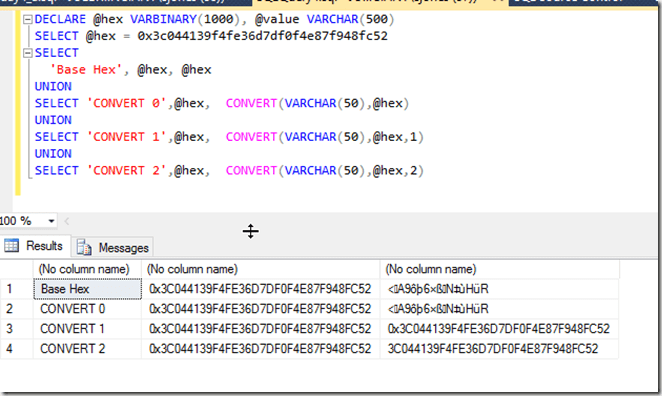
    2016-02-02 11_00_14-Settings

    Two lessons. First, learn the data types and how they convert. Second, read the documentation carefully when things don’t work as expected.
  • Creating a User Without a Login

    Another post for me that is simple and hopefully serves as an example for people trying to get blogging as #SQLNewBloggers.

    This is one of those simple things that many people should be able to do in order to build in better security for their database code. However I’m sure many people haven’t ever built one. I ran into this recently, and thought it would be a great SQLNewBlogger post.

    Creating the User

    It’s a bit anticlimactic, but creating a user in a database without a login is simple:

    CREATE USER UpdateStatsUser
    WITHOUT LOGIN WITH DEFAULT_SCHEMA = [dbo];
    GO

    This creates a new user in my database,

    2016-01-25 13_38_56-Start

    that is not associated wtih a login.

    2016-01-25 13_39_13-Netflix

    I can assign this user permissions, like any other user.

    GRANT CONTROL ON dbo.Authors TO UpdateStatsUser;

    I could then use these permissions any other way.

    Why would you do this?

    A short summary from Pinal Dave, which is pretty good. Essentially you want to give different permissions to a user, without using something like an Application Role, which has a name and password that must be managed. Here, you can allow a user to execute a routine as another, more privileged user, without giving the original user additional permissions.

    SQLNewBlogger

    This is a really simple post that took my longer to write than create the user. About 10 minutes. I wouldn’t expect most of you to stop here. I’d want a post that shows you understand something about how this user can be used, show me an example of reading or writing a table as a user with this impersonation in action.

    References

    CREATE USER – https://msdn.microsoft.com/en-us/library/ms173463.aspx

  • Loading a Text File from T-SQL

    Another post for me that is simple and hopefully serves as an example for people trying to get blogging as #SQLNewBloggers.

    One of the interesting things I’ve had to work on with the Advent of Code puzzles is loading files into SQL Server. Some of the inputs are large strings, but many are files with lines of code that need to be loaded into SQL Server.

    I thought this might be a nice, simple SQLNewBlogger post. Do you know how to load a text file? Certainly the Import/Export wizard can work, but can you quickly load a file from T-SQL itself?

    If you can’t, go work that out. If you get stuck, come back or search for help.

    Loading a Text File

    Obviously you need a place to load the file. I created a table for each puzzle, and here is the table for Day 2.

    create table Day2_WrappingPresents
    ( dimensions varchar(12)
    )
    go

    Now ordering doesn’t matter for this puzzle, so I have a very simple table. If ordering mattered, I’d have to do this differently.

    To load this file, I’ll use the BULK INSERT command. This takes a table as a target, and optionally has a number of parameters.  Since this is a simple load of a simple file with one column of data to a table with one column of data, I can use the defaults.

    bulk insert Day2_WrappingPresents
    from ‘C:\Users\Steve\Documents\GitHub\AdventofCode\Day 2 – Wrapping\input.txt’

    In this case, the insert will load all 1000 rows into the table. A simple query shows this works:


    Now I can get on with the rest of my puzzle solution.

    SQLNewBlogger

    This is a great example of a simple thing that we might not need to do often, but we may need to do at times. Knowing how to do this, a simple operation, showcases that you are improving your SQL Server skills. This post took me about 5 minutes to write.

  • Creating a Database Snapshot

    Another post for me that is simple and hopefully serves as an example for people trying to get blogging as #SQLNewBloggers.

    I’ve rarely dealt with database snapshots, outside of lab experimentation. They didn’t exist when I did most of my DBA work, and since then we haven’t seen the need for them at SQLServerCentral, though, I may suggest we add them to our deployment process since we can quickly roll back if something breaks.

    However, I created one recently for a test and realized that I’d forgotten the syntax. Unlike the quick "create database xx" syntax I often use, with a snapshot I need to be more specific.

    The big item that I must specify is the location of the snapshot file. This is the file that gets written to with the copy-on-write process that ensures the original state of the pages when the snapshot is created are still available.

    You do need to give the database a logical name as well, which can be anything, but the reference below has suggestions. I’d say that this is bad:

    CREATE DATABASE sandbox_snapshot
    ON (NAME = MySnap
    , FILENAME = ‘h:\SQL Server\MySnap.ss’
    )
    AS SNAPSHOT OF Sandbox

    But this is better

    CREATE DATABASE sandbox_snapshot_20150122_1345
    ON (NAME = SandBox_Snap_20150122
    , FILENAME = ‘h:\SQL Server\MySnap.ss’
    )
    AS SNAPSHOT OF Sandbox

    Because the snapshot is based on an existing database, at a particular point in time, it’s useful to specify the time when the snapshot was created, if possible. While you can get this from metadata, if you have people that look to multiple snapshots for information, it can be handy to know when each is from.

    However if you are providing this on a schedule, like daily, for people to report from, you might need to have the same name every day. Think about this, as you cannot rename a snapshot once it’s created.

    SQLNewBlogger

    When I realized I had to lookup the syntax, I took a few notes and captured code, which meant I combined this writing (< 10 minutes) with other work I was doing.

    You should do the same. When you tackle something new, take screenshots, save code, and drop it in a OneNote/EverNote/etc notebook for your weekly blog writing.

    Reference

    The references I used: