Tag: SQLNewBlogger

  • Running Powershell with Task Scheduler

    Another post for me that is simple and hopefully serves as an example for people trying to get blogging as#SQLNewBloggers.

    One of the things I needed to do with my SQL Saturday download process was run this automatically. I don’t want to remember to do this, so I decided to set this up on a schedule.

    I ran a quick search and it seemed to be a simple process. Essentially I run the Task Scheduler application and then call my script as a parameter to the PowerShell exe. The first step is to run Task Scheduler.

    2015-11-05 11_43_36-Task Scheduler

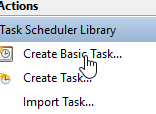
    This has a list of jobs, which I found some to be interesting. I disabled Adobe and a few others. Those are really annoying. I clicked "Create a basic task".

    2015-11-05 11_43_47-Task Scheduler

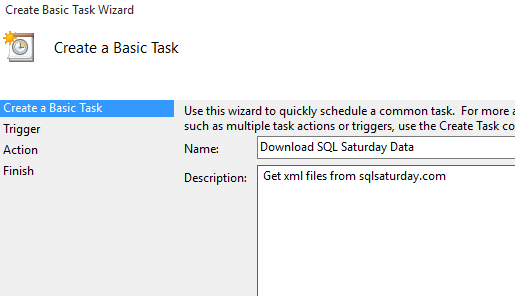
    The basic task is a wizard to walkthrough. First enter a name and description. Use something that will help you in 5 months when this breaks.

    2015-11-05 11_44_07-Create Basic Task Wizard

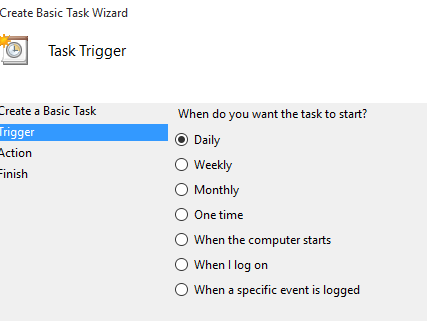
    I decided to run this daily. It’s not a big deal to me, so I’ll let it just go.

    2015-11-05 11_44_16-Create Basic Task Wizard

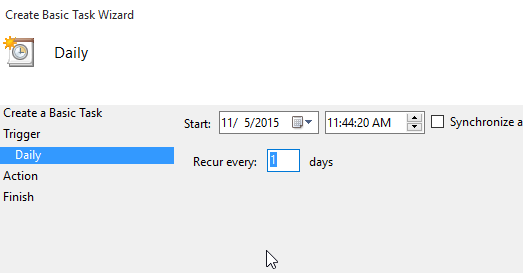
    The time doesn’t matter, and I let it run in the middle of the day. This way I might notice it running sometimes and that will motivate me to keep working on this process.

    2015-11-05 11_44_22-Create Basic Task Wizard

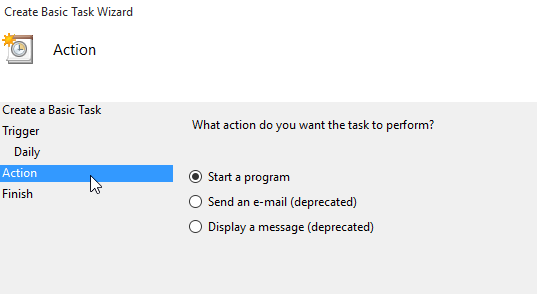
    I want to run a program, so I choose that in the next step.

    2015-11-05 11_44_29-Create Basic Task Wizard

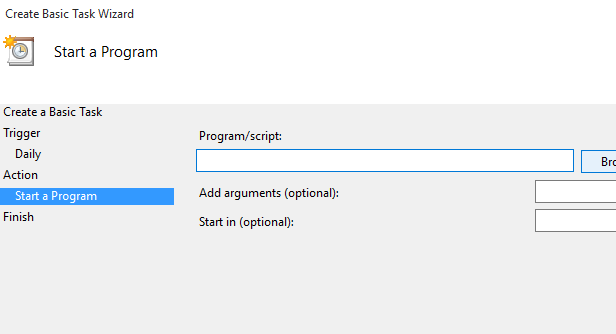
    The dialog wants to know which program. In my case, I’ll have to browse to my PoSh code.

    2015-11-05 11_44_36-Create Basic Task Wizard

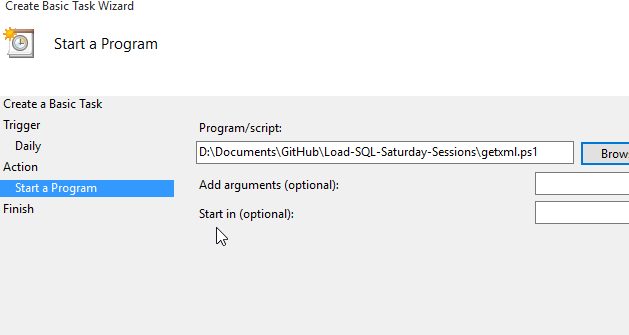
    I pick my code and it puts the path in here. However that won’t run as is. If you’ve used PoSh, you know this doesn’t work.

    2015-11-05 11_44_44-Create Basic Task Wizard

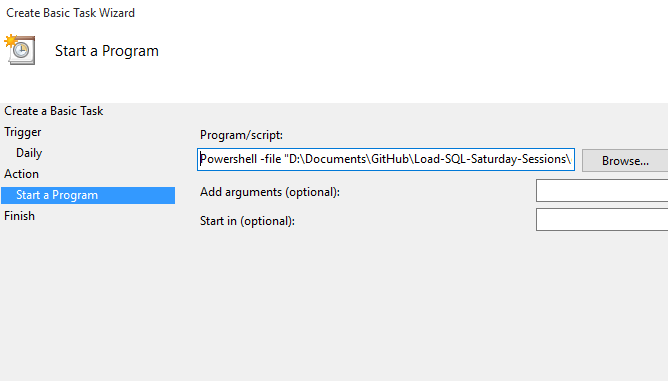
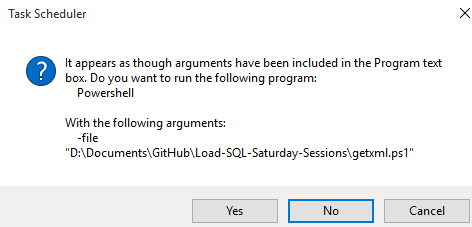
    What I need to do is call powershell.exe. I found this in the reference item below and what I do is add "powershell" to the front of my file, and then use the "-file" parameter. I also enclose my PoSh script in quotes.

    2015-11-05 11_44_58-Create Basic Task Wizard

    When I click next, I get the warning, which I accept.

    2015-11-05 11_45_05-Task Scheduler

    There’s a summary after this, but I say OK to that, and then run the script from the Task Scheduler. It works perfectly, so I stop there.

    Now we’ll see how it works over time. And if I get the next step working.

    SQLNewBlogger

    This was a quick process for me. A google search, a 2 minute read, and then 2 minutes to build the task.

    It took maybe 10 minutes to write this post, most of which was taking the screen shots and resizing them.

    You can do this.

    References

    I just used one link, which was from the Scripting Guy blog.

  • Ending My Loop in PowerShell Early

    Another post for me that is simple and hopefully serves as an example for people trying to get blogging as#SQLNewBloggers.

    I was modifying my PowerShell (PoSh) script to download SQL Saturday files recently to not re-download files. However when I did this, I also realized that I didn’t necessarily want the script to run too long.

    One of the challenges of downloading the data is that I don’t know how many events exist. We don’t keep that number handy, and it changes regularly. One of the things I decided to do was run my process in a loop.

    While ($i -lt 9999) {

    That’s fine, but it’s not a great loop. It runs 9999 times, which isn’t what I want. It works, but it’s an unnecessary use of resources. However I don’t want to break the loop when the file file isn’t found. There have been issues generating a file, like #350, when #351 exists and is there.

    I decided to use a shortcut technique I had learned as a kid. I set a variable and then incremented it when I missed a file. When the increment reaches some value, I break the loop.

    I decided to use 12 as my number of missed. No good reason, but that’s what I picked. I started by putting a variable outside of the loop.

    $missedXML = 0
    While ($i -lt 9999) {

    Then I increment this variable in the CATCH section of my error handler.

    Catch 
    { 
      # if we can't load the file, assume we're done for now. 
      $missedXML++ 
      Write-Host "error with  #" $i 
    }

    Finally, I set up an IF loop at the bottom of the loop. If I’ve missed 12 times, I break the loop by setting the counter to the last value.

    $i = $i + 1
    if ($missedXML -ge 12) { 
     $i = 9999 
    }

    I tested this with some debugging information and what I found was that when I got to 494, I started missing files. As soon as I hit 12, the loop ended.

    Enhancement complete.

    SQLNewBlogger

    This post came about when I started working on the script. I made the modifications from the previous post and decided to also fix the extra loops with this technique.

    This post took about 10 minutes to write.

    References

    No resources needed here. I’ve got enough PoSh knowledge to handle this task myself.

  • Test if a File Exists with Powershell

    Another post for me that is simple and hopefully serves as an example for people trying to get blogging as#SQLNewBloggers.

    Awhile back I wrote a PowerShell script (PoSh) to download the SQL Saturday XML files used for the Guidebook application. These contain a bunch of the information that I wanted to collect, transform, and keep around.

    However the script wasn’t great. It basically looped a set number of times and re-downloaded the files. Not the more efficient solution, especially if I want this to run regularly.

    One of the enhancements I wanted to make was check if the file exists, and if not, then download it. However, if it does exist, then I’ll skip the file. I know this means I don’t get updated files if schedules change, which is possible, but in that case, I can just delete the file from my desktop and go from there.

    I made a quick search, and found a few links to the Test-Path cmdlet. Essentially you give this a file path and it returns true or false. Almost exactly what I need. This is what I added to my code:

    if (Test-Path $DestinationFile) {

    #do something

    }

    However I want to take action if the file doesn’t exist. In most languages, I’d add a ! in front to signify "not". However that doesn’t work in PoSh, just like > doesn’t mean greater than.

    Another search showed me the -NOT operator. That’s what I need, but I can’t do this:

    if (-NOT Test-Path $DestinationFile) {

    #do something

    }

    Instead, I need to have a single expression for -NOT, which means more parenthesis. Not a big deal. I used this code:

    if (-NOT (Test-Path $DestinationFile)) {

    #do something

    }

    That worked great and now I only download the files I need. If I want to re-download (for newer events), I just delete those files and re-run the script.

    SQLNewBlogger

    This post came about when I started working on the script. It actually took longer to write this than find the solution, add it to code, and test it. That process was about 5 minutes.

    This post took about 10 minutes to write. I also had a second post based on similar modifications to the script, so I’m did that in another 5 minutes.

    References

    A few of the links I used:

  • Viewing Extended Properties for Information

    Another post for me that is simple and hopefully serves as an example for people trying to get blogging as#SQLNewBloggers.

    I’ve been working a little with extended properties, adding and updating them for various objects. However in addition to altering properties, viewing the properties on an object is often necessary. This post will look at how we get the properties in a few different ways.

    The easiest way to see extended properties is to look at the properties of an object in the SSMS Object Explorer. For example, I can right click on a table in OE.

    2015-11-02 20_30_55-

    Once I click Properties, I get a dialog with a lot of items on the left. The bottom one is for Extended Properties, with a simple add/edit/delete grid. Here I can see the property(ies) I’ve added.

    2015-11-02 20_31_07-Table Properties - SalesHeader_Staging

    However this is cumbersome for me. I’d much rather find a way to query the information, which is what I need to do with an application of some sort. I’d think sp_help would work, but it doesn’t. If I run this, I get the following result sets:

    • header with owner, type, and creation date.
    • column list with meta data
    • identity property information.
    • RowGuid column information
    • filegroup storage location.
    • Messages with index, constraint, FK, and schemabinding relations.

    Not very helpful in this case.

    I do know that extended property information is in sys.extended_properties. I can query this view, which gives me some information, but I need to join this with sys.objects for easy to understand information.

    2015-11-02 20_38_42-SQLQuery13.sql - aristotle.RaiseCodeQuality (ARISTOTLE_Steve (69))_ - Microsoft

    This works, and this is one of the ways in which I do query properties in various tSQLt tests.

    There is one other way I’ve seen to query extended properties. When perusing the BOL page for sp_updateextendedproperty, I found sys.fn_listextendedpropery. This is a DMF, a function, that you can use to query for property values. Since it’s a TVF function, I need to use it in a query as a functional object.

    2015-11-02 20_42_27-SQLQuery13.sql - aristotle.RaiseCodeQuality (ARISTOTLE_Steve (69))_ - Microsoft

    There are lots of parameters in this function. However you can guess what they are after working with the other extended property procedures. In fact, the first time I started this post, I was disconnected and had to experiment with the function, adding parameters until it ran without an error.

    The first parameter is the name of the property. This can be NULL, in which case you’ll get all the properties that exist.

    2015-11-02 20_44_48-SQLQuery13.sql - aristotle.RaiseCodeQuality (ARISTOTLE_Steve (69))_ - Microsoft

    The rest of the properties correspond to the level 0, 1, 2 types and names that you are using to filter the results. This is actually a good technique to use with this function, and I’ll be using this more in the future.

    SQLNewBlogger

    This post followed on from the previous ones. In this case, I started this disconnected, using the knowledge I had to write the basics with SSMS and the system table. That took about 20 minutes to document and then I spent 5 minutes experimenting with the function, whose name I had on an open browser tab. Once I worked through that, I spent another 5 minutes writing.

    Thirty minutes to a post. You can do this.

    Reference

    A few items from BOL:

    sp_help – https://msdn.microsoft.com/en-us/library/ms187335.aspx

    sys.extended_properties – https://msdn.microsoft.com/en-us/library/ms177541.aspx

    sys.fn_listextendedproperty – https://msdn.microsoft.com/en-us/library/ms179853.aspx