Tag: SQLNewBlogger

  • Updating Extended Properties

    Another post for me that is simple and hopefully serves as an example for people trying to get blogging as#SQLNewBloggers.

    I wrote recently about adding extended properties. Updating them is very similar. There’s an analogous procedure called sp_updateextendedproperty that changes the value of properties.

    The arguments are again, unintuitive, but the more I work with extended properties, the more comfortable I become. In this case, I have the same name and value, and then the level 0,1, 2 items with both a type and name.

    I highly suggest, however, that you name your parameters, including the names in your calls so programmers running across the T-SQL aren’t depending on position for an understanding of the parameter.

    If I look at the table from the previous post, I can update the value of my property with this code:

    EXEC sys.sp_updateextendedproperty
      @name = 'PKException'
    , @value = 0
    , @level0type = 'schema'
    , @level0name = 'dbo'
    , @level1type = 'table'
    , @level1name = 'SalesHeader_Staging' -- sysname
      ;
    GO


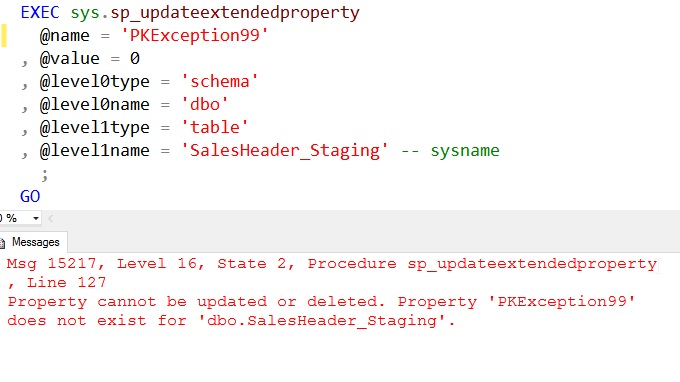
    However my property needs to exist. If I call this procedure with the wrong property, I get an error.

    2015-11-02 17_25_03-Cortana

    This means that you need to be sure that the property exists before you update it. Good code would have the error handling somewhere.

    SQLNewBlogger

    After writing the previous post, this one took only about ten minutes to do the typing. I’d been working with extended properties, so I had the code and just needed to take the screenshot.

    Reference

    A few items from BOL

    sp_updateextendedproperty – https://msdn.microsoft.com/en-us/library/ms186885.aspx

  • Rebooting SQLNewBlogger in November

    I ran into Ed Leighton-Dick last week at the PASS Summit and we were chatting about the SQLNewBlogger challenge he started in April. I enjoyed it and while a number of people started, it seemed like most waned away. I tried to keep the challenge going with my own posts, adding notes to the posts on how much time I spent to give you confidence you could successfully blog yourself.

    Ed wanted to kick off the challenge again, and he did earlier this week. There’s a November SQLNewBlogger challenge, asking you to get four posts done this month. One is due each Tuesday, which means the first was four days ago, on Nov 4.

    Don’t let this discourage you if you didn’t write a post.

    Start now. Write a post today. Look through the ones I’ve written. Heck, write about the same topic I wrote about. Have you written about defining a FK at table create time? If not, write that post now, reference mine, and show how to do it. Give us a sentence or two on why you would do this.

    Write about using the DAC. Write about PowerBI. that one’s still on my list. Ed has ideas as well, and feel free to use one.

    The idea is to just write. Take some time this weekend, reflect on something you did this week, jot some notes, and write a short piece to showcase your knowledge.

    This is your chance to showcase your knowledge for your next employer, or even your review at the end of the year.

    I know I’ve been inspired, knocking out 5 posts this week, which I’ve scheduled each Thursday. I’ll be late to Ed’s challenge, but that’s OK. I’m continuing to write short pieces about my knowledge. In fact, a few changes to a PoSh script today gave me two posts, looking to specific skills I worked on.

    You can do the same. I look forward to you blogging, and seeing your posts appear in the #SQLNewBlogger hashtag on Twitter.

  • Adding Extended Properties

    Another post for me that is simple and hopefully serves as an example for people trying to get blogging as#SQLNewBloggers.

    One of the things I needed to do recently was add some extended properties to objects. I got the idea of using them from John McClusky at SQL Bits. He had a great presentation on tSQLt that’s worth watching.

    In any case, I wanted to add, and update, extended properties.  I had used SSMS to do this, but it’s cumbersome. I decided to experiment and see how the T-SQL code works. My browsing of Books Online showed me there are a few procedures used, one each for adding, updating, and deleting properties. I decided to start with sp_addextendedproperty.

    This procedure takes some interesting, rather unintuitive arguments. Name and value are easy to understand. These are the name of the property and it’s assigned value. One thing to note is that value is a sql_variant, which should work fine for most situations, but CASTing may be required.

    However the next arguments are level 0, 1, and 2, with a type and name for each. Those didn’t make much sense at first. In fact, as I wrote a few scripts, I had to keep looking up the meanings. Essentially we have three classifications of objects. The outer containers, the objects, and the dependent objects. I’ll explain them below.

    The level0 type is essentially the class of object. Is this an Assembly, a Contract, a Schema, etc. For my purposes, this has always been a schema, but certainly you could add properties to the other classes if you needed them.

    The level1 is the object type that we usually work with: table, view, function, procedure. For me this is pretty much been table, view or procedure, but certainly function is something I’d use as well.

    The level2 is the dependent object: the trigger, the column, the parameter, the constraint. These I haven’t really used, but I certainly think that adding in properties for indexes, triggers, etc are valuable.

    Adding a property is easy. For example, one of the items I add is a PK exception for heap tables. To do that (for the SalesHeader_Staging table), I’d run this.

    EXEC sys.sp_addextendedproperty 
      @name = 'PKException',
      @value = 1, -- sql_variant
      @level0type = 'schema', -- varchar(128)
      @level0name = 'dbo', -- sysname
      @level1type = 'table', -- varchar(128)
      @level1name = 'SalesHeader_Staging' -- sysname
      ;
    GO


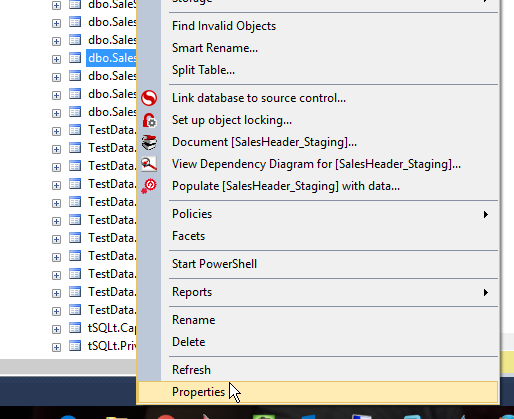
    I can see this easily in SSMS.

    2015-11-02 17_16_53-Table Properties - SalesHeader_Staging

    Properties are great ways to add additional information to an object in SQL Server, though I certainly wish they were more visible in objects.

    SQLNewBlogger

    I knew there was a procedure to do this, and a quick search on extended properties got me to the BOL reference. I was experimenting with adding the properties while working on this, and I had to research the meanings of the parameters a bit, so this took about 20 minutes to get ready for publication.

    Reference

    A few items from BOL

    sp_addextendedproperty – https://msdn.microsoft.com/en-us/library/ms180047.aspx

  • Use SCOPE_IDENTITY()–SQLNewBlogger

    Another post for me that is simple and hopefully serves as an example for people trying to get blogging as #SQLNewBloggers.

    I ran across a question on Facebook, of all places, the other day. Someone had asked a friend how to return a value from a procedure and assign it to a variable. My friend answered, but in the discussion, I noticed the poster was looking to return @@IDENTITY to the calling procedure as the value of the row that was just inserted.

    Don’t do that. At least not without understanding the potential issues.

    It’s been years since I’ve seen @@IDENTITY in use, and for a number of years before that, this was an easy “weed out” question in interviews.

    If you look at the documentation for @@IDENTITY, the documentation notes that SCOPE_IDENTITY() and @@IDENTITY both return the last identity value inserted in the table, but @@IDENTITY is not limited in scope to the current session.  This means that when concurrent inserts occur, you could receive the identity value of another session. Depending on how you use this value, that may or may not be an issue.

    How does this work? Let’s create a simple table with an identity. I also create a logging table and a trigger that will add a message to my logging table when I add a row to the first table.

    CREATE TABLE newtable
        (
          id INT IDENTITY(1 ,1)
        , mychar VARCHAR(20)
        );
    GO
    CREATE TABLE Logger
     (logid INT IDENTITY(56,1)
     , logdate DATETIME
     , msg VARCHAR(2000)
     );
    GO
    CREATE TRIGGER newtable_logger ON dbo.newtable FOR INSERT
    as
      INSERT INTO logger VALUES (GETDATE(), 'New value inserted into newtable.')
    RETURN
    ;
    go
    

    If I run this, what do I expect to be returned?

    INSERT INTO dbo.newtable
            ( mychar )
    VALUES  ( 'First row'  -- mychar - varchar(20)
              )
    
    SELECT @@IDENTITY


    However I get this. A 56 in my result set for @@identity.

    2015-09-22 17_32_20-Cortana

    Why?

    The reason is that the last identity value was 56, from the logging table. The order of operations is

    • insert value into newtable
    • @@identity set to 1
    • trigger fires
    • insert into logger
    • @@identity set to 56

    That’s often not what we want when capturing an identity value. What’s worse, this behavior can exist, but not manifest itself until someone changes a trigger later.

    If I change this SCOPE_IDENTITY(), I get a different result.

    2015-09-22 17_38_26-Start

    This is because the SCOPE_IDENTITY() function takes the scope into account and doesn’t get reset by the trigger code.

    SQLNewBlogger

    This took some time to write. Mostly because I had to setup the demo, test things, and then get the explanation straight in my head. It took me 15-20 minutes, including lookup time in BOL, but if you are new to writing, this might take a bit longer. You’d also want someone to review your explanation since this can be tricky to explain.

    Reference

    • @@IDENTITY
    • SCOPE_IDENTITY()