Tag: syndicated

  • Daily Coping 24 Mar 2023–The Final Tip

    Today’s coping tip is to discover the joy in the simple things in life.

    This is the last coping tip for now. It’s been 3 years, and I hope you’ve enjoyed them.

    I have really tried to enjoy simple, little things in my life and travels. A text from one of my kids. A short chat with an athlete I coach. A conversation at a SQL Saturday or other event. The chance to share a picture, or see one, of a friend.

    Simple, little things make life interesting and wonderful.

    When I finish a book I enjoy. A small success in a game. Learning a new song or lick on guitar, or even having a single song play well. A tasty meal. A laugh from my wife.

    Looking at the world and enjoying little things helps me cope with the hard things, or the upsetting things. Remembering little joys, or noticing them, can reset my attitude or dampen other negative emotions.

    Try appreciating and enjoying something small. I bet you feel happier in the rest of your life.

    I started to add a daily coping tip to the SQL Server Central newsletter and to the Community Circle, which is helping me deal with the issues in the world. I’m adding my responses for each day here. All my coping tips are under this tag.

  • Experimenting with RedisGraph on Docker and Windows

    I have been experimenting a bit with graph databases, trying to learn more about them. One of the platforms I wanted to experiment with was RedisGraph. This post looks at getting this set up and running on a Windows machine.

    Things You Need

    A list of things:

    These are what I used.

    Getting Setup

    I won’t go into getting Docker running, but you should ensure you have Docker running and set to Linux containers on Windows. Once you’ve done that, then you can start up a container.

    You also need to run the Redis install to get the CLI to connect. I installed this and then set Redis to start manually and not start. You don’t need this running, nor do you want lots of extra services going. Plus, you’ll get a port conflict with instructions below.

    2023-03-23 22_30_20-Redis Properties (Local Computer)

    To start the container, run this code from a command prompt:

    docker run -p 6379:6379 -it --rm redislabs/redisgraph

    This does run the container with output to the command line, and you should see this when you run this:

    2023-03-23 22_32_21-cmd - docker  run -p 6379_6379 -it --rm redislabs_redisgraph

    To stop it, CTRL+C will stop the container.

    Connecting

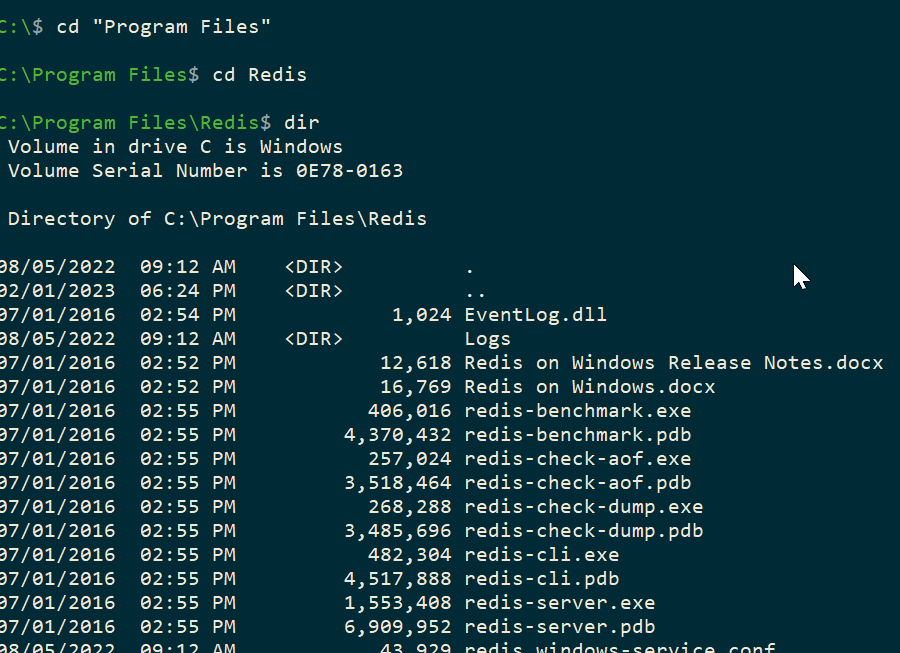
    To connect, we will run the Redis-cli.exe program. We can connect from programs, but for testing, let’s work at the command prompt. In a second command window, you will run this. My exe was in c:\program files\Redis, as you see below. Yours might be different, but once you find it, change to that directory.

    2023-03-23 22_34_01-cmd

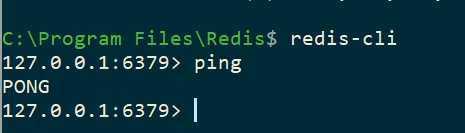
    If you run the redis-cli, you see this, a connection to the local host, with the port:

    2023-03-23 22_34_55-cmd - redis-cli

    In another post, I’ll create a graph, but to test this, if you type “ping”<enter>, you’ll get PONG back. That means your install is working fine.

    2023-03-23 22_36_49-cmd - redis-cli

  • Resources for Adding Graph Structures to Your Database at VS Live

    Thanks to everyone who attended my talk at VS Live Las Vegas 2023 on graph databases. I hope you enjoyed it, and if you have questions, please feel free to reach out.

    Resources

    Here are the resources:

  • Resources for Architecting Zero Downtime Deployments

    I delivered my talk on Architecting Zero Downtime Deployments yesterday at VS Live Las Vegas 2023. It went fairly well, even though I ran some incorrect code somewhere. Apologies for that, but glad I could fix things.

    The code for the database and the C# app is in this Github repo: https://github.com/way0utwest/ZeroDowntime

    The PPT is also in the repo, updated today.

    If you find issues, or an improve my C#, please feel free to open an issue or submit a PR.