Tag: syndicated

  • Changing the Cardinality of a FK in Redgate Data Modeler

    One of the things a customer asked recently about Redgate Data Modeler was how to adjust a FK constraint between two tables. The tool seemed to makes this  easy, and this post will show you how.

    This is part of a series on Redgate Data Modeler.

    Altering a Constraint

    In a previous post, I looked at adding a FK. Let’s do things a little differently here. Let’s change a constraint to better reflect the relationships between entities. In this case, let’s look at a part of my model. I have the User and Author entities linked as shown below. Note that we have a User with a 1:many relationship to Author.

    2026-04_0213

    This isn’t correct. A User cannot be a part of multiple authors. This is, logically, a 1:1 relationship. Each Author is related to one and only one User. Each User can be an author, but only one Author. So let’s fix this.

    If I click on the relationship, it turns blue and highlights.

    2026-04_0214

    On the right side, the properties pane displays the relationship properties. Note that there is a relationship type below the comment.

    2026-04_0215

    If I click the  drop down, I can change this to whatever cardinality makes sense.

    2026-04_0216

    I’ll choose one to one. When I do that, I can see the diagram changes.

    2026-04_0217

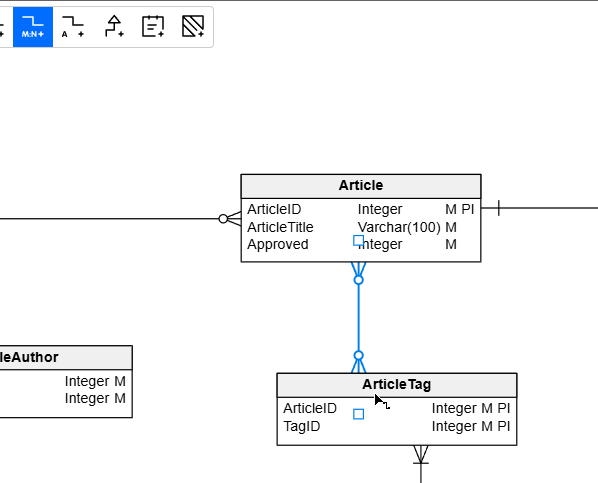
    I can also change this for other entities. Here I have a One to Many, but this is really a many to many relationship. So I need to change it.

    2026-04_0218

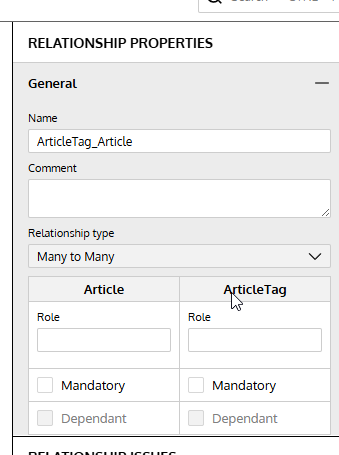
    I can adjust the properties in the drop down and you can see both the diagram and the right properties pane match.

    2026-04_0219

    Summary

    We may model our entities incorrectly, either because of incomplete information or simple mistakes. In any case, if you need to change cardinality in a relationship, it’s easy to do in the relationship properties.

    Give Redgate Data Modeler a try and see if it helps you and your team get a handle on your database.

    Video Walkthrough

    Here’s a short video of my working with Redgate Data Modeler and changing cardinality.

  • Advice I Like: Rewards from Work

    The greatest rewards come from working on something that nobody has words for. If you possibly can, work where there are no names for what you do.” – from Excellent Advice for Living

    I work for a software company, trying to sell tools to companies for database work. It’s not hugely rewarding. I enjoy it, and I like going to work. I like the colleagues and customers, but this doesn’t fill my soul.

    I’m an average person and while I’m good at what I do, I don’t make huge differences. I make small changes, both at Redgate and while coaching. The latter is way more fulfilling to me. I coach at a small club, not the top one, we don’t make news locally, but I help and watch kids grow up before my eyes in many ways.

    I love that.

    The saddest thing I’ve seen across the last 30 years of my career is how many brilliant people have moved to work in finance and tech (including biotech), aiming to win the lottery with options and IPOs rather than spending their efforts on making the world better. Their focus is on clicks and trades, not bettering science, knowledge, or anything for humanity.

    Lots of people do great work still, but many of the brightest of my generation and the next aren’t focused there.

    I’ve been posting New Words on Fridays from a book I was reading, however, a friend thought they were a little depressing. They should be as they are obscure sorrows. I like them because they make me think.

    To counter-balance those, I’m adding in thoughts on advice, mostly from Kevin Kelley’s book. You can read all these posts under the advice tag.

  • Monday Monitor Tips: A New Analysis Page

    We have multiple teams (8) working on Redgate Monitor. Some work on the Standard Edition, a few on the Enterprise Edition, and others handling core work, like the Linux/PostgreSQL option.

    We also have designers, and they regularly research how well the product works for customers, what is difficult, and they propose changes. One of them was recently release. We have a new analysis page in Redgate Monitor and this post looks at the changes.

    Video walk-through of this post below.

    This is part of a series of posts on Redgate Monitor. Click to see the other posts.

    The New Experience

    If you go to monitor.red-gate.com, you can see this at: https://monitor.red-gate.com/Analysis. This shows the new analysis graph, which is easier to see and takes up the entire screen.

    2026-03_0166

    If you haven’t used this, I’ve added metrics below this for certain servers. You can see in the legend that I’m looking at CPU time along with batch requests for both sides of my cluster. I can compare these to see if the number of batches is impacting CPU. A correlation I might use to research how a workload affects my system.

    If I put my cursor over the graph, I can get info on the metric, the current time and the value/min/mean/max. These values are for the time period.

    2026-03_0168

    If I change my time period, I see the values change for the stats.

    2026-03_0169

    Below this, for the metrics, it’s a little cleaner as well. The interface hasn’t changed a lot, but it’s a little larger and spread out. I can see that I pick a metric for a cluster, and then for a machine. This is the same.

    2026-03_0170

    What has changed is the “add a metric” is now at the top on the side. If I click this, I get a new set of metrics to pick below this. Note the “same as above” for the cluster, which is very handy. I can also type in the box to search.

    At the right, the explanation of the metrics and statistics are still on the far right.

    This makes an interesting experience that works smoother to ensure that

    The Classic Experience

    If you don’t like this, there’s a link in the upper right to switch back.

    2026-03_0173

    Clicking this loses my metrics, but if I add them back, you can see the old view. It’s a little less appealing to me. The other thing I hated is that the “add a metric” is below the list shown below, which is annoying. I often scroll down to find it.

    2026-03_0167

    I also have statistics which only show one of the metrics (first one?) and not both. I’m also missing stats of the average.

    2026-03_0174

    Summary

    This is a small change, but a nice one, IMHO. The ease with which the UX is designed can make a big difference to how users can interact with the data. This is a small one, but one that I really appreciated.

    If you have feedback in general, please let us know as we value your opinions and comments on how we shape the future of Redgate Monitor.

    Redgate Monitor is a world class monitoring solution for your database estate. Download a trial today and see how it can help you manage your estate more efficiently.

    Video Walk-through

    Video of this post below.

  • A Las Vegas Break

    Only a little break for me. I’m actually heading to Las Vegas today for  the Red Rock Rave volleyball tournament with a team of 13 year olds. We’ve been pushing them at practice for a few weeks, so hopefully they’re ready to compete and we break into the top half tomorrow.

    That’s usually our goal as the teams I coach aren’t often the top athletes in Colorado. If we finish 1st or 2nd in our pool tomorrow, then we’ll be in the top half for Sunday and Monday. We did this at Crossroads in Jan and the RMR Showdown in Feb. The second day can get rough, but we’re learning and improving each time.

    The tournament finished Monday and my wife and I are staying until Tues to get a little break. During tournament days, we’re very busy and it’s real work. We don’t get a lot of down time, and we are constantly searching for ways we can coach better and help the team improve. Plus the 15 year olds from our club are going and we coached 3 of those girls at 13, so we’ll stick around and watch them after we’re done playing.

    It’s great to get away from technology and do something in the real world. I always like those moments when I get away from computers, and I’m looking forward to the break.