From our webinar today, I mentioned I had a dog named “Azure”. Here she is.

No, this isn’t an homage to Microsoft, and I didn’t name the dog. My daughter did, and she’s not a data platform person.
From our webinar today, I mentioned I had a dog named “Azure”. Here she is.
No, this isn’t an homage to Microsoft, and I didn’t name the dog. My daughter did, and she’s not a data platform person.
One of the important tasks that is needed for any organization that wants to better protect their sensitive data is some sort of list of what data is sensitive. Often we might assume all data matters, in which case we embark upon projects to over protect everything. That leads to high costs, and often a decision to stop trying to over protect everything. Which means often we stop protecting some sensitive data.
The idea of a data catalog that has some metadata or information about all the data in your organization has been around for some time, but often the task is handled by a spreadsheet of some sort, filled out as a project and then forgotten, never maintained and perpetually out of date.
The early versions of a data catalog from Microsoft, and a few other companies, involved essentially a web form that filled out a spreadsheet for you. Not a good way of managing this data.
We’re giving this a try. Redgate has launched a beta of our Data Catalog utility. I’ve watched this work for almost a year now as engineers have been trying to understand the problem space and find a better way. Customers want it, and in the case of the GDPR, need it.
Our first cut integrates with other products, such as our SQL Provision, which should help you find places where you might not be in compliance with regulations such as GDPR, HIPAA, and PCI. You’ll see when a new copy of a database has data that should be masked, and you can ensure that you mask it when making copies for development and test environments.
Give it a try, and let us know what you think.
Join me for our Year in Review Webinar next week, Dec 18, at 4pm GMT. I’ll be joining Kendra and Grant to talk through what happened this year, and make a few predictions for 2019.
It should be fun, festive, maybe a bit silly, but a good break in your day.
You can register here.
Another post for me that is simple and hopefully serves as an example for people trying to get blogging as #SQLNewBloggers.
This bites me constantly, and I was reminded of this while watching Kathi talk at #SQLintheCity. When you write a Window function, there is an implicit default frame for the windows that you might not be aware of.
For example, if I have this data:
create table WindowDemo( groupid int,
letterid int
, letter varchar(10))
GO
insert WindowDemo
values
( 1, 1, 'A')
, ( 1, 2, 'B')
, ( 1, 3, 'C')
, ( 2, 4, 'D')
, ( 2, 5, 'E')
GO
and I run this code:
select groupid
, letterid
, last_value(letter) over (partition by groupid order by letterid)
from WindowDemo
I get this:
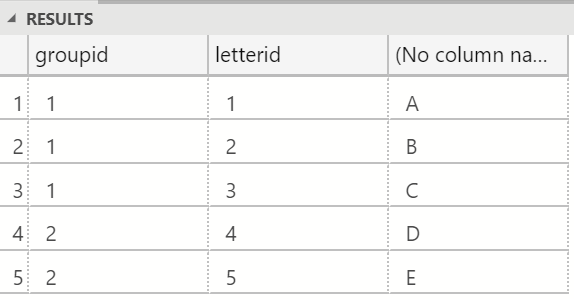
Not what I expected. I would think the last value for each groupid is the largest letter. Instead, I have a running total of sorts.
There is a framing clause that I can use after the ORDER BY in the OVER clause. The default frame is RANGE UNBOUNDED PRECEDING AND CURRENT ROW. At least, this is what appears when you include an ORDER BY clause. Many of us do this, but still get confused with the LAST_VALUE() and FIRST_VALUE functions.
What I really want is a complete set of data, which is either starting from the current row to the end, or includes all values. If I modify my framing clause, I’ll get what I expect.
select groupid, letterid
, last_value(letter) over (partition by groupid order by letterid rows between unbounded preceding and unbounded following)
from WindowDemo
This gives me:

That’s what I’d expect for a LAST_VALUE().
This has bitten me a few times, so I decided to write about it. I can show that I solved this issue, which is what my next boss wants to see. The other side effect is that blogging helps me remember how this works.
This took about 15 minutes, mostly to reproduce the demo that was similar to my issue, but simpler to explain.
 Voice of the DBA