Tag: syndicated

  • My SQL Server Travels in 2018

    It’s the end of the year, and I’m looking back at the events and travels I’ve had this year. I keep a list of travels on my blog for speaking as a kind of Speaking CV, and United (my primary airline) provides me with a summary of travel each year.

    Since I’m planning and looking forward to 2019, I thought I’d recap a few of my travels.

    New Events and Places

    Every year I try to visit some new places and events, getting the chance to meet new people and learn about events and places. There are so many to see and attend that this is a never ending goal, but that’s part of the fun.

    New places I visited this year: Cork, Pittsburgh, Nashville, Jacksonville (personal), and Hong Kong (personal).

    New Events for me: ISACA Ireland, Music City Tech, Microsoft Inspire, SQL Sat Pittsburgh, Certified InfoSec.

    I did a few new virtual talks, even though I don’t really enjoy these. I like feedback from in person talks but the Milwaukee and Queensland user groups got me to speak.

    Revisiting Fond Memories

    I was lucky enough to get to revisit a number of places this year. Of those, I enjoyed getting to do some live SQL in the City events, in addition to the streamed ones. I did 4 of each, so a good SQL in the City year.

    It was also great to get back to Baton Rouge, Louisville, Los Angeles, Colorado Springs, Boulder, Oslo, and Cambridge for events. Those are some of my favorite places for SQL events and I’ve been at all of them 3 or more times.

    I was also luck to spend a few days in Washington DC and New York City, two amazing places in the US.

    Of course, as usual, London was the most visited destination. 6 times in 2018, and probably close to 40 trips there in my life.

    Missed Out

    I missed out on SQL Bits in 2018, the first time in quite a few years. Unfortunately this conflicted with other commitments at home, and will again in 2019. Hopefully that will change in 2020.

    I also skipped the VS Live, Dev Connections, Ignite, Build, and SQL Intersection events. I’ve enjoyed those over the years, but this wasn’t the time to go, and next year might not be either. We’ll see what happens.

    All in all it was a great year speaking, and with travel that was manageable. Hopefully that continues in 2019.
  • Identity Gaps–#SQLNewBlogger

    Another post for me that is simple and hopefully serves as an example for people trying to get blogging as #SQLNewBloggers.

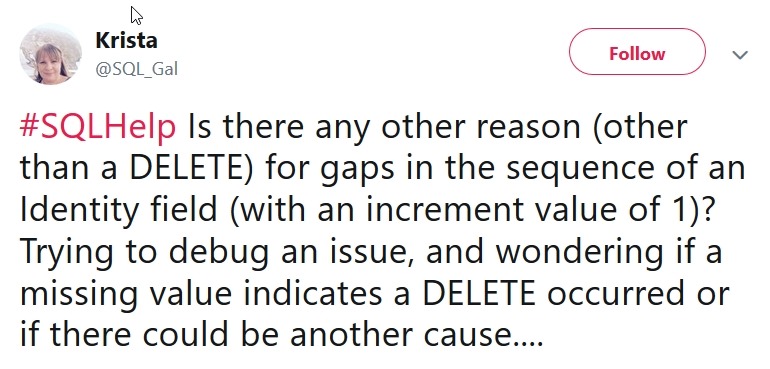
    Many people think that that an identity property will ensure a consistent, increasing numerical value. I ran across this tweet that indicates that situation.

    2018-12-21 12_13_51-Krista on Twitter_ _#SQLHelp Is there any other reason (other than a DELETE) for

    This isn’t really true, for many reasons, but in this post I’ll look at the possible reasons we get gaps in identity values.

    Normal Operation

    Let’s start with a basic table that contains an identity value. I’ll use this code:

    CREATE TABLE dbo.SalesOrderHeader
    ( OrderKey INT IDENTITY(1, 1)
    , CustomerName VARCHAR(30)
    )
    GO

    Now I can insert a few rows. Note that the results shown below the code will contain increasing values for the OrderKey.

    INSERT dbo.SalesOrderHeader (CustomerName) VALUES ('Andy')
    INSERT dbo.SalesOrderHeader (CustomerName) VALUES ('Brian')
    INSERT dbo.SalesOrderHeader (CustomerName) VALUES ('Steve')
    INSERT dbo.SalesOrderHeader (CustomerName) VALUES ('Anna')
    GO

    Each of these inserts is a separate transaction, and they cause the identity to increment.

    2018-12-21 12_04_17-SQLQuery5.sql - Plato_SQL2017.sandbox (PLATO_Steve (59))_ - Microsoft SQL Server

    Deleting Rows

    This is noted in the tweet as a cause, but let’s test this.

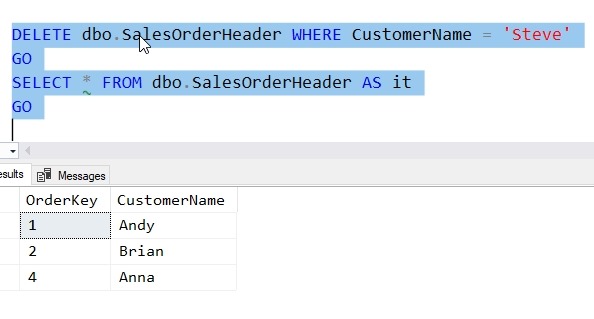
    One of the common ways that we get gaps in identity values is when rows are deleted. Let’s remove the row with Steve in it.

    2018-12-21 12_06_46-SQLQuery5.sql - Plato_SQL2017.sandbox (PLATO_Steve (59))_ - Microsoft SQL Server

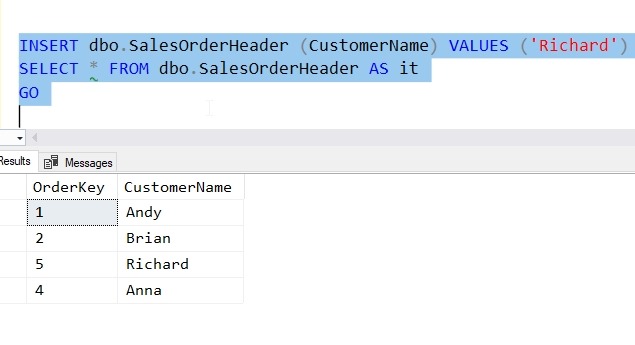
    I clearly have a gap in OrderKey here now. What happens if we add a new row? The identity value is built for (some) efficiency and doesn’t fill the gap. Only the next value is kept. We insert a row and get a 5.

    2018-12-21 12_08_00-SQLQuery5.sql - Plato_SQL2017.sandbox (PLATO_Steve (59))_ - Microsoft SQL Server

    As a side note, there is no index on this table, and no ORDER BY clause, so you can clearly see that there isn’t a reason why I should expect the ORDERKEY column to be returned in numerical or even insert order.

    The Rollback

    One of the more common occurrences with inserts is a problem with the value. For example, in this table, I have allocated 30 characters. What happens if I run this code?

    INSERT dbo.SalesOrderHeader (CustomerName) 
       VALUES ('A Really Long Name Van Something The Third')

    I get an error, which is shown here.


    Checking the table, I have no value:

    2018-12-21 12_11_17-SQLQuery5.sql - Plato_SQL2017.sandbox (PLATO_Steve (59))_ - Microsoft SQL Server

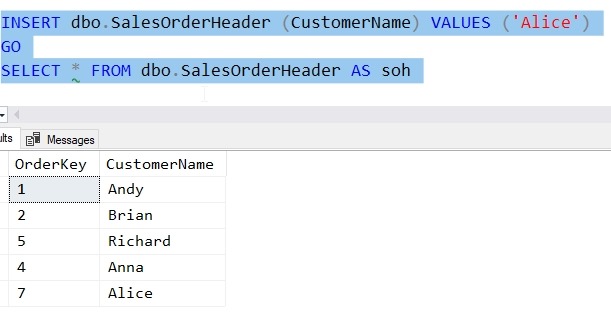
    Let’s insert a new value and see.

    2018-12-21 12_12_00-SQLQuery5.sql - Plato_SQL2017.sandbox (PLATO_Steve (59))_ - Microsoft SQL Server

    We get a gap. The value “6” was skipped because of the error. The identity was allocated, but the rollback of the transaction due to the error did not rollback the identity sequence.

    Reseeding the Property

    One of the other ways to miss a value is directly reseeding the table. I can use the DBCC CHECKIDENT function to accomplish this. In my case, let’s run this code and set the identity value to 20.

    DBCC CHECKIDENT(SalesOrderHeader, RESEED, 20)
    GO

    Now I can insert new values and I’ll get these results.

    2018-12-21 12_17_28-SQLQuery5.sql - Plato_SQL2017.sandbox (PLATO_Steve (59))_ - Microsoft SQL Server

    The identity value was set to 20 and the next insert will increment this and take 21, leaving a gap from 8 to 20.

    Be Careful

    Don’t depend on the identity property to give you uniqueness, consecutive values, or avoid duplicates. It is up to you to code properly to account for these values.

    SQLNewBlogger

    This post came about from helping someone understand the problems and limitations. I wrote this in about 20 minutes (with setup and testing) to ensure that I understood what I was explaining to someone.

    You could write something similar to show that you know the ways in which identity works.

  • 2018 Advent of Code–Day 1

    I enjoy when the Avent of Code comes around each year. I seem to make this a December (or sometimes New Year’s) resolution to get through them all, but life usually gets in the way. In any case, I decided to at least start this year and see how far I get.

    Day 1 – First Puzzle

    This is a simple one, and one that seems to lend itself to T-SQL. We have an input file that looks like:

    +11

    +9

    -10

    -5

    etc.

    This asks us to walk through the file, summing the values together and getting a new value. So the first row ends with 11. The next ends with 20 (11+9). The next is 10 (20-10), and so on. This feels like a simple calc, so let’s get it.

    I wanted to load this with BULK LOAD, so I started with a table:

    CREATE TABLE Day1(rawdata VARCHAR(20))

    I know I’ll need to change this, but let’s make this easy. I use this command to now load my data.

    BULK INSERT dbo.Day1 FROM 'C:\Users\way0u\Source\Repos\AdventofCode\2018\Day1\input.txt'

    Once this is done, I’ll move on. Since I need to get this into some numeric values (this is a math problem), I’ll make another table.

    CREATE TABLE Day1_a(frequency INT)

    Now I move the data.

    INSERT dbo.Day1_a
    (
         frequency
    )
    SELECT CAST(rawdata AS int)
    FROM dbo.Day1
    GO

    That seems to work fine. How do I get the end result? Well, addition doesn’t matter here, so I can do this:

    SELECT SUM(frequency) FROM dbo.Day1_a
    GO

    I get an answer, plug it in, and viola, I’m right. That feels good.

    Day 1 – Second Puzzle

    This one is a little harder. I’m supposed to find out the first time that the end result repeats it’s value. The test cases show this working as follows:

    Value    New result

    0       0
    1       1
    -1      0

    If I walk through this, the 0 repeats. The other test cases show this, but with the large input set, I need to change a few things.

    1. I need to preserve ordering
    2. I need to process this row by row.

    The second item doesn’t mean that I’m looping necessarily, but I need to calculate out the sums as I go and potentially repeat the list.

    To get started, let me modify my Bulk Insert and table to keep the ordering. I created this table.

    CREATE TABLE Day1b(datakey INT IDENTITY(1,1), rawdata VARCHAR(20))

    I then ran BULK INSERT. I got this error:

    2018-12-03 15_24_00-SQLQuery5.sql - dkrSpectre_SQL2017.sandbox (DKRSPECTRE_way0u (53))_ - Microsoft

    I tried a number of items, but nothing really worked. This was a very, very annoying error, and the main solution I saw on Stack Overflow was to add a column to the input file, which I don’t want to do. I initially thought this was a problem with the encoding, but it’s really the identity.

    The best solution was a lower down answer, which was to create a view without the identity.

    CREATE VIEW vDay1b
    AS
    SELECT rawdata
      FROM dbo.Day1b
    GO

    If I run the BULK INSERT to this view, it works fine.

    OK. We’re moving and I have the data in order. Let’s move it to get the integer results we need.

    CREATE TABLE Day1_2
    ( n INT, frequency INT)
    GO
    INSERT Day1_2
      SELECT datakey,
             CAST(rawdata AS INT)
       FROM dbo.Day1b

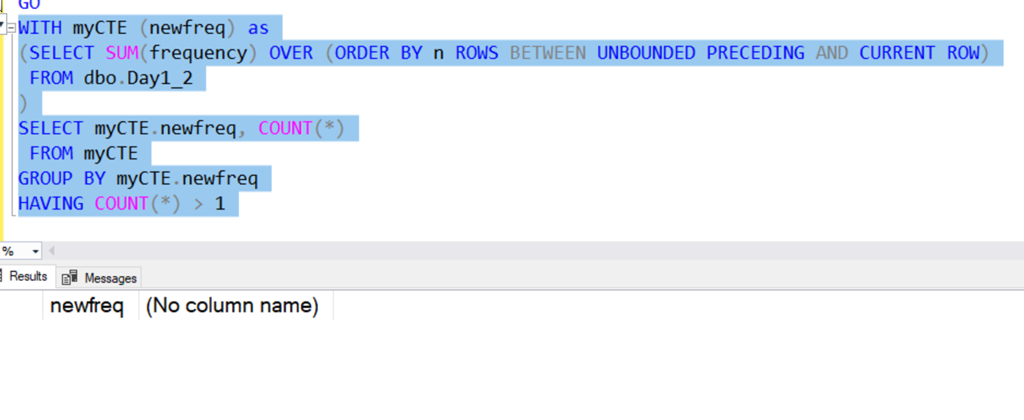
    If I run a quick query that does a SUM() OVER(), I get a series of results. I can see there are no duplicates here.

    2018-12-03 15_32_29-SQLQuery5.sql - dkrSpectre_SQL2017.sandbox (DKRSPECTRE_way0u (53))_ - Microsoft

    OK, this means I need to repeat the data. I can re-insert data into the table, but that feels inefficient. I ought to be able to group data together.

    Let’s do this by selecting the data as a group, but adding a value to it. I can do that with a cross join. Here’s a short example that illustrates this. Suppose I have a table with the values “Broncos”, “Chiefs”, “Raiders”, “Chargers”, I get select data like this in groups.

    2018-12-03 15_36_36-SQLQuery5.sql - dkrSpectre_SQL2017.sandbox (DKRSPECTRE_way0u (53))_ - Microsoft

    With that in mind, let’s create a tally table and start to duplicate data. I have no idea how many times, but having done the Advent of Code before, I’m guessing 5 groups isn’t enough. Let’s start with 100 repeats.

    One note, I do need to start with 0, so we’ll use a UNION to add the 0 row. We don’t want the 0 row repeated, so we don’t add that to the table.

  • Restarting a Sequence–#SQLNewBlogger

    Another post for me that is simple and hopefully serves as an example for people trying to get blogging as #SQLNewBloggers.

    As part of my experiments with the sequence object, I wanted to see what allows me to restart a sequence at a new value. This is useful in a few situations, some of which I want to see in this post.

    Starting Over

    One common scenario might be where I create a sequence and test it a few times, but don’t want those values lost. For example, Suppose I create this sequence and test it a few times.

    CREATE SEQUENCE Counters.TopTen
    START WITH 1
    MAXVALUE 10
    CYCLE
    GO
    SELECT NEXT VALUE FOR Counters.TopTen
    GO
    SELECT NEXT VALUE FOR Counters.TopTen
    GO

    I don’t want the first two values to be removed from the sequence. Instead, I want to get the next number back to 1. I could run 8 more SELECTs to allow the sequence to cycle, but if you’re like me, you’ll end up executing this one too many times and then have to repeat the experience.

    Instead, I can use the ALTER command to fix this.

    ALTER SEQUENCE counters.TopTen RESTART WITH 1

    Of course, I’ll test this with a SELECT, but once I am confident this behaves as expected, I’ll re-run the ALTER again.

    Going Backwards

    One common situation might be a case where an application requests a number of sequence numbers for a situation, but they never get inserted. Suppose I set up an insert statement to load some data in a table, but a key error or some other problem prevents the inserts. I don’t want those values to be lost, so I want to restart numbering.

    As an example, I find that one of my sequences has the value, 41.

    2018-12-05 15_49_08-sequences.sql - dkrSpectre_SQL2017.sandbox (DKRSPECTRE_way0u (65))_ - Microsoft

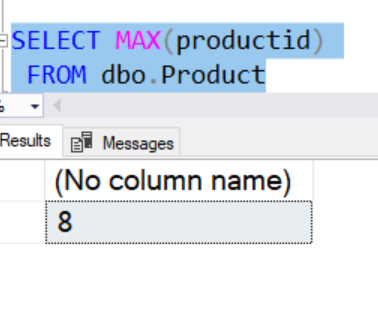
    However, this is because a load of new products failed. The last number used in the table was 8.

    2018-12-05 15_49_29-sequences.sql - dkrSpectre_SQL2017.sandbox (DKRSPECTRE_way0u (65))_ - Microsoft

    In this case, I want to reset the sequence object to 9, so let’s do that.

    ALTER SEQUENCE Counters.Products RESTART WITH 9

    Now I can proceed on loading products into this table, using the sequence object to get the next value.

    SQLNewBlogger

    This was a continuation of a series of posts on the sequence object. As I continued to experiments, I captured the code and some images to use in posts, writing this up as I had time.

    For this post, I took about 10 minutes of experimenting and then another 5-10 trying to sort out some of the experiments into an area. This writeup was about 10 more minutes.