Tag: syndicated

  • Enabling Database Containment for an Instance – #SQLNewBlogger

    Another post for me that is simple and hopefully serves as an example for people trying to get blogging as #SQLNewBloggers. This is also a part of a basic series on git and how to use it.

    I wanted to test a contained database feature the other day and ran this:

    ALTER DATABASE [sandbox2] SET CONTAINMENT = PARTIAL WITH NO_WAIT
    GO

    However, this didn’t work. I ended up with an error:

    Msg 12824, Level 16, State 1, Line 3

    The sp_configure value 'contained database authentication' must be set to 1 in order to alter a contained database.  You may need to use RECONFIGURE to set the value_in_use.

    The issue is that the server instance needs to have contained authentication enabled in order to pass any authentication requests to the database

    EXEC sys.sp_configure N'contained database authentication', N'1'
    GO
    RECONFIGURE WITH OVERRIDE
    GO

    Now I can run the code again to alter the database for containment.

    SQLNewBlogger

    The issue was obvious to me since I’d dealt with it in the past, but this is something you could solve and write up in 10-15 minutes.

  • The New CU Schedule

    Is my math right? The new CU servicing schedule for SQL Server 2017 is:

    • 1 CU per month for the first year
    • 1 CU per quarter through mainstream support (5 years)

    That means by my count, we get this:

    WITH myTally(n)
    AS
    (SELECT n = ROW_NUMBER() OVER (ORDER BY (SELECT null))
      FROM (VALUES (1), (2), (3), (4), (5), (6), (7), (8), (9), (10)) a(n)
       CROSS JOIN (VALUES (1), (2), (3)) b(n)
    )
       SELECT dt = CAST('20171002' AS DATE)
       , patch = 'RTM'
       UNION
    SELECT dt = DATEADD( MONTH, n, CAST('2017-10-02' AS date))
        , patch = 'CU' + CAST(n AS VARCHAR(2))
    FROM myTally
    WHERE n < 12
    UNION
    SELECT dt = DATEADD( QUARTER, n-13, CAST('2018-10-02' AS date))
        , patch = 'CU' + CAST((n -1) AS VARCHAR(2))
    FROM myTally
    WHERE n >12
    AND n < 30
    ORDER BY dt

    Or, for those of you want want it spelled out:

    2017-10-02 RTM
    2017-11-02 CU1
    2017-12-02 CU2
    2018-01-02 CU3
    2018-02-02 CU4
    2018-03-02 CU5
    2018-04-02 CU6
    2018-05-02 CU7
    2018-06-02 CU8
    2018-07-02 CU9
    2018-08-02 CU10
    2018-09-02 CU11
    2018-10-02 CU12
    2019-01-02 CU13
    2019-04-02 CU14
    2019-07-02 CU15
    2019-10-02 CU16
    2020-01-02 CU17
    2020-04-02 CU18
    2020-07-02 CU19
    2020-10-02 CU20
    2021-01-02 CU21
    2021-04-02 CU22
    2021-07-02 CU23
    2021-10-02 CU24
    2022-01-02 CU25
    2022-04-02 CU26
    2022-07-02 CU27
    2022-10-02 CU28

    There will be slippage, and potentially other issues, so I don’t know we’ll see 28 CUs, but having a schedule is something I’m glad about.

  • Test Your SQL Memory Setting with dbatools

    I really like the dbatools project. This is a series of PowerShell cmdlets that are built by the community and incredibly useful for migrations between SQL Servers, but also for various administrative actions. I have a short series on these items.

    One of the settings that has caused me problems at times is the max memory setting for a SQL Server. Overall, I like to have dedicated hosts for SQL Server and may not care about limiting SQL Server in way way. However, there are places where I may have multiple instances, or other applications, and I should be setting memory to some level.

    Jonathan Kehayias wrote a post about calculating max memory, and that was the inspiration for Test-DbaMaxMemory. This is a great little resource that you may use rarely, but it saves some time and makes the memory check quick and easy.

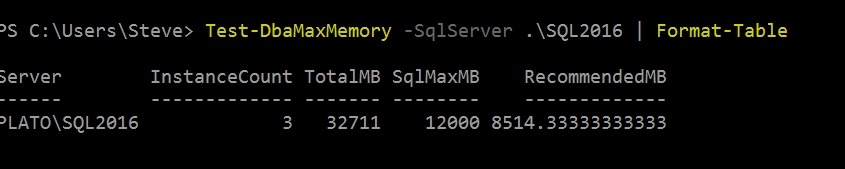
    It’s a simple command, with a parameter for the instance. The Format-Table is a great place to pipe this output. For one of my instances, I see:

    2017-09-28 13_29_48-powershell

    Not great, since I have other instances running. I wouldn’t want this to take over my workstation. My other instance is a little better configured.

    2017-09-28 13_30_38-powershell

    There are all sorts of filters here to use with this. The doc pages shows filtering to find instances where the setting is greater than total  memory. Maybe a better one might be looking for instances greater than (total memory –2GB), or 4GB. Or maybe you want some deviance from the recommended value.

    You can run this with any list of servers as well, and get a nice report. Maybe even one that you can use to convince your boss that you need a bit more RAM for that busy instance.

    As with the other dbatools, this fulfills a simple function. It’s quick, easy, and helpful. Give it a try today.

  • This Made Me Laugh: SQL v NoSQL

    It’s a humorous history lesson on SQL (and product promotion), but it opens like this:

    battle

    SQL awakens to fight the dark forces of NoSQL

    From there it looks at the beginnings of SQL and the growth of NoSQL, going through a few sections, like

    newhope

    Part 1: A New Hope

    and

    strike

    Part 2: NoSQL Strikes Back

    before moving to

    return

    Part 3: Return of the SQL

    They finish with the idea that SQL is the most important, and common, tool for data analysis. In this era of Python and R, many may disagree, but I think they’re overall right.

    Perhaps this last part proves that?

    yoda

    Master Data Scientist Yoda

    It’s an interesting read, and I may have to watch some Star Wars this weekend.