Tag: syndicated

  • Quick PoSh Kills with Stop-DbaProcess

    I’ve been trying to get used to using the dbatools cmdlets in PoSh. They help me learn some PowerShell, but they also make some things easier. As a part of my practice, I’m documenting the various items I’ve played with. This post looks at Stop-DbaProcess.

    Killing Spids

    At first I didn’t think much of this cmdlet, because I need to know a spid right? The time it takes me to run sp_WhoIsActive or sp_who2, find a spid, and decide to kill it is most of the time. A quick “kill xx” is easy in SSMS.

    This cmdlet does more, which makes it really handy for me. I know it’s just issuing a kill in the background, but it does have some features that perhaps make this more enticing, especially during times where I might need to quiesce  a server and remove a number of users.

    The first thing that comes to mind is that I can quickly kill all the users using a particular program. For example, I had a demo app with a generic connection to SQL Server. When I ran it, there were multiple connections to SQL Server. If this had been behaving badly, perhaps with a long running query, I’d have had to kill both of these to ensure I got the right one. In a demo, perhaps “kill 60” and “kill 62” is quick enough.

    2016-11-21 16_47_25-SQLQuery1.sql - localhost_SQL2016.sandbox (PLATO_Steve (66))_ - Microsoft SQL Se

    I could have done this, though.

    2016-11-21 16_47_18-powershell

    Way more typing, right? Sure it is. There’s an advantage, which I could have used more than a few times in my career. I didn’t have to look up the Spid with PoSh. In various jobs where I’ve had poorly behaving applications, I’d have to get a list of processes, find the numbers, and kill each of them individually. Easy as a one-off, harder (and annoying) when you are interrupting work regularly to repeat a tedious process.

    With Sop-DbaProcess, I can keep this script ready and have it kill all the connections using that program name, whether there is 1 or 100.

    What’s more, I have more options to exclude particular spids or logins, limit this to databases, run across multiple hosts, etc.

    Simple, easy, and useful in some situations. I wouldn’t kill a single process with this, but I’d certainly want to use this if I had to repeat myself over and over.

    Give dbatools a try and see where you might start finding PoSh to be useful while administering SQL Server.


  • Escaping a Dollar Sign in PoSh–#SQLNewBlogger

    Another post for me that is simple and hopefully serves as an example for people trying to get blogging as #SQLNewBloggers.

    I’ve been working more with PowerShell lately and ran into a problem I thought would be easy, but it wasn’t. So I decided to blog what I learned.

    Assigning a String

    I had a string that I wanted to use in a command. In this case, the Start-Service command. Here’s what I wrote:

    Start-Service -Name “SQLAgent$$SQL2016_QA”

    This didn’t work, mainly because of this error.

    2016-11-15 14_32_20-powershell

    PoSh thinks my string is “SQLAgent\”, not “SQLAgent$SQL2016_QA”. That’s strange, at least to me. Let’s try a variable.

    2016-11-15 14_33_06-powershell

    OK, I know I need to escape the dollar sign. I ran a quick Google search, because that’s way quicker than looking through documentation and found a piece on escaping strings. It mentions the backtick (`) as the character to use. Let’s try that.

    2016-11-15 14_35_41-powershell

    It works. Now to try to start the service.

    2016-11-15 14_38_46-cmd - powershell (Admin)

    No error, but it is it running? Yes.

    2016-11-15 14_39_26-cmd - powershell (Admin)

    This is a quick look at string work in PoSh. The more I try to automate work and get things to run themselves, the handier I find PoSh. Since I tend to work with named instances, this was valuable.

    #SQLNewBlogger

    This was one of those items that I spent about 5-10 minutes figuring out and then another 10 minutes shooting screens and duplicating my work. The writeup was easy, and it will help me remember how to do that in the future.

  • Getting Team City working with BitBucket

    As a part of building a CI/CD home lab, I set up TeamCity in the past. I plan on using this for multiple projects, and in fact, I’d built a basic Hello, World C# application as my first build.

    Now it is time to work on something more complex. As a part of my SQL Server Builds project, I decided to host the Ready Roll build here. That means connecting TeamCity to BitBucket.

    I had no idea how this might work, and some searching showed that this needed a plugin prior to v10, but the capability was built-in after that. I’ve been meaning to upgrade, so I did that first. As you can see, I have my TC v10 system, and when I go to create a new project, BitBucket is a first class citizen.

    2016-11-15 11_57_33-Projects — TeamCity

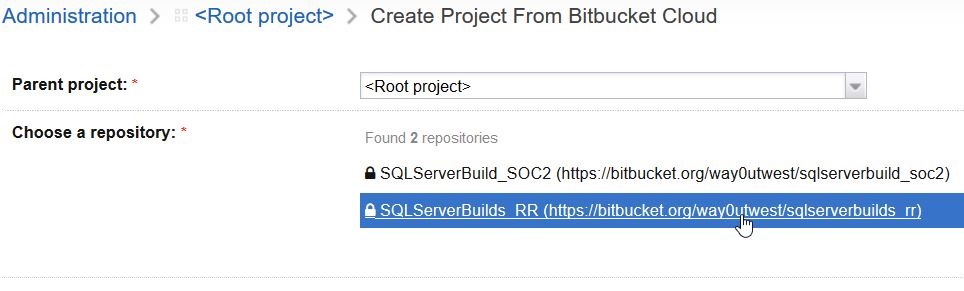
    Once I picked this, the system has me authenticate with Bitbucket (I won’t show this) and then get a key and secret that I paste into the dialog. This is fairly easy to follow, but for security purposes I’ll skip that. Once I’m authenticated, I can see my repos:

    2016-11-15 14_21_23-Create Project From Bitbucket Cloud — TeamCity

    I pick this repo and a project is created. In fact, TeamCity detects that I’ve got a VS solution in the repo, so it sets that as my build config.

    2016-11-15 12_02_58-Build Configuration — TeamCity

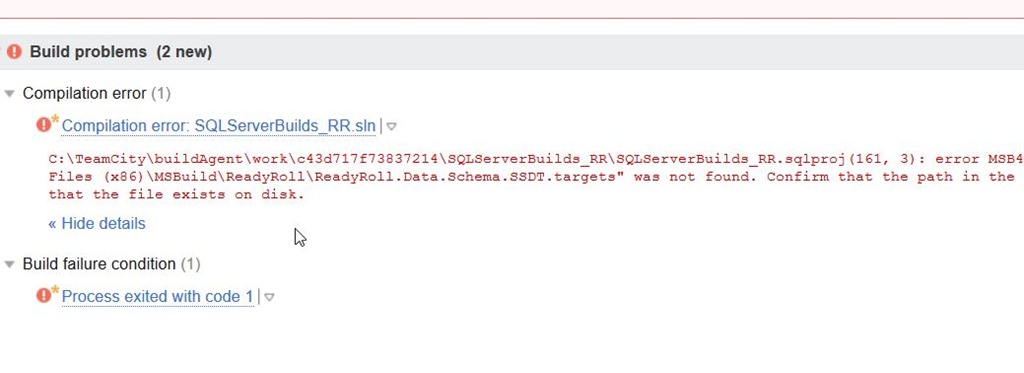
    That’s pretty cool, and I’m hooked up. Or am I? Let’s see. I’ll manually run a build.

    2016-11-15 12_43_56-Sqlserverbuilds RR __ Build _ #1 (15 Nov 16 12_36) _ Overview — TeamCity

    It doesn’t work. However, if you read the error, you’ll realize that the ReadyRoll project type doesn’t seem to work. That’s because I’m building on this server, which is separate from my development machine. I need to install the ReadyRoll binaries there.

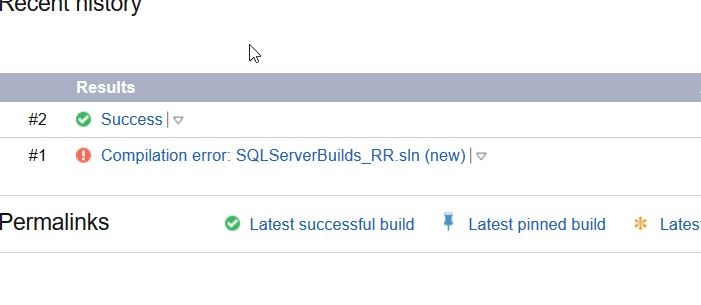
    A quick download from Redgate, and I install ReadyRoll. Now when I click “run”, I get this:

    2016-11-15 12_44_05-Sqlserverbuilds RR __ Build _ Overview — TeamCity

    Success.

    There’s more to getting setup, but this is a quick look at getting TeamCity hooked up to BitBucket.

    If you want to try ReadyRoll, grab an eval.

  • Two Weeks to Live! 360 and VSLive Orlando

    A short break in speaking, as I haven’t been on stage since Oct 11.

    LSPK42

    Now it’s two weeks to Live! 360 in Orlando and VS Live, both happening in Orlando on Dec 5-9. You can still register, and save $500 with my link.

    This is my first time at this event, though I’ve been to other VS Live events. I really like these conferences because I get the chance to attend non-SQL sessions and broaden my excitement for other parts of the Microsoft platform.

    If you’ve got some training dollars left for 2016, consider coming down and joining me today.

    Register and use LSPK42 to save $500.