Tag: syndicated

  • SQL in the City is coming next week

    Next week is the 2016 version of SQL in the City and you can register now to attend. It’s free and doesn’t require any travel. You can watch the event live from the comfort of your office chair.

    In the many years that we’ve run SQL in the City, we’ve had events in London and various cities around the US. It’s been a lot of fun and we want to continue the tradition, but with an experiment.

    This year we’re broadcasting SQL in the City from the Redgate Software offices in Cambridge, UK. We have seven hours of sessions mixed in with tips and tricks that will help you become better SQL Server developers and DBAs while showing you some new ways you might use the SQL Toolbelt to work more efficiently. Even if you’re not a Redgate Software customer, I’m sure you’ll learn some things about SQL Server.

    In order to make things more convenient for everyone around the globe, we are broadcasting on two days, December 14 and 15. The content is the same both days, but the times vary. Wednesday will be an early day for my in Cambridge as we broadcast for Asia and Eastern Europe. Thursday will be a late night as the conference is scheduled to fit the Western Europe and US time zones.

    I hope you’ll join us and get excited about our new SQL Clone and Data Platform Studio as well as learn a few things about DLM Automation, SQL Monitor, ReadyRoll and more.

  • A Python SQL Server App

    I got a link recently from Microsoft on building apps easily for SQL Server. At the top of the page, they ask you to pick a language and OS. Since I’ve done a little Python and I used Windows, I chose that option.

    The page looks to walk you through a simple app. I decided to try this out and see if it works, following the instructions. Since I already had SQL 2016 installed (and newly upgraded to SP1), I just connected and verified it was there.

    2016-11-22 11_50_06-powershell

    I didn’t want to go back to Python 2.7, and I’d rebuilt this machine for testing, so I used Chocolatey to quickly get Python 3.5. I’ll have to adjust code to match this version.

    2016-11-22 11_52_38-cmd - choco  install python (Admin)

    One python was installed, I needed to get virtualenv and then create a folder. I used my regular git folder since it’s really, really simple to get a project with version control running. Unfortunately, when I went to get pyodbc, I had an error.

    2016-11-22 12_18_53-cmd (Admin)

    This is going to use C++ tools to build the pyodbc files, so I need to get those installed. I can do that from Visual Studio.

    Once I run those and install them, I can now get pyodbc. There is a build error, but I seem to have the module. My next step is to create my db. I also create a login that is db_owner for this.

    2016-11-22 12_41_22-powershell

    Now it’s time for the code. That’s easy enough, so I copy the code into VSCode and change the instance and user information.

    2016-11-22 12_42_11-crud.py - Visual Studio Code

    I also had to replace the print statements with parenthesis around the quoted items, which is required in Python 3.x. Once that’s done, I start the program and it appears to work.

    2016-11-22 12_39_25-cmd (Admin)

    If I check from SSMS, sure enough the program has worked.

    2016-11-22 12_39_54-SQLQuery1.sql - localhost_SQL2016.SampleDB (PLATO_Steve (62))_ - Microsoft SQL S

    The second part of the tutorial uses the Django Web Framework to setup a simple site. Once again, I get a pyodbc error and there’s nothing that works. Fortunately I found the issue is with Python 3.5 and not having the proper binaries in the default PyPI directory. I resolved it with this link.

    2016-11-22 13_26_45-crud.py - Visual Studio Code

    However, there were other errors, which I suspect are related to Python 2.7 v Pyhton 3.5. Rather than solve those, I went on to the columnstore demo. In this, you create a table with 5mm rows and then run a query against it from Python. I did that, then created the columnstore index, then ran it again. The results are below.

    2016-11-22 13_46_23-columnstore.py - Visual Studio Code

    Note: I had to create the variable, tsql, and used this line of code:

    tsql = “SELECT SUM(Price) FROM Table_with_5M_rows”

    Python Works

    Despite some issues, which are probably my fault, this is a good introduction to how you might use Python with SQL Server. Since we now have SQL Server on Linux coming, and there are lots of Python developers, this might be a good place for some of you to learn a bit about connectivity with Python if you ever need troubleshoot that kind of setup.

  • Find my git remote

    I work on a few projects and have a bunch of demos setup, but I don’t work on them all every week. Being only semi-creative like many of you, I end up with some similar projects with similar names. When I wanted to determine which project was linked to which remote repository, I didn’t see an easy way.

    I perused help from the command line, but didn’t see anything, so I did a quick Google search. From Stack Overflow, I found this quick command.

    git remote –v

    When I ran this, I easily could get the address of my remote:

    2016-12-03 20_12_43-cmd

    Running this in each of the repos showed me the one I needed.

    I’m sure plenty of experienced people might know this, or you might always use something like SourceTree or GitKraken, but if you’re working in the command line more (as I often am), you might find this handy.

    Hopefully I’ll also remember this now.

  • Moving Tasks with Copy-SqlJob

    More dbatools experimentation for me. This is a great set of Powershell cmdlets that solve simple, handy problems. In this post, I want to look at Copy-SqlJob, which will allow me to easily move jobs from one instance to another.

    The Job Subsystem

    Jobs in SQL Server are part of the SQL Agent subsystem, which means they’re a part of SQL Server, but not really. Maybe the one part of the jobs that is really complex is getting the code for the job. You either need to use an SMO interface and script out the job, or you can decode the tables in msdb. Neither of which is handy.

    We do need to move jobs, though. Perhaps the most common places I need to copy jobs around is for a DR (disaster recovery) situation. Clustering will move jobs from node to node as it covers the instance, but all the other technologies (AGs, Log Shipping, Mirroring), all of these only work with databases. So items like jobs need to be manually moved.

    That’s not good.

    Over time, we’ll edit, add, change jobs, but I’ve never seen anyone do a great job of actually ensuring the DR systems are up to date with jobs, logins, etc. all the time. There’s too much of a manual process.

    That can change with Copy-SqlJob. I can now not only copy particular jobs between an instance, I can use a –Force command to ensure the copy takes place. This means that I can easily ensure the most recent version of my job is copied over. Or I can just skip this, and if the job exists, it’s not copied.

    Running the Cmdlet

    It’s easy to use this cmdlet. It can use Windows Auth or SQL Auth. It’s up to you. The documentation leaves something to be desired, so you’ll need to use the PowerShell Get-Help to learn what parameters exist.

    For a simple copy, I’ll move all jobs from one instance to another. Here are the jobs on my primary SQL Server 2016 instance.

    2016-11-22 09_11_09-SQLQuery1.sql - localhost_SQL2016.DBAAdmin (PLATO_Steve (66))_ - Microsoft SQL S

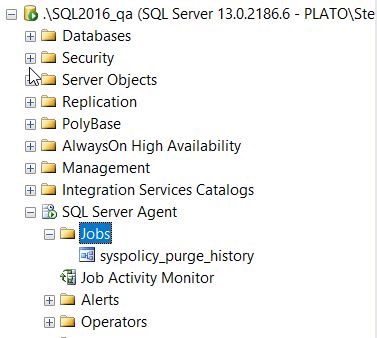
    These are administrative, backup jobs and index jobs from Ola Hallengren. I don’t have these on my QA instance, which isn’t good.
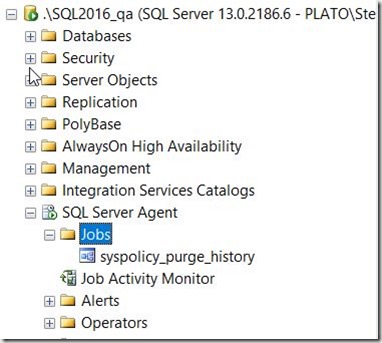
    2016-11-22 09_11_25-SQLQuery1.sql - localhost_SQL2016.DBAAdmin (PLATO_Steve (66))_ - Microsoft SQL S

    Suppose this is a new instance and I want to add them? I can use Copy-SqlJob, but I want to know what will happen. I’ll use the –Source and –Destination parameters and then include a –Whatif. This gives me a list of jobs that will be copied, and those that won’t be.

    2016-11-22 09_21_13-powershell

    If I use the –Force parameter, you’ll see that all jobs are copied.

    2016-11-22 09_22_25-powershell

    Well, not copied, but they will be.

    I could limit this to specific jobs. For example, let me just copy over these jobs

    • DatabaseBackup – SYSTEM_DATABASES – FULL
    • DatabaseBackup – USER_DATABASES – FULL

    When I run the command with the –Jobs parameter, I see just these jobs moved:

    2016-11-22 09_45_14-powershell

    Let’s actually do that. Once I remove the “”-Whatif” and run the command, I see this:

    2016-11-22 10_09_21-SQLQuery1.sql - localhost_SQL2016.DBAAdmin (PLATO_Steve (66))_ - Microsoft SQL S

    Note, this doesn’t actually move the dependent objects. Meaning the first job uses this procedure:  [dbo].[DatabaseBackup]

    I’d have to make sure this is copied separately for the job to actually run and succeed. Right now it will fail with an error that an object can’t be found. However, if you have jobs that you are using in a DR situation, this ensures the job itself is moved over.

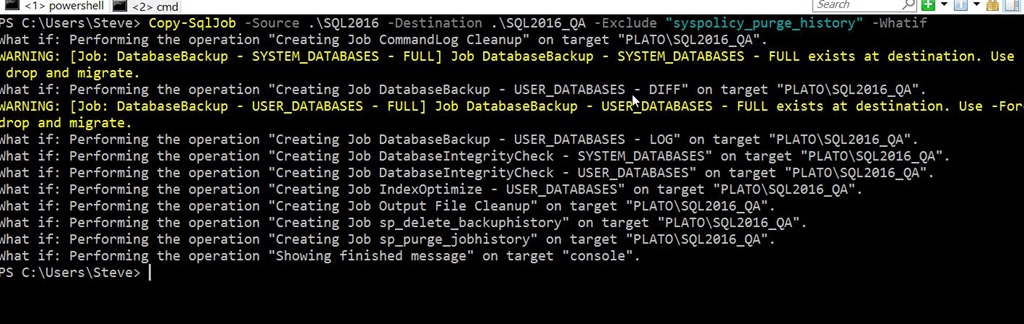
    Rather than copy the syspolicy_purge_history job, I’ll exclude it. I can do that with the –Exclude parameter. Note that the two jobs I’ve already copied are shown as warnings.

    2016-11-22 10_11_39-powershell

    All the parts of the job itself are copied. The description, the owner, the comments, the schedule, the steps. Everything is copied, which makes this perfect for ensuring that when you deploy a job, it can be deployed to all of the places you need it deployed by copying it from the source.

    Of course, you’ll also want to ensure you use some method to disable the jobs on the DR instances (along with re-enabling them on failover).