Tag: syndicated

  • Hey Posh, Are My Services Running?–#SQLNewBlogger

    Another post for me that is simple and hopefully serves as an example for people trying to get blogging as #SQLNewBloggers.

    In a previous post, I looked at escaping strings. The reason I needed to do this was that I was trying to do some automatic work with building and starting SQL Server instances. Part of laying the base for this was checking if services are running, and then perhaps taking action, like starting or stopping.

    I knew there was a Get-Service command, and ran that. The output from this is much more than I’d like to consume.

    2016-11-15 14_46_58-cmd - powershell (Admin)

    I’d like to limit this to SQL Server services. I know there is usually an MSSQLServer service, but since I tend to use named instances, this doesn’t work. Plus, I don’t want to search for just a particular service. I want all services for SQL Server.

    There is a Where-Object command, that allows me to search. There is also a –Like option for comparisons. I’ll structure a command like this:

    Get-Service | Where-Object ($_.Name –Like “SQL*”)

    That is less than successful.

    2016-11-15 14_49_20-cmd - powershell (Admin)

    Why not? Well, PoSh has some syntax requirements and one of them here is that I don’t want parenthesis, I want curly braces. If I change this, things work better.

    2016-11-15 14_51_00-cmd - powershell (Admin)

    If you’re older like me and don’t necessarily read small print easily, this might be one that catches you for a bit. However, notice that I only have my SQLAgent and system services, not the core database engine. My wildcard needs work.

    2016-11-15 14_52_01-cmd - powershell (Admin)

    Now I see all my services and I can easily decide if I want to stop, start, restart, etc.

    #SQLNewBlogger

    This was a quick post. It took me 10 minutes to relearn a few PoSh things and practice and then about 5 minutes to write this.

    I’ll remember it, and it shows how I’m building my administrative skills. You should do that as well.
  • What’s the little popup window in #SQLPrompt?

    Awhile back I was working in SSMS and saw this window.

    2016-11-21 16_25_51-SQLQuery1.sql - localhost_SQL2016.sandbox (PLATO_Steve (66)) - Microsoft SQL Ser

    It threw me off since I was trying to write some code and hadn’t expected it. I clicked Escape, Enter, a few things and was getting frustrated when it disappeared.

    I ignored it until I saw the window again and then investigated. I’m glad I did because I was able to answer a question from someone else recently that didn’t know how to get rid of it.

    Tl;Dr CTRL will make it appear or disappear.

    When I am working with SQL Prompt, it’s in the background. I usually just depend on it to pop up some code or give me information. This means when I have a cursor, there’s no sign of SQL Prompt. Notice this below.

    2016-11-21 16_27_38-SQLQuery1.sql - localhost_SQL2016.sandbox (PLATO_Steve (66))_ - Microsoft SQL Se

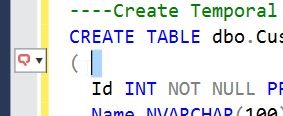
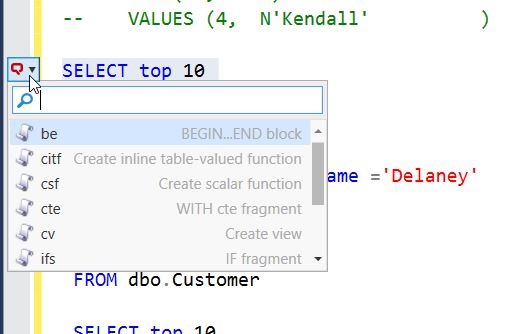
    As soon as I select an area, as little as one space, I get a small SQL Prompt window in the left sidebar. As you can see in the image below, this has a down arrow on it.

    2016-11-21 16_27_44-SQLQuery1.sql - localhost_SQL2016.sandbox (PLATO_Steve (66))_ - Microsoft SQL Se

    I can click on this, but being a keyboard person whenever possible, I accidently discovered that CTRL will expand this, as shown below.

    2016-11-21 16_29_34-SQLQuery1.sql - localhost_SQL2016.sandbox (PLATO_Steve (66))_ - Microsoft SQL Se

    What threw me initially is that not all my snippets are in this list. Only those that have the $SELECTEDTEXT$ token inside them. These are handy snippets that I want to use to encapsulate text.

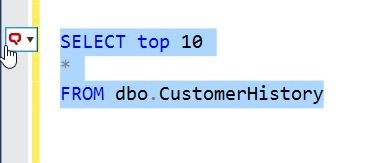
    For example, let me surround a simple query.

    2016-11-21 16_32_00-SQLQuery1.sql - localhost_SQL2016.sandbox (PLATO_Steve (66))_ - Microsoft SQL Se

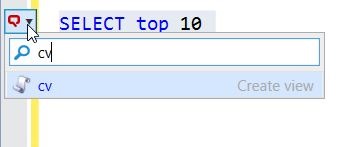
    I see the SQL Prompt icon and can click CTRL to open the list. If I type “cv”, I get the Create View snippet.

    2016-11-21 16_32_11-SQLQuery1.sql - localhost_SQL2016.sandbox (PLATO_Steve (66))_ - Microsoft SQL Se

    Once I then hit tab, I get the snippet with my query inside.

    2016-11-21 16_32_22-SQLQuery1.sql - localhost_SQL2016.sandbox (PLATO_Steve (66))_ - Microsoft SQL Se

    This is especially handy with things like TRY..CATCH, where I can write the TRY part and then quickly surround it with the structure.

    Once you get used to this, and learn not to habitually tap the CTRL key (as I do), you’ll find this list of snippets handy. And if you don’t like them, just tap CTRL and get rid of the list.

  • Rate a Session for GroupBy

    One of the things that I struggle with is understanding whether a session at a conference like a SQL Saturday is worth watching. I also struggle writing abstracts and attracting people to my own sessions, so I think the idea of GroupBy allowing rating and reviewing of abstracts in advance is fantastic.

    Group_By_Conference_Logo

    First, let me encourage many of you to go take a minute today and rate an abstract. If you see something that you like, leave a note. If you aren’t sure of something, or don’t like something, or even have a question about the content, leave that note as well.

    I’ve been fortunate to attend lots of events. I speak at many, but I try to view a session or two at each as well. I’ve seen some great ones, and some poor ones. I do try to provide constructive criticism, and I do so privately. If you’d like feedback from me at any event, please ask.

    One of the things I’ve seen is that the abstract often doesn’t quite match the talk, or the abstract doesn’t really help me understand what will be covered. It doesn’t matter if someone has tried to write a cute description or a plain boring one, the writing doesn’t always match the talk well.

    I know I make mistakes in my abstracts. I know sometimes I write something that I realize later isn’t quite what I think will work in the talk. I’d like the chance to edit and correct small items. More importantly, I’d like to be sure that if my abstract topic (and talk) could slightly be tweaked in a way that more people like, I want to do it.

    Take a minute and give some feedback. Be honest, rate what you want, don’t take up too much of your day, and help improve the conference schedule.

    I’d love to see PASS implement this as well for the Summit. I realize this can be hard, but I would prefer to see some give and take in advance to help build the best set of sessions that people want to attend.

  • Validating a Set of Database Scripts using DLM Automation

    The basis of all the DLM Automation from Redgate is a series of PowerShell cmdlets. They might look intimidating or confusing, but they aren’t. This is part of a series of posts that examine how you use each one.

    Previously I looked at New-DatabaseConnection. In this post, I’ll go through Invoke-DlmDatabaseSchemaValidation. This is the cmdlet that one uses to check if your set of scripts will actually produce a database. This is equivalent to the “build” plugin that exists for a few platforms.

    The way this works is that the location of the database scripts is passed to this object through a pipe. This will then validate the scripts on LocalDB with a build of the database and the static data scripts. If this works, then an output object is returned.

    A Quick Build

    Let’s see how this works. I have a valid database folder on my computer. This has all my object code in subfolders, including static data in the data folder. I want to validate this folder.

    2016-11-22 13_56_30-ScriptFolder

    I can do that with this code. I’ll pass the location of the scripts into the cmdlet.

    $output = “e:\Documents\GitHub\SimpleTalk_Devlopment\ScriptFolder” | Invoke-DlmDatabaseSchemaValidation

    When I do this, a LocalDB instance is created and the code validated. I get a message to that effect. The output variable has the confirmation message.

    2016-11-22 14_06_39-powershell

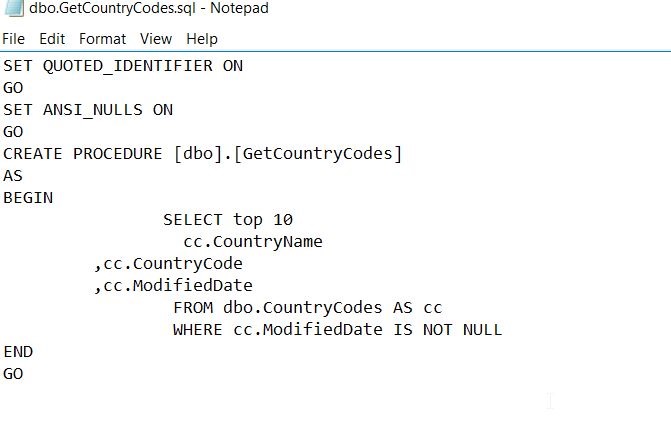
    This means the code is valid. However, does this really work? Let’s edit some code and see. I’ll change the code for a procedure. Here’s the original GetCountryCodes.sql.

    2016-11-22 14_08_29-dbo.GetCountryCodes.sql - Notepad

    Let’s change this to top 100 and add an ALTER, but I’ll get an extra comma in there. This is no longer valid SQL.

    2016-11-22 14_10_45-dbo.GetCountryCodes.sql - Notepad

    Let’s re-run the build. We now see this has failed with an error, and the file is the one I edited:

    2016-11-22 14_11_41-powershell

    This is a quick look at builds, but there is more that can be done. You can specify the server and database to be used, combining this with the New-DlmDatabaseConnection I previously wrote about.

    I urge you to experiment with this cmdlet if you want to perform your own builds.