Tag: syndicated

  • Basic XML Node Query–#SQLNewBlogger


    Another post for me that is simple and hopefully serves as an example for people trying to get blogging as #SQLNewBloggers.

    I saw a question recently about querying an XML document. Certainly avoid this in the database if you can, but there are times you need to. Rather than link to the post, I wanted to show the basics of how you query a node.

    Let’s suppose I have an XML document like this:

    <Order>
      <OrderID>4FB9</OrderID>
      <ORderDate>2019-07-20-00.31.23.000000</ORderDate>
      <Status>Open</Status>
      <Customer>
        <CustomerName Type=”Individual”>
          <FirstName>Jon</FirstName>
          <LastName>Doe</LastName>
        </CustomerName>
      </Customer>
      <Customer Type = “Company”>
        <CustomerName>
          <CompanyName>Acme</CompanyName>
          <Account>12345</Account>
        </CustomerName>
      </Customer>
      </Order>

    Now, I saw someone query this with code like this to get the OrderID.

    DECLARE @xml XML;
    SET @xml = N’
    <Order>
      <OrderID>4FB9</OrderID>
      <ORderDate>2019-07-20-00.31.23.000000</ORderDate>
      <Status>Open</Status>
      <Customer>
        <CustomerName Type=”Individual”>
          <FirstName>Jon</FirstName>
          <LastName>Doe</LastName>
        </CustomerName>
      </Customer>
      <Customer Type = “Company”>
        <CustomerName>
          <CompanyName>Acme</CompanyName>
          <Account>12345</Account>
        </CustomerName>
      </Customer>
      </Order>
    ‘;

    SELECT
          t.b.value(‘(ORDERID)[1]’, ‘NVARCHAR(100)’) AS MSGID
      FROM
        @xml.nodes(‘/Order’) t(b);

    This doesn’t work.
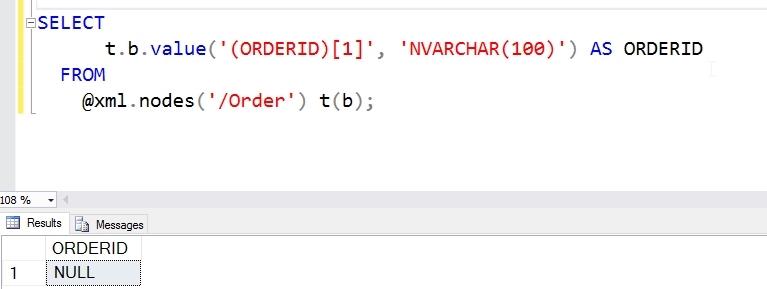
    2016-06-15 13_09_07-Photos

    The reason this doesn’t work is that XML is case sensitive. Meaning ORDERID != OrderID. The former is in the query, the latter in the XML document. If I change the query, this works (note I have OrderID below).
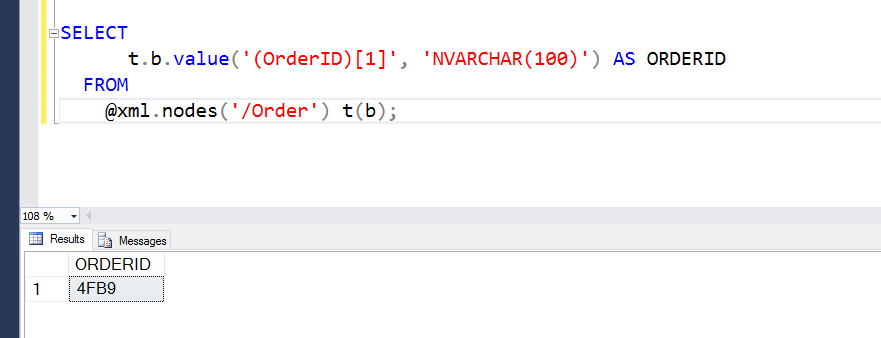
    2016-06-15 13_11_23-Photos

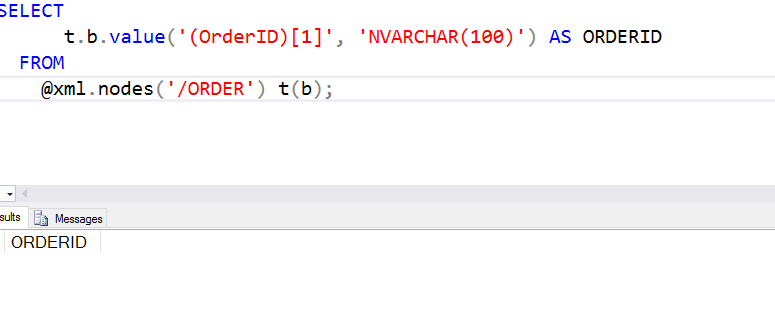
    This would also apply to the .Nodes call. If I had .ORDER, this also wouldn’t work.
    2016-06-15 13_11_54-Photos

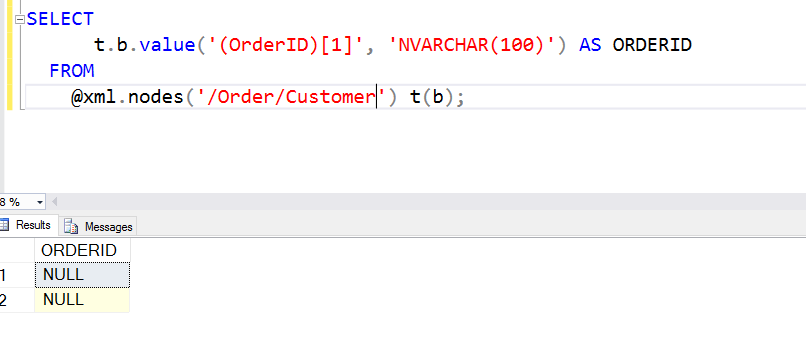
    The @xml.nodes() call determines the root at which I’ve essentially set the document. I could have this as /Order/Customer if I wanted. In that case, I couldn’t access the OrderID. The OrderID isn’t below the Customer node.
    2016-06-15 13_13_21-Photos

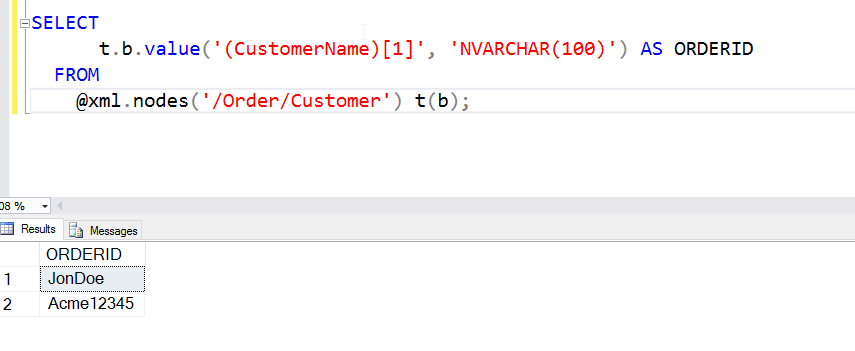
    However, from below Customer, I can get to the names.
    2016-06-15 13_14_05-Photos

    There is a lot more to know about XML, but you can experiment with the various nesting levels by including different paths. I’ll show a few more things in another post.

    SQLNewBlogger

    Querying XML is hard, and can be frustrating as the document size grows and complexity grows. However, this is a good way to showcase your skills (or build them), but tackling different query questions or challenges and writing about them.

    Hint: this will also help solidify your XML skills.

  • The Desktop Rebuild–Part 3

    This is the last part of this series, at least for now. If you haven’t seen Part 1 and Part 2, feel free to check them out.

    After I got through Part 2, I was working again. In fact, I continued to chocotaley install a few things, but for the most part, I could get productive quickly, working on writing, email, even code. I did install Visual Studio, SQL, and SSMS by hand, mostly to be sure they were the right versions I needed.

    However, things weren’t great. The two monitors I showed from Part 2 were OK, but the not great. I missed my third monitor, especially when I had the second one in portrait more. I decided I needed to just upgrade things again. Not everything, just the video card.

    I tried my two older cards, shown below, in various combinations, but every time I added them to the motherboard, I couldn’t boot. Remove them, and things worked again. After 4-5 tries, I thought it was time to abandon this path.

    Photo Jun 27, 12 54 11 PM

    I’ve been stretching my budget slightly. I’ve had a few expenses here, and while this is tax deductible, it still costs real money. I got a few recommendations for video cards, including this Quadro K1200, which looked great. However, another $300 right now would likely get my wife a bit more upset than I’d like.

    I looked around the Internet a few times at night and found some other cards that would support 3 monitors, at a more reasonable cost. In the end, I decided to switch from ATI to NVidia and got a EVGA GeoForce GT740 card with two DVI and one mini HDMI out. Quite a few people had used this for workstations and it seemed to support 3 monitors well.

    Photo Jun 27, 12 54 16 PM

    This was a large card, and the first one I’ve ever owned that needed its own power connections. Hardware has changed. This is also a card with 4GB of memory, which is a long way from the first computer I built after college that had 4MB of main memory.

    Installing the card was easy. It slipped in, I connected it to power and my desktop booted right up. Well, I had a CMOS error, but I cleared things and then it booted. The mini-HDMI cable was a tight fit, but I managed to get it in there.

    One note on cables, go longer. I got a 3ft mini-HDMI to HDMI and it wasn’t quite long enough. I had to rearrange monitors a bit, which is OK, but I should have just gotten a 6 foot cable and then secured the extra.

    I downloaded the NVidia driver before I’d shut down the machine, so I booted to a single monitor, installed the driver, and things worked right away. I configured things and ended up going with a 3 monitor config that has the center one in portrait mode.

    Photo Jun 27, 1 00 12 PM

    It’s been a few days and so far everything looks and works great. I’ve rebooted a few times, taken the desk up and down multiple times, and connections are solid, hardware is working, and I can get back to getting work done.

    I ran a test using UserBenchMark and got great scores everywhere but video and then only for gaming. Overall, this is a much faster machine, and seems to work smoother. I’ve had zero issues with the hardware and Windows 10 seems more stable since the fresh installation.

    2016-06-27 13_08_24-Asrock Z170 Extreme6 Performance Results - UserBenchmark

    My Windows Experience Index also changed dramatically.  The old machine was a 5.1, mainly due to graphics, with the other scores in the low 8s. The new score is 7.9, with graphics holding things back, but I have a third monitor now and more CPU and RAM resources.

    Summary

    Here are the changes I made. Note I’m not recommending these items. I got some recommendations from Glenn Berry, and they worked well for me. This stuff changes often, so check with friends and do your own research.

    Old

    • MB – Gigabyte, circa 2010-ish
    • 24GB RAM
    • 256 boot SSD, 512 SSD, 2x1TB HDD
    • ATI 512MB RAM graphics card, circa 2010
    • ATI 1MB graphics card, circa 2012
    • Corsair 600W power supply

    New

    ASRock Extreme6 motherboard – $109 (after rebate)

    Intel i7-6700k – $269

    32GB Memory – $50

    Cooling fan – $30

    EVGA Video – $110

    That’s $620 for a fairly substantial upgrade.

    I’m pretty happy for now, and I suspect this will last for some time. If I change anything, it will be adding another graphics card because I need video stuff (or I buy Doom 4) and getting a larger power supply.

  • Better Explorer on High dpi Displays

    I’ve got a high dpi display on my laptop. The recommended resolution is 2560×1704. That’s small. I have had all kinds of issues with SSMS, VS, and various other applications, including a few from Redgate.

    The other day I was looking at the Explorer window from about 2 feet away and struggling to see some of the icons and filenames as the light faded one afternoon. I found I could barely make out some icons and found myself leaning forward to see and back to type. Getting older has really made this annoying.

    I found an article that helped, letting me adjust the title bars and icon sizes in Explorer. I bumped up the sizes for title bars, menus, and icons. Everything went to 12 or 14, from the 9 or 10 points that are the defaults.

    Now I can read my Explorer window better. If you’re struggling with the higher resolution displays, give this a try. It’s hard to tell in the screenshot, but things are much easier to read now.

    2016-06-09 18_14_38-File Explorer

  • Better ReadyRoll Script Naming

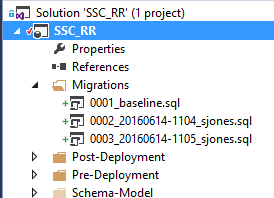
    One of the things that I like about ReadyRoll is that the product will automatically build new scripts that are named in a sequential order. This usually results in a few scripts that look like this:

    2016-06-14 11_05_15-Movies & TV

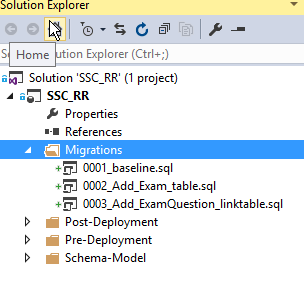
    As you can see, these scripts aren’t very intuitive. In fact, if you get lots of scripts, this starts to look fairly complex and confusing. What about something more like this:

    2016-06-14 11_08_13-Movies & TV

    That’s easier to read and understand. I’d also have a better idea of what happens in each script. How can I do this? It’s easy.

    Add an Object

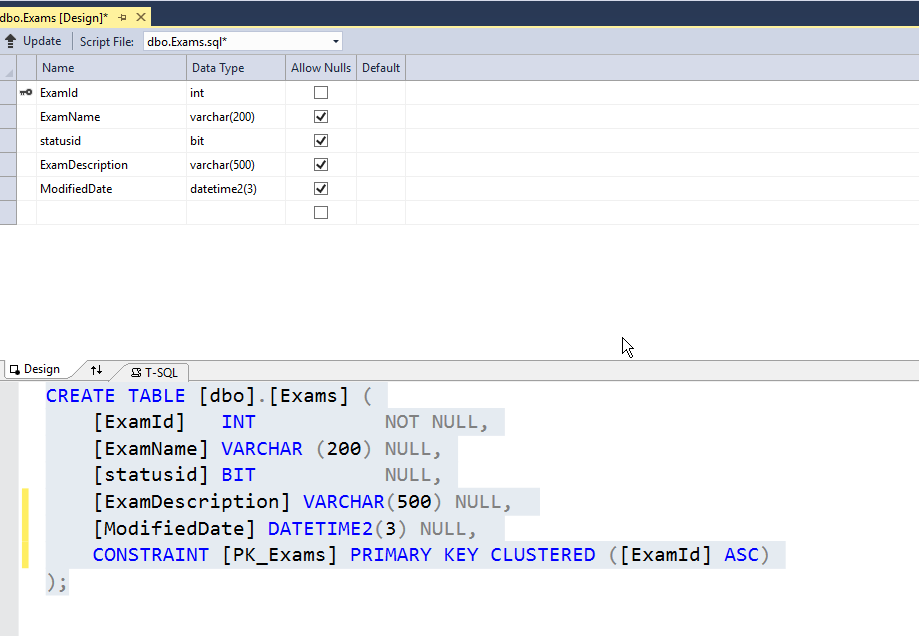
    First, let’s add an object in ReadyRoll. I’ll alter my Exams table to add a few columns. To keep this simple, imagine I want to add a modified date and a short description. I could do this in SSMS, but I’ll open the designer in VS. Here’s the table.

    2016-06-14 11_10_30-Photos

    I’ll make my changes.

    2016-06-14 11_11_01-Photos

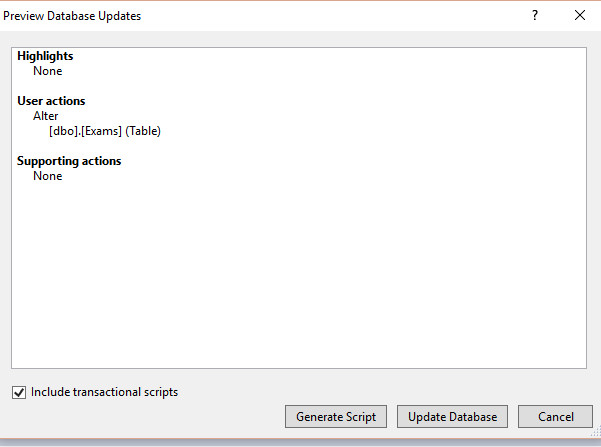
    Now, I click the “Update” button in the upper left. When I do this, I get a Generate script item. I could do other things, but I like to do this and see my script before applying it to the dev database.

    2016-06-14 11_12_04-Movies & TV

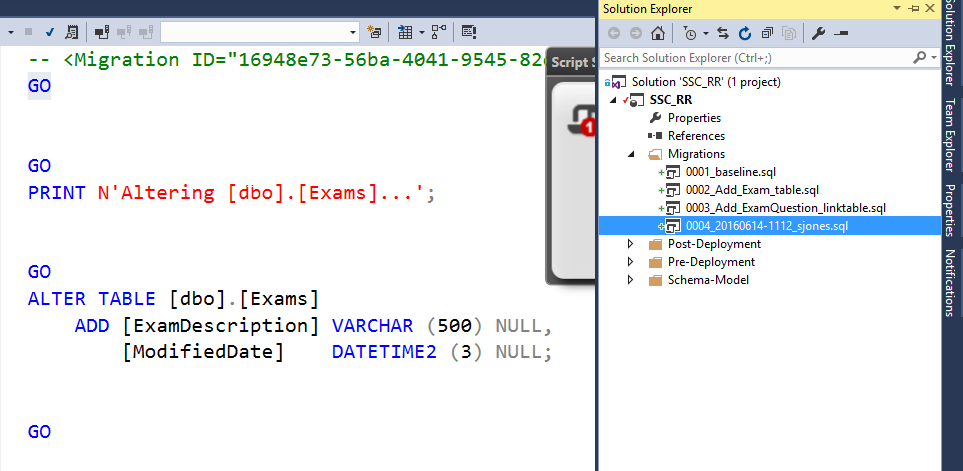
    I click Generate, and I get the script. Notice, it’s named with some random number (after the 0004) on the right.

    2016-06-14 11_12_34-Photos

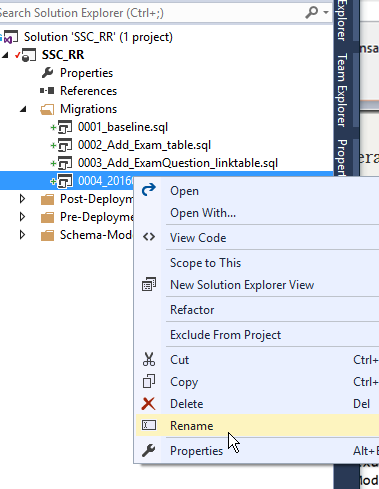
    If I right click the script, I can do all the normal file operations.

    2016-06-14 11_13_32-Photos

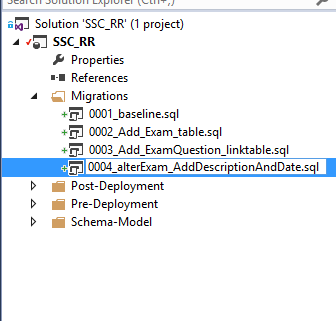
    Let’s give this a more descriptive name. It’s taken me a long time from my 8.3 name days, but I’ve learned to take advantage of file names to make them descriptive. A few bytes in a name is cheap.

    2016-06-14 11_13_58-Photos

    That’s it.

    ReadyRoll does use the first characters in front of the underscore (_) to order scripts, so I don’t want to change those. I could, but in this case, I need script 4 to come after script 2 at the very least.

    After the underscore, I can do whatever I like. In this case, I can see the changes being made to my database, just reading down the scripts and seeing how things will occur. I always have the detail in the code, but at a high level, I can see the changes.

    I’m sure if you adopt this technique, you’ll find that it’s much easier to manage scripts and track what’s happening to your database.