Tag: syndicated

  • Not a Great Search

    Tldr: A bit of a rant. I’m not spending a bunch of time crafting this.

    I have mixed feelings about searching for information on Microsoft sites. It kind of works, kind of doesn’t. I know that there are resource constraints to upgrading their sites, but I’m more and more annoyed.

    Perhaps this is one reason I don’t use Bing. Maybe, not sure. I need to think about this.

    Anyway, I go to the main BOL page online often. It’s supposed to be more updated than the local help, and I don’t have to use some procedure to get to it. I went today and entered in a search, getting these results.

    2016-06-22 13_47_36-t-sql wildcard characters - MSDN Search

    Check out the second one. That might be interesting, and it’s in the Support KB. I click on it and see this:
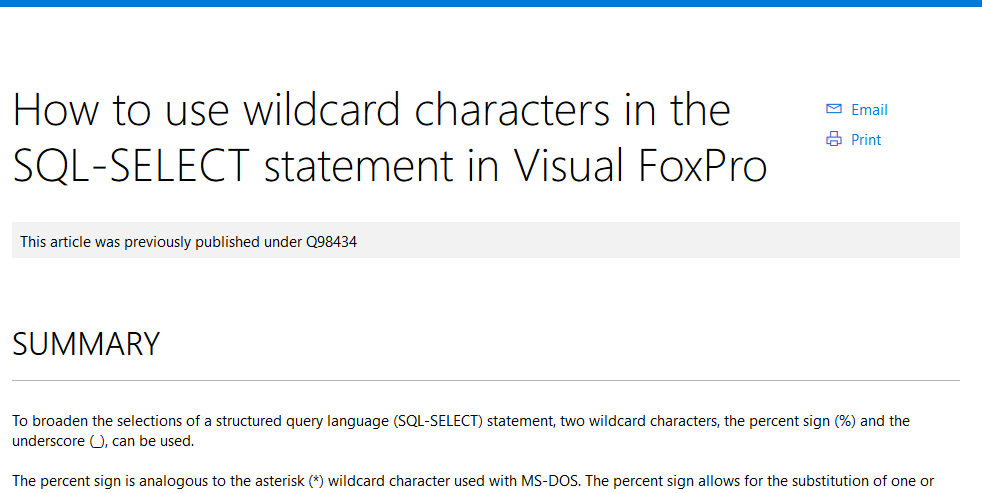
    2016-06-22 13_53_40-How to use wildcard characters in the SQL-SELECT statement in Visual FoxPro

    That. Is. Not. What. I. Want. (at least not these days)

    Even surfacing the entire title, or maybe tagging this as a VFP article in addition to a kb one.

    As I delve into more technologies, I find acronyms crossing over, so I want to look for a term in SQL Server, or in C#, and right now I have to search and then try to limit things with a click on the left. Except that I don’t always get a good way to limit searches.

    2016-06-22 13_55_37-Settings

    That’s not a great example, but that’s the term of I thought of today that crosses over.

    Can we please get some way to default a search to the areas we’re working in? I can click something if I’m working with SQL and need to search wider, but I seem to get (more and more) results from Sharepoint, C#, etc that aren’t relevant.

    Ugh, I know I’m ranting a bit, but search becomes more and more important in the see of data, especially with things like Azure rev’ing every quarter. Give me a way to search current docs, in my area, easily, by default.

  • Starting ReadyRoll with an Existing DB

    I’ve been working with ReadyRoll quite a bit the last few months, and wanted to start putting out some information. I’m looking to do a longer series, but here’s a quick post on getting started.

    When you install ReadyRoll, you get a new project type under SQL Server.

    2016-06-14 12_27_14-Photos

    This is a database project that will track all changes to your database as a series of migration scripts. Let’s get started. I’ll choose this and give it a name.

    Once I do this, I get the ReadyRoll window with some information. What I really want to do here is point this to my existing database. Right now it’s looking at a LocalDB instance.

    2016-06-14 12_28_07-Photos

    I’ll click the configure link and get the Connection String dialog. This is the database that mirrors one of the SSC databases, with lots of objects in it.

    2016-06-14 12_29_38-Photos

    Once I’ve done this, the project will use this database. The Shadow database will also be on this instance.

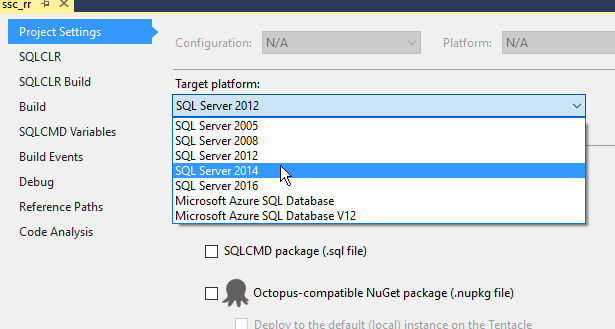
    I need to make one other change and set the correct version in the Project Settings.

    2016-06-14 12_48_29-Photos

    Now, back to the ReadyRoll window. I’ve configured the DB connection, so I can ignore that. What I want to do is import my database, getting a baseline script.

    2016-06-14 12_49_32-Movies & TV

    I click that and ReadyRoll creates a Shadow database (since one doesn’t exist) and begins to import objects.

    2016-06-14 12_49_39-Photos

    Once that’s done, I get a list.

    2016-06-14 12_49_48-Photos

    And a migration script.

    2016-06-14 12_49_58-Movies & TV

    This is my baseline, starting script. This contains all the objects that exist in the database at this point. These are also added to the Schema-Model, but I can ignore those. I’m going to work on the database itself.

    The ReadyRoll widget notes this was an import, and there’s no need to deploy anything since these aren’t changes, but just the state of the db.

    2016-06-14 12_52_09-Movies & TV

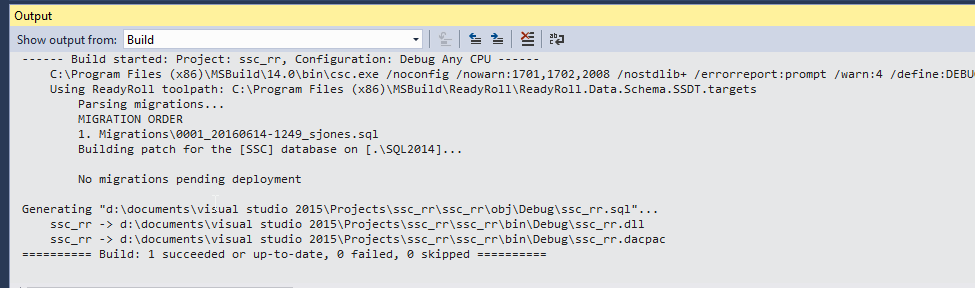
    I can see this if I do a Visual Studio build. Note the message in the middle: No migrations pending deployment. The changes in script 1 (001_20160614-1249_sjones.sql) are already in the db.

    2016-06-14 12_52_50-Photos

    Now I can make changes to my database and get new scripts. Add a table in the designer?

    2016-06-14 12_54_55-Photos

    When I click Update (and Generate Script), I get a new migration script.

    2016-06-14 12_55_09-Movies & TV

    Note that I just generated this script. I’ll write more about this process later, but for now, I’ll click Deploy Project to execute this against my database. When I do that, VS does a build, and one migration is executed.

    2016-06-14 12_56_06-Photos

    Add a procedure?

    2016-06-14 12_57_13-Photos

    Generate a new migration script.

    2016-06-14 12_57_35-Movies & TV

    And so it goes. I can work with my database in VS and get new scripts. I can also do an import if someone else makes changes to the database from their own machine with VS, SSMS, SQLCMD, isql, etc. The import will generate another migration script that gets added.

    This is a really basic look at ReadyRoll, but it will get you started. I’ll tackle more topics and different ways of working with database development in another series of posts.

  • LAST_VALUE–The Basics of Framing

    I did some work a 3-4 years ago, learning about the Windowing functions and enjoying them so much I built a few presentations on them. In learning about them, and trying to understand them, I found some challenges, and it took some experimentation to actually understand how the functions work in small data sets.

    I noticed last week that SQLServerCentral had re-run a great piece from Kathi Kellenberger on LAST_VALUE, which is worth the read. There’s a lot in there to understand, so I thought I’d break things down a bit.

    Framing

    The important thing to understand with window functions is that there is a frame at any point in time when the data is being scanned or processed. I’m not sure what the best term to use is.

    Let’s look at the same data set Kathi used. For simplicity, I’ll use a few images of her dataset, but I’ll examine the SalesOrderID. I think that can be easier than looking at the amounts.

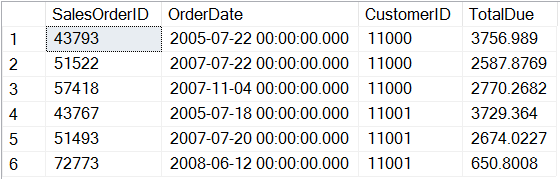
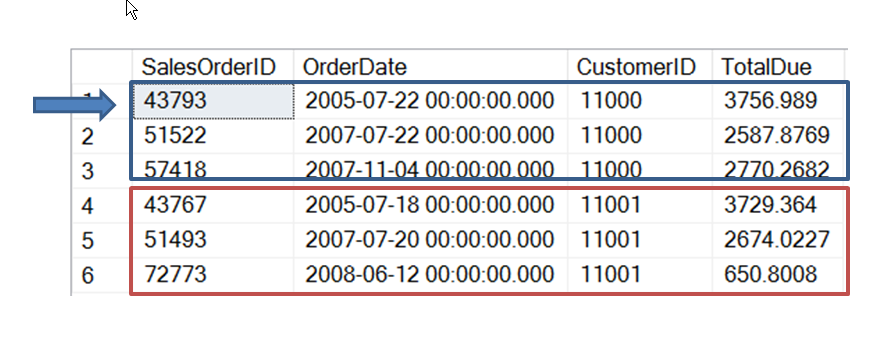
    Here’s the base dataset for two customers, separated by CustomerID and ordered by the OrderDate. I’ve included amount, but it’s really not important.

    2016-06-06 13_38_55-Phone

    Now, if I do something like query for LAST_VALUE with a partition of CustomerID and ordered by OrderDate, I get this set. The partition divides the set up into the two customer sets. Without an ORDER BY, these sets would exist as the red set and blue set, but in no particular order. The ORDER BY functions as it does in any query, guaranteeing the same order every time.

    2016-06-06 13_46_36-Movies & TV

    Now, let’s look at the framing of the partition. I have a few choices, but at any point, I have the current row. So my processing looks like this, with the arrow representing the current row.

    2016-06-06 13_49_22-Movies & TV

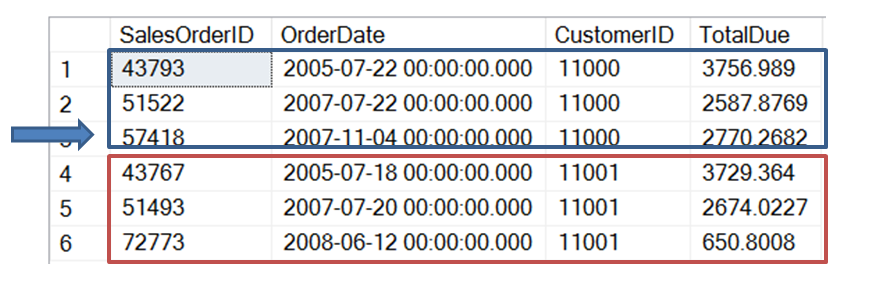
    The next row is this one:

    2016-06-06 13_49_33-Movies & TV

    Then this one (the last one for this customer)

    2016-06-06 13_49_44-Movies & TV

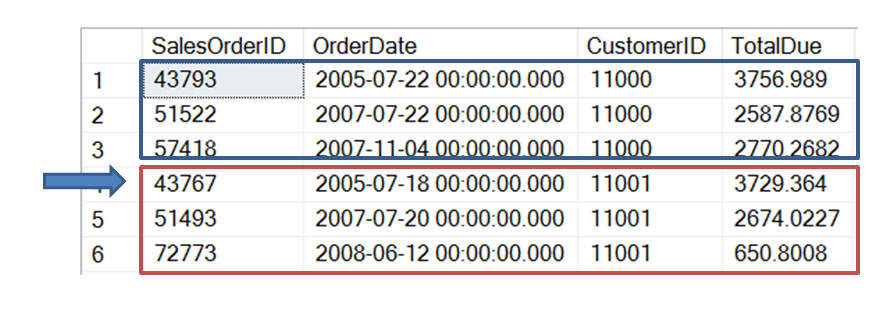
    Then we move to the next customer.

    2016-06-06 13_49_54-Movies & TV

    When I look at any row, if I use “current row” in my framing, then I’m looking at, and including, the current row. The rest of my frame depends on what else I have. I could have UNBOUNDED PRECEEDING and UNBOUNDED FOLLOWING in there.

    If I used UNBOUNDED PRECEEDING and CURRENT ROW, I’d have this frame, in green, for the first row. It’s slightly offset to show the difference.

    2016-06-06 13_53_22-Movies & TV

    However, if I had CURRENT ROW and UNBOUNDED FOLLOWING, I’d have this frame (in green).

    2016-06-06 13_54_21-Movies & TV

    In this last case, the frame is the entire partition.

    What’s the last value? In the first case, the last part of that frame is the current SalesOrderID (43793). That’s the only row in the frame. In the second frame, the last one is 57418, the last row in the frame, and partition.

    What if we move to the next row? Let’s look at both frames. First, UNBOUNDED PRECEEDING and CURRENT ROW.

    2016-06-06 13_56_16-Movies & TV

    Now the frame is the first two rows. In this case, the last value is again the current row (51522). Below, we switch to CURRENT ROW and UNBOUNDED FOLLOWING.

    2016-06-06 13_56_29-Movies & TV

    Now the frame is just the last two rows of the partition and the last value is the same (57418).

    There’s a lot more to the window functions, and I certainly would recommend either Kathi’s book (Expert T-SQL Window Functions in SQL Server) or Itzik’s book (Microsoft SQL Server 2012 High-Performance T-SQL Using Window Functions). Either one will help. We’ve also got some good articles at SQLServerCentral on windowing functions.

  • The RGE

    I first heard this little acronym from Grant Fritchey (b | t). He used it when talking about backups and restores, and I like it. However I realize that I’ve never actually noted what it is, so a short blog to do so today.

    An RGE is a Resume Generating Event. This is usually when you make a mistake so egregious that you’ll be packing up your personal effects and exiting the building. If it’s really bad, such as releasing financial or other confidential information, you might be escorted out and someone else packs up your things. I’ve seen it happen, and it will shake you. Don’t do this.

    We talk about forgetting about backups, or writing bad code or some important task we often perform as causing an RGE. In my experience, that doesn’t happen too often. Companies usually have a fairly high tolerance for mistakes.

    However, that tolerance is usually extended only once. Don’t make the same mistake again. I’d also note that some managers can be very short tempered, and a single, large issue might be an RGE in their eyes.

    I don’t usually worry about causing an RGE, but I keep the acronym in mind. Especially when I do something that could affect the core parts of my organization’s business.