Tag: syndicated

  • Quick Tests for a Function

    I was writing a poorly performing UDF the other day and then wanted to replace it with a better performing one. However, I wanted to be sure that the function was the acting the same externally. In other words, does all my code that calls the function work the same?

    It’s a no brainer for me to use tSQLt to do this. I can quickly put together a few tests for my function. In my case, my function was proper casing a string. In this case, I make a class and add a quick test.

    My function is dbo.udfProperCase(@string). This takes a string value and returns a string value. My test needs then only a few variables.

    DECLARE @i VARCHAR(500) = ‘steve’
    , @expected VARCHAR(500) = ‘Steve’
    , @a VARCHAR(500)

    These are my input, my expected, and actual values. The rest of the test is simple.

    EXEC @a = dbo.udfProperCase @input = @i

    EXEC tsqlt.AssertEquals @Expected = @expected, @Actual = @a, @Message = N’single name failure’

    This calls the function, gets the return, and the asserts this is equal to the Expected value. I wrap this in a procedure definition. My complete definition is then:

    EXEC tsqlt.NewTestClass
      @ClassName = N’StringTests’;
    go
    CREATE PROC [StringTests].[test propercase single name]
    AS
    BEGIN
    DECLARE @i VARCHAR(500) = ‘steve’
    , @expected VARCHAR(500) = ‘Steve’
    , @a VARCHAR(500)

    — Act
    EXEC @a = dbo.udfProperCase @input = @i

    — assert
    EXEC tsqlt.AssertEquals @Expected = @expected, @Actual = @a, @Message = N’single name failure’

    END

    That test took me about 2 minutes to write. It’s fairly trivial, but this gives me a happy path test. I easily copied this multiple times, changing the input and Expected values.

    DECLARE @i VARCHAR(500) = ‘steve jones’
    , @expected VARCHAR(500) = ‘Steve Jones’

    and

    DECLARE @i VARCHAR(500) = ‘steve von jones’
    , @expected VARCHAR(500) = ‘Steve von Jones’

    and

    DECLARE @i VARCHAR(500) = ‘J steve Jones’
    , @expected VARCHAR(500) = ‘J Steve Jones’

    That gives me a few items. However I also want to look for issues, so I include a few other items.

    DECLARE @i VARCHAR(500) = ”
    , @expected VARCHAR(500) = ”

    as well as

    DECLARE @i VARCHAR(500) = null

    , @expected VARCHAR(500) = null

    This lets me quickly run a series of tests against my function. While this might not seem like much, they do give me flexibility. If I change the function from a loop to something more like Tony Rogerson’s code, I should get the same results.

    That’s the power of testing. Not so much that this verifies my code is correct, though it does that. Testing provides me the freedom to change code, without worrying I’ve subtlety broken things. I get a complete test run against new code quickly.

    Certainly I could have bugs in code, but I can easily write a new test when I find a bug and include it in my suite of tests to run against the function for the future.

    Testing isn’t that hard, and the more you practice writing tests, the better (and faster) you’ll get at it.

  • Another Recursive CTE–Doing Math

    Another post for me that is simple and hopefully serves as an example for people trying to get blogging as #SQLNewBloggers.

    I showed how to write a simple recursive query recently that calculated an amount of money paid out each day. Now I want to extend this a bit to include a few math formulas.

    Note: These aren’t terribly useful, but they are good practice for just writing recursive queries.

    Fibonacci Series

    I’m sure many of you have dealt with a Fibonacci series at some point in your life. This is a series where the current value is the sum of the two previous values. In other words,

    term 3 = term 1 + term 2

    term 4 = term 2 + term 3

    etc.

    The series starts with 0, 1 and goes from there. Can we do this in SQL? Sure.

    Let’s start by looking at what we need. We need some counter, a current term, and a previous term. That’s 3 columns in our query. We start by building an anchor, which has the first two terms. The counter is n and the two terms are i and j.

    — Anchor

    select n = 1

    , i = 0

    , j = 1

    Now we add the recursive part. In this case, the counter increases by 1. I only include the counter so I know when to stop. SQL Server has a finite size of various values, and we can exceed that without a way to stop.

    The first value will be calculated from the current value + the next call. The current value will become the second one on the next last call, so we move that over. This gives us.

    select counter + 1

      , first = first + second

    , second = first

    With this, we can then add a WHERE clause to stop. I’ll stop at the first ten terms. Here’s the CTE.

    WITH myFib (n, i, j)
    AS
    (
      — anchor
      SELECT ‘n’ = 1
           , ‘i’ = 0
           , ‘j’ = 1
       UNION ALL
       — recursive section
       SELECT n + 1
            , i + j
            , i
           FROM myFib
    WHERE myFib.n < 10
    )
    SELECT
    ‘Level’ = myFib.n
    , ‘Fibonacci’ = i FROM myFib

    If we run this, we see:

    2016-05-17 19_16_28-Cortana

    We can extend this by altering the WHERE clause.

    A Little Calculus

    What about math functions? Have any of you worked with a series in calculus? If so, you might remember something like this:

    eq0018M

    This is a repetitive calculation, and should either converge or diverge. Can we implement this as a recursive CTE? Sure.

    This one is really simple. I use the POWER() function in my recursive member to raise –1 to whatever counter I’m using for n. I then use a SUM() across all previous values in the outer query to get the sum.

    WITH myPartialSum (n, s)
    AS
    (
    SELECT ‘n’ = 1
         , ‘s’ = POWER( -1, 0)
         UNION ALL
         SELECT n + 1
           , POWER(-1, n)
           FROM myPartialSum
           WHERE n < 100
    )
    SELECT myPartialSum.n
          ,myPartialSum.s
          , ‘partialsum’ = SUM(s) OVER (ORDER BY (SELECT NULL) ROWS BETWEEN UNBOUNDED PRECEDING AND CURRENT ROW)
    FROM myPartialSum

    Note: This series does not converge, as it alternates to infinity.

    Neither of these is terribly useful, but they do allow some practice in writing CTEs that will recurse.

    SQLNewBlogger

    Implement some other series or sequence yourself and explain how it works.

  • Running Multiple Threads Quickly

    Recently I was looking to generate a quick workload against an instance. I wanted to add to the amount of work my system was doing by executing a number of queries simultaneously. There are a variety of ways to do this, but I just wanted a quick set of queries. I’ll show a couple ways to do this and then look at a few other tools in later posts.

    The Cumbersome Way

    I can open queries in two windows in SSMS. Note, each of these will execute 50 times.

    2016-05-20 14_17_34-SQLQuery1.sql - 192.168.1.71.SQLServerCentral (sa (56))_ - Microsoft SQL Server

    Now I have two windows, and I can click execute in one, then click to the other, and click execute again. That’s easy. When I do this, I’ll have two threads, each running a query 50 times.

    A Better Way

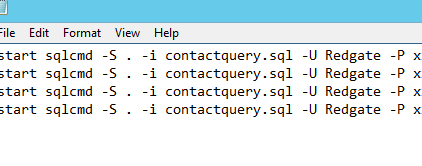
    A better way is to use a SQLCMD call with my query in it. In this case, I’ll create a notepad file and add multiple SQLCMD calls in it.

    2016-05-20 14_29_03-SalesDemo-2015-12-01-1745-export-i-fgod4b6h - VMware Workstation

    The key here is the “start” at the beginning of the line. This will spawn a new thread with the program being called in it. In this case, I’ll get 5 windows very quickly, each running my query. My query is in another file:

    2016-05-20 14_28_19-SalesDemo-2015-12-01-1745-export-i-fgod4b6h - VMware Workstation

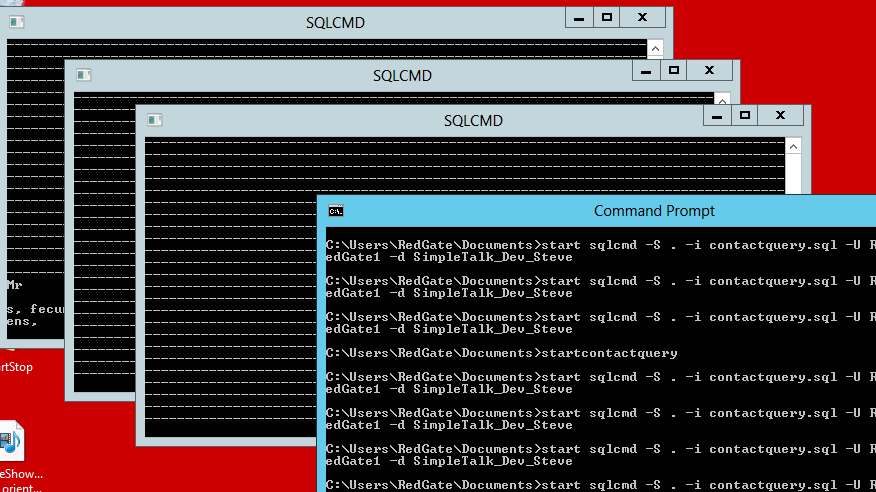
    If each query is set to run multiple times, I’ll have a simple load generated. In my case, I’ll run the .CMD file from the command line, but I could double click it. When I do, I see this:

    2016-05-20 14_30_13-SalesDemo-2015-12-01-1745-export-i-fgod4b6h - VMware Workstation

    You can see the window where I started the queries in front. Three of the command windows are in the background, each of them running queries over and over. The output from the query, with all the dashes for spacing between the headers and data, are in each window.

  • Just a week to SQL Saturday in Pensacola

    Next week is  SQL Saturday #491 in Pensacola. I’ll be there, along with a number of other great speakers. It’s free SQL Server training, and a great place to vacation. There are a couple pre-conference sessions available as well if you are looking for some training.