Tag: syndicated

  • A Basic Recursive CTE and a Money Lesson

    Another post for me that is simple and hopefully serves as an example for people trying to get blogging as #SQLNewBloggers.

    When I was a six or seven year old, my Mom asked me a question. She asked if I’d rather have $1,000,000 at the end of the month, or a penny on day 1, with the note that each day of the month, she’d double what I’d gotten the first day. Doing quick math in my head, $0.01, $0.02, $0.04, etc, I said a million.

    Was I right? Let’s build a recursive CTE.

    Recursion is an interesting computer science technique that stumps lots of people. When I was learning programming, it seemed that recursion (in Pascal) and pointers (in C), were the weed out topics.

    However, they aren’t that bad, and with CTEs, we can write recursion in T-SQL. I won’t cover where this might be used in this post, though I will give you a simple CTE to view.

    There are two parts you need: the anchor and the recursive member. These are connected with a UNION ALL. There can be multiple items, but we’ll keep things simple.

    I want to first build an anchor, which is the base for my query. In my case, I want to start with the day of the month, which I’ll represent with a [d]. I also need the amount to be paid that day, which is represented with [v]. I’ll include the $1,000,000 as a scalar at the end. My anchor looks like this:

    WITH myWealth ( d, v)
    AS (

    — anchor, day 1
    SELECT
    ‘d’ = 1
    , ‘v’ = CAST( 0.01 AS numeric(38,2))
    UNION ALL

    Now I need to add in the recursive part. In this part, I’ll query the CTE itself, calling myWealth as part of the code. For my query, I want to increment the day by 1 with each call, so I’ll add one to that value.

    SELECT
    myWealth.d + 1

    For the payment that day, it’s a simple doubling of the previous day. So I can do this a few days: addition or multiplication. I’ll use multiplication since it’s easier to read.

    SELECT
    myWealth.d + 1
    , myWealth.v * 2

    My FROM clause is the CTE itself. However I need a way to stop the recursion. In my case, I want to stop after 31 days. So I’ll add that.

    UPDATE: The original code (<= 31) went to 32 days. This has been corrected to stop at 31 days.

    FROM
    myWealth
    WHERE
    myWealth.d <= 30

    Now let’s see it all together, with a little fun at the end for the outer query.

    WITH  myWealth ( d, v )
    AS (
    — anchor, day 1)
    SELECT
    ‘d’ = 1
    , ‘v’ = CAST(0.01 AS NUMERIC(38, 2))
    UNION ALL
    — recursive part, get double the next value, end at one month
    SELECT
    myWealth.d + 1
    , myWealth.v * 2
    FROM
    myWealth
    WHERE
    myWealth.d <= 31
    )
    SELECT
    ‘day’ = myWealth.d
    , ‘payment’ = myWealth.v
    , ‘lump sum’ = 1000000
    , ‘decision’ = CASE WHEN myWealth.v < 1000000 THEN ‘Good Decision’
    ELSE ‘Bad decision’
    END
    FROM
    myWealth;

    When I run this, I get some results:
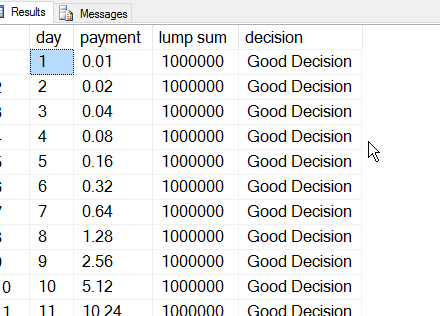
    2016-05-17 18_48_04-Start

    Did I make a good choice? Let’s look for the last few days of the month.

    2016-05-17 18_48_16-Start

    That $1,000,000 isn’t looking too good. If I added a running total, it would be worse.

    SQLNewBlogger

    If you want to try this yourself, add the running total and explain how it works.

  • Changing Your PASS Credentials

    I got an email today from PASS, noting that credentials were changing from username to email. That’s fine. I don’t really care, but I know I got multiple emails to different accounts, so which account is associated with which email?

    I clicked the “login details” link in the email and got this:

    2016-05-24 12_31_06-PASS _ User Login

    Not terribly helpful, but I was at least logged in. If I click my name, I see this:

    2016-05-24 14_09_26-Movies & TV

    Some info, including the email, which I’m not sure is linked to the email I clicked on, or is based on browser cookies. However, there’s no username here.

    If I click the edit profile link, I get more info, but again, no username. No way to tie back anything I’ve done in the past to this account.

    2016-05-24 14_12_28-Movies & TV

    I have always used a username to log into the SQLSaturday site, so I went there. On this PASS property, I’ve got my username.

    2016-05-24 14_14_46-Movies & TV

    If I click the username, I go back to the PASS site, to the MySQLSaturday section, but again, no link to this username. However I realize now which email is related to which username.

    Hopefully the others will go dormant soon and I won’t get multiple announcements, connectors, ballots, etc.

    The point here isn’t to pick on PASS as much as it is to point out some poor software and communication preferences. Changing to email from username (or vice versa) can be a disruptive change. I’d expect the email would include some information on username and email relation, or at least username since it was sent to a specific email. That would allow me to determine where I might need to contact PASS to update things, or which username was affected for me.

    I’d also expect that the username to be stored somewhere and visible on the site. Even if this isn’t valid login information, why not just show it? When we migrated SQLServerCentral from one platform to another, we kept some columns in the database that showed legacy information. This information wasn’t really used, but it did help track down a few problems we had with the migration. Having a bit of data is nice, and it doesn’t cost much (at least in most cases).

    This wasn’t a smooth process, though not too broken for me. I like that PASS sent the communication, and I’m glad the old method still works. I logged in with username today. I wish there was a bit more consistency between PASS applications, and that they included a date when username will no longer work. I also hope they update their testing (or test plan) with any issues they discover this week, so the problems aren’t repeated.

  • Changing a Computed Column–#SQLNewBlogger

    Another post for me that is simple and hopefully serves as an example for people trying to get blogging as #SQLNewBloggers.

    I was working with a computed column the other day, and realized I had the wrong definition. In this case, I was performing some large calculation, and the result was larger than an int. However the first part of the formula was an int, which resulted in an implicit conversion to an int.

    I needed to change the formula, and then realized that plenty of people might not work with computed columns much, and not realize how you alter a computed column.

    You don’t.

    In fact, you need to drop the column and add it back. In my case, this was what I did. Here was my table:

    CREATE TABLE SiteStats
    (
    StatID INT IDENTITY(1,1) PRIMARY KEY NONCLUSTERED
    , StateDate DATE DEFAULT SYSDATETIME()
    , StatMonth TINYINT
    , StatYear int
    , PageVisits INT
    , TimeOnSite TIME
    , Engagement AS (PageVisits * DATEDIFF(SECOND, CAST(’00:00:00′ AS TIME), TimeOnSite))
    )

    I wanted to cast the PageVisits part of the column to a bigint to solve the issue. I first needed to do this:

    ALTER TABLE dbo.SiteStats
    DROP COLUMN Engagement

    Once that’s done, I can do this:

    ALTER TABLE dbo.SiteStats
      ADD Engagement AS (CAST(PageVisits AS BIGINT) * DATEDIFF(SECOND, CAST(’00:00:00′ AS TIME), TimeOnSite));
    GO

    Now I have a new definition that works great.

    Some of you might realize that this could be an issue with columns in the middle of the table, and it is. However you shouldn’t worry about column order. Select the columns explicitly and you can order them anyway you want.

    SQLNewBlogger

    A quick post, five minutes. Even if you had to search for how this works, you could do this in 10-15 minutes, tops. Research, write why you did this and potential issues with your system.

  • The New Global Dashboard

    Redgate recently released SQL Monitor 5.2, which is the latest upgrade to our monitoring/alerting/troubleshooting product for DBAs. This was the big change that the team has spent a lot of time developing and refining. It’s been available for a few weeks as a hidden URL, but with 5.2, this becomes the default main screen for SQL Monitor.

    I think it’s a good move forward. In general, I don’t like things moving around physically in applications, as I get used to them being in a certain spot, or I expect them. However in this case, it makes sense.

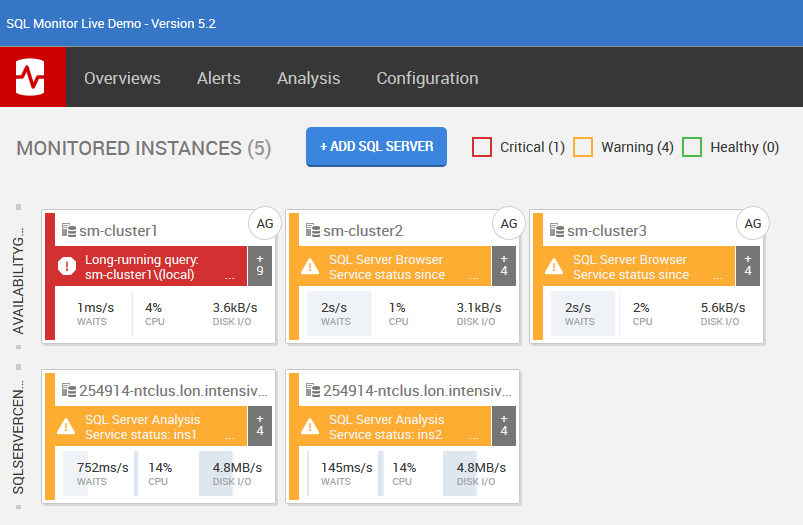
    In a dashboard for monitoring and alerting, you want to know what’s broken. Having a list of 20 servers at the top, and 1 broken one potentially “beneath the fold” (in newspaper parlance) and requiring scrolling would be bad. As a DBA, I’d want to see those items that are problematic. When I look at the monitor.red-gate.com site, I see:

    2016-05-12 08_39_11-Global Dashboard

    The cluster has a long running query, which is an active, high priority alert. If I were to clear this, along with the other active alerts, this “card” would move to the end, and the sm-cluster2 item would take the top left spot.

    Note there are options to configure what is a high or low priority, and even pin specific servers at the top, but the general behavior is to let you know what’s broken now.

    There’s one other cool feature in this. If I have a high level alert, like a machine unreachable, and the alert clears itself (the machine reboots), I may see the machine as “green” on the dashboard when I login. This is because current alerts are shown, not historical ones. I can still get the historical data, but the intention is to make this a responsive tool for right now, not last night.

    I think this is a great change, and I’m excited to see how well it works in practice as customers roll this out.