Tag: syndicated

  • Changing the sa Password with SQLCMD

    Another post for me that is simple and hopefully serves as an example for people trying to get blogging as #SQLNewBloggers.

    I wanted to make a quick note on changing the sa password, as this is a sensitive account, and the password should be changed if you ever suspect it is compromised. I’d also recommend you change this if anyone that knows the password leaves your group.

    I wrote about using SSMS, but that’s not always convenient. If you need to change this remotely, perhaps in a hurry, SQLCMD is a quick way to do this.

    SQLCMD is a command line tool, so open a command prompt.

    2016-04-06 12_47_33-Photos

    Run SQLCMD and connect to your instance as a sysadmin. If you have any doubt, you can enter the query from my previous post to check your connection.

    Once you’ve connected, you can issue this code:

    ALTER LOGIN [sa] with PASSWORD = N‘Sup#rAmaz!ngP@$$w0rd’

    This is the code that will change the password for the login specified, even if I’ve logged in with a different account.

    Once I’ve done this, test the sa login from a new session and verify it works.

    SQLNewBlogger

    Make sure you know how to do this. It’s a basic skill, so learn it, blog about it, and use it where appropriate. Maybe write about why you’d do this in your own post.

    References

    SQLCMD – https://msdn.microsoft.com/en-us/library/ms162773.aspx

    ALTER LOGIN – https://msdn.microsoft.com/en-us/library/ms189828.aspx

  • Promotions and Conflicts of Interest

    I noticed my co-worker, friend, and PASS board member, Grant Fritchey, posted a note on members of the PASS Board of Directors (BoD) presenting pre-cons at SQL Saturday events. It’s potentially a legal issue, and conflict of interest. I’m glad that the issue is being raised, and discussed publically. Here’s Grant’s question:

    The question is simple, for a PASS branded event, should a member of the PASS board receive payment?

    There’s two parts to this, because there are two events. There are events that the organization runs and takes legal and financial responsibility for, and there are events associated with PASS, but run by others who have responsibility.

    My short answer is yes to local events, and no to events run by the PASS board. I’ve read through some of the comments and I have some thoughts.

    PASS Run Events

    First, events run by the organization, such as the Summit and BAC, are different. The BoD can vote on aspects of these events, and can override the decisions on which individuals are chosen. With that being the case, I think there is a clear conflict of interest here and for the limited time the BoD members serve, they should not be a part of these events. Whether they receive direct payment or not, I’d say no.

    There was a conflict about this a few years ago, and I think it was justified. If you serve, you can’t present a pre-conference (or post) session. You have other duties, and a responsibility here.

    If your business or your employer wants you to be a part of this event in a different way, resign one position or the other.

    SQL Saturdays

    Really this could be any event that PASS might support or lend their name to, but doesn’t have any financial (or likely, legal) responsibility. This is trickier, as certainly the ability to bestow favors on the organizers of these events in terms of choosing them for PASS run events is possible. However I’d say that this is very unlikely, and hasn’t been an abuse of power. If that changes, I’d change my opinion

    I think that the BoD members are still speakers and well respected trainers, and I really have no issue with them being accepted to present a pre-con and being paid by the events. I’d like the fact disclosed, but this doesn’t seem to be a conflict of interest to me at this point.

    It’s also good for the community.

  • KDiff3

    As I write more code, especially database code, and I collaborate with others (or myself), I find that I have the need to merge code more and more. It’s inevitable, and since I work across a couple machines, I even find that I need to merge my own code at times.

    One way to do this well is use a merge tool of some sort. KDiff3 is a popular one, that’s free, and it’s one that integrates nicely with SQL Source Control, which I also use for various tasks.

    If you install KDiff3 (use “choco instal kdiff3”) then you get a basic tool that allows you to compare files. If you start it, you’ll get a simple interface that lets you select multiple files and view them together in one interface. If you don’t use version control, apart from making a mistake, you also probably manage code like this.

    2016-04-07 14_20_47-Settings

    Or you might have this:

    2016-04-07 14_23_22-Settings

    Either way creates problems. If you have multiple people doing this, then you have other issues.

    KDiff gives you a nice interface to see the differences between files. As you can see below, I have the changes marked in each file.

    2016-04-07 14_26_43-Settings

    I can edit the files directly, or choose to merge them together. If I do the merge, I’ll get a third window that has the merged code.

    2016-04-07 14_28_41-Settings

    As you can see, if I click the merge area, I can choose the code from either of the original files.

    On the right is a scroll bar that lets me know where in the file the differences are.

    2016-04-07 14_26_49-Settings

    Software developers think nothing of these types of tools, but DBAs aren’t as easily used to using tools like this. I’d suggest that you download kdiff3 and give it a chance in trying to reconcile any code between team members or servers.

    And start using Version Control. It’s easy and incredibly useful.

  • Basic SQLCMD–#SQLNewBlogger

    Another post for me that is simple and hopefully serves as an example for people trying to get blogging as #SQLNewBloggers.

    I had the need to connect from the command line recently, and decided to make a quick post on using SQLCMD, as I had an issue.

    SQLCMD is a command line utility that comes with SQL Server. I know many people don’t use command lines, but they are handy at times. I recently opened a command prompt.

    2016-04-06 12_47_33-Photos

    I then typed SQLCMD. After a delay, I got this:

    2016-04-06 12_51_23-Photos

    The issue here is that I don’t have a default instance on this machine. All of mine are named. I need to provide a –S parameter, with a server name (and possibly instance name).

    2016-04-06 13_01_33-Photos

    I do that and I’m connected. By default, SQLCMD (and osql) try to use Windows Auth. The 1> indicates that the utility is ready for T-SQL queries. You need to know your language here as there’s no help.

    I can enter code, and check my user name. I do this, and get a 2>. The end of a batch is indicated with “GO” and this will execute the batch. You can see how this works below:

    2016-04-06 13_01_47-Photos

    I can use this to make my code easier to read. I can format code as I would in an editor, though be aware you can’t go back and edit previous lines.

    2016-04-06 13_07_03-Photos

    If I enter go, I’ll get this:

    2016-04-06 13_07_15-Photos

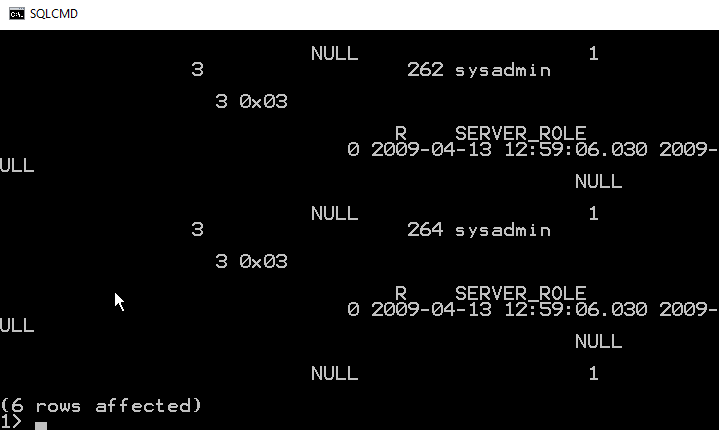
    Not so easy to read. I have to scroll up to even figure out what the display is:

    2016-04-06 13_07_26-Photos

    As you can see, using SELECT *, or retrieving too many columns make results hard to read. You would to wise to pick only those columns you need to return.

    To leave SQLCMD, you can type exit, which will return you to the command prompt.

    2016-04-06 14_00_07-Start

    This is a short look at SQLCMD. The older, osql, utility functions the same way, and both are good, lightweight ways to connect to your SQL Server instance.