Tag: syndicated

  • T-SQL Tuesday #77–My Favorite Feature

    tsqltuesdayThis month is an interesting, but tough topic. The blog party is hosted by Jens Vestergaard, and his invitation is short and simple. Pick your favorite feature and write about it. This is good, because SQL Server has grown so much, I’m sure that many people will choose different things. However it’s hard for someone that works with many different features.

    My Favorite Feature

    I’ve been working with SQL Server since 1991. I’ve worked with all the Windows versions, and a few on OS/2. That means I’ve had the chance to manage and develop applications on:

    • SQL Server 4.2
    • SQL Server 6/6.5
    • SQL Server 7/2005
    • SQL Server 2008/R2/2012/2014/2016

    I’ve seen the platform grow and expand quite a bit. I’ve spoken on a number of topics over the years, as my jobs have changed and my emphasis has wandered. Of all the features available, however, if I have to choose one, it would be…

    SQL Agent.

    I’m a programmer at heart. I grew up admiring the power of computers to execute code over and over again. I appreciate the ability of computers to remember things and remind me, or to handle them on their own.

    SQL Agent allows that. Over the years, I’ve taken advantage of SQL Agent to perform maintenance on systems, to alert me to issues, to run a process that needed to be performed. I can even schedule one off jobs, having them delete themselves. I can’t tell you how many times someone has asked me to run something “later” on the server, often during the evening. It’s easy to schedule a job for later, have it run one time, and then let it disappear.

    For example, Andy asks me to run a query tonight that gathers some data. I create a new job and step.

    2016-04-07 13_50_00-Movies & TV

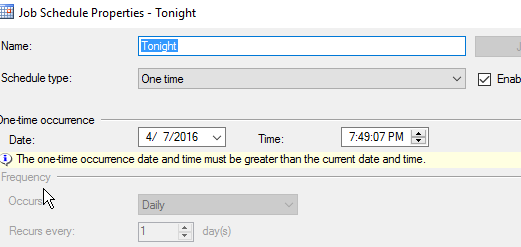
    I set up a one time schedule.

    2016-04-07 13_49_51-Settings

    Certainly I can set alerts and logging, but in notifications, I can have this job disappear.

    2016-04-07 13_50_12-Movies & TV

    I certainly want to make sure I have results saved, but this allows me to execute code, without much effort, and in a way that doesn’t clutter up my system.

    I’ve found SQL Agent to be incredibly easy to work with, and quick to build jobs running against my SQL Server. I don’t need to setup connections, like I might need to with the Windows scheduler.

    If you haven’t experimented with SQL Agent’s capabilities, or you don’t use it extensively in production, you should.
  • Changing the sa Password with SSMS–#SQLNewBlogger

    Another post for me that is simple and hopefully serves as an example for people trying to get blogging as #SQLNewBloggers.

    I wanted to make a quick note on changing the sa password, as this is a sensitive account, and the password should be changed if you ever suspect it is compromised. I’d also recommend you change this if anyone that knows the password leaves your group.

    Changing sa with SSMS is really simple. Follow these steps:

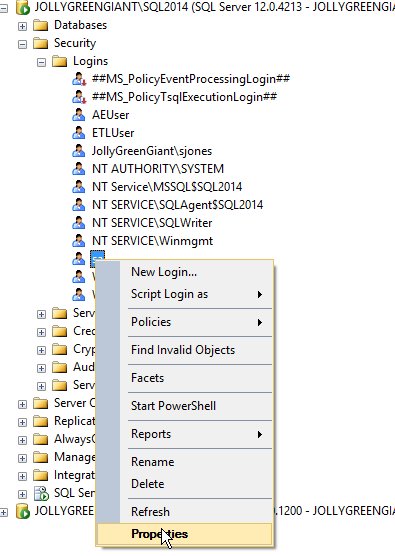
    Connect to SSMS as a sysadmin. You can check this for your login. Then expand the Security folder and the Logins folder. Right click the “sa” account and choose properties.

    2016-04-06 12_40_31-Photos

    Once you do this, you’ll get the login properties dialog, and see the Password text field at the top in the General tab.

    2016-04-06 12_42_22-Photos

    You can type a new password in the Password box, and confirm this in the Confirm Password box. Password policies checks are up to you, though I’d recommend you use them.

    Click OK and the password is changed. You can then connect a new query window as “sa” and verify your password.

    SQLNewBlogger

    Make sure you know how to do this. It’s a basic skill, so learn it, blog about it, and use it where appropriate. Maybe write about why you’d do this in your own post.

  • Win a SQLBits Pass

    You can win a free conference pass to SQL Bits, in Liverpool, May 4-7. It’s easy, just post a review of one of their previous events. Haven’t been? No worries, post a review of a video of one of the sessions. You can find those here:

    If you want to just register, there’s a few discount code slots left, so use 4pr1l-F00l when you register.

    This is my favorite event, and I hope to see you there.

  • MDF File Password Confusion

    I had never seen this, but I ran across a blog that mentioned an MDF File password here. The post really looks at ways to reset the administrator password for the “sa” account in SQL Server. However it has some mistakes and issues. I tried leaving a comment, but comments are disabled.

    With that in mind, I decided to respond to a few things and clear up confusions.

    With regards to the post, I think it’s confusing in that the text notes an MDF file password, but all the instructions are really about resetting the “sa” account password. sa is the built in sysadmin account in SQL Server, which isn’t related to the MDF file. The MDF file is the extension of the main data file for a database. You can change this, but there isn’t a good reason to do so. Note, the .ndf files are the same format, though by convention, these are the 2nd, 3rd, and other files added to a database.

    There also isn’t a password on these files. I can open them in notepad (not recommended) or xvi32, and there isn’t any requirement if I have read access in NTFS to the file. It doesn’t matter if this is the master database or any user database. If you have NTFS permissions, you can read the file.

    Now interpreting is different. SQL Server interprets this, and it requires permissions itself to access the server process, either sysadmin, or normal login. However, you can use ORCAMDF or MDF Viewer, or some other tool to read the files. The information contained in an mdf/ndf file is just formatted in a certain way. If you spend a lot of time, you will understand how to interpret the format.

    Changing the sa password requires that the SQL Server service be running and you connect in some way. The post gets the methods right, but says that you must stop the service, which is only needed if you access the file some other way (ORCAMDF, xvi32, etc.). If you want to change the sa password, there are a few choices:

    1. USE SSMS
    2. Use SQLCMD
    3. Use osql
    4. Use one of the above methods with SQL Server restarted in single user mode
    5. Use a third party utility.

    Any of these first four will work, and feel free to use whichever fits your situation. The last one is one I do not recommend as I can’t be sure any third party products will work correctly here.

    Ultimately I’m a little embarrassed by this post, as it appeared through our syndication process on SQLServerCentral. We don’t review these posts, so there is no quality control. Most of the posts on this blog are good ones, but this one appears to be by a guest author and it’s one I’d ignore.